manuals.online logo
Brands
  1. Home
  2. •
  3. Brands
  4. •
  5. Haier
  6. •
  7. TV
  8. •
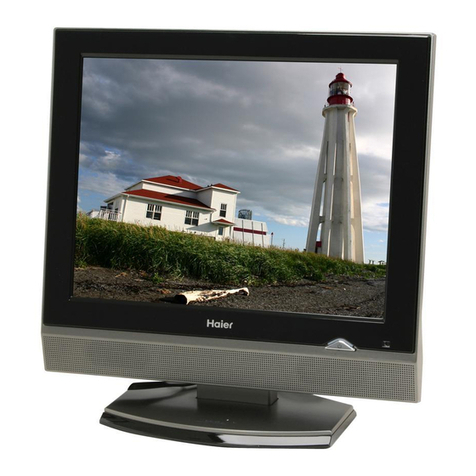
  9. Haier HE24D4MFA User manual

Haier HE24D4MFA User manual

Other Haier TV manuals

Haier L22T3 User manual

Haier

Haier L22T3 User manual

Haier HL40BG - 40" LCD TV User manual

Haier

Haier HL40BG - 40" LCD TV User manual

Haier LC-2710D User manual

Haier

Haier LC-2710D User manual

Haier HL26B-A User manual

Haier

Haier HL26B-A User manual

Haier LE42D10FM User manual

Haier

Haier LE42D10FM User manual

Haier NS-L19W2Q-10A User manual

Haier

Haier NS-L19W2Q-10A User manual

Haier 32E2000 User manual

Haier

Haier 32E2000 User manual

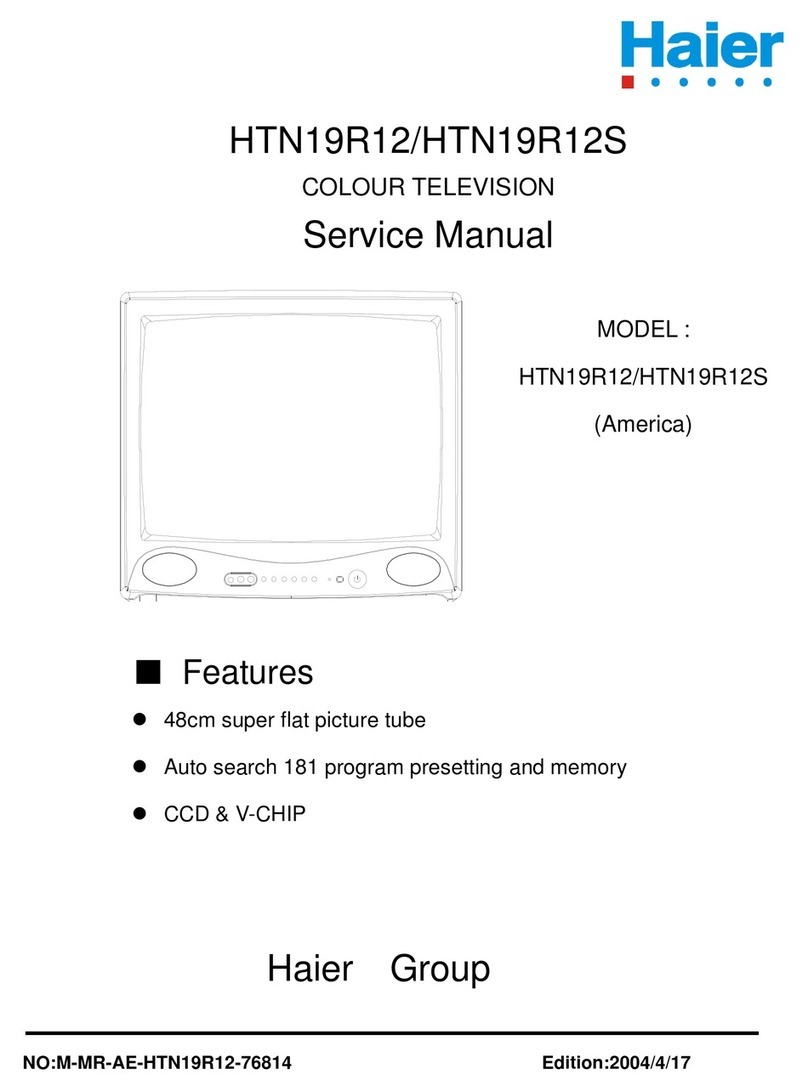
Haier HTN19R12 User manual

Haier

Haier HTN19R12 User manual

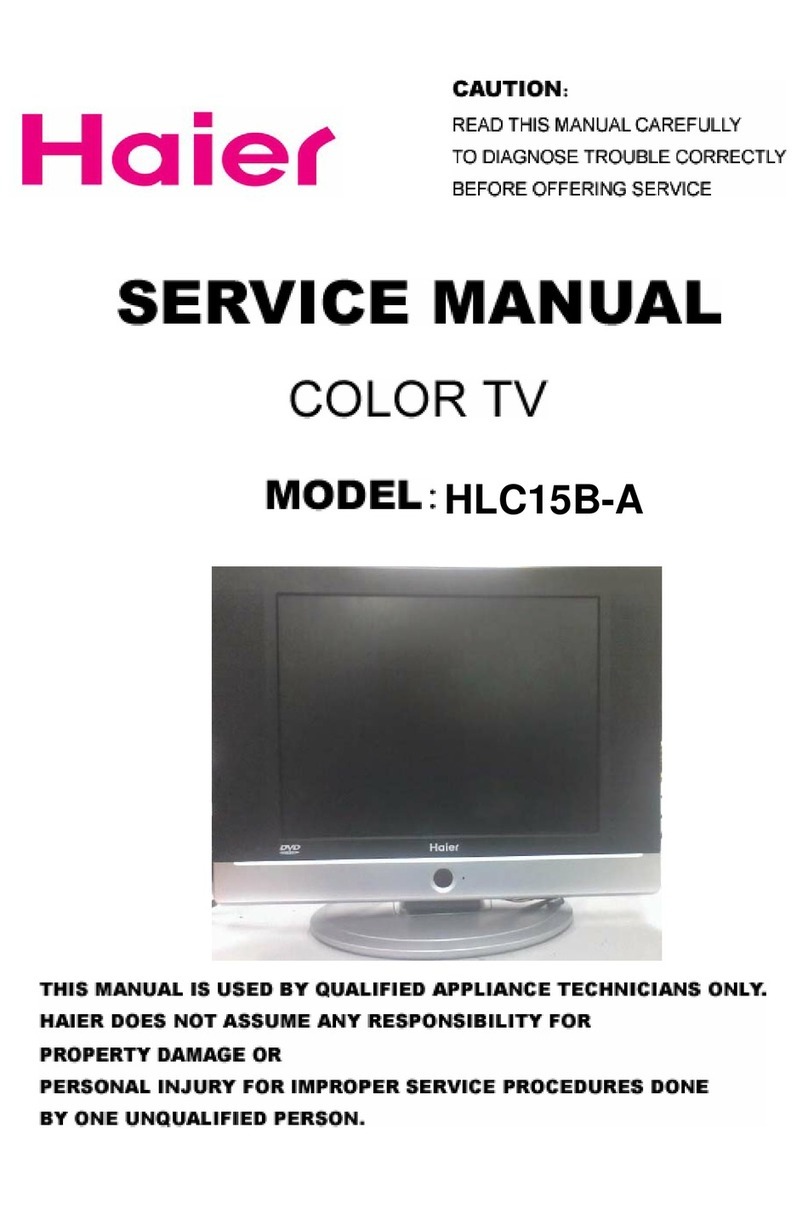
Haier HLC15B-A User manual

Haier

Haier HLC15B-A User manual

Haier 29FV5H User manual

Haier

Haier 29FV5H User manual

Haier L26F6 User manual

Haier

Haier L26F6 User manual

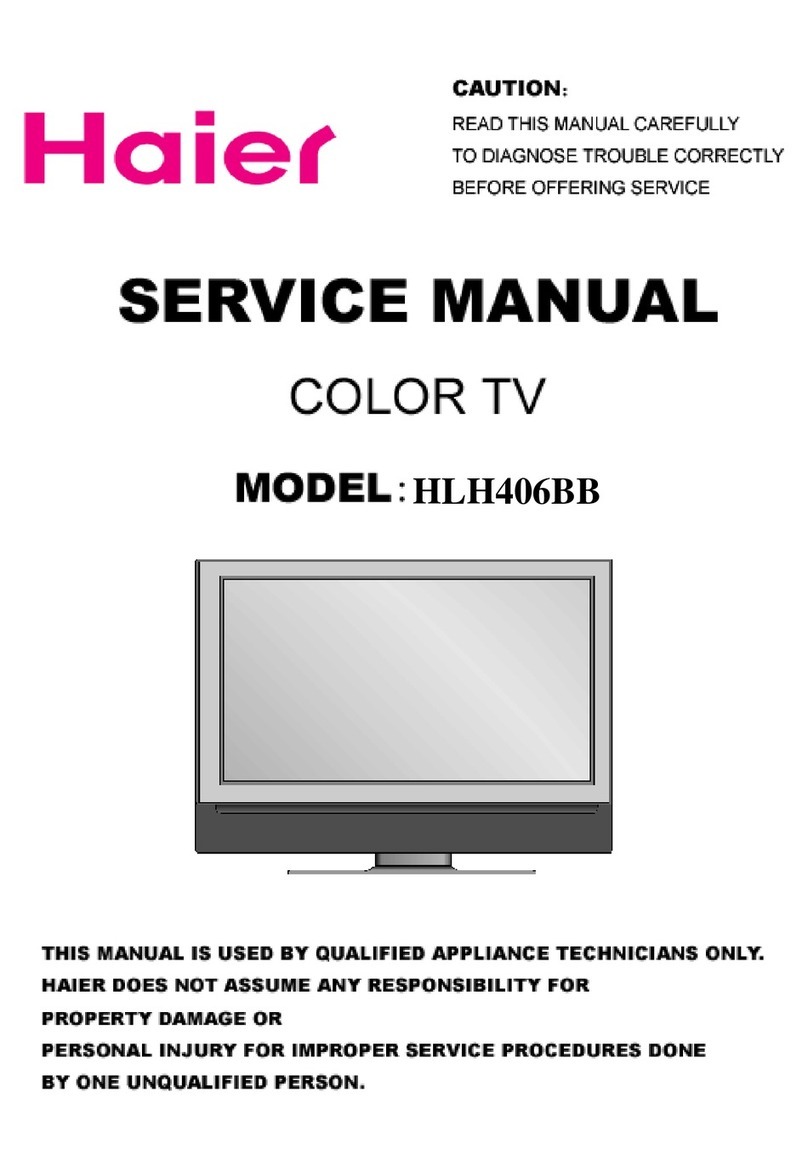
Haier HLH406BB Instruction manual

Haier

Haier HLH406BB Instruction manual

Haier HP-2999 User manual

Haier

Haier HP-2999 User manual

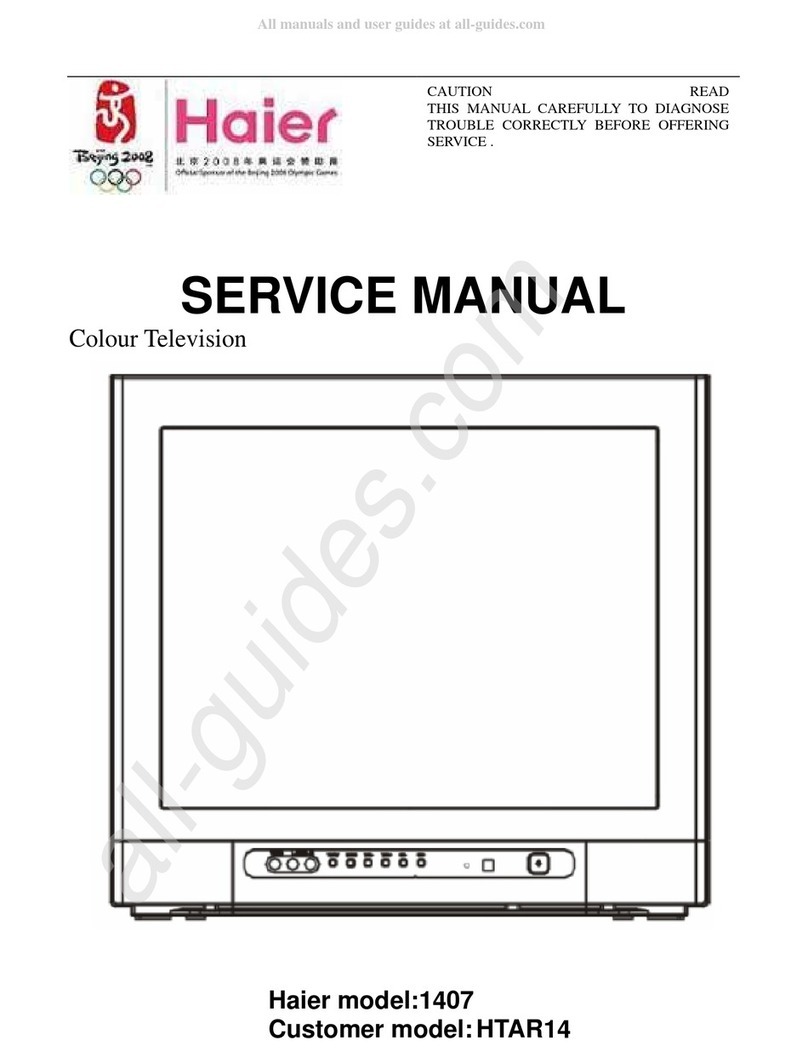
Haier 1407 User manual

Haier

Haier 1407 User manual

Haier HLC15E User manual

Haier

Haier HLC15E User manual

Haier HTAF2918 User manual

Haier

Haier HTAF2918 User manual

Haier HL22T User manual

Haier

Haier HL22T User manual

Haier L39B2180 Assembly instructions

Haier

Haier L39B2180 Assembly instructions

Haier 21T9B-S User manual

Haier

Haier 21T9B-S User manual

Haier HTX32S31 User manual

Haier

Haier HTX32S31 User manual

Haier L42V6-A8K User manual

Haier

Haier L42V6-A8K User manual

Haier 21FA1 User manual

Haier

Haier 21FA1 User manual

Haier L42C1180 Assembly instructions

Haier

Haier L42C1180 Assembly instructions

Haier 21FA12 User manual

Haier

Haier 21FA12 User manual

Popular TV manuals by other brands

IKEA UPPLEVA user manual

IKEA

IKEA UPPLEVA user manual

Toshiba 19A20 Service manual

Toshiba

Toshiba 19A20 Service manual

Sony XBR-100Z9D reference guide

Sony

Sony XBR-100Z9D reference guide

Sony Trinitron KV-HR36M90 Service manual

Sony

Sony Trinitron KV-HR36M90 Service manual

JVC AV-14AG16 instructions

JVC

JVC AV-14AG16 instructions

Loewe Table Stand Reference 55 user guide

Loewe

Loewe Table Stand Reference 55 user guide

Panasonic Genus TX-G10 operating instructions

Panasonic

Panasonic Genus TX-G10 operating instructions

Samsung LN26C350D1D Service manual

Samsung

Samsung LN26C350D1D Service manual

BBK LT1516D Service manual

BBK

BBK LT1516D Service manual

Samsung 55S9 B Series Quick setup guide

Samsung

Samsung 55S9 B Series Quick setup guide

Sharp LC-40FI5012E user manual

Sharp

Sharp LC-40FI5012E user manual

Evervue BN185 Operation manual

Evervue

Evervue BN185 Operation manual

North State TV2GO user guide

North State

North State TV2GO user guide

Toshiba CX35F70 owner's manual

Toshiba

Toshiba CX35F70 owner's manual

Magnavox PS1980 owner's manual

Magnavox

Magnavox PS1980 owner's manual

Philips 20HF5335D manual

Philips

Philips 20HF5335D manual

Panasonic QuintrixF TX-29AS1D operating instructions

Panasonic

Panasonic QuintrixF TX-29AS1D operating instructions

Samsung 4 Series Quick setup guide

Samsung

Samsung 4 Series Quick setup guide

manuals.online logo
manuals.online logoBrands
  • About & Mission
  • Contact us
  • Privacy Policy
  • Terms and Conditions

Copyright 2025 Manuals.Online. All Rights Reserved.

д»¿-» ÎÛßÜ ¬¸·- ³¿²«¿´ ½¿®»º«´´§ ¾»º±®»
±°»®¿¬·²¹ §±«® ÌÊô ¿²¼ ®»¬¿·² ·¬ º±® º«¬«®»
®»º»®»²½»ò
ÌÚÌóÔÝÜ ÌÊ
ÑÉÒÛÎ Í ÓßÒËßÔù
Î
É¿®²·²¹
Î×ÍÕ ÛÔÛÝÌÎ×Ý ÍØÑÝÕ
ÜÑ ÒÑÌ ÑÐÛÒ
ÝßËÌ×ÑÒ
ÿ
ÝßËÌ×ÑÒæ ÌÑ ÎÛÜËÝÛ ÌØÛ Î×ÍÕ ÑÚ ÛÔÛÝÌÎ×Ý ÍØÑÝÕô
ÜÑ ÒÑÌ ÎÛÓÑÊÛ ÝÑÊÛÎ øÑÎ ÞßÝÕ÷ò
ÒÑ ËÍÛÎ ÍÛÎÊ×ÝÛßÞÔÛ ÐßÎÌÍ ×ÒÍ×ÜÛò
ÎÛÚÛÎ ÍÛÎÊ×Ý×ÒÙ ÌÑ ÏËßÔ×Ú×ÛÜ ÍÛÎÊ×ÝÛ
ÐÛÎÍÑÒÒÛÔò
̸» ´·¹¸¬²·²¹ º´¿-¸ ©·¬¸ ¿®®±©¸»¿¼ -§³¾±´ô ©·¬¸·² ¿²
»¯«·´¿¬»®¿´ ¬®·¿²¹´» ·- ·²¬»²¼»¼ ¬± ¿´»®¬ ¬¸» «-»® ¬± ¬¸»
°®»-»²½» ±º «²·²-«´¿¬»¼ ¼¿²¹»®±«- ª±´¬¿¹» ©·¬¸·² ¬¸»
°®±¼«½¬Ž- »²½´±-«®» ¬¸¿¬ ³¿§ ¾» ±º -«ºº·½·»²¬ ³¿¹²·¬«¼»
¬± ½±²-¬·¬«¬» ¿ ®·-µ ±º »´»½¬®·½ -¸±½µò
̸» »¨½´¿³¿¬·±² °±·²¬ ©·¬¸·² ¿² »¯«·´¿¬»®¿´ ¬®·¿²¹´» ·-
·²¬»²¼»¼ ¬± ¿´»®¬ ¬¸» «-»® ¬± ¬¸» °®»-»²½» ±º ·³°±®¬¿²¬
±°»®¿¬·²¹ ¿²¼ ³¿·²¬»²¿²½» ø-»®ª·½·²¹÷ ·²-¬®«½¬·±²- ·²
¬¸» ´·¬»®¿¬«®» ¿½½±³°¿²§·²¹ ¬¸» ¿°°´·¿²½»ò
ÿ
ÉßÎÒ×ÒÙæ ÌÑ ÐÎÛÊÛÒÌ Ú×ÎÛ ÑÎ ÍØÑÝÕ ØßÆßÎÜô ÜÑ ÒÑÌ ÛÈÐÑÍÛ ÌØ×Í ßÐÐÔ×ßÒÝÛ ÌÑ
Îß×Ò ÑÎ ÓÑ×ÍÌËÎÛò
ÝßËÌ×ÑÒæ ÌÑ ÐÎÛÊÛÒÌ ÛÔÛÝÌÎ×Ý ÍØÑÝÕ ÜÑ ÒÑÌ ËÍÛ ÌØ×Í ÐÑÔßÎׯÛÜ ÐÔËÙ É×ÌØ ßÒ
ÛÈÌÛÒÍ×ÑÒ ÝÑÎÜô ÎÛÝÛÐÌßÝÔÛ ÑÎ ÑÌØÛÎ ÑËÌÔÛÌ ËÒÔÛÍÍ ÌØÛ ÞÔßÜÛÍ
ÝßÒ ÞÛ ÚËÔÔÇ ×ÒÍÛÎÌÛÜ ÌÑ ÐÎÛÊÛÒÌ ÞÔßÜÛ ÛÈÐÑÍËÎÛò
ÝßËÌ×ÑÒæ ̸»-» -»®ª·½·²¹ ·²-¬®«½¬·±²- ¿®» º±® «-» ¾§ ¯«¿´·º·»¼ -»®ª·½» °»®-±²²»´ ±²´§ò ̱ ®»¼«½» ¬¸»
®·-µ ±º »´»½¬®·½ -¸±½µô ¼± ²±¬ °»®º±®³ ¿²§ -»®ª·½·²¹ ±¬¸»® ¬¸¿² ¬¸¿¬ ½±²¬¿·²»¼ ·² ¬¸» ±°»®¿¬·²¹ ·²-¬®«½¬·±²-
«²´»-- §±« ¿®» ¯«¿´·º·»¼ ¬± ¼± -±ò
׳°±®¬¿²¬ Í¿º»¬§ ײ-¬®«½¬·±²-
ï÷ λ¿¼ ¬¸»-» ·²-¬®«½¬·±²-ò
î÷ Õ»»° ¬¸»-» ·²-¬®«½¬·±²-ò
í÷ Ø»»¼ ¿´´ ©¿®²·²¹-ò
ì÷ Ú±´´±© ¿´´ ·²-¬®«½¬·±²-ò
ë÷ ܱ ²±¬ «-» ¬¸·- ¿°°¿®¿¬«- ²»¿® ©¿¬»®ò
ê÷ Ý´»¿² ±²´§ ©·¬¸ ¼®§ ½´±¬¸ò
é÷ ܱ ²±¬ ¾´±½µ ¿²§ ª»²¬·´¿¬·±² ±°»²·²¹-ò ײ-¬¿´´ ·² ¿½½±®¼¿²½» ©·¬¸ ¬¸» ³¿²«º¿½¬«®»®ù- ·²-¬®«½¬·±²-ò
è÷ ܱ ²±¬ ·²-¬¿´´ ²»¿® ¿²§ ¸»¿¬ -±«®½»- -«½¸ ¿- ®¿¼·¿¬±®-ô ¸»¿¬ ®»¹·-¬»®-ô -¬±ª»-ô ±® ±¬¸»® ¿°°¿®¿¬«- ø·²½´«¼·²¹
¿³°´·º·»®-÷ ¬¸¿¬ °®±¼«½» ¸»¿¬ò
ç÷ Ю±¬»½¬ ¬¸» °±©»® ½±®¼ º®±³ ¾»·²¹ ©¿´µ»¼ ±² ±® °·²½¸»¼ °¿®¬·½«´¿®´§ ¿¬ °´«¹-ô ½±²ª»²·»²½» ®»½»°¬¿½´»-ô ¿²¼ ¬¸»
°±·²¬ ©¸»®» ¬¸»§ »¨·¬ º®±³ ¬¸» ¿°°¿®¿¬«-ò
ïð÷ Ѳ´§ «-» ¿¬¬¿½¸³»²¬-ñ¿½½»--±®·»- -°»½·º·»¼ ¾§ ¬¸» ³¿²«º¿½¬«®»®ò
ïï÷ Ë-» ±²´§ ©·¬¸ ¬¸» ½¿®¬ô -¬¿²¼ô ¬®·°±¼ô ¾®¿½µ»¬ô ±® ¬¿¾´» -°»½·º·»¼ ¾§ ¬¸» ³¿²«º¿½¬«®»®ô
±® -±´¼ ©·¬¸ ¬¸» ¿°°¿®¿¬«-ò ɸ»² ¿ ½¿®¬ ·- «-»¼ô «-» ½¿«¬·±² ©¸»² ³±ª·²¹ ¬¸» ½¿®¬ñ
ß°°¿®¿¬«- ½±³¾·²¿¬·±² ¬± ¿ª±·¼ ·²¶«®§ º®±³ ¬·°ó±ª»®ò
ïî÷ ˲°´«¹ ¬¸·- ¿°°¿®¿¬«- ¼«®·²¹ ´·¹¸¬²·²¹ -¬±®³- ±® ©¸»² «²«-»¼ º±® ´±²¹ °»®·±¼- ±º ¬·³»ò
ïí÷ λº»® ¿´´ -»®ª·½·²¹ ¬± ¯«¿´·º·»¼ -»®ª·½» °»®-±²²»´ò Í»®ª·½·²¹ ·- ®»¯«·®»¼ ©¸»² ¬¸» ¿°°¿®¿¬«- ¸¿- ¾»»² ¼¿³¿¹»¼
·² ¿²§ ©¿§ô -«½¸ ¿- °±©»®ó-«°°´§ ½±®¼ ±® °´«¹ ·- ¼¿³¿¹»¼ô ´·¯«·¼ ¸¿- ¾»»² -°·´´»¼ ±® ±¾¶»½¬- ¸¿ª» º¿´´»² ·²¬± ¬¸»
¿°°¿®¿¬«-ô ¬¸» ¿°°¿®¿¬«- ¸¿- ¾»»² »¨°±-»¼ ¬± ®¿·² ±® ³±·-¬«®»ô ¼±»- ²±¬ ±°»®¿¬» ²±®³¿´´§ô ±® ¸¿- ¾»»² ¼®±°°»¼ò
ïì÷̸» ¿°°¿®¿¬«- -¸¿´´ ²±¬ ¾» »¨°±-»¼ ¬± ¼®·°°·²¹ ±® -°´¿-¸·²¹ ¿²¼ ¬¸¿¬ ²± ±¾¶»½¬- º·´´»¼ ©·¬¸ ´·¯«·¼-ô -«½¸ ¿- ª¿-»-ô
-¸¿´´ ¾» °´¿½»¼ ±² ¬¸» ¿°°¿®¿¬«-ò
ïë÷̸» ³¿·²- °´«¹ ±® ¿°°´·¿²½» ·²´»¬ ·- «-»¼ ¿- ¬¸» ¼·-½±²²»½¬ ¼»ª·½»ô ®»³¿·² ·¬ ®»¿¼·´§ ±°»®¿¾´» ¼«®·²¹ ¬¸»
¿°°¿®¿¬«- ²±®³¿´ «-»ò
ײ¬®±¼«½¬·±²
ÝÑÒÌÛÒÌ
ï
î
í
í
í
í
ì
ë
ë
ê
ê
é
è
è
è
ç
ç
ïð
ïð
ïï
ïï
ïï
ïï
ïï
ïï
ïï
ïï
ïî
ïî
ïî
ïí
ïí
ïì
ïì
ïì
ïë
ïë
ïê
ïê
ïé
ïé
ïé
ïè
ïè
ïç
ïç
îð
îï
îî
òòòòòòòòòòòòòòòòòòòòòòòòòòòòòòòòòòòòòòòòòòòòòòòòòòòòòòòòòòòòòòòòòòòòòòòòòòòòòòòòòòòòòòòòòòòòòòòòòòòòòòòòòòòòòòòòòòòòòòòòòòòòòòò
λ³±¬» ݱ²¬®±´òòòòòòòòòòòòòòòòòòòòòòòòòòòòòòòòòòòòòòòòòòòòòòòòòòòòòòòòòòòòòòòòòòòòòòòòòòòòòòòòòòòòòòòòòòòòòòòòòòòòòòòòòòòòòòòòòòòòòòòòòòòòòòò
ݱ²²»½¬·±² ײ-¬®«½¬·±²-òòòòòòòòòòòòòòòòòòòòòòòòòòòòòòòòòòòòòòòòòòòòòòòòòòòòòòòòòòòòòòòòòòòòòòòòòòòòòòòòòòòòòòòòòòòòòòòòòòòòòòòòòòòòòòòòòòòò
òòòòòòòòòòòòòòòòòòòòòòòòòòòòòòòòòòòòòòòòòòòòòòòòòòòòòòòòòòòòòòòòòòòòòòòòòòòòòòòòòòòòòòòòòòòòòòòòòòòòòòòòòòòòòòòòòòòòòòòòòòòòòòòò
Û¨¬»®²¿´ »¯«·°³»²¬ ݱ²²»½¬·±²-òòòòòòòòòòòòòòòòòòòòòòòòòòòòòòòòòòòòòòòòòòòòòòòòòòòòòòòòòòòòòòòòòòòòòòòòòòòòòòòòòòòòòòòòòòòòòòòòòòòò
ß²¬»²²¿ ݱ²²»½¬·±²òòòòòòòòòòòòòòòòòòòòòòòòòòòòòòòòòòòòòòòòòòòòòòòòòòòòòòòòòòòòòòòòòòòòòòòòòòòòòòòòòòòòòòòòòòòòòòòòòòòòòòòòòòòòòòòòòòòò
òòòòòòòòòòòòòòòòòòòòòòòòòòòòòòòòòòòòòòòòòòòòòòòòòòòòòòòòòòòòòòòòòòòòòòòòòòòòòòòòòòòòòòòòòòòòòòòòòòòòòòòòòòòòòòòòòòòòòòòòòò
Û¨¬»®²¿´ ßÊ Í±«®½» Í»¬«°òòòòòòòòòòòòòòòòòòòòòòòòòòòòòòòòòòòòòòòòòòòòòòòòòòòòòòòòòòòòòòòòòòòòòòòòòòòòòòòòòòòòòòòòòòòòòòòòòòòòòòòòòòòò
òòòòòòòòòòòòòòòòòòòòòòòòòòòòòòòòòòòòòòòòòòòòòòòòòòòòòòòòòòòòòòòòòòòòòòòòòòòòòòòòòòòòòòòòòòòòòòòòòòòòòòòòòòòòòòòòòòòòòòòòòò
òòòòòòòòòòòòòòòòòòòòòòòòòòòòòòòòòòòòòòòòòòòòòòòòòòòòòòòòòòòòòòòòòòòòòòòòòòòòòòòòòòòòòòòòòòòòòòòòòòòòòòòòòòòòòòòòòòòò
ݱ²²»½¬·±²òòòòòòòòòòòòòòòòòòòòòòòòòòòòòòòòòòòòòòòòòòòòòòòòòòòòòòòòòòòòòòòòòòòòòòòòòòòòòòòòòòòòòòòòòòòòòòòòòòòòòòòòòòòòòòòòòòòòòòòòò
ØÜÓ× ×² òòòòòòòòòòòòòòòòòòòòòòòòòòòòòòòòòòòòòòòòòòòòòòòòòòòòòòòòòòòòòòòòòòòòòòòòòòòòòòòòòòòòòòòòòòòòòòòòòòòòòòòòòòòòòòòòòòòòòòòòòòòòòòòò
òòòòòòòòòòòòòòòòòòòòòòòòòòòòòòòòòòòòòòòòòòòòòòòòòòòòòòòòòòòòòòòòòòòòòòòòòòòòòòòòòòòòòòòòòòòòòòòòòòòòòòòòòòòòòòòòòòòòòòòòòòòòò
òòòòòòòòòòòòòòòòòòòòòòòòòòòòòòòòòòòòòòòòòòòòòòòòòòòòòòòòò
Þ¿-·½ Ѱ»®¿¬·²¹ ײ-¬®«½¬·±²-òòòòòòòòòòòòòòòòòòòòòòòòòòòòòòòòòòòòòòòòòòòòòòòòòòòòòòòòòòòòòòòòòòòòòòòòòòòòòòòòòòòòòòòòòòòòòòòòòòòòòòòòòòòòò
òòòòòòòòòòòòòòòòòòòòòòòòòòòòòòòòòòòòòòòòòòòòòòòòòòòòòòòòòòòòòòòòòòòòòòòòòòòòòòòòòòòòòòòòòòòòòòòò
Í©·¬½¸·²¹ ¬¸» ÌÊ Ñ² ±® Ѻºòòòòòòòòòòòòòòòòòòòòòòòòòòòòòòòòòòòòòòòòòòòòòòòòòòòòòòòòòòòòòòòòòòòòòòòòòòòòòòòòòòòòòòòòòòòòòòòòòòòòòòòòòòòò
Ó«¬»òòòòòòòòòòòòòòòòòòòòòòòòòòòòòòòòòòòòòòòòòòòòòòòòòòòòòòòòòòòòòòòòòòòòòòòòòòòòòòòòòòòòòòòòòòòòòòòòòòòòòòòòòòòòòòòòòòòòòòòòòòòòòòòòòòòòòòòòòòòòò
Í´»»° ¾«¬¬±²òòòòòòòòòòòòòòòòòòòòòòòòòòòòòòòòòòòòòòòòòòòòòòòòòòòòòòòòòòòòòòòòòòòòòòòòòòòòòòòòòòòòòòòòòòòòòòòòòòòòòòòòòòòòòòòòòòòòòòòòòòòòòòòòòò
óÞ«¬¬±²òòòòòòòòòòòòòòòòòòòòòòòòòòòòòòòòòòòòòòòòòòòòòòòòòòòòòòòòòòòòòòòòòòòòòòòòòòòòòòòòòòòòòòòòòòòòòòòòòòòòòòòòòòòòòòòòòòòòòòòòòòòòòòòòòòòòòòòòò
ÝØòÔ×ÍÌ ¾«¬¬±²òòòòòòòòòòòòòòòòòòòòòòòòòòòòòòòòòòòòòòòòòòòòòòòòòòòòòòòòòòòòòòòòòòòòòòòòòòòòòòòòòòòòòòòòòòòòòòòòòòòòòòòòòòòòòòòòòòòòòòòòòòòòò
ÚßÊòÔ×ÍÌ ¾«¬¬±²òòòòòòòòòòòòòòòòòòòòòòòòòòòòòòòòòòòòòòòòòòòòòòòòòòòòòòòòòòòòòòòòòòòòòòòòòòòòòòòòòòòòòòòòòòòòòòòòòòòòòòòòòòòòòòòòòòòòòòòòòòòòò
òòòòòòòòòòòòòòòòòòòòòòòòòòòòòòòòòòòòòòòòòòòòòòòòòòòòòòòòòòòòòòòòòòòòòòòòòòòòòòòòòòòòòòòòòòòòòòòòòòòòòòòòòòòòòòòòòòò
ßÎÝ ¾«¬¬±²òòòòòòòòòòòòòòòòòòòòòòòòòòòòòòòòòòòòòòòòòòòòòòòòòòòòòòòòòòòòòòòòòòòòòòòòòòòòòòòòòòòòòòòòòòòòòòòòòòòòòòòòòòòòòòòòòòòòòòòòòòòòòòòòòòò
Ó»²« Ѱ»®¿¬·±²-òòòòòòòòòòòòòòòòòòòòòòòòòòòòòòòòòòòòòòòòòòòòòòòòòòòòòòòòòòòòòòòòòòòòòòòòòòòòòòòòòòòòòòòòòòòòòòòòòòòòòòòòòòòòòòòòòòòòòòòòòòòòò
з½¬«®» Ó»²« Ѱ¬·±²-òòòòòòòòòòòòòòòòòòòòòòòòòòòòòòòòòòòòòòòòòòòòòòòòòòòòòòòòòòòòòòòòòòòòòòòòòòòòòòòòòòòòòòòòòòòòòòòòòòòòòòòòòòòòòòòòòòòò
ر© ¬± ½«-¬±³·¦» §±«® ±©² °·½¬«®» -¬¿¬«-òòòòòòòòòòòòòòòòòòòòòòòòòòòòòòòòòòòòòòòòòòòòòòòòòòòòòòòòòòòòòòòòòòòòòòòòòòòòòòòòòòòòò
ß«¼·± Ó»²« Ѱ¬·±²-òòòòòòòòòòòòòòòòòòòòòòòòòòòòòòòòòòòòòòòòòòòòòòòòòòòòòòòòòòòòòòòòòòòòòòòòòòòòòòòòòòòòòòòòòòòòòòòòòòòòòòòòòòòòòòòòòòòòòò
ر© ¬± Ý«-¬±³·¦» §±«® ±©² ¿«¼·± -¬¿¬«-òòòòòòòòòòòòòòòòòòòòòòòòòòòòòòòòòòòòòòòòòòòòòòòòòòòòòòòòòòòòòòòòòòòòòòòòòòòòòòòòòòòòòòò
ݸ¿²²»´- Ó»²« Ѱ¬·±²-òòòòòòòòòòòòòòòòòòòòòòòòòòòòòòòòòòòòòòòòòòòòòòòòòòòòòòòòòòòòòòòòòòòòòòòòòòòòòòòòòòòòòòòòòòòòòòòòòòòòòòòòòòòòòòòòò
òòòòòòòòòòòòòòòòòòòòòòòòòòòòòòòòòòòòòòòòòòòòòòòòòòòòòòòòòòòòòòòòòòòòòòòòòòòòòòòòòòòòòòòòòòòòò
òòòòòòòòòòòòòòòòòòòòòòòòòòòòòòòòòòòòòòòòòòòòòòòòòòòòòòòòòòòòòòòòòòòòòòòòòòòòòòòòòòòòòòòòòòòòòòòòòòòòòòòòò
òòòòòòòòòòòòòòòòòòòòòòòòòòòòòòòòòòòòòòòòòòòòòòòòòòòòòòòòòòòòòòòòòòòòòòòòòòòòòòòòòòòòòòòòòòòòòòòòòòò
òòòòòòòòòòòòòòòòòòòòòòòòòòòòòòòòòòòòòòòòòòòòòòòòòòòòòòòòòòòòòòòòòòòòòòòòòòòòòòòòòòòòòòòòòòòòòòò
òòòòòòòòòòòòòòòòòòòòòòòòòòòòòòòòòòòòòòòòòòòòòòòòòòòòòòòòòòòòòòòòòòòòòòòòòòòòòòòòòòòòòòòòòòòòòòòòò
òòòòòòòòòòòòòòòòòòòòòòòòòòòòòòòòòòòòòòòòòòòòòòòòòòòòòòòòòòòòòòòòòòòòòòòòòòòòòòòòòòòòòòòòòòòòòòòòòòòòòòòòòòòòòòòòòò
Í»¬¬·²¹- Ó»²« Ѱ¬·±²-òòòòòòòòòòòòòòòòòòòòòòòòòòòòòòòòòòòòòòòòòòòòòòòòòòòòòòòòòòòòòòòòòòòòòòòòòòòòòòòòòòòòòòòòòòòòòòòòòòòòòòòòòòòòòòòòòòò
Ý´±-»¼ Ý¿°¬·±²òòòòòòòòòòòòòòòòòòòòòòòòòòòòòòòòòòòòòòòòòòòòòòòòòòòòòòòòòòòòòòòòòòòòòòòòòòòòòòòòòòòòòòòòòòòòòòòòòòòòòòòòòòòòòòòòòòòòòòòòòòò
òòòòòòòòòòòòòòòòòòòòòòòòòòòòòòòòòòòòòòòòòòòòòòòòòòòòòòòòòòòòòòòòòòòòòòòòòòòòòòòòòòòòòòòòòòòòòòòòòòòòòòòòòòòòòòòòò
òòòòòòòòòòòòòòòòòòòòòòòòòòòòòòòòòòòòòòòòòòòòòòòòòòòòòòòòòòòòòòòòòòòòòòòòòòòòòòòòòòòòòòòòòòòòòòòòòòòòòòòòòòòòòòò
òòòòòòòòòòòòòòòòòòòòòòòòòòòòòòòòòòòòòòòòòòòòòòòòòòòòòòòòòòòòòòòòòòòòòòòòòòòòòòòòòòòòòòòòòòòòòòòòòòòòòòòòòòòòòò
ݱ³°±²»²¬ òòòòòòòòòòòòòòòòòòòòòòòòòòòòòòòòòòòòòòòòòòòòòòòòòòòòòòòòòòòòòòòòòòòòòòòòòòòòòòòòòòòòòòòòòòòòòòòòò
òòòòòòòòòòòòòòòòòòòòòòòòòòòòòòòòòòòòòòòòòòòòòòòòòòòòòòòòòòòòòòòòòòòòòòòòòòòòòòòòòòòòòòòòòòòòòòòòòòòòòòòòòòòòòòòòòòòòòòòòòòòòòòòòòòò
Ю±¼«½¬ Ͱ»½·º·½¿¬·±²òòòòòòòòòòòòòòòòòòòòòòòòòòòòòòòòòòòòòòòòòòòòòòòòòòòòòòòòòòòòòòòòòòòòòòòòòòòòòòòòòòòòòòòòòòòòòòòòòòòòòòòòòòòòòòòòòòòòòòò
Ì®±«¾´»-¸±±¬·²¹òòòòòòòòòòòòòòòòòòòòòòòòòòòòòòòòòòòòòòòòòòòòòòòòòòòòòòòòòòòòòòòòòòòòòòòòòòòòòòòòòòòòòòòòòòòòòòòòòòòòòòòòòòòòòòòòòòòòòòòòòòòòò
ÌÊ ½±³°±²»²¬-
ß½½»--±®·»-
ÊÝÎ ½±²²»½¬·±²
ÜÌÊ ½±²²»½¬·±²
Ü·¹·¬¿´ ß«¼·± Ñ«¬°«¬
°«¬
Ý¿¾´» -¿³°´»
λ³±ª·²¹ ¬¸» ¬¿¾´» -¬¿²¼ ¿²¼ ·²-¬¿´´·²¹ ¿ ©¿´´ ³±«²¬ ¾®¿½µ»¬
Ì«®²·²¹ ±² §±«® ÌÊ º±® ¬¸» º·®-¬ ¬·³»
ÍßÐ Þ®±¿¼½¿-¬- Í»¬«°
ß«¬±³¿¬·½¿´´§ -½¿²²·²¹ º±® ½¸¿²²»´-
Í»¬¬·²¹ «° ¿ º¿ª±®·¬» ½¸¿²²»´ ´·-¬
ß¼¼·²¹ ±® ½¸¿²¹·²¹ ¿ ½¸¿²²»´ ´¿¾»´
ݸ»½µ·²¹ ¬¸» ÜÌÊ -·¹²¿´ -¬®»²¹¬¸
Ì«®²·²¹ ±² ß«¬± Ʊ±³
ß¼¶«-¬·²¹ ¬·³» -»¬¬·²¹-
Í»¬¬·²¹ ¬¸» -´»»° ¬·³»®
ß¼¶«-¬·²¹ ³»²« -»¬¬·²¹-
Ô¿¾»´·²¹ ¿² ·²°«¬ -±«®½»
ݱ³°«¬»® ±® Í»¬¬·²¹-
Ó¿·²¬»²¿²½»
ÜÊÜ ½±²²»½¬·±²
ÊÙß
ß¼¼·²¹ ±® -µ·°°·²¹ ½¸¿²²»´-

TV components
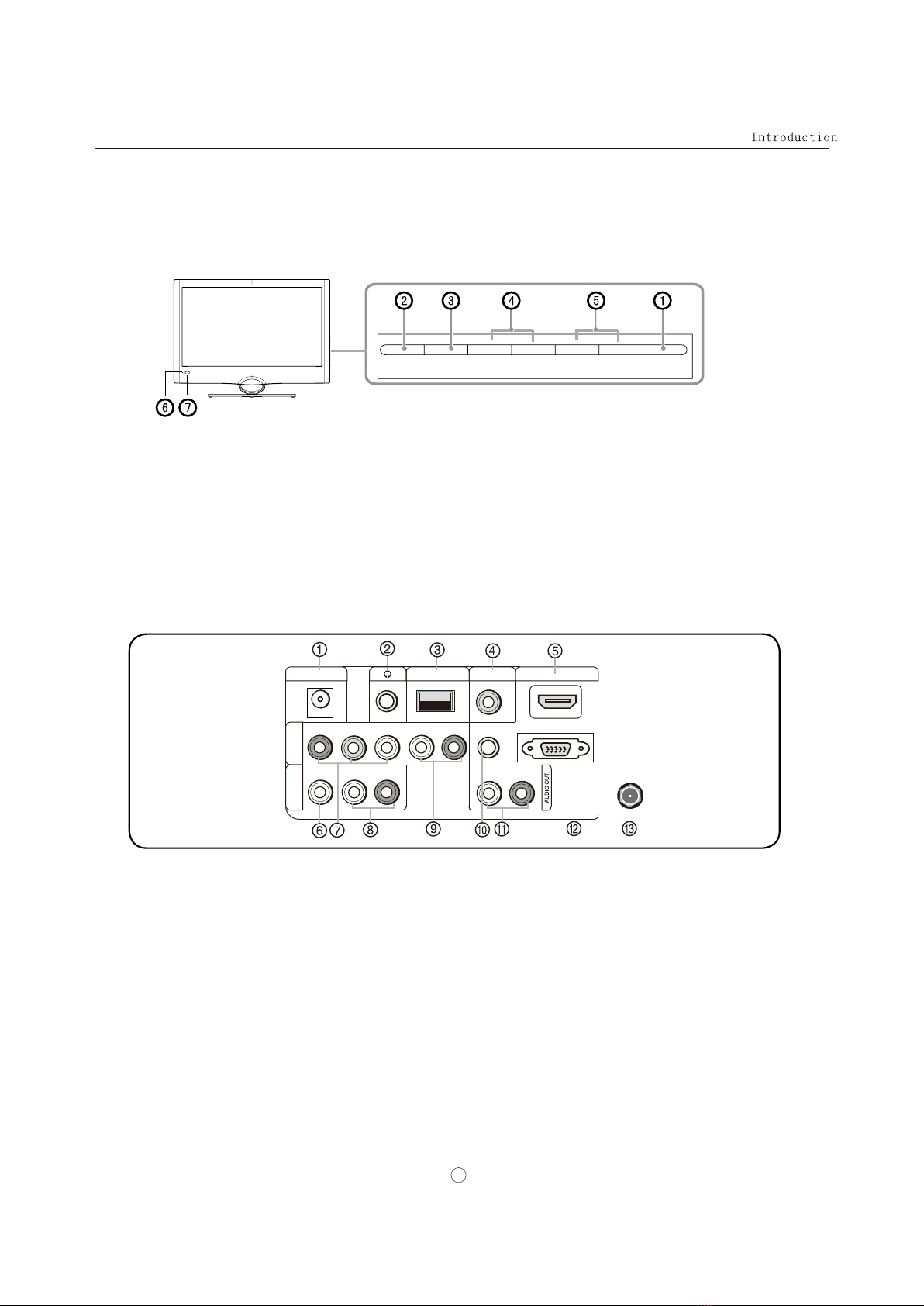
1.POWER: Press to turn on and off the TV.
3.INPUT: Press to access the input source mode.In the MENU/INPUT screen, these buttons serve as OK buttons.
2.MENU: Menu display.
4.VOL+/- : Press to adjust the volume .In the MENU screen, these buttons serve as left/right buttons.
5.CH+/- : Press to scan through channels. To scan quickly through channels, press and hold down either +/- . In the
MENU screen, these buttons serve as up/down buttons.
6.Power indicator
7.Remote Sensor: Receives IR signals from the remote control. Do not put anything near the sensor, which may
block the remote control signal.
Back
Front and side panels
1
MENU INPUT VOL+ VOL- CH+ CH- POWER
DC IN
VIDEO
AV IN COMPONENT
IN
Y Pb Pr
USB
PC/DVI AUDIO IN PC IN
L -AUDIO- R
L R
L -AUDIO- R
HDMI IN
ANT IN
DIGITAL OUT
(COAXIAL)
1.DC IN:Direct current input.
2.Headphone jack:Headphone audio output terminal.
3.USB input:Connect a USB flash drive to view MPEG2 videos, JPEG images or listen to MP3 songs.
4.Digital Out:Connect various types of digital audio equipment.
5.HDMI In:Connect a HDMI device to receive digital audio and uncompressed digital video.
6.VIDEO In:Connect the video signal from a video device to this jack.
7.Component Input:Connect a component video device to these jacks.
8.AUDIO In:Connect the audio L/R cables from the video signal source to these jacks.
9.AUDIO In:Connect the audio L/R cables from the video signal source to these jacks.
10.PC Audio In:Connect the audio L/R cables from a computer to this jack.
11.AUDIO OUT:Connect the audio L/R cables to your audio equipment.
12.PC Video In:Connect a video cable from a computer to this jack.
13.Antenna Input:Connect cable or antenna signals to the TV, either directly or through your cable box.
ײ¬®±¼«½¬·±²
̸» ®»³±¬» ½±²¬®±´ ½¿²²±¬ ¾» ±°»®¿¬»¼ «²´»-- ¬¸» ¾¿¬¬»®·»- ¿®» °®±°»®´§ ´±¿¼»¼ò
ɸ»² «-·²¹ ¬¸» ®»³±¬» ½±²¬®±´ô ¿·³ ·¬ ¿¬ ¬¸» ®»³±¬» ½±²¬®±´ -»²-±® ±² ¬¸» ÌÊò
Ú«²½¬·±² ·²¬®±¼«½¬·±²
λ³±¬» ݱ²¬®±´
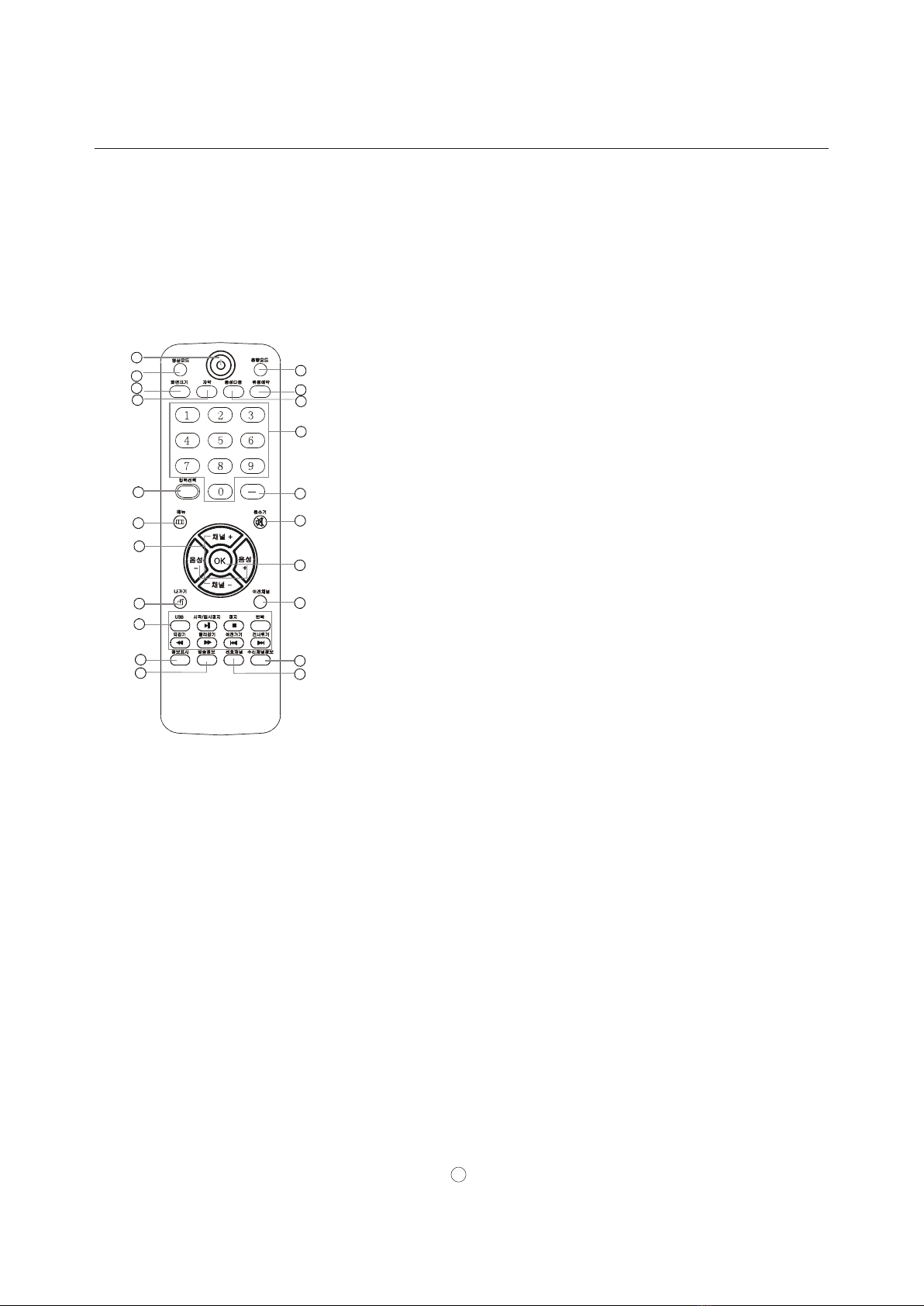
ïòЮ»-- ¬± ¬«®² ±² ¿²¼ ±ºº ¬¸» ÌÊò
îòЮ»-- ®»°»¿¬»¼´§ ¬± ½§½´» ¬¸®±«¹¸ ¬¸» ¿ª¿·´¿¾´» °·½¬«®» ³±¼»-ò
íòЮ»-- ¬± ½¸¿²¹» ¬¸» ¿-°»½¬ ®¿¬·±ò
ìòÍ»´»½¬ ¿ ½´±-»¼ ½¿°¬·±² ±°¬·±²ò
ëò͸±© ¬¸» ·²°«¬ -±«®½»ò
êòЮ»-- ¬± ±°»² ¬¸» ±²ó-½®»»² ³»²«ò
éò
èòÛ¨·¬ Ѳ ͽ®»»² Ü·-°´¿§ò
çò
ïðòЮ»-- ¬± ¼·-°´¿§ ¬¸» ÌÊ -¬¿¬«- ·²º±®³¿¬·±² ±² ¬¸» ¬±° ±º ¬¸» ÌÊ
-½®»»²ò
ïïò͸±©- °®±¹®¿³ -½¸»¼«´» ·² ÌÊò
ïîòЮ»-- ¬± ½§½´» ¬¸®±«¹¸ ¼·ºº»®»²¬ -±«²¼ -»¬¬·²¹-ò
ïíòЮ»-- ¬± ¼·-°´¿§ ¬¸» -´»»° ¬·³»® ±°¬·±²ò
ïìòÍ»´»½¬ ÓÑÒÑô ÍÌÛÎÛÑô ÍßÐ ·² ÒÌÍÝ -§-¬»³ò
ïëòЮ»-- ¬± ½¸¿²¹» ¿ ½¸¿²²»´ò
ïêòЮ»-- ¬± -»´»½¬ ¼·¹·¬¿´ ½¸¿²²»´-ò Ú±® »¨¿³°´»ô ¬± »²¬»® •ëìóíŒô
°®»-- •ëìŒô •ó Œ ¿²¼ •íŒò
ïéòÍ©·¬½¸»- ¬¸» ÌÊ -±«²¼ ±² ±® ±ººò
ïèò
îðòѰ»² ¬¸» ½¸¿²²»´ ´·-¬ ·² ÌÊò
îïòѰ»² ¬¸» º¿ª±®·¬» ½¸¿²²»´ ´·-¬ ·² ÌÊò
Ю»-- ÝØõ ±® ÝØó ¬± ¹± ¬± ¬¸» ²»¨¬ ±® °®»ª·±«- ½¸¿²²»´ ·² ¬¸»
½¸¿²²»´ ´·-¬ò
Ю»-- ÊÑÔõ ±® ÊÑÔó ¬± ·²½®»¿-» ±® ¼»½®»¿-» ¬¸» ª±´«³»ò
Ю»-- ¬± ½±²º·®³ -»´»½¬·±²- ·² ¿² ±²ó-½®»»² ³»²« ±® ¬± ±°»²
¿ -«¾³»²«ò
ïçòЮ»-- ¬± ¹± ¬± ¬¸» ´¿-¬ ª·»©»¼ ½¸¿²²»´ò
²± ¿ª¿·´¿¾´»ò
î
ï
î
í
ì
ë
ê
é
è
ç
ïð
ïï
ïî
ïí
ïì
ïë
ïê
ïé
ïè
ïç
îð
îï
ײ-¬¿´´¿¬·±²
Ù»²»®¿´´§ -°»¿µ·²¹ô ¬± »²¶±§ ¿ ½´»¿®»® °·½¬«®»ô ©» ®»½±³³»²¼ ¬¸¿¬ §±« «-» ¿ ÝßÌÊ -§-¬»³ ±® ¿²
±«¬¼±±® ¿²¬»²²¿ ò
ò
Ѫ»®ó¬¸»ó¿·® ÌÊ ®»½»°¬·±² ¯«¿´·¬§ ©·´´ ¼»°»²¼ ±² §±«® ¿²¬»²²¿ ¬§°»ô ¿²¬»²²¿
´±½¿¬·±² ¿²¼ ¿²¬»²²¿ °±-·¬·±²·²¹
Û¨¬»®²¿´ Û¯«·°³»²¬ ݱ²²»½¬·±²-
ß²¬»²²¿ ݱ²²»½¬·±²
Ó«´¬·óº¿³·´§ Ü©»´´·²¹-ñß°¿®¬³»²¬-
øÝ±²²»½¬ ¬± ©¿´´ ¿²¬»²²¿ -±½µ»¬÷
É¿´´ ß²¬»²²¿
ͱ½µ»¬
Í·²¹´»óº¿³·´§ Ü©»´´·²¹- ñر«-»-
øÝ±²²»½¬ ¬± ©¿´´ ¶¿½µ º±® ±«¬¼±±® ¿²¬»²²¿÷
Ñ«¬¼±±®
ß²¬»²²¿
ÊØÚ ß²¬»²²¿
ËØÚ ß²¬»²²¿
Ì«®² ½´±½µ©·-» ¬± ¬·¹¸¬»²
ÎÚ Ý±¿¨·¿´ É·®» øéë ±¸³÷
Þ®±²¦» É·®»
Þ» ½¿®»º«´ ²±¬ ¬± ¾»²¼ ¬¸» ¾®±²¦» ©·®»
©¸»² ½±²²»½¬·²¹ ¬¸» ¿²¬»²²¿ò
Þ®±²¦» É·®»
̱ ·³°®±ª» ¬¸» °·½¬«®» ¯«¿´·¬§ ·² ¿ °±±® -·¹²¿´ ¿®»¿ô
°´»¿-» °«®½¸¿-» ¿ -·¹²¿´ ¿³°´·º·»® ¿²¼ ·²-¬¿´´ °®±°»®´§ò
׺ ¬¸» ¿²¬»²²¿ ²»»¼- ¬± ¾» -°´·¬ º±® ¬©± ÌÊÀ-ô ·²-¬¿´´
¿ îóÉ¿§ Í·¹²¿´ Ͱ´·¬¬»® ·² ¬¸» ½±²²»½¬·±²-ò
̱ ·²-¬¿´´ ¬¸» ¿²¬»²²¿ °®±°»®´§ °´»¿-» ½±²¬¿½¬ ¿
°®±º»--·±²¿´ ·² §±«® ¿®»¿ò
ß½½»--±®·»-
λ³±¬» ½±²¬®±´ Ñ©²»®À- ³¿²«¿´ ß´µ¿´·²» ¾¿¬¬»®§øßßß÷ î
д» ¿-» ÎÛ ßÜ ¬¸·- ³ ¿²«¿ ´½ ¿®» º«´´§ ¾» º±® »
±°» ®¿¬·² ¹ §±«® Ì Êô ¿²¼ ®» ¬¿·² ·¬ º±® º «¬«® »
®»º» ®»²½ »ò
ÌÚÌóÔÝÜ ÌÊ
ÑÉÒÛÎ Í ÓßÒËßÔù
ݱ²²»½¬·±² ײ-¬®«½¬·±²-
í
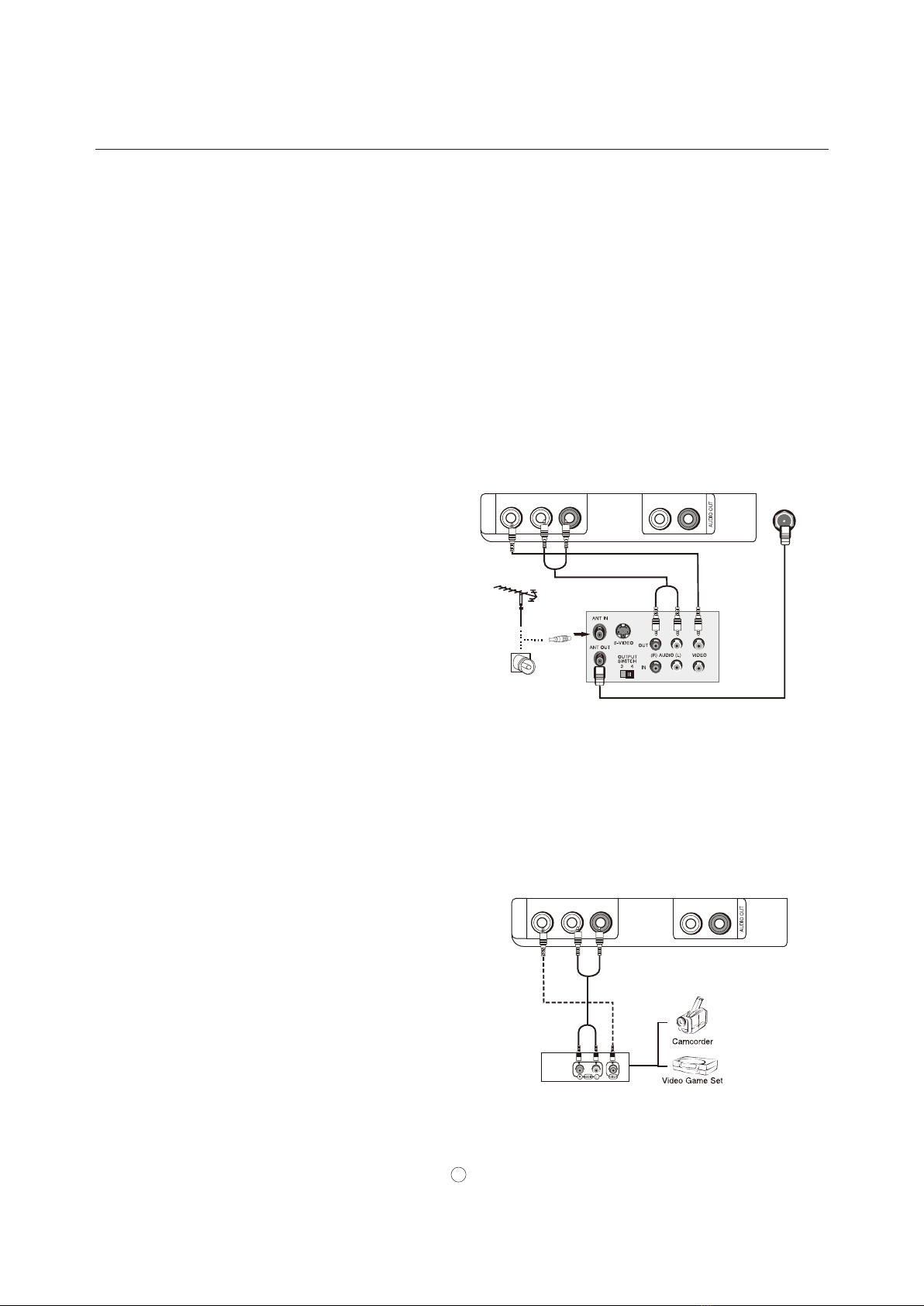
VCR connection
NOTE: All cables shown are not included with the TV.
There are several ways to connect your television, depending on the components you want to connect
and the quality of the signal you want to achieve. The following are examples of some different ways
to connect your TV with different input sources.
Choose Your Connection
To avoid picture noise (interference), leave an adequate distance between the VCR and TV.
Connection Option 1
Set VCR output switch to channel 3 or 4 and
then tune the TV to the same channel number.
Connection Option 2
1. Connect the audio and video cables from the
VCR's output jacks to the TV input jacks, as
shown in the figure.
When connecting the TV to VCR, match the
jack colors (Video = yellow, Audio Left = white,
and Audio Right = red).
If you connect an S-VIDEO output from VCR to
the S-VIDEO input, the picture quality is
improved; compared to connecting a regular
VCR to the Video input.
2. Insert a video tape into the VCR and press
PLAY on the VCR. (Refer to the VCR owner`s
manual.)
3. Select the input source with using the
INPUT button on the remote control, and
then press CH+/- button to select the source,
press the OK button to confirm.
Installation
Connection Instructions
4
How to connect
Connect the audio and video cables from the external
equipment's output jacks to the TV input jacks, as shown
in the figure. When connecting the TV to external equipment,
match the jack colors (Video = yellow, Audio Left = white,
and Audio Right = red).
How to use
1. Select the input source with using INPUT button on
the remote control.
2. Press CH+/- button to select the desired source.
3. Press OK button to confirm.
4. Operate the corresponding external equipment.
External A/V Source Setup
VCR
VIDEO
AV IN
L R
L -AUDIO- R ANT IN
VIDEO
AV IN
L R
L -AUDIO- R
Installation
How to connect
1. Connect the DVD video outputs (COMPONENT) to
the Y Pb Pr jacks on the TV and connect the DVD audio
outputs to the Y Pb Pr Audio IN jacks on the TV, as
shown in the figure.
2. If your DVD only has an S-VIDEO output jack,
connect this to the S-VIDEO input on the TV. as shown
in the figure.
How to use
1. Turn on the DVD player, insert a DVD.
2. Use INPUT button on the remote control to select
mode.
3. Press Play button on external equipment for program
play.
4. Refer to the DVD player's manual for operating
instructions.
Y
Pb Pr
Component Input ports
To get better picture quality, connect a DVD player to the
component input ports as shown below.
Component ports
on the TV
Video output ports
on DVD player
Y Pb Pr
Y Pb Pr
Y B-Y R-Y
Y Cb Cr
Y P P
B R
Component Setup
Connection Instructions
5
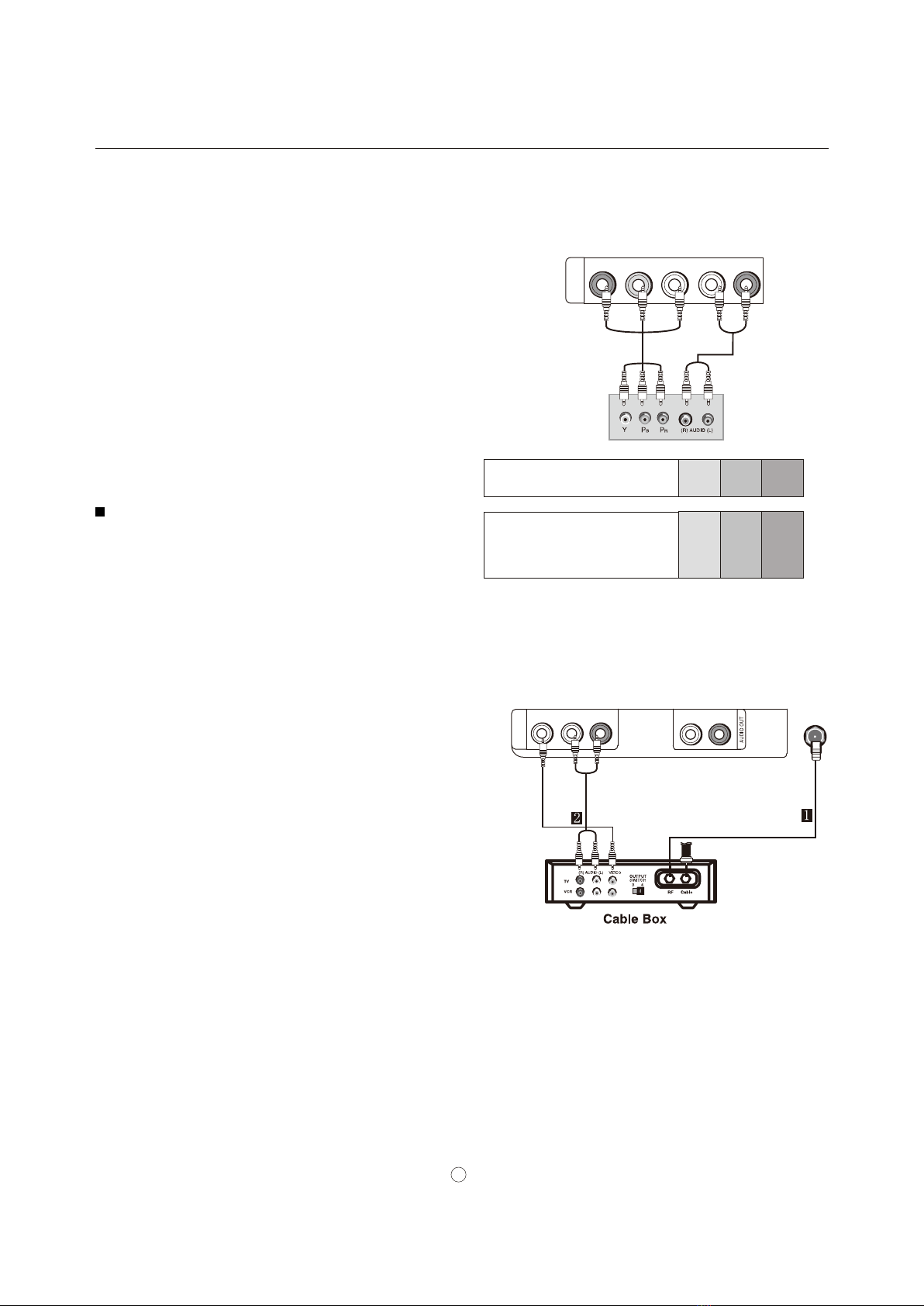
After subscribing to a cable TV service from a local provider
you can watch cable TV programming. The TV cannot
display TV programming unless a TV tuner device or cable
TV converter box is connected to the TV.
For further information regarding cable TV service, contact
your local cable TV service provider(s).
Connection Option 1
1. Select 3 or 4 with channel switch on cable box.
2.Tune the TV channel to the same selected output
channel on cable box.
3.Select channels at the cable box or with the cable box
remote control.
Connection Option 1
1. Connect the audio and video cables from the Cable
Box's output jacks to the TV input jacks, as shown in the
figure. When connecting the TV to a Cable Box, match the
jack colors (Video = yellow, Audio Left = white, and Audio
Right = red).
2. Select the input source by using the INPUT button on the
remote control or on the TV.
3.Select your desired channel with the remote control for
cable box.
Cable TV Setup
COMPONENT
IN
Y Pb Pr L -AUDIO- R
VIDEO
AV IN
L R
L -AUDIO- R ANT IN
Installation
How to connect
1. To get the best picture quality, adjust the PC graphics card to 1024
2. Use the TV`s VGA or DVI (Digital Visual Interface)Audio IN port for video connections, depending on your
VGA connector.
If the graphic card on the PC does not output analog and digital RGB simultaneously, connect only one of
either VGA r HDMI/DVI IN to display the PC on the TV.
If the graphic card on the PC does output analog and digital RGB simultaneously, set the TV to eithe VGA
DVI; (the other mode is set to Plug and Play automatically by the TV.)
3. Then, make the corresponding audio connection. If using a sound card, adjust the PC sound as required.
How to use
1. Turn on the PC and the TV.
2. Turn on thedisplay by pressingthe POWER button on theTV's remote control.
3. Use INPUT on the remote control to select PC or HDMI source.
4. Check the image on your TV. There may be noise associated with the resolution, vertical pattern, contrast or
brightness in PC mode. If noise is present, change the PC mode to another resolution, change the refresh rate to
another rate or adjust the brightness and contrast on the menu until the picture is clear. If the refresh rate of the
PC graphic card can not be changed, change the PC graphic card or consult the manufacturer of the PC graphic
card.
Note
1.Use a HDMI to DVI cable.
2.Avoid keeping a fixed image on the TV's screen for a long period of time. The fixed image may become
permanently imprinted on the screen.
3. Thesynchronization input formfor Horizontal andVertical frequenciesis separate.
x768 .
IN o
r or
HDMI/
Resolution
Frame
frequency
(Hz)
VGA
SVGA
XGA
60Hz
800x600
1024x768 60Hz
60Hz
Mode Resolution
75Hz
75Hz
Connecting a computer
Connection Instructions
640x480
1280x768
6
HDMI Input
How To Connect
How To Use
1.
Connect the cables from the external equipment's output
jacks to the TV input jacks, as shown in the figure.
Select the input source by using INPUT button on the
remote control or on the TV.
2.Operate the corresponding external equipment.
Refer to external equipment operating guide.
PC/DVI AUDIO IN PC IN
HDMI IN
DIGITAL OUT
(COAXIAL)
HDMI
Operation
In the manual, the OSD (on screen display) may be different from your TV`s, because it is just an example to help
you with the TV operation.
There are several options you might need to set up in order for your TV to work properly. Read the instructions that
follow.
1. Choose the TV source and then press MENU button.
2. Press VOL+/- to select SETTINGS menu.
3. Press CH-/OK, then press CH+/- to select the
.
4. Press VOL+/OK, th e opens.
5. Press CH+/- to select language you want.
You can select English
Menu
Settings
Menu Settings
Korea
Basic Operating Instructions
Turning on your TV for the first time
To turn on and configure your TV:
1 Make sure that you have inserted the batteries in the remote control, connected the antenna to the TV, and
connected the AC power.
2 Press POWER , then wait several seconds. The power indicator LED turns blue and the TV turns on.
Note
If the TV in power on , the screen show information according the type of input signal . the information will disappear.
If there is no signal , NO SIGNAL will display on the screen.
3 Select the signal source for your TV change the picture source so you can watch your TV, cable TV, VCR,
DVD, or any other devices that are connected to your TV.
1. Press INPUT to open the signal source menu and then press CH+/- button to select the s
2. Press VOL+/OK button to confirm .
4 Select the TV signal source for your TV and auto scan for channels
ource TV, Composite,
Component, , HDMI, USB .PC
1. Press MENU ,then press VOL+/- to select CHANNELS menu.
2. Press CH-/OK, the CHANNELS menu opens.
3. Press CH+/- to select the Auto Channels Search . Press
VOL+/OK the Auto Channels Search menu opens.
4. Press CH+/- to select Antenna or Cable , then press OK.
A checkmark appears in the circle next to your choice.
Press CH+/- to select START, then press VOL+/OK. The TV
automatically scans and memorizes all the active, available
channels in your area.
5 Set the volume of your TV by pressing VOL+ or VOL-.
6 Choose the Menu Language
7 Select the channel you want by pressing CH+/CH- to go to the next or previous channel, or directly by
pressing the number buttons.
OK
OK