Hitachi AXS030BTU User manual

INSTRUCTION MANUAL
TV Soundbar
AXS030BTU
346/3424
Lines open: 9am - 8pm Monday to Saturday and 10am - 4pm Sunday
Important - Please read these instructions fully before installing or operating and keep for
future reference.
These instructions contain important information which will help you get the best
from your Soundbar and ensure safe and correct installation and operation.
For and help concerning set up and use of your TV
Please call the Customer Helpline: 0345 604 0105


Contents
Some Dos and Don’ts on the Safe Use of Equipment ....................................................... 4
Safety Warnings....................................................................................................................6
Unpacking.............................................................................................................................9
Support ............................................................................................................................
... 8
Product Overview................................................................................................................10
Front View .................................................................................................................................................... 10
Top View ........................................................................................................................................................10
Bottom View.................................................................................................................................................10
Remote Control...................................................................................................................11
Inserting new batteries and replacing old batteries for the Remote Control................11
Remove the plastic strip from the remote control...........................................................11
Handling the Battery................................................................................................................................ 12
Handling the Remote Control .............................................................................................................. 12
Remote Control Operation Range.....................................................................................12
Connections ........................................................................................................................13
Using the AUX 1 Connection.................................................................................................................
Using the AUX 2 Connection.................................................................................................................
Using the Bluetooth Connection..........................................................................................................
Using the Optical Connection...............................................................................................................
Using the COAXIAL Connection...........................................................................................................
13
13
13
14
Connecting to the Mains Supply..........................................................................................................15
14
General Operation..............................................................................................................15
Selecting Modes ........................................................................................................................................ 15
Maintenance .......................................................................................................................16
Cleaning the Unit ...................................................................................................................................... 16
Special Operation...............................................................................................................16
Compound keys on the Unit................................................................................................................. 16
Hints and Tips .....................................................................................................................17
Notes for battery disposal................................................................................................. 18
Guarantee 19
Contact Us ..........................................................................................................................
..........................................................................................................................
20
......................................................................................................................17
For any help concerning set up and use of your Soundbar please call the Customer Helpline: 0345 604 0105

4
SOME DOS AND DON’TS ON THE SAFE USE OF EQUIPMENT
This equipment has been designed and manufactured to meet international safety
standards but, like any electrical equipment, care must be taken if you are to obtain the
best results and safety is to be assured.
DO read the operating instructions before you attempt to use the equipment.
DO ensure that all electrical connections (including the mains plug, extension leads
and inter-connections between the pieces of equipment) are properly made and
mains plug before making or changing connections.
DO consult your dealer if you are ever in doubt about the installation, operation or
safety of your equipment.
DO be careful with glass panels or doors on the equipment.
DO route the mains lead so that it is not likely to be walked on, crushed, chafed, or
subjected to excessive wear and tear or heat.
DON’T
DON’T obstruct the ventilation openings of the equipment with items such as
newspapers, tablecloths, curtains, etc. Overheating will cause damage and
shorten the life of the equipment.
DON’T allow electrical equipment to be exposed to dripping or splashing, or objects
DON’T
DON’T
provided and according to the instructions.
DON’T use equipment such as personal stereos or radios that will distract you from the
DON’T adjust the volume of the headphones which can be connected to any device with the
equipmentto be too high and use thatfor an extended period, it can damage hearing.
DON’T
using the ON/OFF switch on the equipment or at the mains socket, and make
sure that your family knows how to do this. Special arrangements may need to be
DON’T continue to operate the equipment if you are in any doubt about it working
the mains socket and consult your dealer.
ABOVE ALL
– NEVER let anyone especially children push anything into holes, slots or any other
opening in the equipment – this could result in a fatal electric shock.
– NEVER guess or take chances with electrical equipment of any kind. It is better to
be safe than sorry!
S
pac
obje
sho
e
Ne
b
applying he
T
b
such.
Keep loose but
y
For any help concerning set up and use of your Soundbar please call the Customer Helpline: 0345 604 0105

5
Used correctly, domestic batteries are a safe and dependable source
of portable power. Problems can occur if they are misused or abused
Here are some simple guidelines to safe battery use designed to
eliminate any such problems.
correctly, observing the plus and
minus marks on the battery and
even an explosion.
Replace the whole set of batteries at
one time, taking care not to mix old
and new batteries or batteries of
even an explosion.
Remove dead batteries from
equipment and all batteries from
equipment you know you are not
going to use for a long time.
Otherwise the batteries may leak and
cause damage.
Store unused batteries in their
packaging and away from metal
objects which may cause a
short-circuit resulting in leakage or, in
explosion.
this can cause them to explode.
Please recycle dead batteries; do not
put with the normal household
waste.
Supervise children if they are
replacing batteries themselves in
order to ensure these guidelines are
followed.
Never attempt to recharge ordinary
batteries, either in a charger or by
applying heat to them. They may
There are special rechargeable
batteries which are clearly marked as
such.
Remember that small button cell
batteries such as used in some
hearing aids, toys, games and other
appliances, are easily swallowed by
young children and this can be
dangerous.
Make sure battery compartments are
secure.
Keep loose button cells away from
young children.
Seek medical advice if you believe a
cell has been swallowed.
For any help concerning set up and use of your Soundbar please call the Customer Helpline: 0345 604 0105

6
Safety Warnings
•Read all the instructions carefully before
using the unit and keep them for future
reference.
•Retain the manual. If you pass the unit
onto a third party make sure to include this
manual.
•Check that the voltage marked on the
rating label matches your mains voltage.
Damage
•Please inspect the unit for damage after
unpacking.
•Do not continue to operate the unit if you
are in any doubt about it working normally,
withdraw the mains plug and consult your
dealer.
Location of Unit
•
surface and should not be subjected to
vibrations.
•Do not place the unit on sloped or unstable
•The mains socket must be located near the
unit and should be easily accessible.
Temperature
•Avoid extreme degrees of temperature,
either hot or cold. Place the unit well away
from heat sources such as radiators or gas/
•Avoid exposure to direct sunlight and other
sources of heat.
Naked Flames
•Never place any type of candle or naked
Moisture
•
product damage, do not expose this unit
to rain, moisture, dripping or splashing. No
should be placed on the unit.
•If you spill any liquid into the unit, it can
mains immediately. Withdraw the mains
plug and consult your dealer.
Ventilation
•To prevent the risk of electric shock or
that curtains and other materials do not
obstruct the ventilation vents.
•Do not install or place this unit in a
bookcase, built-in cabinet or in another
ventilated.
Safety
•Always disconnect the unit from the mains
supply before connecting/ disconnecting
other devices or moving the unit.
•Unplug the unit from the mains socket
before a lightning storm.
Mains Adapter
•The mains adapter will continue to draw
electricity from the mains supply when
plugged in the mains socket. In the
interests of safety and to avoid unnecessary
energy consumption, never leave the
adapter plugged in the mains socket
while unattended for long periods of time.
Disconnect the adapter from the power
supply.
Mains Adapter Cable
•Make sure the unit or unit stand is not
resting on top of the mains adapter cable,
as the weight of the unit may damage the
cable and create a safety hazard.
Interference
•Do not place the unit on or near appliances
which may cause electromagnetic
interference. If you do, it may adversely
unit, and cause a distorted picture or sound.
Batteries
•Batteries used in the remote control for this
unit are easily swallowed by young children
and this is dangerous.
•Please dispose of batteries correctly by
following the guidance in this manual.
For any help concerning set up and use of your Soundbar please call the Customer Helpline: 0345 604 0105

7
Supervision
•Children should be supervised to ensure
that they do not play with the unit and the
remote control.
•Never let anyone especially children push
anything into the holes, slots or any other
openings in the case - this could result in a
fatal electric shock.
CAUTION
RISK OF ELECTRIC SHOCK
DO NOT OPEN
symbol, within an equilateral triangle,
is intended to alert the user to the
presence of uninsulated“dangerous
voltage” within the unit’s enclosure
constitute a risk of electric shock.
The exclamation point within an
equilateral triangle is intended to alert
the user to the presence of important
operating and maintenance (servicing)
instructions in the manual
accompanying the unit.
Service
•To reduce the risk of electric shock, do not
remove screws. The unit does not contain
any user-serviceable parts. Please leave all
•
expose dangerous voltages.
Maintenance
•Ensure the unit is fully unplugged from the
power supply before cleaning.
•
•
Do not use any type of abrasive pad or
abrasive cleaning solutions as these may
damage the unit’s surface.
•Do not use liquids
should be placed on the apparatus.
to clean the unit.
For any help concerning set up and use of your Soundbar please call the Customer Helpline: 0345 604 0105

Support
Technical experts are available 7 days a week
Simple help and advice on setting up your digital
equipment (image).
Guidance on connecting other devices to your
television such as a DVD player, Sky, home
cinema
system or a games console.
Order spare parts, including that lost remote
control.
Any other technical issues you may need
assistance with.
Call us today: 0345 604 0105
Local call rates applies*
Lines open 9am-8pm Monday to Saturday and 10am-4pm Sunday.
*Calls to Argos enquiry lines may attract a charge and set up fee from residential
lines depending on your call plan/tariff. Mobile and other providers costs may vary,
see www.bt.com/pricing for details.
For Security and training purposes, telephone calls to and from customer service
centres maybe recorded and monitored. Calls from Republic of Ireland will attract
international call charges.
8For any help concerning set up and use of your Soundbar please call the Customer Helpline: 0345 604 0105

Unpacking
Remove all items from the packaging. Retain the packaging. If you dispose of it please do so
according to local regulations.
The following items are included:
Thank you for purchasing your new HITACHI Soundbar.
We recommend that you spend some time reading this instruction manual
Read all the safety instructions carefully before use and keep this
instruction manual for future reference.
9
For any help concerning set up and use of your Soundbar please call the Customer Helpline: 0345 604 0105
Sound Bar
Remote Control 3.5-RCA Cable Power Cable
Instruction Manual
Power Adapter
INSTRUCTION MANUAL
TV Soundbar
AXS030BTU
346/3424
Lines open: 9am - 8pm Monday to Saturday and 10am - 4pm Sunday
Important - Please read these instructions fully before installing or operating and keep for
future reference.
These instructions contain important information which will help you get the best
from your Soundbar and ensure safe and correct installation and operation.
For and help concerning set up and use of your TV
Please call the Customer Helpline: 0345 604 0105

10 For any help concerning set up and use of your Soundbar please call the Customer Helpline: 0345 604 0105
Product Overview
Front View
4. Button
Switches the unit
between ON and STANDBY modes.
5. MODE Button
Selects the input source.
8. COAXIAL Socket 12.
9. OPTICAL Socket 13. DC Socket
10. INPUT 2 Socket
11. INPUT 1 Socket
SUB OUT Socket
4 5 6 7
8
6. VOL – Button
Decreases the volume.
7. VOL + Button
Increases the volume.
Top View
Bottom View
21 3
9
10
11
12
13
1. Speakers
2. LED Display
3. Foot pad
Bluetooth
Status Display
Table of contents
Other Hitachi Speakers manuals
Hitachi
Hitachi BTN5 User manual
Hitachi
Hitachi W200 User manual

Hitachi
Hitachi AXS014BTU User manual
Hitachi
Hitachi AXS020E User manual

Hitachi
Hitachi AXS240BTU User manual
Hitachi
Hitachi SM0102 User manual

Hitachi
Hitachi AXS460BTU User manual

Hitachi
Hitachi W50 User manual

Hitachi
Hitachi HSHS501WE User manual
Hitachi
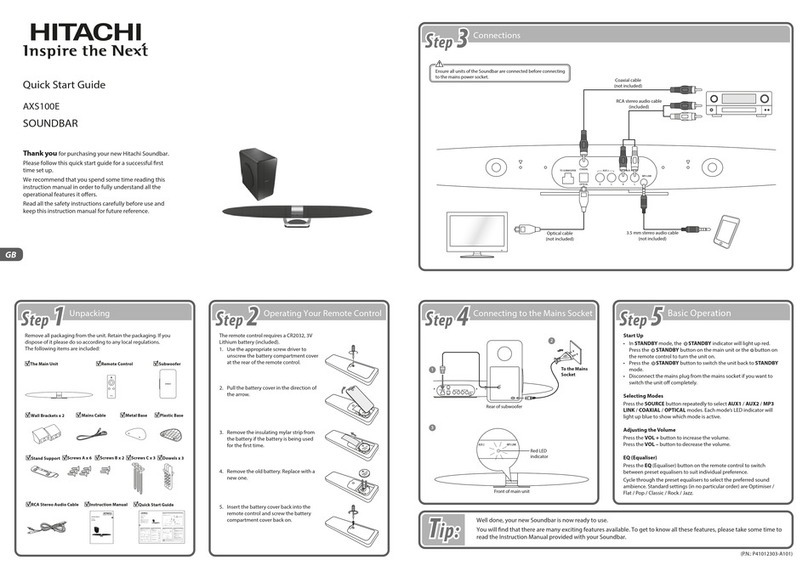
Hitachi AXS100E User manual