manuals.online logo
Brands
  1. Home
  2. •
  3. Brands
  4. •
  5. HPA
  6. •
  7. Media Player
  8. •
  9. HPA SY-M1043 User manual

HPA SY-M1043 User manual

Popular Media Player manuals by other brands

VidaBox LUX installation guide

VidaBox

VidaBox LUX installation guide

CasaTunes CT-3S quick start guide

CasaTunes

CasaTunes CT-3S quick start guide

Yamaha TSX-112 owner's manual

Yamaha

Yamaha TSX-112 owner's manual

Fantec MM-FHDL user manual

Fantec

Fantec MM-FHDL user manual

Visual Land Impulse quick start guide

Visual Land

Visual Land Impulse quick start guide

Philips GoGear Muse SA2MUS08 quick start guide

Philips

Philips GoGear Muse SA2MUS08 quick start guide

Fantec MM-HDRL user manual

Fantec

Fantec MM-HDRL user manual

Kvarta DVB Streamer quick start

Kvarta

Kvarta DVB Streamer quick start

Dune HD Duo 4K user manual

Dune HD

Dune HD Duo 4K user manual

Camos MMS-1000 manual

Camos

Camos MMS-1000 manual

Energy 75 Series user manual

Energy

Energy 75 Series user manual

Z3 Technology DME-03 user guide

Z3 Technology

Z3 Technology DME-03 user guide

Sony SVR-2000 Dimensions

Sony

Sony SVR-2000 Dimensions

Meicheng HD-1080K12 user manual

Meicheng

Meicheng HD-1080K12 user manual

DENAFRIPS ARCE owner's manual

DENAFRIPS

DENAFRIPS ARCE owner's manual

Topaz CMS Media Player Hardware user manual

Topaz

Topaz CMS Media Player Hardware user manual

InFocus LightCast user guide

InFocus

InFocus LightCast user guide

Samsung MP-80S Owner's instructions

Samsung

Samsung MP-80S Owner's instructions

manuals.online logo
manuals.online logoBrands
  • About & Mission
  • Contact us
  • Privacy Policy
  • Terms and Conditions

Copyright 2025 Manuals.Online. All Rights Reserved.

Owner’s Manual
DC 24V IN
CD / MEDIA
FIXED AUDIO OUTPUTVARIABLE AUDIO OUTPUT
CD / MEDIA / TUNER TUNER
ANTENA
30075
DIGITAL TUNER & CD/MEDIA PLAYER
DESIGNED AND ENGINEERED IN KOREA
WARNING
DO NOT EXPOSE
THIS EQUIPMENT
TO RAIN OR
MOISTURE
CAUTION
FOR CONTINUED
PROTECTION AGAINST
RISK OF FIRE, REPLACE
ONLY SAME TYPE FUSE
AVIS
RISQUE DE CHOC
ELECTRONIQUE NE
PAS OUVRIR
ATTENTION
UTILISER UN FUSIBLE
DE RECHANGE MEME
TYPE
~ AC INPUT
100-240V 50/60Hz, 12W
FUSE: T500mAL /250V
PLAY/PAUSE STOP
EJECT
REPNEXTPRE
DIR -
USB SD/MMC CARD
FUNCTION
DIR + RAND
BAND
MEMO
EQ
MUTE
POWER
DIGITAL TUNER & CD/MEDIA PLAYER
SY-M1043
ON
OFF

SY-M1043
CD / TUNER / USB / MEDIA Player
WARNING
SY-M1043
1
Table of Contents
Introduction 2
Front Panel 3
Rear Panel overview 7
Specifications 9
SY-M1043
2
Introduction
Introduction
CD / TUNER / USB / MEDIA Player
The SY-M1043 is an All-In-One audio source device which acc ommodates three
different kinds of audio sources into one single device.
It combines a CD-Player, MEDIA-player and AM/FM tuner into one single rack
space 19”housing.On the front side is a CD slot, an USB slot and a SD/MMC
memory card slot provided. This makes it possible to play regular audio CD's
as well as MP3 files from either CD's, USB memory sticks or SD/MMC memory
cards.
On the rear side of the device are three stereo outputs provided. Two of them are
dedicated to the tuner and CD/MEDIA function, while the third output is a variable
output. Because of the two separate stereo outputs, the tuner and CD/MEDIA
player can operate simultaneously.
This feature can be useful for applications such as Multi-Zone systems where
multiple audio sources are required at the same time.
The variable output has a volume control function and carries the signal from the
CD/MEDIA player when a track is playing, but when the CD/MEDIA has ended,
the variable output will automatically switch to tuner function.
PLAY/PAUSE STOP
EJECT
REPNEXTPRE
DIR -
USB SD/MMC CARD
FUNCTION
DIR + RAND
BAND
MEMO
EQ
MUTE
POWER
DIGITAL TUNER & CD/MEDIA PLAYER
SY-M1043
ON
OFF
SY-M1043
3
Front Panel
Front Panel
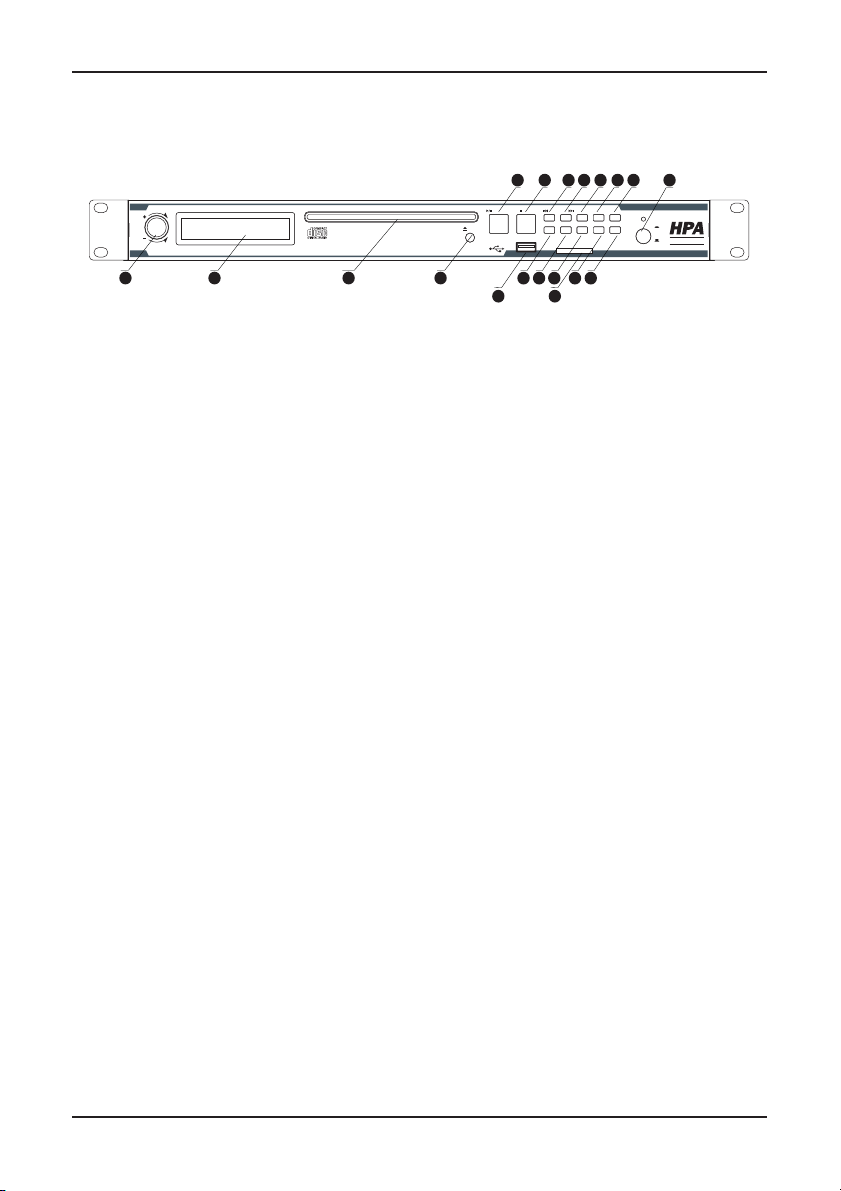
1. Function selection button (FUNCTION):
The function selection button is a rotatable push dial. By pressing this button,
the device will toggle between Tuner, CD or USB & SD/MMC operation mode. By
rotating this button, the volume for the “Variable audio output” can be adjusted.
By pressing and holding this button, the playback mode will be switched between
‘Single Play’ and ‘Normal Play’ mode. In ‘Normal play’ mode, the next track will
automatically start playing when the current track is finished. In ‘Single play’
mode, the player will fall into stop mode after the current track being finished,
waiting for a ‘Play’ command (press the Play button) before playing the next track.
In situations where the device is used for music, usually the ‘Normal Play’ mode
will be desirable, while in other situations such as educational purposes, houses
of worships or gym’s the ‘Single Play’ mode can provide great user convenience.
2. LCD Display:
The LCD Display shows the current operation mode of the unit. It shows which
radio station is playing, which audio track is playing, which functions are enabled,
…
3. CD Slot:
Audio CD’s shall be inserted into this drive. The drive will load the CD automati-
cally when it is inserted into this slot. Only use CD’s with normal round shape and
with normal size (12 cm). Always check if the CD slot is empty before inserting a
CD and don’t force the CD into the slot when it doesn’t accept the CD automati-
cally. When a CD is inserted, the device will automatically start playing it.
4. CD Eject button (EJECT):
This button shall be pressed to remove the CD from the drive. After this button
being pressed, the CD will be ejected from the drive and can be taken out by
the user. If the CD is not taken within ~10 seconds, the CD will be automatically
inserted to the drive again.
5.Play / Pause button (PLAY/PAUSE):
s#$53"3$--#MODE
0RESS4HEMUSICFROMTHE#$OR53"3$--#CANBESTARTEDANDPAUSEDWITH
this button. When a track currently is playing, it will be paused after pressing this
button and the current position (Track no and time) will be shown on the display. It
will resume to play after pressing this button again.
PLAY/PAUSE STOP
EJECT
REPNEXTPRE
DIR -
USB SD/MMC CARD
FUNCTION
DIR + RAND
BAND
MEMO
EQ
MUTE
POWER
DIGITAL TUNER & CD/MEDIA PLAYER
SY-M1043
ON
OFF
   
       
 
    
SY-M1043
4
Front Panel
Front Panel
s4UNERMODE
0RESS(OLD"YPRESSINGANDHOLDINGTHISBUTTONTHECURRENTCHOSENRADIOFRE-
quency will be stored on ‘Position 1’ of the selected band.
6.Stop button (STOP):
s#$53"3$--#MODE
The currently playing track will be stopped when pressing this button. After press-
ing ‘Play’ again, it will resume to play at the absolute beginning of the inserted
data carrier.
s4UNERMODE
0RESS(OLD"YPRESSINGANDHOLDINGTHISBUTTONTHECURRENTCHOSENRADIOFRE-
quency will be stored on ‘Position 2’ of the selected band.
7.Tuning down / CD-Mp3 Track selection down ( ):
s#$53"3$--#MODE
In CD or USB & SD/MMC mode, the playing track and position in the track can be
selected with this button.
0RESS"YPRESSINGTHISBUTTONFORASHORTTERMTHEPREVIOUSTRACKWILLBESELECTED
0RESS(OLD"YPRESSINGANDHOLDINGTHISBUTTONTHEPOSITIONINTHECURRENTLY
playing track can be selected (backwards). After the button is released the track
will resume to play from this point.
s4UNERMODE
In tuner mode, the desired radio station can be selected with this button.
0RESS"YPRESSINGTHISBUTTONONESINGLETIMETHEPREVIOUSRADIOSTATIONWILLBE
searched in auto seek mode, and when used in manual seek mode the selected
frequency will decrease one step.
0RESS(OLD"YPRESSINGANDHOLDINGTHISBUTTONTHESELECTIONMODEFORTHE
tuner will be switched to manual seek mode and the frequency can be decreased
by holding / pressing this button. It will resume automatically to auto seek mode
after about ~3 seconds.
8.Tuning up / CD-Mp3 Track selection up ( ):
s#$53"3$--#MODE
In CD or USB & SD/MMC mode, the playing track and position in the track can be
selected with this button.
0RESS"YPRESSINGTHISBUTTONFORASHORTTERMTHENEXTTRACKWILLBESELECTED
0RESS(OLD"YPRESSINGANDHOLDINGTHISBUTTONTHEPOSITIONINTHECURRENTLY
playing track can be selected (forward). After the button is released the track will
resume to play from this point.
s4UNERMODE
In tuner mode, the desired radio station can be selected with this button.
0RESS"YPRESSINGTHISBUTTONONESINGLETIMETHENEXTRADIOSTATIONWILLBE
searched in auto seek mode, and when used in manual seek mode the selected
frequency will increase one step.
/
/
SY-M1043
5
Front Panel
Front Panel
0RESS(OLD"YPRESSINGANDHOLDINGTHISBUTTONTHESELECTIONMODEFORTHE
tuner will be switched to manual seek mode and the frequency can be increased
by holding / pressing this button. It will resume automatically to auto seek mode
after about ~3 seconds.
9.Repeat (REP):
s#$53"3$--#MODE
With this button, the repeat mode can be selected between Repeat One (Repeats
currently playing track), Repeat Folder (Repeats all tracks in currently playing
folder),Repeat All (Repeats all tracks on inserted data carrier) and Repeat Off
(Stops playing after all tracks are played once) in this sequence. Press this button
to toggle between the different repeat modes.
s4UNERMODE
0RESS(OLD"YPRESSINGANDHOLDINGTHISBUTTONTHECURRENTCHOSENRADIOFRE-
quency will be stored on ‘Position 3’ of the selected band.
10.Band select for the tuner (BAND):
s4UNERMODE
Press this button to select between the different tuner bands. The different tuner
bands are FM1 / FM2 / FM3 / MW1 / MW2 and will be selected in this sequence.
s#$53"3$--#MODE
Press this button to display the information of the ID3 tag of the current track.
(Folder / File / Title / Artist / Album)
0RESS(OLD"YPRESSINGANDHOLDINGTHISBUTTONTHELOUDNESSCANBESWITCHED
On and Off.
11.Equalizer select (Flat / Classic / Pop / Rock / Off ) (EQ):
0RESSTHISBUTTONTOSWITCHBETWEENDIFFERENTEQUALIZERPRESETS&LAT#LASSIC
Pop / Rock / Off. They will be selected in this sequence.
12.Search down (DIR -):
s#$53"3$--#MODE
Press this button to jump to a lower folder.
s4UNERMODE
0RESS0RESSTHISBUTTONINTUNERMODETOSELECTTHEPREVIOUSPROGRAMMEDRADIO
PRESET0RESS(OLD"YPRESSINGANDHOLDINGTHISBUTTONTHECURRENTCHOSEN
radio frequency will be stored on ‘Position 5’ of the selected band.
13.Search up (DIR +):
s#$53"3$--#MODE
Press this button to jump to a higher folder.
s4UNERMODE
0RESS0RESSTHISBUTTONINTUNERMODETOSELECTTHENEXTPROGRAMMEDRADIOPRE-
SET0RESS(OLD"YPRESSINGANDHOLDINGTHISBUTTONTHECURRENTCHOSENRADIO
frequency will be stored on ‘Position 6’ of the selected band.
SY-M1043
6
Front Panel
14.Random play (RAND):
s#$53"3$--#MODE
Press this button to switch the random play mode (Shuffle) On and Off. When
random play is switched ON, tracks will be played in a random sequence.
s4UNERMODE
0RESS(OLD"YPRESSINGANDHOLDINGTHISBUTTONTHECURRENTCHOSENRADIOFRE-
quency will be stored on ‘Position 4’ of the selected band.
15.Memory for the tuner frequency (MEMO):
When pressing this button, available radio stations will be searched and auto-
matically stored to the preset memory. The radio stations are stored in order of
increasing frequency, starting from Band 1 - Position 1 with subsequently the
increasing frequencies on the higher positions.
Manual position assignment of the preset frequencies can also be done by press-
ing and holding the PLAY/PAUSE(1) – STOP(2) – REP(3) – RAND(4) – DIR-(5) –
DIR+(6) buttons.
16.Mute (MUTE):
By pressing this button, the variable output and fixed CD/MP3 output can be
muted / unmuted. The fixed tuner output is not affected by the mute button.
When the outputs are muted, the message ‘MUTE’ will blink on the display.
17.USB connection port & SD/MMC card slot:
An USB storage device and/or an SD/MMC memory card can be inserted to
these slots.Tracks stored on here can be played through the CMP30 and it will
automatically start to play when the medium is inserted.
18.Power switch:
The device can be switched ON and Off using the power switch. When the device
is switched ON, the blue LED above the power button will illuminate. After
powering on, it takes about three seconds before the device being operational.
The device will automatically resume to its previous operation mode upon
power on.
19. Power switch:
By means of the power switch, the device can be turned ON and OFF. When the
device is switched on, the blue LED above the power button will illuminate.
Front Panel
SY-M1043
7
Rear Panel overview
1.Power inlet:
The mains power supply (110~240V AC / 50~60 Hz) has to be applied to this AC
power inlet. The connection is made by an IEC C14 power connector which is fit-
ted with a fuse.When replacing the fuse, make sure that the value of the replace-
ment fuse matches the value of the original fuse. (T500mAL/250V)
2.RS232 control port:
The RS232 control port can be used for controlling the device through external
hardware such as audiovisual installations, home & industrial automation sys-
tems, computers, ...
3.Variable audio output CD/MEDIA/Tuner:
The variable audio output can be switched between CD/MEDIA or tuner mode
and the output level (volume) can be adjusted. The selection and volume adjust-
ment should be done using the rotary function dial. In most basic audio applica-
tion where only one simultaneous source is required (either CD/MEDIA or tuner),
the variable audio output will be used.
4.Fixed audio output CD/MEDIA:
The signal on this output is dedicated to the CD/MEDIA player, and has a con-
stant line output level (the volume is not adjustable). This output can be used for
audio applications where multiple sources are simultaneously used (CD/MEDIA
and tuner), such as Multi-Zone audio applications.
5.Fixed Audio Output Tuner:
The signal on this output is dedicated to the tuner, and has a constant line output
level (the volume is not adjustable). This output can be used for audio applica-
tions where multiple sources are simultaneously used (CD/MEDIA and tuner),
such as Multi-Zone audio applications.
Rear Panel overview
DC 24V IN
CD / MEDIA
FIXED AUDIO OUTPUTVARIABLE AUDIO OUTPUT
CD / MEDIA / TUNER TUNER
ANTENA
30075
DIGITAL TUNER & CD/MEDIA PLAYER
DESIGNED AND ENGINEERED IN KOREA
WARNING
DO NOT EXPOSE
THIS EQUIPMENT
TO RAIN OR
MOISTURE
CAUTION
FOR CONTINUED
PROTECTION AGAINST
RISK OF FIRE, REPLACE
ONLY SAME TYPE FUSE
AVIS
RISQUE DE CHOC
ELECTRONIQUE NE
PAS OUVRIR
ATTENTION
UTILISER UN FUSIBLE
DE RECHANGE MEME
TYPE
~ AC INPUT
100-240V 50/60Hz, 12W
FUSE: T500mAL/250V

     
SY-M1043
8
Rear Panel overview
Rear Panel overview
6.FM Antenna connection:
Connect the supplied FM antenna to those connectors to ensure a good FM re-
ception. In case of bad reception, the connection of an external outdoor antenna
or cable distribution can significantly improve the audio reception.
7.DC+24V Input connection:
The back-up power supply (DC+24V) has to be applied to this connector.