
iiNet Budii User manual

Setup Guide
Tablet
*If you have purchased a Budii™ Tablet as a stand-alone from your Budii™ Modem, you will need to follow
these instructions.
Table of Contents
Getting started with your Budii™ Tablet 2
Budii™ Tablet overview 3
Charging your tablet 5
Surfing the web 7
Making a phone call 8
Using a Micro SD card 9
Software updates 10
Additional Tablets*13
Pairing to your Budii™ Modem 13
Connecting to Wi-Fi 15

IF YOUR NEW BUDII™ TABLET IS PAIRED*,
HERE’S HOW TO GET STARTED:
×Budii™ Tablet overview
×Charging your tablet
×Surfing the web
×Making a phone call
×Using a Micro SD card
×Performing software updates
ADDITIONAL TABLETS**
×Pairing to your Budii™ Modem
×Connecting to Wi-Fi
Getting started with your Budii™ Tablet
*This is automatically done when you purchase your tablet at the same time as the Budii™ modem.
**Pairing your device will be required if you purchased your tablet separate to your Budii™ modem.
2

3Getting started with your Budii™Tablet
Microphone
Camera ii Home
Browser
Touchscreen
(Home Menu)
Back Button
Launcher
Phone
Menu Button
BUDII™ TABLET OVERVIEW

4Getting started with your Budii™Tablet
ii Home
×When your tablet is off, press and hold ii Home for 5 seconds to turn it on.
×Press and hold ii Home to turn your tablet off.
×Press ii Home once to access the Home screen.
Touchscreen The screen you’ll use to control your tablet. Touch icons to launch applications.
Home Screen The Home screen shows commonly used applications.
Reach this any time by pressing ii Home.
Launcher Shows a screen with all your tablet’s applications.
Browser Press the Browser icon to surf the Internet.
Back button Press the Back button to go back to the previous screen.
Menu button While using an application, press the Menu button to see more options.
Phone Press the Phone icon to launch the Phone dialling pad.
Before you follow this guide, make sure you’ve used your Quick Installation Guide to get Budii™ Modem up and
running. You’ll need it set up to get started with your tablet.

5Getting started with your Budii™Tablet
FIRSTLY CHARGE YOUR BUDII™ TABLET
To charge your tablet on the Budii™ Modem:
×Make sure your Budii™ Modem is connected to power.
×Place your tablet in the charging position on the Budii™ Modem, as shown in the image below.
The first thing you’ll need to do is charge your tablet’s battery for at least 24 hours.
Doing this is important as it preserves the battery’s capacity.

6Getting started with your Budii™Tablet
To charge your tablet on a Budii™ picture frame charger:
×Make sure the picture frame charger is connected to power.
×Place your tablet in the charging position on the picture frame, as shown in the image below.
Here’s what happens when you charge a Budii™ Tablet:
×If the battery is empty, the tablet will take at least 20 minutes to turn on.
×When the battery has charged enough, the tablet will wake up.
×You can continue to charge your tablet while it’s on. The screen will dim after a few minutes of inactivity.
Press ii Home to wake up the tablet.
If your tablet is off, press and hold ii Home for 5 seconds to turn it on.

7Getting started with your Budii™Tablet
SURFING THE WEB
1. From your tablet’s Home screen, press
the Browser icon.
2. Press the Address bar and type either:
×a URL - e.g. www.iinet.net.au
×a search term - e.g. funny cat videos.
3. When you’ve finished typing, press Go.
8Getting started with your Budii™Tablet
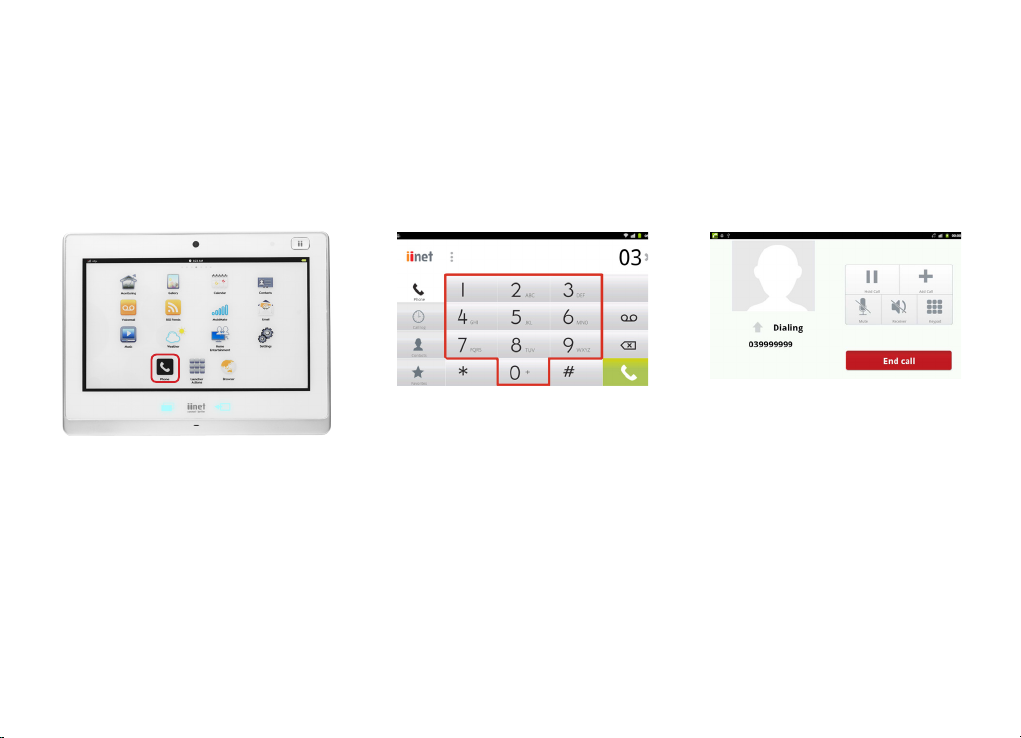
MAKING A PHONE CALL
To make a phone call with your Budii™ Tablet:
1. With your Budii™ Tablet turned on, press
the Phone icon.
3. Calls you make with your tablet are
hands-free - so simply rest the tablet
on your desk and talk. Press End Call
to hang up.
2. From the number keypad, type the
number you want to call. Press the green
Phone icon when you’ve finished typing.

9Getting started with your Budii™Tablet
GETTING STARTED WITH A MICROSD CARD
MicroSD cards are not included with your Budii™ Tablet. However, you can use your own MicroSD card to access
portable music or other media content on your Budii™ Tablet.
1. Lift the cover from the MicroSD card slot.
2. Insert the MicroSD card, logo facing up, into the slot (figure 1).
3. Gently push the card into the slot until it clicks into place.
4. Access the content of your MicroSD card through the File Explorer (figure 2).
(figure 1)(figure 2)
Other manuals for Budii
2
Table of contents
Popular Tablet manuals by other brands

Laser
Laser MID-1060 Quick operation guide

MUNBYN
MUNBYN IRT09J Easy setup guide

Motorola
Motorola MC3090R - Win CE 5.0 Professional 520 MHz quick start guide

Dell
Dell Latitude ST Setup and features information

Lenovo
Lenovo IdeaTab S6000L Hardware Maintenance Manual

Venturer
Venturer WT9L11 quick start guide











