manuals.online logo
Brands
  1. Home
  2. •
  3. Brands
  4. •
  5. Integra
  6. •
  7. DVD Player
  8. •
  9. Integra RDV-1 User manual

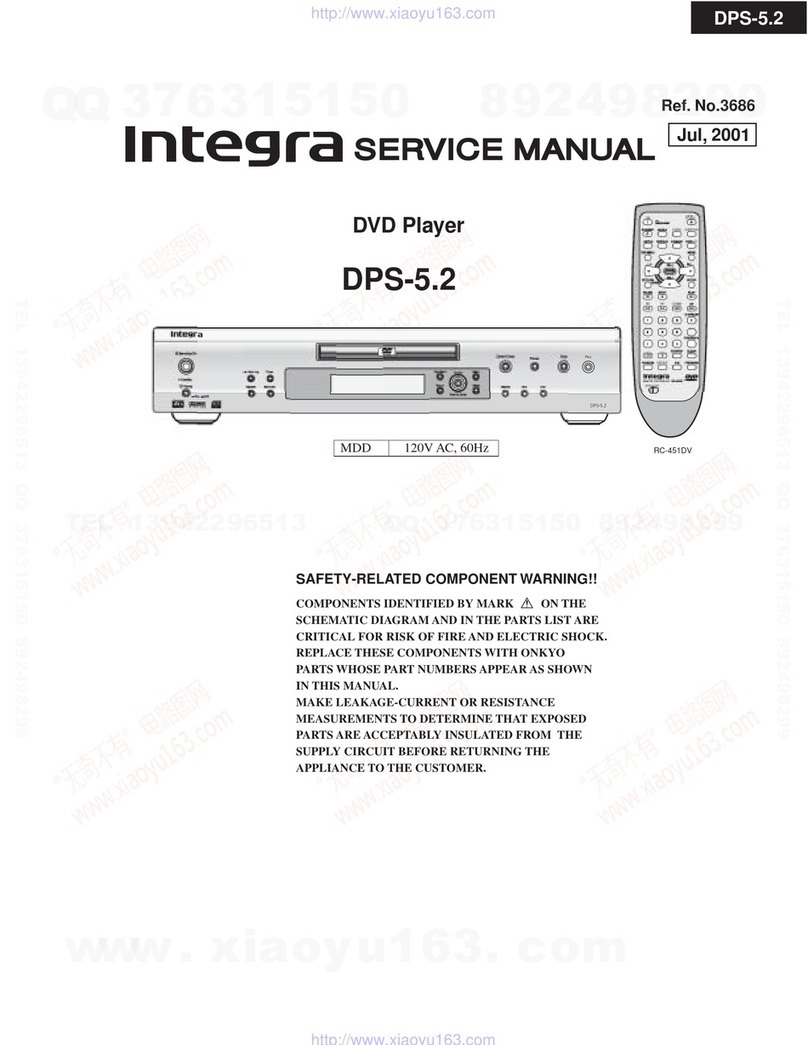
Integra RDV-1 User manual

Other Integra DVD Player manuals

Integra DPS-10.5 User manual

Integra

Integra DPS-10.5 User manual

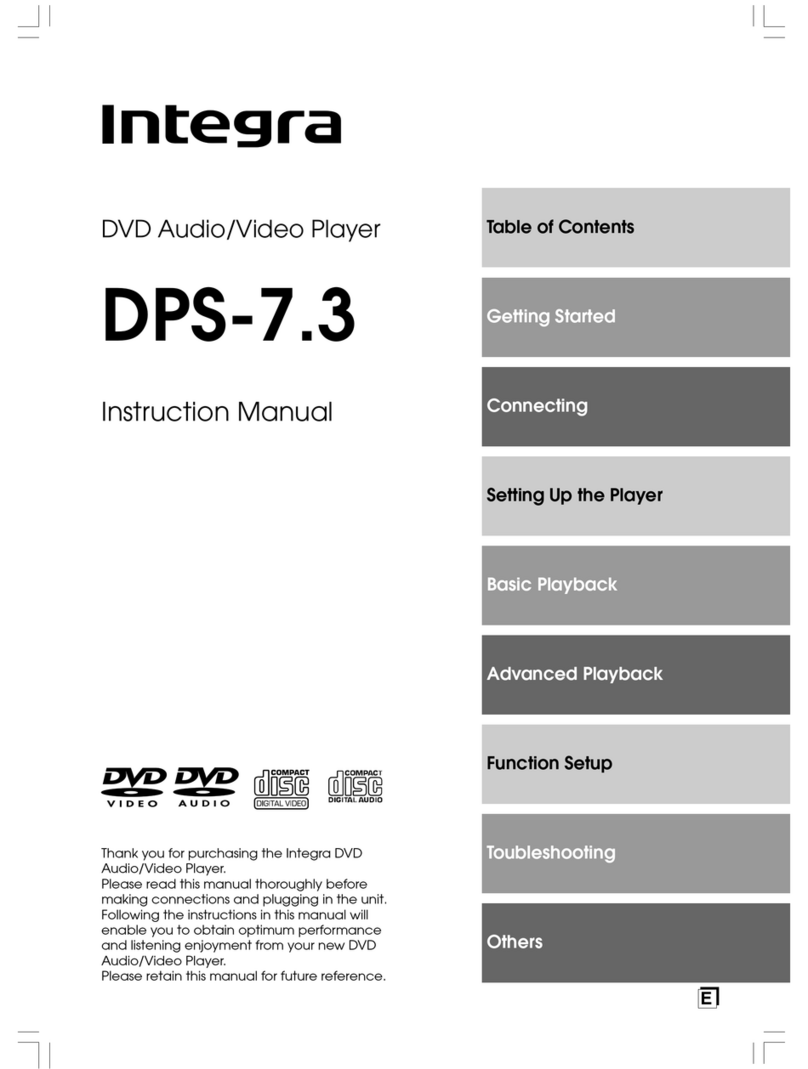
Integra DPS-7.3 User manual

Integra

Integra DPS-7.3 User manual

Integra DPS-7.2 User manual

Integra

Integra DPS-7.2 User manual

Integra DPC-8.5 User manual

Integra

Integra DPC-8.5 User manual

Integra DPS-8.3 User manual

Integra

Integra DPS-8.3 User manual

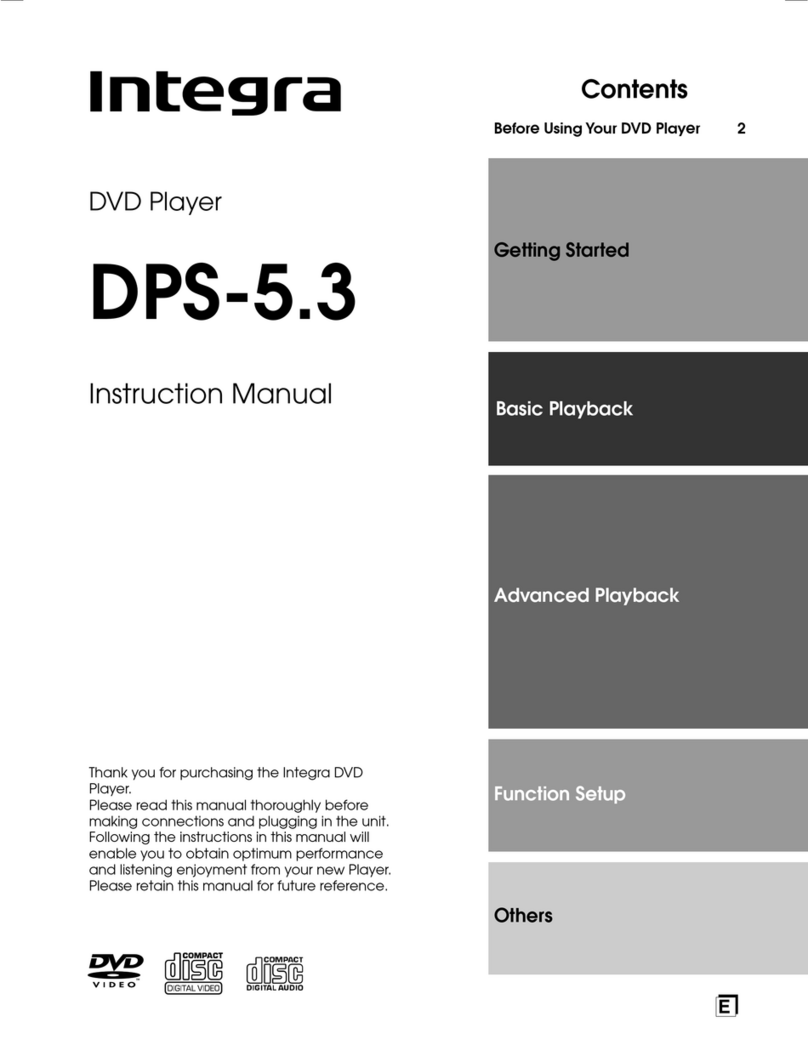
Integra DPS-5.2 User manual

Integra

Integra DPS-5.2 User manual

Integra DPS-5.5 User manual

Integra

Integra DPS-5.5 User manual

Integra DPS-5.4 User manual

Integra

Integra DPS-5.4 User manual

Integra DPS-7.3 User manual

Integra

Integra DPS-7.3 User manual

Integra DPS-5.4 User manual

Integra

Integra DPS-5.4 User manual

Integra DPS-6.5 User manual

Integra

Integra DPS-6.5 User manual

Integra DPS-5.2 User manual

Integra

Integra DPS-5.2 User manual

Integra DPS-6.7 User manual

Integra

Integra DPS-6.7 User manual

Integra DPS-10.5 User manual

Integra

Integra DPS-10.5 User manual

Integra DPS-5.9 User manual

Integra

Integra DPS-5.9 User manual

Integra RDV-1.1 User manual

Integra

Integra RDV-1.1 User manual

Integra DPS-10.5 User manual

Integra

Integra DPS-10.5 User manual

Integra DPS-5.5 User manual

Integra

Integra DPS-5.5 User manual

Integra DPS-7.2 User manual

Integra

Integra DPS-7.2 User manual

Integra DPS-10.5 User manual

Integra

Integra DPS-10.5 User manual

Integra DPS-6.7 User manual

Integra

Integra DPS-6.7 User manual

Integra DPS-8.3 User manual

Integra

Integra DPS-8.3 User manual

Integra DPS-7.3 User manual

Integra

Integra DPS-7.3 User manual

Integra DHS-8.8 User manual

Integra

Integra DHS-8.8 User manual

Popular DVD Player manuals by other brands

Yamaha DVD S540 - Progressive Scan DVD Player Service manual

Yamaha

Yamaha DVD S540 - Progressive Scan DVD Player Service manual

Yamakawa DVD-MP12i user manual

Yamakawa

Yamakawa DVD-MP12i user manual

Philips DVP3042/12 user manual

Philips

Philips DVP3042/12 user manual

Philips DVP5900/37B Quick use guide

Philips

Philips DVP5900/37B Quick use guide

Roadstar DVD-2020H Service manual

Roadstar

Roadstar DVD-2020H Service manual

Beko DVD 2006 user manual

Beko

Beko DVD 2006 user manual

Atak DVDA2015 instruction manual

Atak

Atak DVDA2015 instruction manual

LG DV257K owner's manual

LG

LG DV257K owner's manual

auna 10005069 manual

auna

auna 10005069 manual

Philips MCD700/61 user manual

Philips

Philips MCD700/61 user manual

Sony DVP-F11 Service manual

Sony

Sony DVP-F11 Service manual

Toshiba SD-2300U owner's manual

Toshiba

Toshiba SD-2300U owner's manual

LENCO DVP-740 X2 user manual

LENCO

LENCO DVP-740 X2 user manual

Tevion 44330 user guide

Tevion

Tevion 44330 user guide

Aiwa XD-DV370 operating instructions

Aiwa

Aiwa XD-DV370 operating instructions

Sony DVP S530D operating instructions

Sony

Sony DVP S530D operating instructions

Denon DVM-1805 - DVD Changer operating instructions

Denon

Denon DVM-1805 - DVD Changer operating instructions

Toshiba SD-3815 owner's manual

Toshiba

Toshiba SD-3815 owner's manual

manuals.online logo
manuals.online logoBrands
  • About & Mission
  • Contact us
  • Privacy Policy
  • Terms and Conditions

Copyright 2025 Manuals.Online. All Rights Reserved.

Getting Started 8
Basic Playback 22
Advanced Playback 29
Others 61
Before sing Your DVD Player 2
Quick Control and
Performance Options 38
Function Setup 46
Remote Controller 56
Thank you for purchasing the Integra
RESEARCH DVD AUDIO/VIDEO Player.
Please rea this manual thoroughly before
making connections an plugging in the unit.
Following the instructions in this manual will
enable you to obtain optimum performance
an listening enjoyment from your new player.
Please retain this manual for future reference.
RDV-1
DVD A DIO/VIDEO Player
Instruction Manual
RDV-1 US/Asia 29342995
RDV-1(US_E)Cover.p65 10/4/00, 17:031
2
Important Safeguards
CAUTION:
TO REDUCE THE RISK OF ELECTRIC SHOCK, DO NOT
REMOVE COVER (OR BACK). NO USER-SERVICEABLE
PARTS INSIDE. REFER SERVICING TO QUALIFIED
SERVICE PERSONNEL.
triangle, is intended to alert the user to the presence of uninsulated
“dangerous voltage” within the product’s enclosure that may be of
sufficient magnitude to constitute a risk of electric shock to persons.
The exclamation point within an equilateral triangle is intended to alert
the user to the presence of important operating and maintenance
(servicing) instructions in the literature accompanying the appliance.
1. Read Instructions – All the safety an operating instructions
shoul be rea before the appliance is operate .
2. Retain Instructions – The safety an operating instructions
shoul be retaine for future reference.
3. Heed Warnings – All warnings on the appliance an in the
operating instructions shoul be a here to.
4. Follow Instructions – All operating an use instructions
shoul be followe .
5. Cleaning – Unplug the appliance from the wall outlet
before cleaning. The appliance shoul be cleane only as
recommen e by the manufacturer.
6. Attachments – Do not use attachments not recommen e
by the appliance manufacturer as they may cause
hazar s.
7. Water and Moisture – Do not use the appliance near water
–for example, near a bath tub, wash bowl, kitchen sink, or
laun ry tub; in a wet basement; or near a swimming pool;
an the like.
8. Accessories – Do not place the appliance on an unstable
cart, stan , tripo , bracket, or table. The appliance may
fall, causing serious injury to a chil or a ult, an serious
amage to the appliance. Use only with a cart, stan ,
tripo , bracket, or table recommen e by the
manufacturer, or sol with the appliance. Any mounting of
the appliance shoul follow the manufacturer’s
instructions, an shoul use a mounting accessory
recommen e by the manufacturer.
9. An appliance an cart
combination shoul be
move with care. Quick stops,
excessive force, an uneven
surfaces may cause the
appliance an cart
combination to overturn.
10. Ventilation – Slots an openings in the cabinet are
provi e for ventilation an to ensure reliable operation of
the appliance an to protect it from overheating, an
these openings must not be blocke or covere . The
openings shoul never be blocke by placing the
appliance on a be , sofa, rug, or other similar surface. The
appliance shoul not be place in a built-in installation
such as a bookcase or rack unless proper ventilation is
provi e . There shoul be free space of at least 5 cm an
an opening behin the appliance.
11. Power Sources – The appliance shoul be operate only
from the type of power source in icate on the marking
label. If you are not sure of the type of power supply to
your home, consult your appliance ealer or local power
company.
12. Grounding or Polarization – The appliance may be
equippe with a polarize alternating current line plug (a
plug having one bla e wi er than the other). This plug will
fit into the power outlet only one way. This is a safety
feature. If you are unable to insert the plug fully into the
outlet, try reversing the plug. If the plug shoul still fail to fit,
contact your electrician to replace your obsolete outlet.
Do not efeat the safety purpose of the polarize plug.
13. Power-Cord Protection – Power-supply cor s shoul be
route so that they are not likely to be walke on or
pinche by items place upon or against them, paying
particular attention to cor s at plugs, convenience
receptacles, an the point where they exit from the
appliance.
14. Lightning – For a e protection for the appliance uring
a lightning storm, or when it is left unatten e an unuse
for long perio s of time, unplug it from the wall outlet an
isconnect the antenna or cable system. This will prevent
amage to the appliance ue to lightning an power-line
surges.
15. Overloading – Do not overloa wall outlets, extension
cor s, or integral convenience receptacles as this can
result in a risk of fire or electric shock.
16. Object and Liquid Entry – Never push objects of any kin
into the appliance through openings as they may touch
angerous voltage points or short-out parts that coul
result in a fire or electric shock. Never spill liqui of any kin
on the appliance.
17. Servicing – Do not attempt to service the appliance
yourself as opening or removing covers may expose you to
angerous voltage or other hazar s. Refer all servicing to
qualifie service personnel.
18. Damage Requiring Service – Unplug the appliance form
the wall outlet an refer servicing to qualifie service
personnel un er the following con itions:
A. When the power-supply cor or plug is amage ,
B. If liqui has been spille , or objects have fallen into the
appliance,
C. If the appliance has been expose to rain or water,
D. If the appliance oes not operate normally by following
the operating instructions. A just only those controls
that are covere by the operating instructions as an
improper a justment of other controls may result in
amage an will often require extensive work by a
qualifie technician to restore the appliance to its
normal operation,
E. If the appliance has been roppe or amage in any
way, an
F. When the appliance exhibits a istinct change in
performance – this in icates a nee for service.
19. Replacement Parts – When replacement parts are
require , be sure the service technician has use
replacement parts specifie by the manufacturer or have
the same characteristics as the original part. Unauthorize
substitutions may result in fire, electric shock, or other
hazar s.
20. Safety Check – Upon completion of any service or repairs
to the appliance, ask the service technician to perform
safety checks to etermine that the appliance is in proper
operation con ition.
21. Wall or Ceiling Mounting – The appliance shoul be
mounte to a wall or ceiling only as recommen e by the
manufacturer.
22. Heat – The appliance shoul be situate away from heat
sources such as ra iators, heat registers, stoves, or other
appliances (inclu ing amplifiers) that pro uce heat.
PORTABLE CART WARNING
S3125A
RDV-1 US/Asia 29342995
RDV-1(US_E)p02-07.p65 10/4/00, 17:032

3
For Canadian model
This class B igital apparatus complies with Cana ian ICES-
003.
For models having a power cord with a polarized plug:
CA TION: TO PREVENT ELECTRIC SHOCK, MATCH WIDE BLADE
OF PLUG TO WIDE SLOT, FULLY INSERT.
Modele pour les Canadien
Cet appareil numérique e la classe B est conforme à la
norme NMB-003 u Cana a.
Sur les modeles dont la fiche est polarisee:
ATTENTION: POUR EVITER LES CHOCS ELECTRIQUES, INTRODUIRE
LA LAME LA PLUS LARGE DE LA FICHE DANS LA BORNE
CORRESPONDANTE DE LA PRISE ET POUSSER JUSQU’AU FOND.
For .S. model
The laser is covere by a housing which prevents exposure
uring operation or maintenance. However, this pro uct is
classifie as a Laser Pro uct by CDRH (Center for Devices an
Ra iological Health) which is a epartment of the Foo an
Drug A ministration. Accor ing to their regulations 21 CFR
section 1002.30, all manufactures who sell Laser Pro ucts must
maintain recor s of written communications between the
manufacturer, ealers an customers concerning ra iation
safety. If you have any complaints about instructions or
explanations affecting the use of this pro uct, please feel free
to write to the a ress on the back page of this manual. When
you write us, please inclu e the mo el number an serial
number of your unit.
In compliance with Fe eral Regulations, the certification,
i entification an the perio of manufacture are in icate on
the rear panel.
FCC INFORMATION FOR SER
CA TION:
The user changes or mo ifications not expressly approve by
the party responsible for compliance coul voi the user’s
authority to operate the equipment.
NOTE:
This equipment has been teste an foun to comply with the
limits for a Class B igital evice, pursuant to Part 15 of the FCC
Rules. These limits are esigne to provi e reasonable
protection against harmful interference in a resi ential
installation. This equipment generates, uses an can ra iate
ra io frequency energy an , if not installe an use in
accor ance with the instructions, may cause harmful
interference to ra io communications. However, there is no
guarantee that interference will not occur in a particular
installation. If this equipment oes cause harmful interference
to ra io or television reception, which can be etermine by
turning the equipment off an on, the user is encourage to
try to correct the interference by one or more of the following
measures:
• Reorient or relocate the receiving antenna.
• Increase the separation between the equipment an
receiver.
• Connect the equipment into an outlet on a circuit ifferent
from that to which the receiver is connecte .
• Consult the ealer or an experience ra io/TV technician
for help.
This unit contains a semicon uctor laser system an is
classifie as a “CLASS 1 LASER PRODUCT”. So, to use this
mo el properly, rea this Instruction Manual carefully. In
case of any trouble, please contact the store where you
purchase the unit. To prevent being expose to the laser
beam, o not try to open the enclosure.
CA TION:
VISIBLE LASER RADIATION WHEN OPEN AND INTERLOCK
FAILED OR DEFEATED. DO NOT STARE INTO BEAM.
CA TION:
THIS PRODUCT UTILIZES A LASER. USE OF CONTROLS OR
ADJUSTMENTS OR PERFORMANCE OF PROCEDURES OTHER
THAN THOSE SPECIFIED HEREIN MAY RESULT IN HAZARDOUS
RADIATION EXPOSURE.
The label on the
right is applie on
the rear panel
except for USA an
Cana ian mo els.
1. This unit is a CLASS 1 LASER PRODUCT an employs a
laser insi e the cabinet.
2. To prevent the laser from being expose , o not
remove the cover. Refer servicing to qualifie
personnel.
“CLASS 1 LASER
PRODUCT”
RDV-1 US/Asia 29342995
RDV-1(US_E)p02-07.p65 10/4/00, 17:033
4
1. Regional Restriction Codes (Region Number)
Regional restriction co es are built into DVD Players an
DVD-Vi eo me ia for each sales region. If the regional
co e of the DVD Player oes not match one of the
regional co es on the DVD-Vi eo, playback is not possible.
The regional number can be foun on the rear panel of
the DVD Player. (e.g. 1 for Region 1)
2. About This Manual
This manual explains the basic proce ures for operating
the DVD Player. Some DVD-Vi eo an DVD-Au io iscs o
not support the full potential of the DVD technology. Your
DVD Player may therefore not respon to all operating
comman s. Refer to instruction notes on iscs.
A “ ” mark may appear on the TV screen uring
operation. It means that the operation is not permitte by
the DVD Player or the isc.
3. Warranty Claim
You can fin the serial number on the rear panel of the
unit. In case of warranty claim, please report this number.
4. Recording Copyright
Recor ing of copyrighte material for other than personal
use is illegal without permission of the copyright hol er.
5. Power
WARNING
BEFORE PLUGGING IN THE UNIT FOR THE FIRST TIME, READ THE
FOLLOWING SECTION CAREFULLY.
The voltage of the available power supply iffers
accor ing to country or region. Be sure that the power
supply voltage of the area where the unit will be use
meets the require voltage (e.g., AC 120 V, 60 Hz) written
on the rear panel.
6. Do not touch the unit with wet hands
Do not han le the unit or power cor when your han s are
wet or amp. If water or any other liqui enters the case,
take the unit to an authorize service center for inspection.
7. Location of the unit
• Place the unit in a well-ventilate location.
Take special care to provi e plenty of ventilation on all
si es of the unit especially when it is place in an au io
rack. If ventilation is blocke , the unit may overheat an
malfunction.
• Do not expose the unit to irect sunlight or heating units
as the unit’s internal temperature may rise an shorten
the life of the pickup.
• Avoi amp an usty places an places irectly
affecte by vibrations from the speakers. In particular,
avoi placing the unit on or above one of the speakers.
• Be sure the unit is place in a horizontal position. Never
place it on its si e or on a slante surface as it may
malfunction.
• When you place the unit near a TV, ra io, or VCR, the
playback picture may become poor an the soun may
be istorte . In this case, place the unit away from the TV,
ra io, or VCR.
8. Care
From time to time you shoul wipe the front an rear
panels an the cabinet with a soft cloth. For heavier irt,
ampen a soft cloth in a weak solution of mil etergent
an water, wring it out ry, an wipe off the irt. Following
this, ry imme iately with a clean cloth.
Do not use rough material, thinners, alcohol or other
chemical solvents or cloths since these coul amage the
finish or remove the panel lettering.
9. Notes on Handling
• When shipping the unit, use the original shipping carton
an packing materials. For maximum protection, repack
the unit as it was originally packe at the factory.
• Do not use volatile liqui s, such as insect spray, near the
unit. Do not leave rubber or plastic pro ucts in contact
with the unit for a long time. They will leave marks on the
finish.
• The top an rear panels of the unit may become warm
after a long period of use. This is not a malfunction.
• When the unit is not in use, be sure to remove the isc
an turn off the power.
• If you o not use the unit for a long perio , the unit may
not function properly in the future. Turn on an use the
unit occasionally.
10. To Obtain a Clear Picture
The unit is a high technology, precision evice. If the optical
pick-up lens an isc rive parts are irty or worn own,
the picture quality becomes poor. To obtain a clear
picture, we recommen regular inspection an
maintenance (cleaning or parts replacement) every 1,000
hours of use epen ing on the operating environment. For
etails, contact your nearest ealer.
11. Notes on Moisture Condensation
Moisture condensation damages the unit.
Please read the following carefully.
• What is moisture condensation?
Moisture con ensation occurs, for example, when you
pour a col rink into a glass on a warm ay. Drops of
water form on the outsi e of the glass. In the same way,
moisture may con ense on the optical pick-up lens
insi e the unit, one of the most crucial internal parts of
the unit.
• Moisture condensation occurs in the following cases.
– When you bring the unit irectly from a col place to
a warm place.
– When you use the unit in a room where you just turne
on the heater, or a place where the col win from
the air con itioner irectly hits the unit.
– In summer, when you use the unit in a hot an humi
place just after you move the unit from an air
con itione room.
– When you use the unit in a humi place.
• Do not use the unit when moisture condensation may
occur.
If you use the unit in such a situation, it may amage
iscs an internal parts. Remove the isc, connect the
power cor of the unit to the wall outlet, turn on the unit,
an leave it for two or three hours. After a few hours, the
unit will have warme up an evaporate any moisture.
Keep the unit connecte to the wall outlet an moisture
con ensation will sel om occur.
RDV-1(US_E)p02-07.p65 10/4/00, 17:034
5
Important Safeguar s/Precautions/Table of Contents/Notes on Discs ...2 - 6
Getting Started
Features/Supplie Accessories .......................................................................... 8
Preparing the Remote Controller ...................................................................... 9
Making Connections ......................................................................................... 10
Using the D/A Converter to Listen to Other Components ............................ 14
Control Position an Names ............................................................................. 16
Connecting the Power/Turning on the DVD Player ....................................... 19
Setting up the DVD Player for Optimal Performance .................................... 20
Basic Playback
Playing DVD-Vi eo/Au io, Vi eo CD, an CD .............................................. 22
Locating a Specific Title/Group/Chapter/Track/Location ........................... 26
Advanced Playback
Playing Repeate ly ........................................................................................... 29
Playing in a Favorite Or er ............................................................................... 30
Playing in Ran om Or er ................................................................................. 31
Zooming a Picture ............................................................................................. 32
Improving Picture Quality ................................................................................. 33
Selecting the Camera Angle ........................................................................... 34
Selecting the Subtitle Language/Turning On/Off Subtitles ........................... 35
Selecting the Au io Language........................................................................ 36
Output Soun Conversion Table ...................................................................... 37
Quick Control and Performance Options
Using the Graphic Remote Control - V.REMOTE ............................................. 38
Selecting the Playback Function - QUICK ...................................................... 39
Accessing Playback Features - NAVI ............................................................... 40
Selecting Progressive Vi eo Output ................................................................ 44
Turning Off the Vi eo Signal Output ................................................................ 45
Function Setup
Customizing the Function Settings ................................................................... 46
Remote Controller
Using the Remote Controller ............................................................................ 56
Programming the Comman s of Other Remote Controller Units
into the Remote Controller ........................................................................ 58
Others
Troubleshooting .................................................................................................. 61
Specifications ..................................................................................................... 63
Table of Languages ................................................................ back cover page
RDV-1(US_E)p02-07.p65 10/4/00, 17:035
6
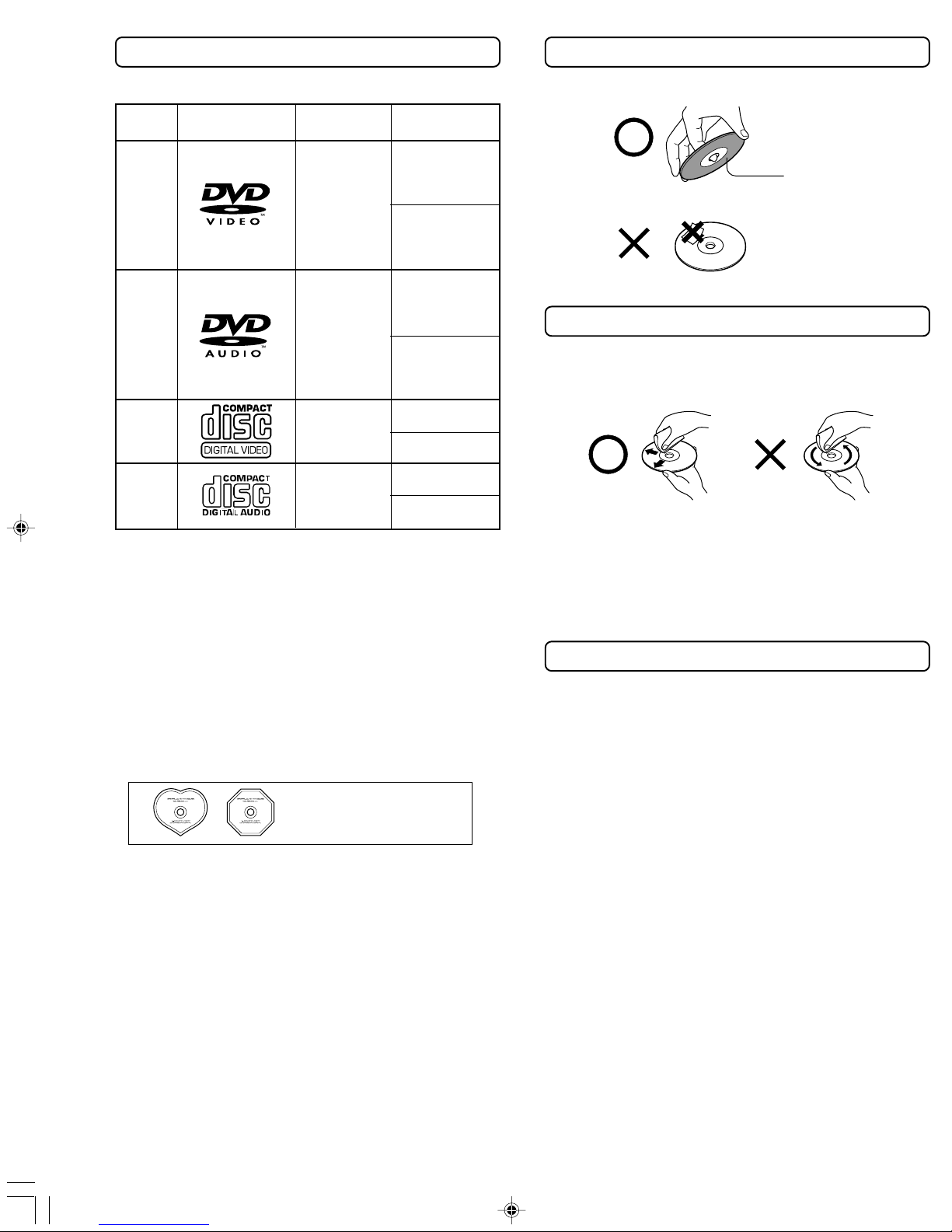
Disc mark Disc size
12 cm

8 cm
12 cm
12 cm
8 cm (CD
single)
Playable Discs
This DVD Player can playback the following iscs.
Contents
Au io
+
Vi eo
(moving
pictures)
Au io
Au io +
Vi eo
(moving
pictures)
Au io
Handling Discs
• Do not touch the playback si e of the isc.
• Do not attach paper or tape to iscs.
Cleaning Discs
• Fingerprints an ust on the isc cause picture an
soun eterioration. Wipe the isc from the center
outwar s with a soft cloth. Always keep the isc clean.
• If you cannot wipe off the ust with a soft cloth, wipe
the isc lightly with a slightly moistene soft cloth an
finish with a ry cloth.
• Do not use any type of solvent such as thinner, benzine,
commercially available cleaners or antistatic spray for
vinyl LPs. It may amage the isc.
Storing Discs
• Do not store iscs in a place subject to irect sunlight
or near heat sources.
• Do not store iscs in places subject to moisture an
ust such as a bathroom or near a humi ifier.
• Store iscs vertically in a case. Stacking or placing
objects on iscs outsi e of their case may cause
warping.
• CD-R an CD-RW iscs recor e by CD-DA metho
can also be playe . Some CD-R/RW iscs may be
incompatible.
• You cannot playback iscs other than those liste
above.
• You cannot play iscs such as CD-ROM, DVD-RAM,
DVD-RW, etc., even if the marks in the above table are
labele on those iscs.
• This DVD Player uses the PAL*/NTSC color system, an
cannot playback vi eo me ia recor e in any other
color system (SECAM, etc.).
• Avoi using heart-shape or octagonal iscs. Playing
irregularly shape iscs may amage the internal
mechanism of the DVD Player.
• Do not use iscs that have resi ue from a hesive tape,
rental iscs that have peeling labels, or iscs that have
custom labels or stickers. Otherwise, you may not be
able to eject the iscs or the DVD Player may become
inoperative.
Discs with shapes such as
these cannot be played.
DVD-
Video
DVD-
Audio
Video
CD
CD
Playback side
8 cm
8 cm
12 cm
This section shows you how to handle, clean, and store discs.
* Not applicable for USA an Cana ian mo els
RDV-1(US_E)p02-07.p65 10/4/00, 17:036
7
About Video CDs
This DVD Player supports Vi eo CDs equippe with the
PBC (Version 2.0) function. (PBC is the abbreviation of
Playback Control.) You can enjoy two playback
variations epen ing on the type of isc.
• Video CD not equipped with PBC function (Version 1.1)
Soun an movies can be playe on this DVD Player in
the same way as a CD.
• Video CD equipped with PBC function (Version 2.0)
In a ition to operation of the Vi eo CD not equippe
with the PBC function, you can enjoy playback with
interactive software an search function using the
menu isplaye on the TV screen (Menu Playback).
Some of the functions escribe in this Instruction
Manual may not work with some iscs.
Notes on Copyright
It is forbi en by law to copy, broa cast, show, broa cast
on cable, play in public, an rent copyrighte material
without permission.
The vi eo recor e on DVD-Vi eo is copy protecte ,
an any recor ings ma e from these iscs will be
istorte .
This pro uct incorporates copyright protection
technology that is protecte by metho claims of
certain U.S. patents an other intellectual property rights
owne by Macrovision Corporation an other rights
owners. Use of this copyright protection technology must
be authorize by Macrovision Corporation, an is
inten e for home an other limite viewing uses only
unless otherwise authorize by Macrovision Corporation.
Reverse engineering or isassembly is prohibite .
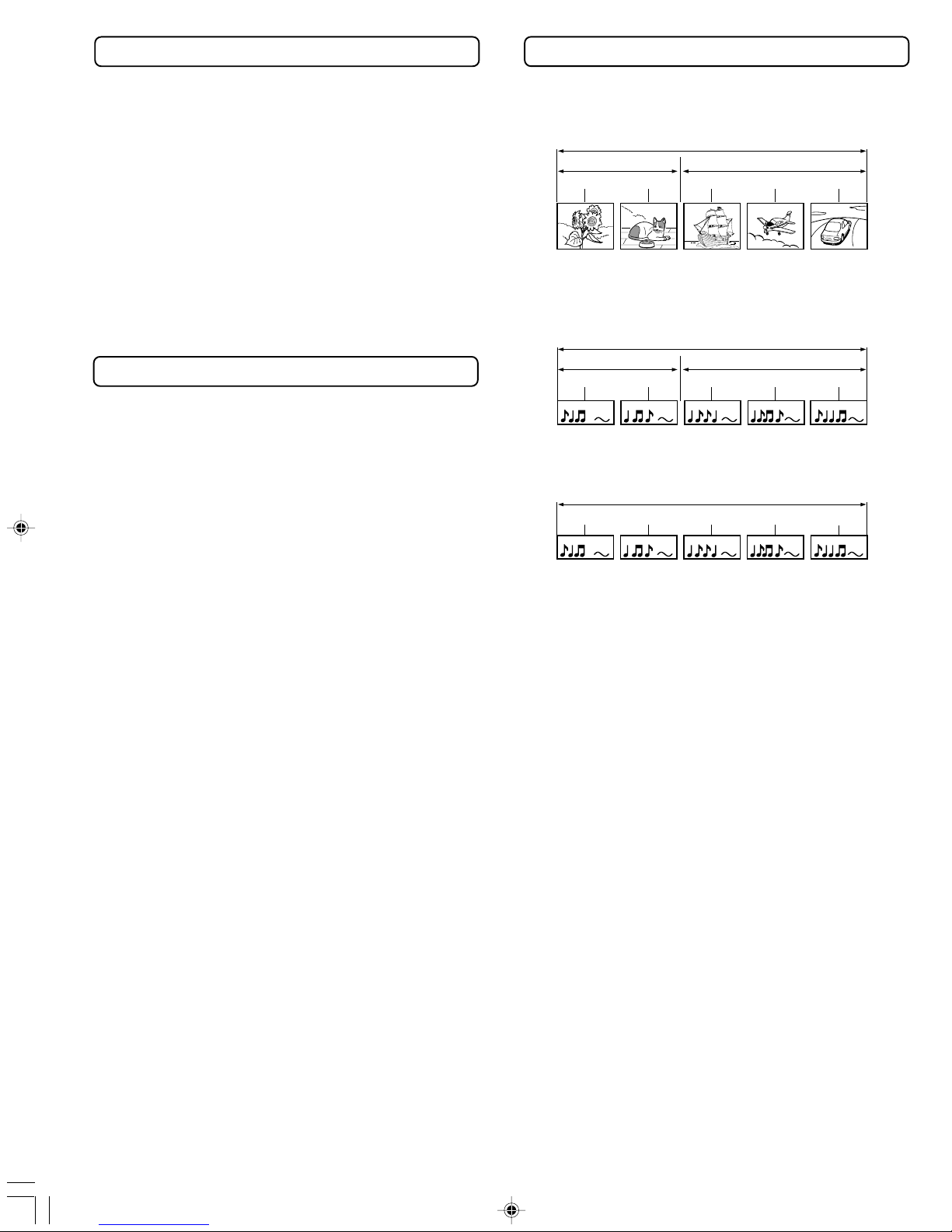
Track 1 Track 2 Track 3 Track 4 Track 5
The Structure of the Disc Content
DVD-Video
Normally, the contents of DVD-Vi eo are ivi e into
titles, an the titles are sub ivi e into chapters.
DVD-Audio
The contents of DVD-Au io are ivi e into groups, an
the groups are sub ivi e into tracks.
Video CD/CD
Vi eo CD an CD are ivi e into tracks.
Title 1 Title 2
Chapter 2
Chapter 2 Chapter 1
Chapter 1 Chapter 3
Group 1 Group 2
Track 1
Track 1 Track 2 Track 2 Track 3
RDV-1(US_E)p02-07.p65 10/4/00, 17:037
8
RDV-1 US/Asia 29342995
Batteries (size AA/ M-3) [2]
Remote controller (RC-439DV) [1]
For USA an Cana ian mo els
*1Manufacture un er license from Lucasfilm Lt .
Lucasfilm an THX are registere tra emarks of
Lucasfilm Lt .
For other mo els
*1Manufacture un er license from Lucasfilm Lt .
Lucasfilm an THX are tra emarks of Lucasfilm Lt .
*2Clocke by Apogee is un er licence an tra emark
of Apogee Electronics, Inc.
*3“DTS” an “DTS Digital Surroun ” are tra emark of
Digital Theater Systems, Inc.
*4Manufacture un er license from Dolby Laboratories.
“Dolby”, “Pro Logic” an the ouble-D symbol are
tra emarks of Dolby Laboratories. Confi ential
Unpublishe Works. ©1992-1997 Dolby Laboratories, Inc.
All rights reserve .
THX ltra
Before any home theatre component can be THX Ultra
certifie , it must pass a rigorous series of quality an
performance tests. Only then can pro uct feature the THX
Ultra logo, which is your guarantee that the Home Theatre
pro ucts you purchase will give you superb performance
for many years to come.
Audio/video connection cable [1]
Supplied Accessories
Make sure your box contains everything listed below.
If any pieces are missing, contact your nearest Onkyo dealer.
The number of accessories is indicated in brackets [ ].
Features
THX*1 Ultra Certifie
Plays DVD-Au io & Vi eo Discs, Vi eo CDs, CD-Rs & CDs
192 kHz/24-bit Linear PCM D/A Converters
Apogee*2 Clock System for the Highest Quality Digital
Conversion
DB-25 an RCA-6ch Multichannel Outputs
Progressive Component-Vi eo Outputs
4 Digital Outputs pass DTS®*3, Dolby®*4 Digital, MPEG* an
PCM Signals
Dolby® Digital eco er Built In
Vector Linear Conversion System
High-Quality Dual Power Supplies, Dual Toroi al
transformers.
External Digital Inputs (Optical/Coaxial)
Direct Digital Path
Full-function remote controller with “Learning” function
for control of other component
Power cord [1]
The power cord may
differ depending on
the region.
S-video cable [1] DB-25 cable [1]
* Not applicable for USA an Cana ian mo els
CV plug (1) (worldwide models only)
RDV-1(US_E)p08-09.p65 10/4/00, 17:038
9
RDV-1 US/Asia 29342995
Open the battery compartment cover.
Insert the two R6 (size AA) batteries.
Be sure to match the + an – en s of the
batteries with the iagram insi e the battery
compartment.
Close the battery compartment cover.
Notes
•Do not mix new batteries with ol batteries or ifferent
kin s of batteries.
•To avoi corrosion, remove the batteries if the remote
controller is not to be use for a long time.
•Remove ea batteries imme iately to avoi amage
from corrosion. If the remote controller oes not operate
smoothly, replace both batteries at the same time.
•The life of the batteries supplie is about six months but
this will vary epen ing on usage.
Inserting the Batteries sing the Remote Controller
Point the remote controller towar the remote control
sensor.
Notes
•Place the unit away from strong light such as irect sunlight or
inverte fluorescent light which can prevent proper operation
of the remote controller.
•Using another remote controller of the same type in the same
room or using the unit near equipment which uses infrare rays
may cause operational interference.
•Do not put any object such as a book on the remote
controller. The buttons of the remote controller may be presse
by mistake an rain the batteries.
•Make sure the au io rack oors o not have colore glass.
Placing the unit behin such oors may prevent proper
remote controller operation.
•If there is any obstacle between the remote controller an the
remote control sensor, the remote controller will not operate.
30˚ 30˚
About 5 m
Remote control sensor
RDV-1(US_E)p08-09.p65 10/4/00, 17:039
10
RDV-1 US/Asia 29342995
VIDEOS VIDEO
VIDEO
OUTPUT
CENTER SURR FRONT CH
1 CH
2
SUBWOOFER
COMPONENT
YP
B
P
R
RS 232 MULTI CHANNEL OUTPUT
ANALOG
OUTPUT
CH
1
CH
2
R
L
120
V
VOLTAGE SELECTOR
220
-230
V
AC INLET
Y
COAXIAL COAXIAL
OPTICAL
OPTICAL
CH 1 CH 2
VIDEO
OUTPUT
COMPONENT
P
B
P
R
COAXIAL
OPTICAL
DIGITAL
INPUTDIGITAL
OUTPUT
To accommo ate a wi e range of home entertainment systems, this player features numerous connection types for
both au io an vi eo. Please refer to the instructions on this an the following pages to etermine the best possible type
of connections for your system.
Incomplete
Inserted completely
Before Connecting
•Refer to the instruction manuals supplie with any an all
components that you plan to connect the DVD Player to.
•Be sure to turn off the power of all components to be
connecte an unplug them from the wall outlet before
making any connections.
•Connect the DVD Player to the TV irectly. If you connect the
DVD Player to a VCR, TV/VCR combination, or vi eo selector,
the playback picture may be istorte as DVD Vi eo images
are copy protecte .
•Please note that vi eo connections to a TV or monitor are
necessary because some iscs require on-screen menu
interaction before they can be playe .
•Connect the plugs securely.
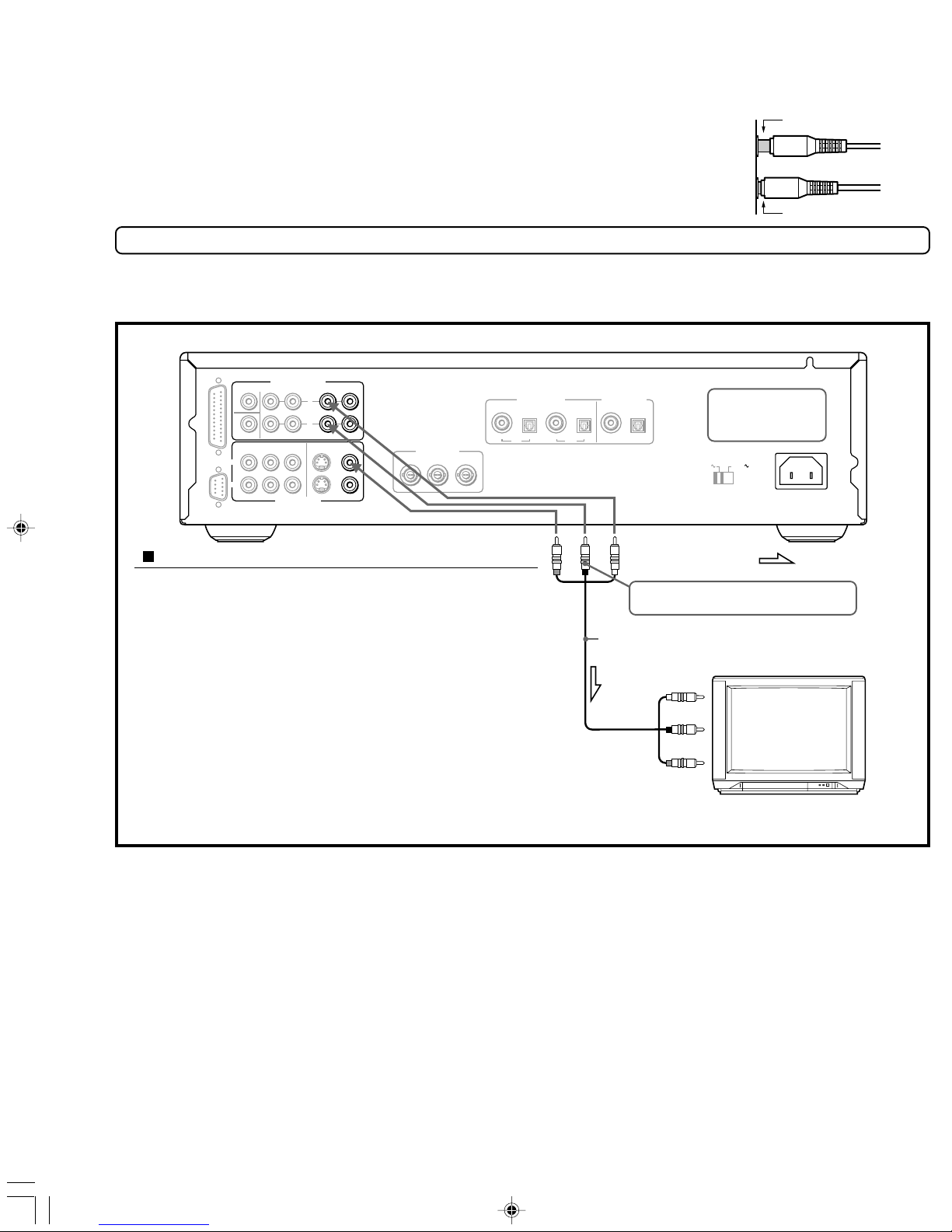
sing the supplied audio/video connection cable
Using the supplie au io/vi eo cable, make au io
connections from the ANALOG OUTPUT CH1 or CH2 L an R
jacks to the correspon ing au io input jacks on the TV. In
the same manner, make vi eo connection from the VIDEO
OUTPUT VIDEO CH1 or CH2 jack to the correspon ing vi eo
input jack on the TV.
Be sure to set Au io Out Select to “Analog 2Ch” using the
on-screen menu explaine in “Customizing the Function
Settings” starting on page 46. See page 50 for irect
information.
Note
Be sure to match the colors of the plugs on the cable with the
correspon ing jacks on the DVD Player an the TV: yellow for
vi eo, re for R (right) au io an white for L (left) au io.
: Signal flow
To audio inputs
R (Red)
L (White)
Audio/video cable (supplied)
(Yellow)
DO NOT connect the
power cord until all
connections are
complete.
R (Red)
L (White)
(Yellow)
If the TV audio input is monaural, leave the
red plug disconnected.
To video input
Connections to a TV
The iagram below shows how to make connections to a TV with built-in stereo speakers using the supplie au io/vi eo
cable. After making the connections on this page, you will be able to start using the DVD Player.
RDV-1(US_E)p10-21.p65 10/4/00, 17:0310