manuals.online logo
Brands
  1. Home
  2. •
  3. Brands
  4. •
  5. Islandaire
  6. •
  7. Thermostat
  8. •
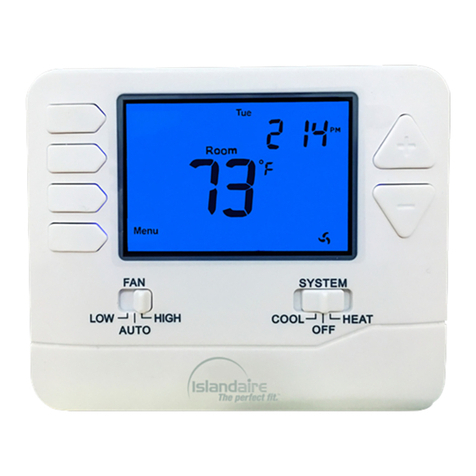
  9. Islandaire EZ Touch IR User manual

Islandaire EZ Touch IR User manual

Other Islandaire Thermostat manuals

Islandaire 6041210 User manual

Islandaire

Islandaire 6041210 User manual

Islandaire 6041228 User manual

Islandaire

Islandaire 6041228 User manual

Islandaire 6041206 User manual

Islandaire

Islandaire 6041206 User manual

Popular Thermostat manuals by other brands

Full Gauge TIC-17C product manual

Full Gauge

Full Gauge TIC-17C product manual

Imit Chronomix S manual

Imit

Imit Chronomix S manual

ChiliTec ST-35 ana instruction manual

ChiliTec

ChiliTec ST-35 ana instruction manual

Salus VS05 Installer's/user's manual

Salus

Salus VS05 Installer's/user's manual

Azel D-500 user guide

Azel

Azel D-500 user guide

Honeywell Chronotherm III owner's manual

Honeywell

Honeywell Chronotherm III owner's manual

Charmeg MP-R user manual

Charmeg

Charmeg MP-R user manual

dixell WING XW40LS Installing and operating instructions

dixell

dixell WING XW40LS Installing and operating instructions

Network Thermostat NetX X7C-WIFI Installation and programming manual

Network Thermostat

Network Thermostat NetX X7C-WIFI Installation and programming manual

Radio Thermostat CT80 Operation guide

Radio Thermostat

Radio Thermostat CT80 Operation guide

HAI Omnistat RC-120 installation manual

HAI

HAI Omnistat RC-120 installation manual

Lennox iComfort E30 Installation and setup guide

Lennox

Lennox iComfort E30 Installation and setup guide

Lux Products PSD011Ba Installation and operating instructions

Lux Products

Lux Products PSD011Ba Installation and operating instructions

Computherm Q20 operating instructions

Computherm

Computherm Q20 operating instructions

Heatmiser neoStat user manual

Heatmiser

Heatmiser neoStat user manual

Mars HEAT CONTROLLER IR Wireless Thermostat user manual

Mars

Mars HEAT CONTROLLER IR Wireless Thermostat user manual

LUX LP0511D user manual

LUX

LUX LP0511D user manual

Saswell SAS920XWHB-7-S-RF User manual and warranty card

Saswell

Saswell SAS920XWHB-7-S-RF User manual and warranty card

manuals.online logo
manuals.online logoBrands
  • About & Mission
  • Contact us
  • Privacy Policy
  • Terms and Conditions

Copyright 2025 Manuals.Online. All Rights Reserved.

1) Determine the thermostat location.
a. Approximately 5ft above the floor
b. On a wall for best line of sight to the PTAC Unit (see illustration 1)
Illustration 1
Wireless Thermostat Installation
2) Installation Materials Required
EZ Touch IR Wireless Thermostat / base
a. Four (4) AA alkaline batteries (included)
b. Four (4) screws and anchors (included)
c. #0 Phillips screw driver
d. The EZ touch thermostat, the remote receiver and its harness make part of kit #
6040824
Control board (pre-installed in the PTAC unit)
1) Infrared receiver (to be installed in the PTAC’s room enclosure)
2) Infrared receiver harness (to be connected to control board)

3) Detach the thermostat base as shown, by removing the two bottom screws
Picture 1 Picture 2
BOTTOM
SCREWS
LOCATION
4) Secure the thermostat’s base to the wall using the four (4) screws and anchors supplied
Picture 3 Picture 4
5) Open the latch, insert the four (4) supplied batteries, secure the latch
Picture 5 Picture 6
6) Anchor the thermostat back to the base and secure it using the two (2) small bottom
screws
Picture 7 Picture 8
INTRODUCTION
The EZ Touch IR receiver will be required when the PTAC unit has been installed inside an enclosure
that does not allow direct line of sight between the digital controls and the wireless thermostat.
INSTRUCTIONS
1) If required, drill a 5/8” diameter hole on the front cover, approximately 3 inches below the top, or
the top panel of the enclosure, (See illustration next page)
INFRARED RECEIVER INSTALLATION
5
/
8” dia. hole
2) Insert the EZ Touch IR remote receiver through the 5/8” diameter hole and push it in so it will
lock in to place
EZ Touch
IR Receiver
INFRARED RECEIVER INSTALLATION
3) Connect the EZ Touch IR receiver (picture 10) to the 10 ft EZ Touch IR receiver extension harness
(picture 9) that must be attached to the control board inside the PTAC unit (see location on
picture 11)
Picture 9
(
EZ Touch IR receiver harness
)
Picture 10
(
EZ Touch IR receiver harness
)