iSmartAlarm SP3S User manual

OWNER’S MANUAL
EN
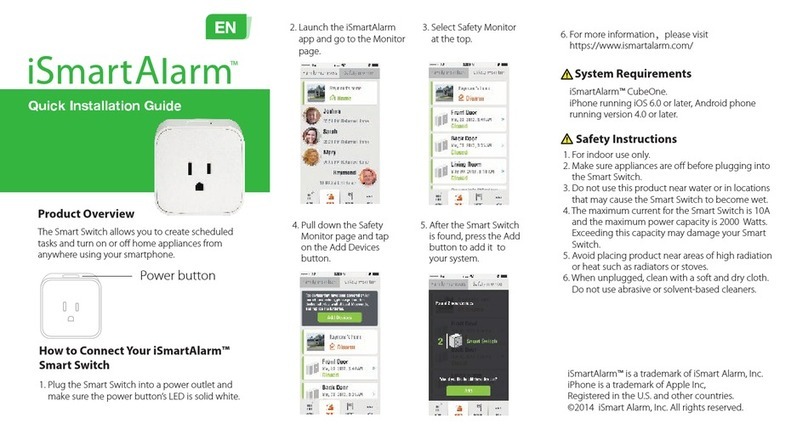
1.Power button
2.Customizable LED
Thank you for purchasing the Smart Switch.
The Smart Switch allows you to create scheduled task and turn on or
off home appliances from anywhere using your smartphone.

Features
• Easy to setup and simple to use
• Remotely turn on or off your connected home appliances
• Program the Smart Switch to do scheduled tasks
• Customizable LED, allowing you to choose up to three colors to
match your home décor.
• Connect additional Smart Switches to your iSmartAlarm™ at any
time for greater convenience.
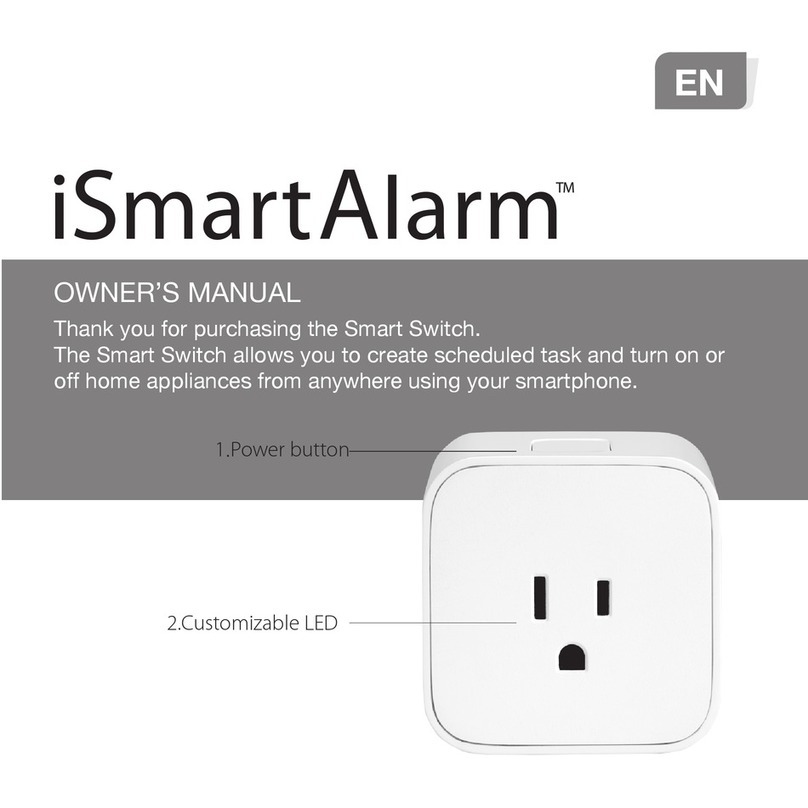
How to connect an iSmartAlarm™ Smart Switch
1. Plug the Smart Switch into an power outlet and make sure the
power button’s LED is solid white
2. Launch the iSmartAlarm app and go to the Monitor page.
3. Select Safety Monitor at the top.
4. Pull the Safety Monitor page down until you see the Add Devices
button and click on it.
5. After the sensors are found, press the Add button to add them to
your system.
System Requirements
iSmartAlarm™ CubeOne.
iPhone running iOS 6.0 or later, Android phone running version 4.0 or
later.

Safety Instructions
1. For indoor use only.
2. Make sure appliances are off before plugging into the SmartSwitch.
3. Do not use this product near water or expose it in a location where
there may be splashing or dripping liquid or water.
4. The maximum current for the Smart Switch is 10A and the
maximum power capacity is 2000 Watts. Exceeding this capacity
may damage your Smart Switch.
5. Avoid placing product near areas of high radiation or heat such as
radiators or stoves.
6 .Clean with a soft and dry cloth. Do not use abrasive or
solvent-based cleaners.
Product Specifications
Product Model SP3S
Dimensions 2.40" x 2.24" x 2.62" (61mm x 57mm x 66.5mm)
Weight 3.35 oz (95g)
Maximum Current 10At
Voltage 120V 60Hz
Maximum Distance 300 feet (100m)
Idle Power < 0.8W
Temperature 14°F~122°F(-10℃~50℃)
Humidity 85%±5 at 30℃±2

LED Indicator Descriptions
LED
Solid white LED
Red LED flashes two times
Solid red LED
No LED
Description
Default LED color when powered on
Linking to an iSmartAlarm™ CubeOne
Error
Powered off
Warranty Information
• This product comes with a 1-year warranty that cannot be excluded
under your local Consumer Law.
• You are entitled to a replacement or refund for a major failure of the
product and for compensation for any other reasonably foreseeable
loss or damage. You are also entitled to have the goods repaired or
replaced if the goods fail to be of acceptable quality and the failure
does not amount to major failure.
• Opening the Smart Switch shell or in any way re-programming the
Smart Switch will void any and all warranties
• The manufacturer and distributors are not responsible for any
known or unknown legal liability resulting from negligence, incorrect
operation, or usage.
Regulation Compliance Information
• This device complies with part 15 of the FCC Rules. Operation is
subject to the following two conditions: (1) This device may not
cause harmful interference, and (2) this device must accept any

interference received, including interference that may cause
undesired operation.
• This equipment has been tested and found to comply with the
limits for a Class B digital device, pursuant to part 15 of the FCC
Rules. These limits are designed to provide reasonable protection
against harmful interference in a residential installation. This
equipment generates, uses and can radiate radio frequency energy
and, if not installed and used in accordance with the instructions,
may cause harmful interference to radio communications. However,
there is no guarantee that interference will not occur in a particular
installation. If this equipment does cause harmful interference to
radio or television reception, which can be determined by turning
the equipment off and on, the user is encouraged to try to correct
the interference by one or more of the following measures:
—Reorient or relocate the receiving antenna.
—Increase the separation between the equipment and receiver.
—Connect the equipment into an outlet on a circuit different from
that to which the receiver is connected.
—Consult the dealer or an experienced radio/TV technician for help.
• Changes or modifications not expressly approved by iSmart Alarm
Inc. could void the user’s authority to operate the equipment.
• Under Industry Canada regulations, this radio transmitter may only
operate using an antenna of a type and maximum (or lesser) gain
approved for the transmitter by Industry Canada. To reduce
potential radio interference to other users, the antenna type and its
gain should be so chosen that the equivalent isotropically radiated

power (e.i.r.p.) is not more than that necessary for successful
communication.
• This device complies with Industry Canada license-exempt RSS
standard(s). Operation is subject to the following two conditions:
(1) this device may not cause interference, and
(2) this device must accept any interference, including interference
that may cause undesired operation of the device.
Explantions Of Symbols
Symbol for the “Owner’s Manual – Must be read”
Symbol for “CAUTION”
Symbol for “ENVIRONMENT PROTECTION – Waste electrical
products should not be disposed of with household waste.
Please recycle where facilities exist. Check with your local
Authority or retailer for recycling advice.”
Symbol for “KEEP DRY”
Symbol for “INDOOR USE ONLY”
This equipment should be installed and operated with a minimum
distance 20cm between the radiator and your body

Manufactured for iSmart Alarm, Inc
1290 Kifer Road, Suite 306
Sunnyvale, CA 94086, USA
www.ismartalarm.com
1-888-638-1799
Made in China
iSmartAlarm™ is a trademark of iSmart Alarm, Inc.
iPhone is a trademark of Apple Inc, Registered in the U.S. and other
countries.
©2014-©2015 iSmart Alarm, Inc. All rights reserved.

MANUEL DU PROPRIÉTAIRE
1.Commutateur
Nous vous remercions d'avoir acheté le Smart Switch.
Le Smart Switch vous permet de créer une tâche planifiée et d'activer ou
de désactiver vos appareils domestiques depuis n'importe quel endroit,
à l'aide de votre téléphone intelligent.
FR

Caractéristiquess
• Simple à configurer et à utiliser
Mise sous et hors tension à distance de vos appareils domestiques
connectés
Programmation du Smart Switch afin d'exécuter des tâches planifiées
Voyant personnalisable: jusqu'à trois couleurs au choix pour l'
adapter à votre décoration.
Connexion de Smart Switches supplémentaires à votre
iSmartAlarm™ à tout moment pour plus de confort.
Connexion d'un iSmartAlarm™ Smart Switch
1. Branchez le Smart Switch dans une prise de courant et
assurez-vous que le voyant du bouton d'alimentation émet une
lumière blanche et fixe.
2. Lancez l'application iSmartAlarm et affichez la page « Monitor ».
3. Sélectionnez « Safety Monitor » (moniteur de surveillance) en haut
de la page.
4. Faites défiler la page « Safety Monitor » (moniteur de surveillance)
jusqu'à ce que le bouton « Add Devices » (Ajouter des appareils)
soit visible, puis cliquez dessus.
5. Après la détection des capteurs, appuyez sur le bouton « Add »
(Ajouter) pour les ajouter au Système.
Prérequis du système
iSmartAlarm™ CubeOne.
iPhone équipé d'iOS 6.0 ou supérieur, téléphone intelligent équipé
d'Android 4.0 ou supérieur.

Consignes de sécurité
1. Pour être utilisé à l'intérieur uniquement.
2. Assurez-vous d'éteindre les appareils avant de brancher le Smart Switch.
3. Ne pas utiliser ce produit à proximité de l'eau et dans un endroit où
il risque d'être exposé aux éclaboussures ou à un liquide ou de
l'eau qui s'égoutte.
4. L'intensité maximale du courant du Smart Switch est de 10 A. Sa p
uissance maximale est de 2000 W. Tout dépassement de ces
capacités pourrait endommager votre Smart Switch.
5. Évitez de placer le produit à proximité des zones de fortes
radiations ou de chaleur, telles que des radiateurs ou des fours.
6. Nettoyez avec un chiffon doux et sec. N'utilisez pas de nettoyants
abrasifs ou à base de solvants.
Caractéristiques du produit
Modèle de produit
Dimensions
Poids
Intensité maximale du courant
Tension
Distance maximale
Consommation en veille
Température
Humidité
SP3S
2.40 x 2.24 x 2.62 po (61 x 57 x 66,5 mm)
3.35 oz (95 g)
10A
120V 60 Hz
100 m (300 pieds)
< 0.8W
-10 à 50 °C (14 à 122 °F)
85 % (±5 %) à 30 °C (±2 %)
Table of contents
Languages:
Other iSmartAlarm Switch manuals
Popular Switch manuals by other brands

SMC Networks
SMC Networks SMC6224M Technical specifications

Aeotec
Aeotec ZWA003-S operating manual

TRENDnet
TRENDnet TK-209i Quick installation guide

Planet
Planet FGSW-2022VHP user manual

Avocent
Avocent AutoView 2000 AV2000BC AV2000BC Installer/user guide

Moxa Technologies
Moxa Technologies PT-7728 Series user manual

Intos Electronic
Intos Electronic inLine 35392I operating instructions

Cisco
Cisco Catalyst 3560-X-24T Technical specifications

Asante
Asante IntraCore IC3648 Specifications

Siemens
Siemens SIRIUS 3SE7310-1AE Series Original operating instructions

Edge-Core
Edge-Core DCS520 quick start guide

RGBLE
RGBLE S00203 user manual