
Jio JioPhone User manual

JioPhone Guide
Reach us at
Customer Care Number 1800 890 9999
Visit us www.jiophone.com

Safety guidelines
Please read these simple safety guidelines.
Restricted area limitation
Switch off your phone in restricted areas.
Road safety
Do not message/text or talk on your phone
while driving. Use a hands free device.
Battery use
Use batteries, chargers, and other
accessories provided by the manufacturer in
the box pack.
Authorised service personnel
Only authorised service personnel should
handle your phone.
Avoid moisture
Keep your phone dry.
Hearing damage
Do not listen at high volume levels for long
period of time.
SAR
THIS DEVICE MEETS INTERNATIONAL
GUIDELINES FOR EXPOSURE TO RADIO
WAVES.
The JioPhone is designed not to exceed the
limits for exposure to radio waves
recommended by international guidelines.
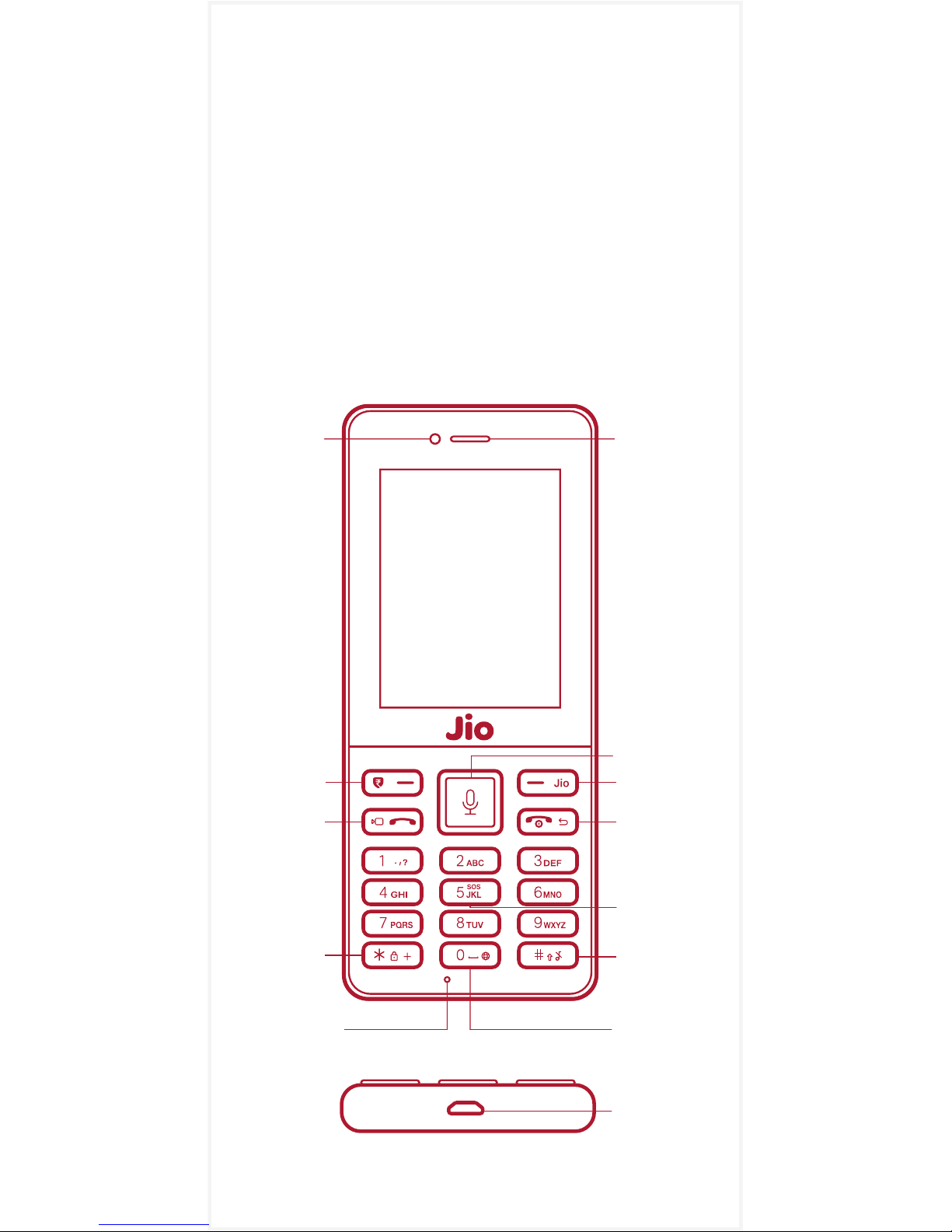
Getting started.
1JioPhone.
Earpiece
DPAD keys /
Voice search
Torch
RSK /
Jio key
Browser
Key
LSK key /
Payments
Voice/
Video
Call key
End call /
Power/
Back key
Front
Camera
Audio Profile
(Normal/
Silent)
Keypad
Lock /
Unlock
Microphone
SOS / Panic
Button Call
Charging
Connector
Illustration for reference only.
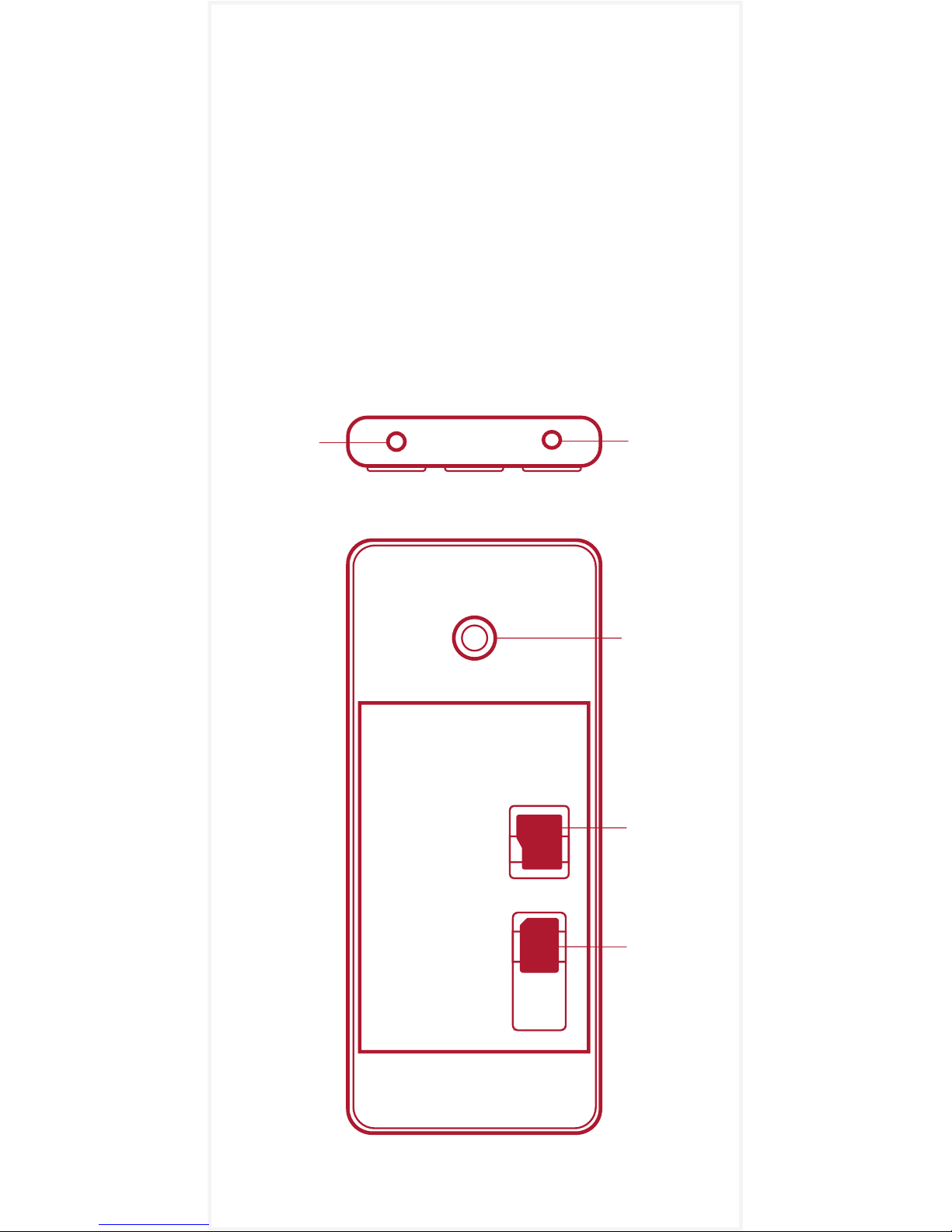
Let us get started with the specifics and have
the JioPhone up and running. The image on
the left illustrates keys and parts of the
JioPhone.
The image below illustrates the placements of
SD card and SIM card.
Placement of phone parts can vary.
Rear
Camera
Headset
Connector
Torch
SIM
Card
SD
Card

2Know your keys
Directional Keypad (DPAD) keys
The navigation keys on DPAD (Left/Right/Top/
Down) are used to move around the screen
and the center key to select a particular item.
DPAD Shortcuts from home screen
Left key Short press it to launch Messages app.
Right key Short press it to launch Camera app.
Up key Short press it to open Quick settings
which gives you easy access to frequently
used features like Torch, Bluetooth, Wi-Fi,
Calculator, Airplane Mode, Camera, Volume,
Brightness, etc.
Down key Short press it to launch Music app
OR to reopen any other music app running in
the background.
HelloJio Long press the center key to launch
Voice search using HelloJio.
Torch Long press the top key to turn Torch
ON/OFF.
Right Side Key (RSK) / Jio key
To show respective app related features &
options / save; long press from home screen
to launch My Jio app.
End call key / Back key / Power key
To end calls; single press takes one step back;
long press to power ON/OFF the phone.
Audio profile key / Hash /
Input method
Long press from home screen to toggle
between normal/vibrate audio profile mode.

a) Insert Jio SIM card, battery and
memory card
Important: This Phone is designed to be
used with Jio SIM card only and comes
with a pre-installed Jio SIM card.
Follow the next steps to replace it.
3About the JioPhone
While in input field in apps - single press to
toggle between numbers, upper case and
lower case characters; long press to toggle
between languages.
Zero / Space / Browser key
Long press to launch browser from home
screen.
Lock / Plus / Star Key
Long press to Lock/Unlock the phone. In
unlocked state, press twice to insert plus(+).
SOS / Panic button call
Long press to initiate Emergency service
number “112”.
Call key Short press to make voice
call and long press to make video call.
Left Side Key (LSK) / Payments key
In unlocked state, long press to launch/close
payment option; short press to launch alerts/
notifications.

Note Switch OFF your phone and disconnect
the charger.
1To remove back cover, gently pull it using the
indentation at the back side of your phone.
2Take the battery out.
3Insert your Jio SIM card into SIM card slot.
SIM Slot It is for Nano SIM card.
4Insert a memory card into the SD card slot.
SD Slot It is for External memory card
5 To insert the battery, slide it into the
compartment ensuring that the three
terminals match the three contact points on
your phone.
6Reattach the back cover.
b) Remove Jio SIM card, battery and
memory card
Note Switch OFF your phone and disconnect
the charger.
1To remove back cover, gently pull it using the
indentation at the back side of your phone.
2Take the battery out.
3Take your Jio SIM card out.
4Take your memory card out.
c) Charge the battery
For the first time, fully charge the battery
before switching ON the JioPhone.
1Insert the battery into the JioPhone.
Note DO NOT switch on the JioPhone.
2Plug in one end of the charger to the power
outlet and the other end to the JioPhone.
Note When the battery gets fully charged, it
will get displayed on your screen. Unplug the
charger and switch on the JioPhone.

Your Jio SIM empowers you with True 4G
experience everywhere you go. You can make
voice calls in HD, enjoy high speed Internet
and get access to a secure mobile wallet, TV
channels, movies, songs, news, and
magazines and secure cloud storage, all on
the JioPhone.
1 Subscribe to Jio services
To subscribe to Jio services, visit the nearest
Jio Store to purchase the JioPhone.
Remember to carry the following documents
with you: Aadhar Card or Proofs of identity &
address, Passport size colour photograph
4About your Jio SIM
Extending Battery life
Turn off radio services, i.e. Wi-Fi, Bluetooth,
GPS, if not required.
Due to non-usage of the phone for prolonged
duration, battery may be drained out. Allow
battery to be charged for at least 30-40
minutes. If the battery still does not reflect any
charge, then please visit the nearest Device
Care Center.
d) Lock or unlock your phone
Use keypad lock to avoid pressing the keys by
mistake. When the JioPhone keypad is
unlocked, long press * button to lock the
keypad. When the JioPhone keypad is locked,
long press * button to unlock the keypad.

After subscribing, insert Jio SIM in the SIM slot
of the JioPhone.
2 Activate your Jio SIM
After inserting the Jio SIM, switch on the
JioPhone. Ensure the JioPhone is fully charged.
Follow the steps to activate Jio SIM. To know
more about Jio services, visit www.jio.com.
3 JioCare
Customer Care Number 198
General Information Number 199
From other networks 1800 889 9999
Visit us www.jio.com
SMS keywords to 199 to receive information
about the following:
Tariff Plan (Postpaid) <MY PLAN>
Bill (Postpaid) <BILL>
Balance (Prepaid) <BAL>
If you have registered for a complaint, we will
provide you a unique docket number. Your
complaint will be resolved within the timelines as
prescribed by TRAI. In case, you are unsatisfied
with the response from JioCare, you can make a
further appeal to the Appellate Authority in your
region with your complaint docket number. The
unique appeal number of your appeal will be
communicated to you within 3 days of filing your
appeal. The appeal will be decided within 39
days from the date of filing your appeal.
Appellate Authority
Reliance Jio Infocomm Ltd.
Phone Number 1800-889-3999
Fax Number 1800-889-1211
For email and address details, please visit our
website www.jio.com.

4 Terms and conditions
Your usage will be rounded up to the next
higher pulse for voice & data usage. As per
TRAI regulations, the tariff is charged
depending upon the duration of the call which
is recorded to be within +/-1 second,
traceable to an appropriate time reference. In
case of non-usage (no voice or video calls,
data, outgoing SMS, usage of Value Added
Services or payment of rental for postpaid) for
a continuous period of 90 days or more, the
services to the mobile number will be
deactivated at the discretion of Reliance Jio
Infocomm Limited. Jio mobile number can be
reactivated by making payment of ₹20 within
15 days of deactivation due to non-usage.
Postpaid
Postpaid customers can opt for the safe
custody scheme in case of continued
non-usage of a mobile number by paying
₹150 for every three months or part thereof.
Prepaid
In case, the available balance in your account
is more than ₹20 at the expiry of 90 days of
non-usage period, ₹20 will be deducted from
your account and the non-usage period will
be extended by 30 days. This process will
continue till the balance in your account is less
than ₹20 post which your number will be
deactivated.
As per DOT directions, national roaming is
not permitted for J&K prepaid customers.
Also, prepaid customers from other circles
cannot roam in J&K.
As per DOT directions, International roaming
is not permitted for prepaid customers of
Assam, North East and J&K.
Table of contents

















