5
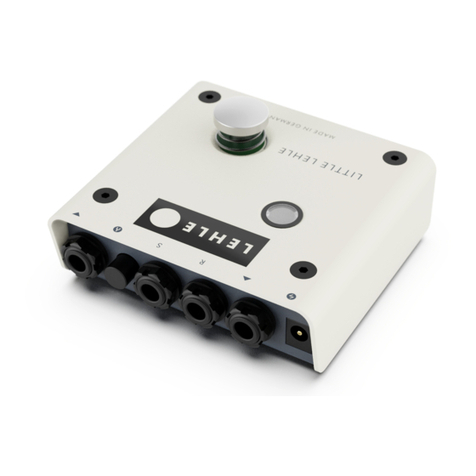
1. Input socket
Connect your instrument to this socket.
The input signal enters via this socket. Like all the
jack plugs on the Little Lehle II, the socket is
of stereo type. The Little Lehle II thus switches
stereo signals (such as stereo effects or keyboards)
and balanced signals (like those from micro-
phones, for instance) and, of course, simple mono
signals, like that of an electric guitar.
The LED (6) shows green when the signal is pres-
ent on the output (4) together with the ground
(earth) connection. Press the True Bypass switch
(7) and the stereo signal and ground connection
are routed to the S socket (2). The LED (6) will now
show red. Switching of the ground connections
eliminates the possibility of hum loops.
2. Send socket
Connect the input of your effects unit or amplifier
to this socket.
Depending on the mode selected, this socket is
either connected to the input of one or more ef-
fects units, to a second amplifier or, for example,
to a tuner.
3. Return socket
Connect the output of your effects unit or a
second instrument to this socket.
This socket can be used for connection to the
output of an effects unit, to the last output of a
complete effect chain or, for example, can also be
used for a second instrument. It has no function
if the Little Lehle II is used as an A/B box for
operation with two amplifiers.
4. Output socket
Connect your amplifier to this socket.
The output signal is routed out of the Little Lehle
II via this socket. The LED (6) shows green when
the input signal together with the ground con-
nection is directly present here. Pressing the True
Bypass switch (7) routes the R(eturn) socket signal
(3) together with the ground connection to the
output socket.
5. External power supply
Connect a power pack for a voltage of 8 to 20 V
to this socket, when needed.
The Little Lehle II switches all audio signals
completely without electricity. To detect the switch-