Customer Support
You can update the Player using the latest software to
enhance the products operation and/or add new features.
To obtain the latest software for this player (if updates have
been made), proceed the software updates as wirtten or
visit http://www.lg.com or contact LG Electronics customer
care center.
Open source software notice
To obtain the source code under GPL, LGPL, MPL and other
open source licenses, that is contained in this product,
please visit http://opensource.lge.com.
In addition to the source code, all referred license terms,
warranty disclaimers and copyright notices are available for
download.
LG Electronics will also provide open source code to you
on CD-ROM for a charge covering the cost of performing
such distribution (such as the cost of media, shipping and
oer is valid for three (3) years from the date on which you
purchased the product.
Additional Information
Software Update
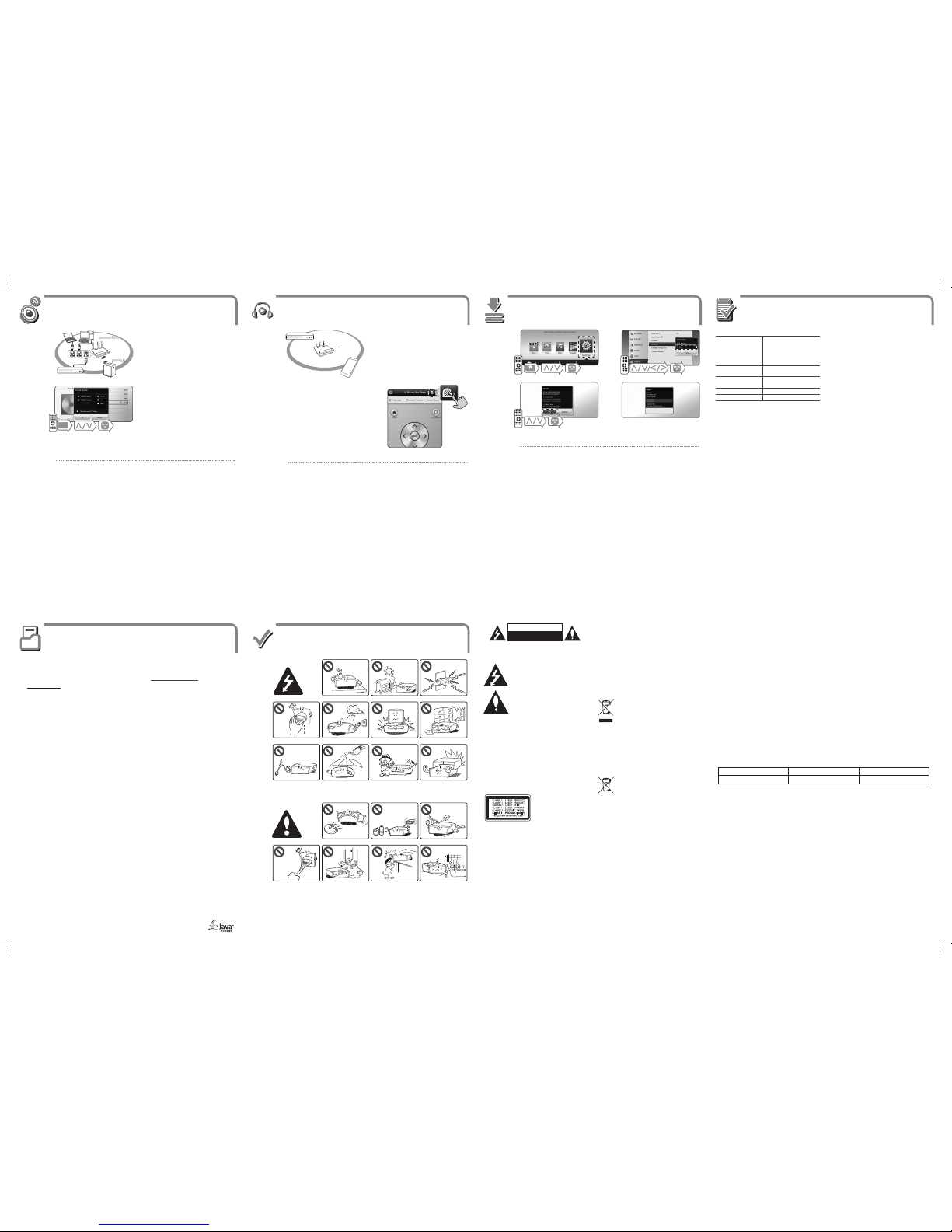
cb Turn on the mobile device LG AV Remote
App is lnstalled and run LG AV Remote App.
Make sure that mobile device is connected to the same
Wi-Fi network as this player.
• Not all modes support sound privacy and pairing multiple devices is not available.
• When you use the unit with MUSIC ow, private sound mode is unavailable.
,
a
Enjoying Private Sound
Safety Information
ENGLISH
AC adapter
yModel : WA-12M12FK
yManufacturer : Asian Power
Devices Inc.
yInput : 100-240 V~,
50-60 Hz 0.5 A Max.
yOutput : 12 V 01 A
Networked standby
power consumption
0.5 W (If all network ports are
activated.)
Dimensions
(W x H x D)
Approx.
270 mm x 43 mm x 195 mm
Net Weight (Approx.) 0.85 kg
Bus Power Supply (USB) 5 V 0500 mA
Design and specications are subject to change without
notice.
POWER: This unit operates on a mains supply of 100-240V~,
50/60Hz.
Wiring: This unit is supplied with a BS 1363 approved main plug.
When replacing the fuse, always use of the same rating approved to
BS 1362. Never use this plug with the fuse cover omitted. To obtain
a replacement fuse cover contact your dealer. If the type of plug
supplied is not suitable for the mains sockets in your home, then
the plug should be removed and a suitable type tted. Please refer
to the wiring instructions below:
Warning: A mains plug removed from the mains lead of this unit
must be destroyed. A mains plug with bared wires is hazardous
if inserted in a mains socket. Do not connect either wire to the
earth pin, marked with the letter E or with the earth symbol 6or
coloured green or green and yellow. If any other plug is tted, use
same rating of fuse in the plug.
Important: The wires in this mains lead are coloured in accordance
with the following codes:
- BLUE: NEUTRAL, BROWN: LIVE - As the colours of the wires in
the mains lead of this unit may not correspond with the coloured
marking identifying the terminals in your plug, proceed as follows:
The wire which is coloured blue must be connected to the terminal
which is marked with the letter N or coloured black. The wire which
is coloured brown must be connected to the terminal which is
marked with the letter L or coloured red.
Specication
Router
a b
c d
Enjoying with LG Multi-room Audio (LG Music Flow)
a
b
Check the network connection and settings.
During playback, press green (G) coloured button →
Select speakers to play →Select [OK].
• It is recommended to connect up to 4 speakers for smooth playback.
• When you perform private sound mode, this function is unavailable.
• This function is available for only audio contents.
,
Router
MUSIC ow
Before updating software, the unit should be connected to your home network.
,
CAUTION
RISK OF ELECTRIC SHOCK
DO NOT OPEN
CAUTION: TO REDUCE THE RISK OF ELECTRIC SHOCK DO NOT
REMOVE COVER (OR BACK) NO USER-SERVICEABLE PARTS INSIDE
REFER SERVICING TO QUALIFIED SERVICE PERSONNEL.
This lightning ash with arrowhead symbol within
an equilateral triangle is intended to alert the user
to the presence of uninsulated dangerous voltage
within the product’s enclosure that may be of
sucient magnitude to constitute a risk of electric
shock to persons.
The exclamation point within an equilateral
triangle is intended to alert the user to the
presence of important operating and
maintenance (servicing) instructions in the
literature accompanying the product.
WARNING: TO PREVENT FIRE OR ELECTRIC SHOCK HAZARD, DO
NOT EXPOSE THIS PRODUCT TO RAIN OR MOISTURE.
WARNING: Do not install this equipment in a conned space such
as a book case or similar unit.
CAUTION: Do not use high voltage products around this product.
(ex. Electrical swatter) This product may malfunction due to
electrical shock.
CAUTION: Do not block any ventilation openings. Install in
accordance with the manufacturer’s instructions.
Slots and openings in the cabinet are provided for ventilation and
to ensure reliable operation of the product and to protect it from
over heating. The openings shall be never be blocked by placing
the product on a bed, sofa, rug or other similar surface. This product
shall not be placed in a built-in installation such as a bookcase or
rack unless proper ventilation is provided or the manufacturer’s
instruction has been adhered to.
CAUTION: This product employs a
Laser System.To ensure proper use
of this product, please read this
owner’s manual carefully and retain
it for future reference. Shall the unit
require maintenance, contact an
authorized service center.
Use of controls, adjustments or the performance of procedures
other than those specied herein may result in hazardous radiation
exposure. To prevent direct exposure to laser beam, do not try to
open the enclosure.
CAUTION concerning the Power Cord
The Power Plug is the disconnecting device. In case of an
emergency, the Power Plug must remain readily accessible.
CAUTION: The apparatus shall not be exposed to water (dripping
or splashing) and no objects lled with liquids, such as vases, shall
be placed on the apparatus.
NOTICE: For safety marking information including product
identication and supply ratings, please refer to the main label on
the bottom or rear of the apparatus.
This device is equipped with a portable battery or accumulator.
Safety way to remove the battery or the battery from the
equipment: Remove the old battery or battery pack, follow the
steps in reverse order than the assembly.To prevent contamination
of the environment and bring on possible threat to human
and animal health, the old battery or the battery put it in the
appropriate container at designated collection points. Do not
dispose of batteries or battery together with other waste. It is
recommended that you use local, free reimbursement systems
batteries and accumulators. The battery shall not be exposed to
excessive heat such as sunshine, re or the like.
CAUTION: Only use the AC adapter supplied with this device.
Do not use a power supply from another device or another
manufacturer. Using any other power cable or power supply may
cause damage to the device and void your warranty.
Disposal of your old appliance
1. When this crossed-out wheeled bin symbol is
attached to a product it means the product is
covered by the European Directive 2002/96/EC.
2. All electrical and electronic products shall be
disposed of separately from the municipal waste
stream via designated collection facilities appointed
by the government or the local authorities.
3. The correct disposal of your old appliance will help
prevent potential negative consequences for the
environment and human health.
4. For more detailed information about disposal of your
old appliance, please contact your city office, waste
disposal service or the shop where you purchased
the product.
Disposal of waste batteries/accumulators
1. When this crossed-out wheeled bin symbol is
attached to batteries/accumulators of Your product it
means they are covered by European Directive
2006/66/EC.
2. This symbol may be combined with chemical
symbols for mercury(Hg), cadmium(Cd) or lead(Pb) if
the battery Contains more that 0.0005% of mercury,
0.002% of cadmium or 0.004% of lead.
3. All batteries/accumulators should be disposed
separately from the municipal waste stream via
designated collection facilities appointed by the
government or the local authorities.
4. The correct disposal of Your old batteries/
accumulators will help to prevent potential negative
consequences for the environment, animal and
human health.
5. For more detailed information about disposal ofYour
old batteries/ accumulators, please contact Your city
offi ce, waste disposal service or the shop where You
purchased the product.
Contact oce for compliance of this product:
LG Electronics European Shared Service Center B.V.
European Standard Team
Krijgsman 1
1186 DM Amstelveen
The Netherlands
Technology with the human touch
GUARANTEE
• LG Electronics U.K. Ltd. will provide the following services in order toexpedite this Guarantee.
1. All faulty components which fail due to defective manufacture will be replaced free of charge for a period of 12 months from the
original date of purchase.
2. The dealer (or his service agent) who sold the product will be reimbursed for any labour provided in the repair of this LG equipment, for
a period of 12 months from the original date of purchase. These claims must be made in accordance with the published scale of service
charges and relevant claims procedure.
PLEASE NOTE:
A. The dealer may restrict the guarantee to the original purchaser.
B. The dealer is not obliged to carry out service under guarantee if unauthorized modifications are made to the apparatus, or if non
standard components are used or if the serial number of the apparatus is removed, defaced, misused, or altered.
C. Any claims made under guarantee must be directed to the dealer from whom the equipment was originally purchased.The dealer may,
before carrying out service under guarantee, require a receipted account as evidence of the date of purchase.
D. We respectfully point out that your dealer is not obligated to replace batteries if they become exhausted or worn in use.
E. Aerial alignment and consumer control adjustments are not covered by this guarantee.
This guarantee does not affect your statutory rights.
• REQUIREMENTS TO MAINTAIN WARRANTY COVERAGE:
RETAINYOUR RECEIPT TO PROVE DATE OF PURCHASE. A COPY OFYOUR RECEIPT MUST BE SURRENDERED AT THETIME GUARANTEE
SERVICE IS PROVED.
• Product Registration Card :
It is helpful to complete at least your name, address, phone, model & serial numbers and return it. This will enable LG to assist you in the
future should you lose your receipt, your units be stolen, or should modifications be necessary.
• To obtain information or assistance:
Call UK: 0344 847 5454 IE: 01 686 9454
MODEL NO.* SERIAL NO.* DATE OF PURCHASE.*
In all cases of diculty - consult your LG dealer from whom the product was purchased
LGEUK Website : www.lg.com/uk
(Service website : www.lg.com/uk/support)