3
dc2310af
DEMO MANUAL DC2310A
Quick start proceDure
notes on test eQuipMent anD setup
• High performance signal generators with low harmonic
outputs should be used for 2-tone measurements. Oth-
erwise, low pass filters at the signal generator outputs
should be used to suppress harmonics.
• High quality combiners should be used to present a
broadband 50Ω termination on all ports as well as
provide good port-to-port isolation. Adding attenuator
padsfurtherimproves sourceisolation andhelpsprevent
the signal generators from producing intermodulation
products.
• Spectrum analyzers can produce significant internal
distortion products if they are overdriven. Generally,
spectrum analyzers are designed to operate at their
best with about –30dBm to –40dBm at their input. The
spectrum analyzer’s input attenuation setting should
be used to avoid saturating the instrument.
• Setthe spectrum analyzer’s input attenuation depending
on the spectrum analyzer used.
• Before performing measurements on the DUT, the
system performance should be evaluated to ensure that
a clean input signal is obtained and that the spectrum
analyzer’s internal distortion is minimized.
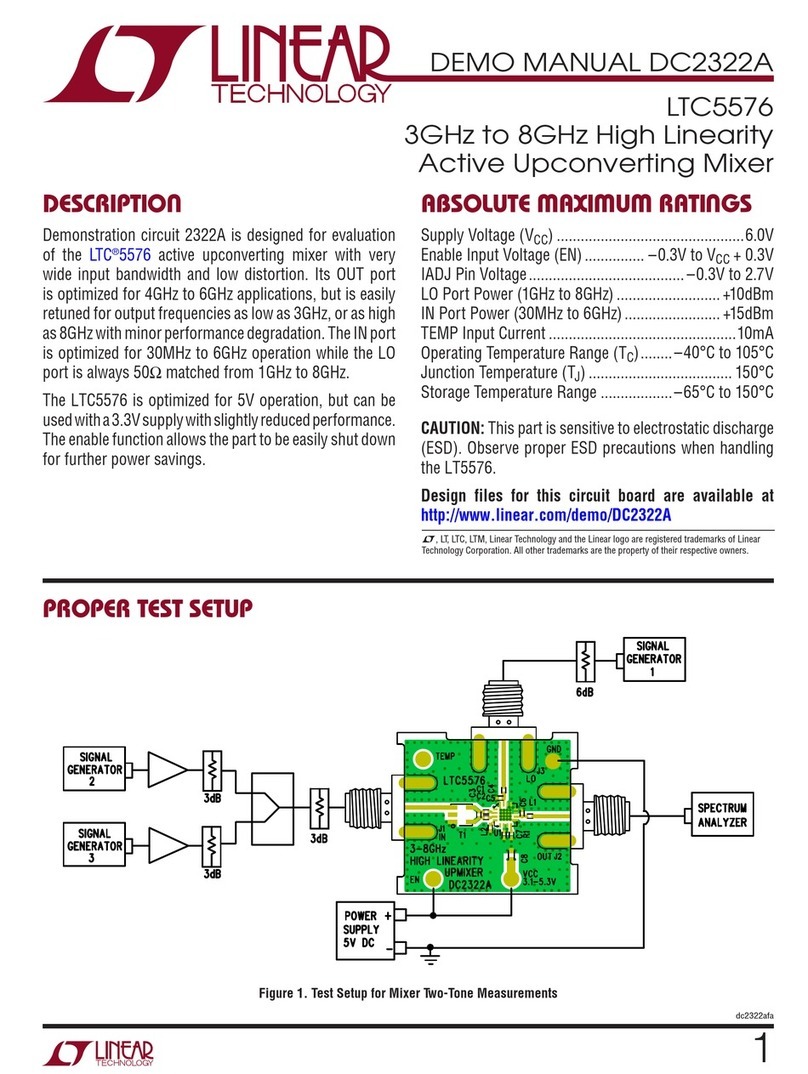
1. Connect all test equipment as shown in Figure 2.
2. Set the power supply output voltage to 3.3V, and set
the current limit to 200mA.
3. Connect the ground and VCC turrets to the power sup-
ply. BE SURE TO CONNECT THE VCC TURRET BEFORE
THE EN TURRET TO ENSURE THAT THE PART DOES
NOT GET DAMAGED. ALSO, REMOVE POWER FROM
EN TURRET BEFORE REMOVING POWER FROM THE
VCC TURRET.
4. Connect the EN turret to the power supply.
5. Set the LO signal generator to provide a 3910MHz CW
signal at about 0dBm to the demo board’s LO port.
6. Set the RF signal generators to provide one 5799MHz
CW signal and one 5801MHz CW signal. The signals
should be applied to the 2-way combiner. The output
of the combiner should be applied to the demo board’s
RF input port. The two tones should be set to –5dBm
each at the mixer’s RF input port.
7. Set the spectrum analyzer’s center frequency to
1890GHz.
8. Perform various measurements
(Conversion Gain, OIP3, LO leakage, etc.)
Downloaded from Arrow.com.Downloaded from Arrow.com.Downloaded from Arrow.com.