manuals.online logo
Brands
  1. Home
  2. •
  3. Brands
  4. •
  5. LOXONE
  6. •
  7. Weather Station
  8. •
  9. LOXONE Weather Station Tree User manual

LOXONE Weather Station Tree User manual

This manual suits for next models

1

Other LOXONE Weather Station manuals
LOXONE WEATHER  STATION TREE User manual

LOXONE

LOXONE WEATHER STATION TREE User manual

LOXONE Weather Station Tree User manual

LOXONE

LOXONE Weather Station Tree User manual

LOXONE Weather Station Air User manual

LOXONE

LOXONE Weather Station Air User manual

LOXONE Weather Station Air User manual

LOXONE

LOXONE Weather Station Air User manual

Popular Weather Station manuals by other brands

Bresser 7000016000000 instruction manual

Bresser

Bresser 7000016000000 instruction manual

Auriol AHFL 433 A1 operating instructions

Auriol

Auriol AHFL 433 A1 operating instructions

Hyundai WS 2202 instruction manual

Hyundai

Hyundai WS 2202 instruction manual

NexSens G2-HYDROMET quick start

NexSens

NexSens G2-HYDROMET quick start

IROX HBVR761 UV-X user manual

IROX

IROX HBVR761 UV-X user manual

La Crosse Technology C86371 instruction manual

La Crosse Technology

La Crosse Technology C86371 instruction manual

ADE WS 1711 operating instructions

ADE

ADE WS 1711 operating instructions

WAREMA EWFS Weather station eco Operating and installation instructions

WAREMA

WAREMA EWFS Weather station eco Operating and installation instructions

Auriol z29592 Operation and safety notes

Auriol

Auriol z29592 Operation and safety notes

Auriol 296289 Operation and safety notes

Auriol

Auriol 296289 Operation and safety notes

Hyundai WS 2266 instruction manual

Hyundai

Hyundai WS 2266 instruction manual

La Crosse Technology WS-2210 Operation manual

La Crosse Technology

La Crosse Technology WS-2210 Operation manual

La Crosse Technology WS-811561 manual 

La Crosse Technology

La Crosse Technology WS-811561 manual 

Ventus W177 owner's manual

Ventus

Ventus W177 owner's manual

National Geographic VA Colour RC instruction manual

National Geographic

National Geographic VA Colour RC instruction manual

Instant Transmission MA 10410 instruction manual

Instant Transmission

Instant Transmission MA 10410 instruction manual

Lutron Electronics PHB-318 Operation manual

Lutron Electronics

Lutron Electronics PHB-318 Operation manual

Oregon Scientific Alizé BAR266 user manual

Oregon Scientific

Oregon Scientific Alizé BAR266 user manual

manuals.online logo
manuals.online logoBrands
  • About & Mission
  • Contact us
  • Privacy Policy
  • Terms and Conditions

Copyright 2025 Manuals.Online. All Rights Reserved.

Part No.: 100246
Need Help?
loxone.com
No Gimmicks.
Real Smart Homes.
Weather
Station Tree
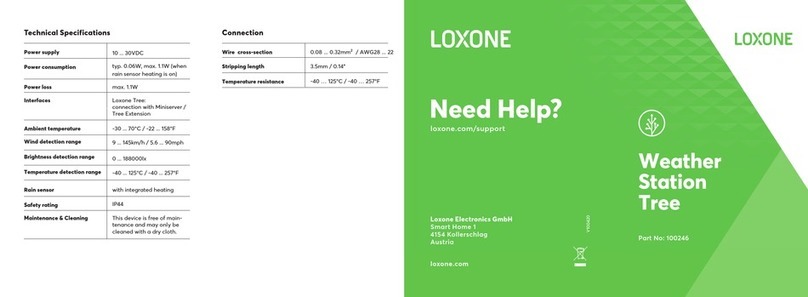
Technical Specifications
Power Supply 10...30VDC SELV
Power Consumption typ. 0.06W, max. 1.1W (when
rain-sensor heating is on)
Heating of Rain-Sensor Surface Yes
Safety Rating IP44
Ambient Temperature -30...85°C / -22...185°F
Wind Detection Range 9...145km/h / 5.6...90mph
Brightness Detection Range 0...188kLux
Temperature Detection Range -40...125°C / -40...257°F
Maintenance & Cleaning This device is free of main-
tenance and may only be
cleaned with a dry cloth.
Loxone Electronics GmbH
Smart Home 1
4154 Kollerschlag
Austria
loxone.com/support
Weather
Station Tree
Part No.: 100246
Station Tree
Connection
Wire Diameter 0.14...1mm²
AWG18...AWG25
Exposed Wire Length 7mm / 9/32”
Push-In-Technology To make connection, insert
the wire; to remove the wire
twist and pull at the same
time.
About the product
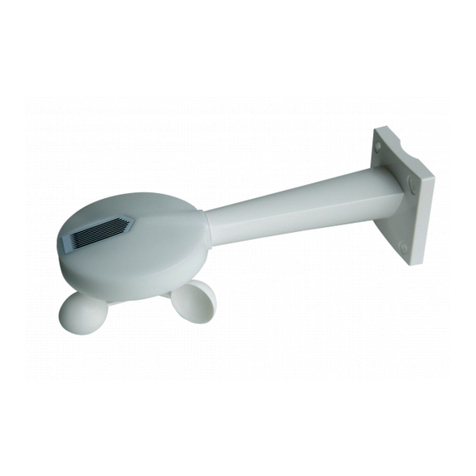
The Weather Station Tree detects important weather conditi-
ons for your Smart Home. Together with the Miniserver, you can
measure wind, rain, brightness and temperature data, and use
this data for a variety of functions throughout your home.
Features
• Wind sensor
• Wind alarm
• Rain sensor
• Brightness sensor
• Temperature sensor
Information
Please note that the temperature sensor may not always
accurately record the external temperature. This is due to
direct sunlight warming the housing, which can influence the
temperature reading. Always select an installation place that’s
suitable for the application.
Installation
We suggest you install the weather station in a place where
wind, rain and brightness can be detected without interference.
Install and connect the device as shown, either on a pole or
directly on the wall, with the provided accessories. Please note
that buildings or objects in close proximity to the Weather
Station could cause air turbulence which may influence the
accuracy of wind measurements.
For additional information, declaration of confirmity,
visit www.loxone.com/help/weather-station-tree
Status LED
Push on both side and
pull to open the top
Push and pull
to unlock
GNDGW 24V