manuals.online logo
Brands
  1. Home
  2. •
  3. Brands
  4. •
  5. Luxart
  6. •
  7. Switch
  8. •
  9. Luxart LX944600 User manual

Luxart LX944600 User manual

This manual suits for next models

1

Other Luxart Switch manuals

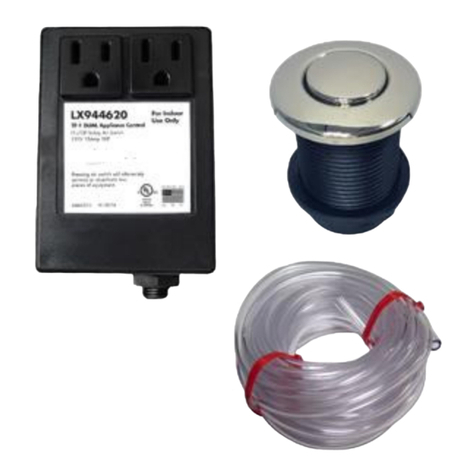
Luxart LX944620 User manual

Luxart

Luxart LX944620 User manual

Luxart LX944650 User manual

Luxart

Luxart LX944650 User manual

Popular Switch manuals by other brands

SMC Networks SMC6224M Technical specifications

SMC Networks

SMC Networks SMC6224M Technical specifications

Aeotec ZWA003-S operating manual

Aeotec

Aeotec ZWA003-S operating manual

TRENDnet TK-209i Quick installation guide

TRENDnet

TRENDnet TK-209i Quick installation guide

Planet FGSW-2022VHP user manual

Planet

Planet FGSW-2022VHP user manual

Avocent AutoView 2000  AV2000BC AV2000BC Installer/user guide

Avocent

Avocent AutoView 2000 AV2000BC AV2000BC Installer/user guide

Moxa Technologies PT-7728 Series user manual

Moxa Technologies

Moxa Technologies PT-7728 Series user manual

Intos Electronic inLine 35392I operating instructions

Intos Electronic

Intos Electronic inLine 35392I operating instructions

Cisco Catalyst 3560-X-24T Technical specifications

Cisco

Cisco Catalyst 3560-X-24T Technical specifications

Asante IntraCore IC3648 Specifications

Asante

Asante IntraCore IC3648 Specifications

Siemens SIRIUS 3SE7310-1AE Series Original operating instructions

Siemens

Siemens SIRIUS 3SE7310-1AE Series Original operating instructions

Edge-Core DCS520 quick start guide

Edge-Core

Edge-Core DCS520 quick start guide

RGBLE S00203 user manual

RGBLE

RGBLE S00203 user manual

Thrustmaster FLIGHT SIMULATOR X quick guide

Thrustmaster

Thrustmaster FLIGHT SIMULATOR X quick guide

Southwire SURGE GUARD 41390 RVC troubleshooting guide

Southwire

Southwire SURGE GUARD 41390 RVC troubleshooting guide

Buhler Nivotemp NT 61 Brief instructions

Buhler

Buhler Nivotemp NT 61 Brief instructions

Kramer VS-41HDCP user manual

Kramer

Kramer VS-41HDCP user manual

Techly IDATA AU-270 user manual

Techly

Techly IDATA AU-270 user manual

Belkin F1U109 user manual

Belkin

Belkin F1U109 user manual

manuals.online logo
manuals.online logoBrands
  • About & Mission
  • Contact us
  • Privacy Policy
  • Terms and Conditions

Copyright 2025 Manuals.Online. All Rights Reserved.

LX944600
Installation
Air Switch
Description: The LX944600 is an easily installed air
actuated On/Off control for an electrical device up to 1HP,
120V. Simply plug the LX944600 into any standard electrical
outlet and plug the appliance into the receptacle provided in
the LX944600. The appliance can be activated and
deactivated by depressing an air button mounted up to 15’
away. Please Note: A 6’ roll of tubing is supplied.
Installation Instructions (for Button Packaged Units): Determine location of
air button, drill or knock out 1-3/8” hole. Determine and attach the desired trim kit finish. Install button
by placing through the hole and hand tightening the nut underneath. Secure it snug enough to establish
a watertight seal but do not over-tighten to damage the plastic. Silicone (Plastic ABS compatible) may
be required in order to bond to some surfaces. Attach the air hose to the spout located at the bottom of
the button. Cut the hose (or coil the hose loosely) to the length needed to reach the control box. The
maximum effective tube distance is 15’. Please Note: A 6’ roll of tubing is supplied. Plug the hose into
the spout located on the bottom of the control box. Plug unit into a UL approved, grounded three
pronged outlet.
NOTE: Ground connections are not shown and vary
with installations.
CAUTION: USE COPPER CONDUCTORS ONLY.
Do not lubricate relays. All controls must be installed
by a licensed electrician according to these
instructions.
Dimensions:
3.75”
3.20”
Garbage Disposal
Applications: -Eliminates need for an electrical wall switch
-Simplifies first time garbage disposal installations
-Operates on a 120V household wall receptacle
LX944600
Installation
IMPORTANT SAFETY INSTRUCTIONS
READ AND FOLLOW ALL INSTRUCTIONS
1. A pressure wire connector is provided on metallic enclosures to permit connections of a minimum No. 8
AWG solid copper bonding conductor between any metal equipment, metal enclosures of electrical
equipment, metal water pipe, or conduit within 5 feet (1.5 m) of the unit as needed
to comply with local requirements. Polymeric enclosures are supplied with an internal equipment ground
bar.
2. THIS CONTROL MUST BE FACTORY INSTALLED OR INSTALLED BY A LICENSED ELECTRICIAN
ACCORDING TO STATE, NATIONAL, AND LOCAL ELECTRICAL CODE AND THE INSTRUCTIONS.
3. Use copper conductors only.
4. DANGER - To reduce the risk of injury do not permit children to use this product unless they are closely
supervised at all times.
5. Install to provide drainage of compartment for electrical components.
6. A ground-fault circuit interrupter (GFCI) designated line is to be installed in accordance with the National
Electrical Code, the Canadian Electrical Code and all local codes in effect at the time of installation. When
unit is provided with a GFCI, the GFCI must be tested monthly. To conduct the test the unit must be
operating. Push the test button. The unit should stop operating and the reset button should appear.
Push the reset button. The unit should now operate normally. If the interrupter fails to operate in this
manner, there is a ground current flowing, indicating the possibility of electric shock. Disconnect the power
until the fault has been corrected.
7. The electrical supply for this product must include a suitably rated switch or circuit breaker to open all
ungrounded supply conductors to comply with Section 422-20 of the National Electrical Code, ANSI/NFPA
70-1987. The disconnect must be readily accessible to the tub occupant but installed at least 5 feet (1.5m)
from tub water.
8. No electrical appliance may be placed within a 5 foot reach path from the water’s edge.
9. Use only non-conductive tubing to connect any air actuator.
10. Valve must be inaccessible to tub occupant and installed at least 5 feet away from the inside walls of
the tub.
READ AND SAVE THESE INSTRUCTIONS
Luxart products manufactured by Allied Innovations, LLC. will be covered by Allied Innovations, LLC
warranty as follows:
Allied Innovations, LLC warrants its products to be free from defects in workmanship and material under
normal use and conditions for a period of one year from the date of original manufacture. Should repair
be required by reason of any defect or malfunction during the warranty period, Allied Innovations, LLC
will repair, or at their discretion, replace this product without charge, subject to verification of the
defect or malfunction, upon delivery of the product to the attention of:
Technical Service Department
Allied Innovations, LLC
7215 Bermuda Rd
Las Vegas, NV 89119-4304
If repair is required after the expiration date of the warranty period, Allied Innovations, LLC will repair
this product and bill for any necessary replacement parts, shipping and handling.
This warranty is void if:
1) the unit is not installed per the instructions; 2) is hooked up to improper voltage; 3) is subjected to
chemical corrosion; 4) is mechanically or electrically altered in any way; 5) is subjected to water or
immersion; 6) contacts show evidence of short circuiting, or the unit has been visibly damaged by
accident or misuse or which has been damaged by wind, rain, lightning, freezing or other cause; or upon
which the serial number or manufacture date has been altered, effaced or removed. There is a charge
for replacement parts if the defective unit is returned for any of the reasons listed above.
Allied Innovations, LLC shall not be liable for any inconvenience, loss of time, or incidental expenses
incurred. Allied Innovations, LLC shall not be liable for any labor charges associated with the removal or
re-installation of any so-claimed defective products.
This is the only warranty expressed or implied by Allied Innovations, LLC. Warranties implied under state
law, including any implied warranty of merchantability or fitness for a particular purpose, shall be
limited to one year from the date of manufacture.
Allied Innovations, LLC disclaims any liability for any incidental or consequential damages.
Ship as follows:
1. Pack the unit in a well-padded, heavy corrugated box.
2. Include name, return address, and daytime phone number along with a short description of problem
with control.
3. Mail the unit, prepaid, to the above address.
Some states do not allow the exclusion or limitation of incidental or consequential damages, therefore
the above limitation may not apply to you.