2/3
Fig. 1
RIS9451
Fig. 2
1. Turn off the power at the main
fuse/breaker box.Carefully open carton,
remove fixture and end caps from carton.
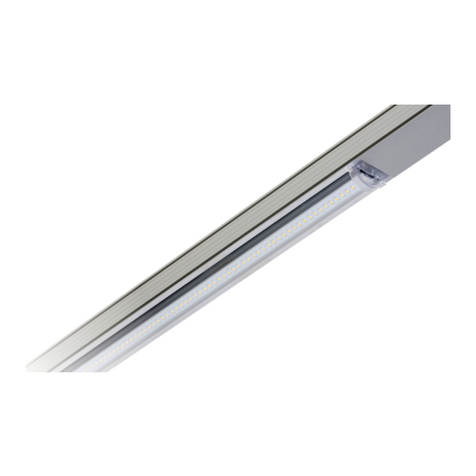
2. To remove the channel cover with LED’s
from the main channel body squeeze
beneath the embossed locking tabs on
the main channel body and lift on the
channel cove with LED’s. Do this for all 6
locking tab locations (Fig.1.). The channel
cover with LED’s can be placed in safe
location until fixture is mounte.
3. Remove appropriate knockout(s) for
power supply wiring. To remove, simply
place a flathead screwdriver on the
knockout and strike it sharply with a
hammer (Fig.2.) The slug may then be
removed with pliers.
Fig. 3
Fig. 4
4. Connect L/N wire using supplied wire
nut(Fig.3.)
5. Prepare the supply wires.
A. Wiring must comply with all applicable
electrical codes.
B. Strip wire to 3/8”(9.5mm).(Fig.3.)
6. Attach junction box cover plate and pull
wire through junction box(Fig.4.)
Note:See row mounting section if
row mounting before continuing
to step 7.
Fig. 8Fig. 7
Fig. 5
7. Locate power supply wires from the junction box and pull them through
the knockout that has been removed on the main channel body so that
the wires and disconnect are inside the housing channel(Fig.5).
8. Attach main housing channel to ceiling or wall using #8 or larger diameter
wood screws plus #10 flat washer for stud mount or 3/16” diameter or
larger toggle bolt plus #10 flat washer for drywall mounting. The spacing
for mounting brackets is 37-3/16” for 4’ fixture or 14 9/16” for
2’ fixture.(Fig.6&7).
Note: 2’ fixture mounting hole pattern is not symmetric.
Fig. 6
9. Connect junction box and driver using supplied wire nut.Black to
black and white to white.(Fig.8).
Fig. 9A Fig. 9B
10. Locate the channel cover with LEDs and provided lead wires to make
connections to the driver output wires and ground wire. To properly
engage wires, fimly push wire leads into the orange in-line connector
attached to the driver output leads. Connect the black lead on the cover
with the black lead on the driver. Then, connect the red lead on the
cover with the red lead on the driver. Lastly, connect the green lead
on the cover with the green ground lead on the housing channel.
For fixtures with 2 drivers connect the second set of black and
red wires to the Channel cover with LED’s. Black to black and red to red
(Fig. 9A, 9B & 9C).
Note: For dimming see Installing Dimmer Instruction Section.
Fig. 9C
Fig. 10
11. Tuck all the excess supply wire, orange inline connectors, and the quick
disconnect back into the main channel housing.
12. Mechanically attach the Channel cover with LED’s back to the housing
channel by sliding the Channel cover with LED’s holes onto the locking
tabs on the main housing channel(Fig. 10) ,Remove protective film from
the lens.
13. Optional: Attach decorative end caps by placing the end cap’s locking
tabs over the ends of the fixture and sliding towards the center of the
fixture until both the locking tabs snap into end cap holes on main
housing (Fig. 11A & 11B).
Note: Decorative end caps cannot be placed between two
fixtures which have been row mounted together.
For row mounting decorative end caps can only be
placed on far ends of fixture.
INSTALLATION INSTRUCTIONS
LLNN