observing!the!status!light!as!you!do.!
A!steady!light!indicates!that!the!
message!has!been!received!or!that!
one!is!being!sent.!
5. If!after!2!attempts!you!still!don’t!
receive!a!reply,!please!refer!to!the!
section!on!network!troubleshooting!
below.!
'
Save'Your'Phone'Number'
'
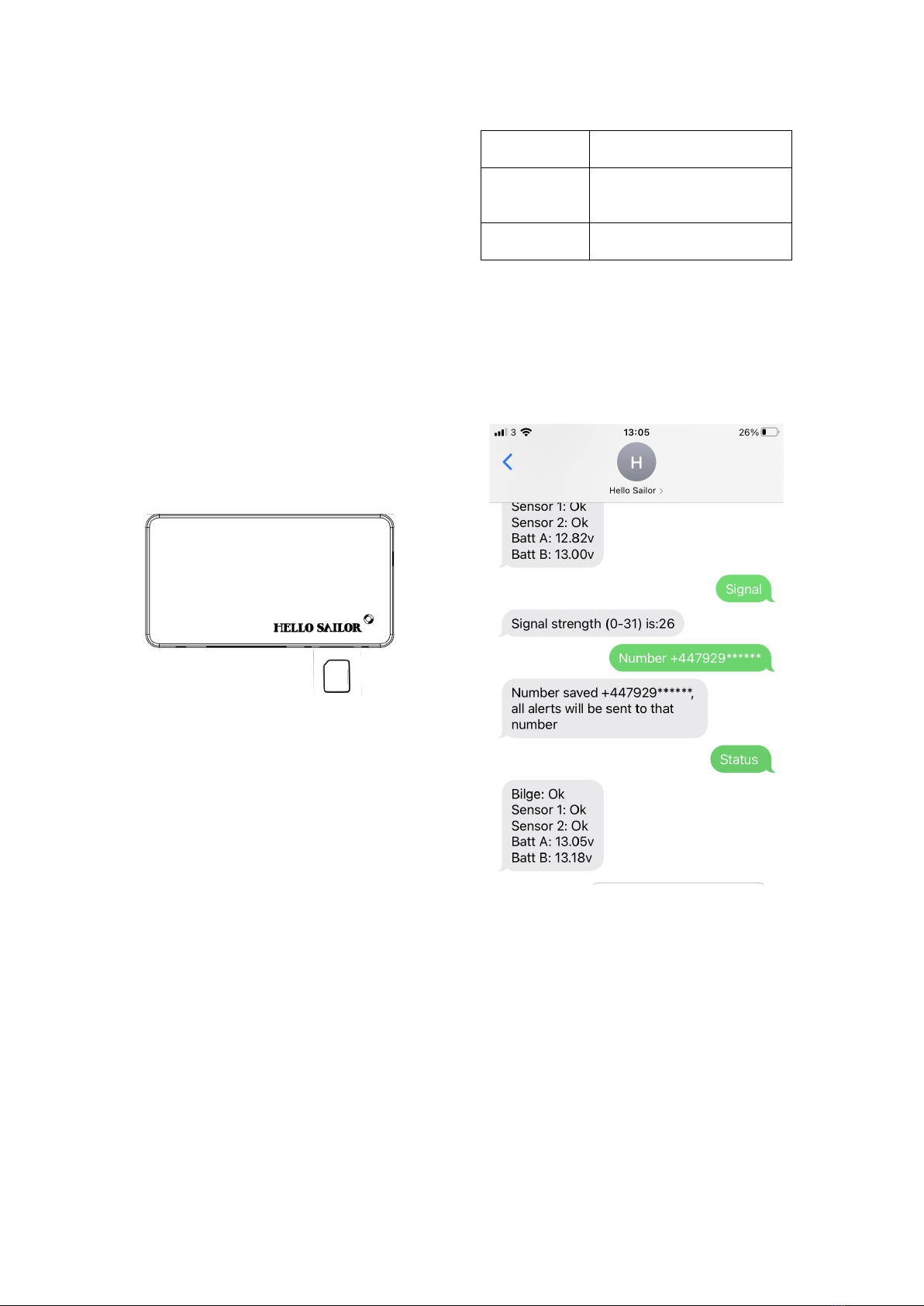
In!order!to!receive!alerts,!you!must!save!
your!mobile!phone!number!into!Hello!
Sailors!memory.!To!do!this!text!the!word!
Number,!followed!by!your!phone!number!in!
international!format.!So!after!Number,!put!a!
space,!and!then!the!+!sign,!followed!by!your!
phone!number!with!the!first!0!removed.!
!
For!example!for!the!United!Kingdom!(+44)!
number!07929******,!text:!
!
Number!+447929******!
!
You!should!shortly!receive!a!reply!
indicating!that!the!number!has!been!saved!
to!memory.!Please!check!the!number!shown!
to!ensure!that!the!correct!number!has!been!
saved.!
!
NOTES:!
Do!not!use!any!spaces!in!the!phone!number!
itself,!only!between!the!word!Number!and!
the!+!symbol.!
Do!not!use!any!brackets!around!the!country!
code.!
Remove!the!zero!at!the!beginning!of!your!
number.!
Only!use!the!+44!format,!rather!than!0044.!
!
Check'Status!
!
1. Text!Status!
2. After!a!short!time!you!should!
receive!a!reply!indicating!the!status!
of!the!connected!batteries!and!
sensors!
!
Test'Inputs!
!
1. If!you!have!a!bilge!pump!connected!
to!Hello!Sailor,!test!the!function!of!
the!alert!by!briefly!activating!the!
pump!using!its!manual!over-ride!
switch!or!by!lifting!its!float!switch.!
2. You!should!receive!a!message!to!the!
saved!phone!number!indicating!
that!the!bilge!pump!has!been!
triggered.!
3. Repeat!this!for!the!switches!
connected!to!inputs!1!&!2,!each!
input!will!activate!the!status!light,!
indicating!that!Hello!Sailor!is!
sending!an!alert.!
!
Test'Relay'
'
1. If!you!have!a!relay!connected!to!the!
relay!output!of!Hello!Sailor,!text:!
!
Switch!on!
!
2. The!status!light!will!activate!
indicating!that!a!message!has!been!
received,!and!shortly!after!the!
device!you!have!attached!to!the!
relay!output!should!activate.!
3. You!will!receive!a!message!
indicating!that!the!relay!output!is!
now!switched!on.!
4. To!switch!the!relay!off!again,!text:!
!
Switch!off!
!
You!should!again!see!the!status!light!come!
on,!the!device!you!have!attached!turn!off,!
and!you!will!receive!a!message!confirming!
this.!!
!
NOTE:!The!relay!can!also!be!turned!off!by!
pressing!the!Reset!button,!by!sending!the!
Reset!message,!or!by!removing!power!to!
Hello!Sailor.!
!
Reset'Ready'For'Use!
!
1. Send!the!text:!
!
Reset!
!
2. You!should!receive!a!message!
indicating!that!Hello!Sailor!is!
restarting,!and!hear!the!double!
beep!indicating!it!is!powering!on.!
3. After!around!20!seconds,!you!
should!hear!the!tone!indicating!that!
startup!has!finished,!and!receive!
another!message!to!the!saved!
phone!number!showing!the!current!
status!of!the!batteries!and!
connected!systems.!The!relay!is!
always!switched!off!after!reset.!
4. The!alerts!are!now!reset!and!will!
send!again!if!an!input!is!triggered.!
5. Hello!Sailor!is!now!in!sleep!mode!
and!ready!for!use.'!