24bits/192kHz USB Asynchronous Audiophile DAC
Dear customer,
Thank you for purchasing a Micromega product. This unit provides ease of use and
sonics of the highest quality. Please pay close attention to this instruction manual,
and read it fully before attempting to operate. It is designed to ensure you maxi-
mise your pleasure of listening to MyDAC.
Checking
Check that the carton has no damage. Should you have any doubt about its condi-
tion, please do not hesitate to contact your dealer. Opening the box, you should
nd:
• One C7 AC Mains cord matching your area, 4 rubber feet
Mains voltage
MyDAC is equipped with an internal universal power supply allowing you to use
MyDAC with voltage and frequency in the range of 85-265 Vac / 50-60 Hz.
Connections and Power up
Except for the mains cord, MyDAC is not supplied with any interconnect cables.
To get the best out of your unit, we recommend that you use good quality cables.
Check with your dealer.
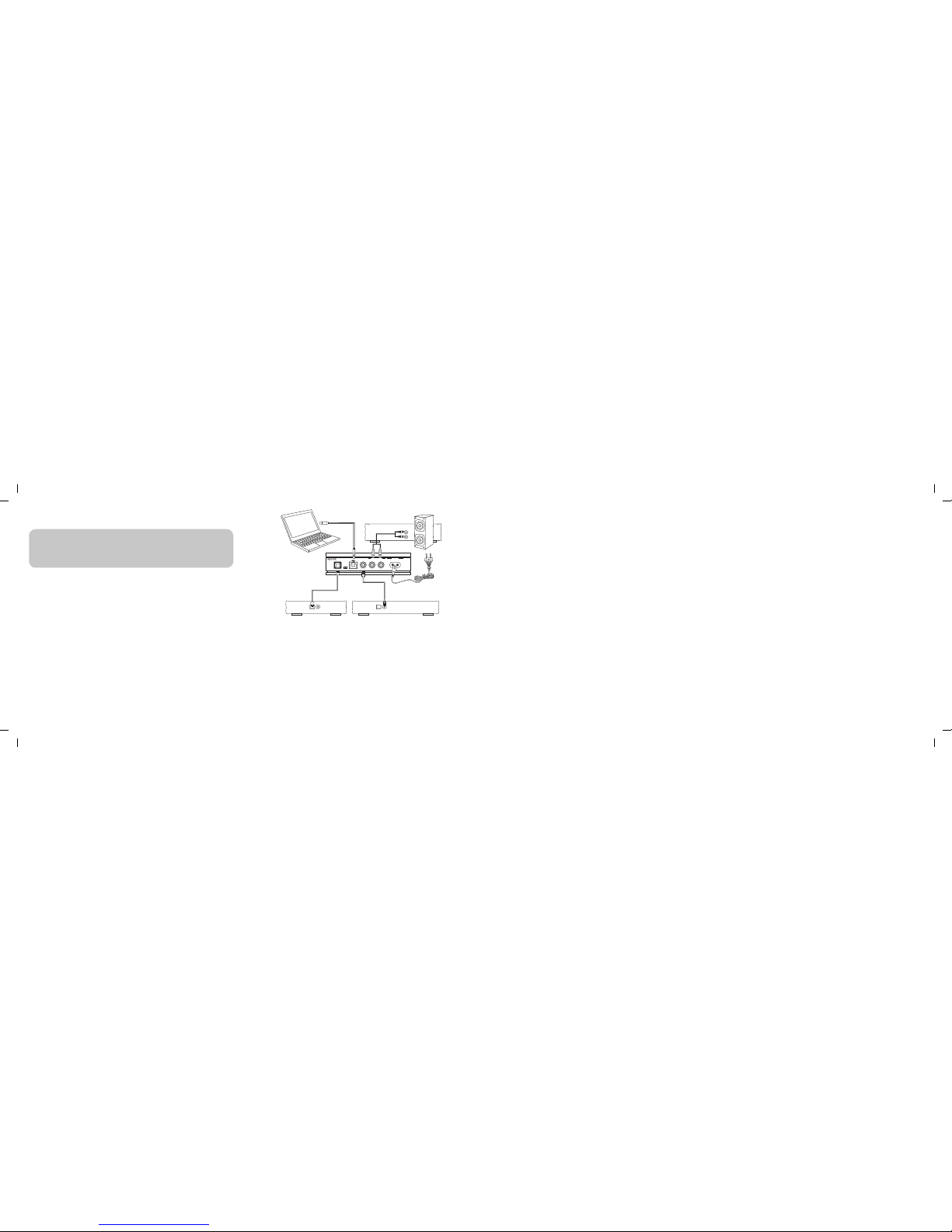
Following the diagram on the next page, connect your digital sources to MyDAC ap-
propriate inputs. Connect the stereo analog output of MyDAC to a line input of your
amplier. While doing this, we recommend you to have your amplier turned off.
Plug the AC line cord to the mains input of MyDAC and then connect the other
end to your wall mains inlet. As soon as MyDAC is connected to the mains, the
led located under the MyDAC logo will light up in red indicating that the unit is in
Standby mode.
Operation:
MyDAC central wheel has four positions. The Standby position is on the extreme
left. Using the wheel from left to right you will access the 3 different inputs : USB,
COAX and OPTO. When you select an input, the led located under the MyDAC logo
turns white and the led located under under the input name lights up in white
either in xed mode, indicating that a valid signal is received on this input, or in
blinking mode indicating that there is no valid signal on the selected input . (Refer
the FAQ section for troubleshooting).
1) Standby
Turn the wheel to the stop of the extreme left position. MyDAC is then in
standby mode and the led located under the MyDAC logo turns red. The unit
is then respectful of the most stringent ECO regulations.
2) USB
The asynchronous USB input accepts signal which are plain multiples of
44,1kHZ and 48kHz sampling rates and this up to 192kHz. This input is
compatible with Audio class 1.0 and 2.0 without using any specic driver
on Mac. For PC users, an audio class2.0 specic driver is available on our
website www.micromega-hi.com. The audio class selector is located on the
back panel of MyDAC next to the USB input connector.
In USB asynchronous mode, jitter is minimized by the use of very low jitter
masterclock oscillators controlling the incoming data ux. When you use the
USB input for the rst time, you will have to declare MyDAC as playing device in
your computer’s operating system. Each operating system being different, we
recommend that you refer the your computer’s operating system manual to
do this.
3) COAX
SPDIF Coaxial input accepting input levels as low as 0.2V p-p / 75Ω and
operating up to 24 bits/192 kHz. The masterclock regenarating circuit features
less than 50 ps Rms of jitter. Once again we need to point out that the quality
of the cable used for such input is of great importance, especially when you
reach sample rates above 96kHZ and becomes critical for 192kHz sample
rate. Ideally this cable should have a specic impedance of 75Ω to avoid data
bouncing inside the cable, creating erroneous data.
4) OPTO
SPDIF Toslink Optical input working up to 24 bits/192 kHz. The quality of the
optical bre used with this input is very important if you want to get the best
of your MyDAC and especially if you will use high sample rates. Please check
with your dealer that will recommend the best cable for your usage.
Cleaning of the unit
1. Unplug MyDAC from AC mains.
2. Using a soft cloth, gently wipe out the dust from MyDAC surfaces. To avoid
any damage to the product, never use any solvent or cleaning product
containing solvent such as acetone,trichloroethylene, ...Never use any abra-
sive material to clean MyDAC.
3. Once MyDAC has been cleaned you can connect the unit to the AC mains
again.
Working conditions
Working temperature : from 0° to 35° C (32° to 95° F)
Storage temperature : from -25° to 60° C (-13° à 140° F)
Relative humidity (working) : from 20 % to 80 %
Relative humidity (storage) : from 10 % to 90 % (without condensation)
Warning
To reduce the risk of re or electrical shock, do not expose MyDAC to rain or
moisture
Warning
• Do not use MyDAC near water.
• Do not place objects lled with liquid on or near MyDAC.
• Do not place MyDAC near any heat sources such as radiators, stoves or other
heat-generating products including open ames.
• Disconnect MyDAC during lightning storms or when unused for extended
periods.
• Refer all service-related issues to qualied personnel.
AUDIS sarl, 13-15 rue du 8 Mai 1945, 94470 Boissy Saint Leger, FRANCE
Fax: +33(0)1 4382 6128 – www.micromega-hi.com – VAT: FR07500331301
OPTO
USB
AUDIO
CLASS
2.0 1.0 USB COAX
ANALOGOUTPUT
Ordinateur/Computer Amplificateur/Amplifier
Left 85 - 265 Vac/50-60 Hz
Right
L
R
ACMAINS
MADEIN FRANCE
Digital OutputsDigital Outputs
Lecteur/Playeur CD - DVD - Blue Ray
Recepteur satellite/Satellite receiver