MKS Ophir FPD-IG-25 User manual

FPD-IG-25 Quick Reference
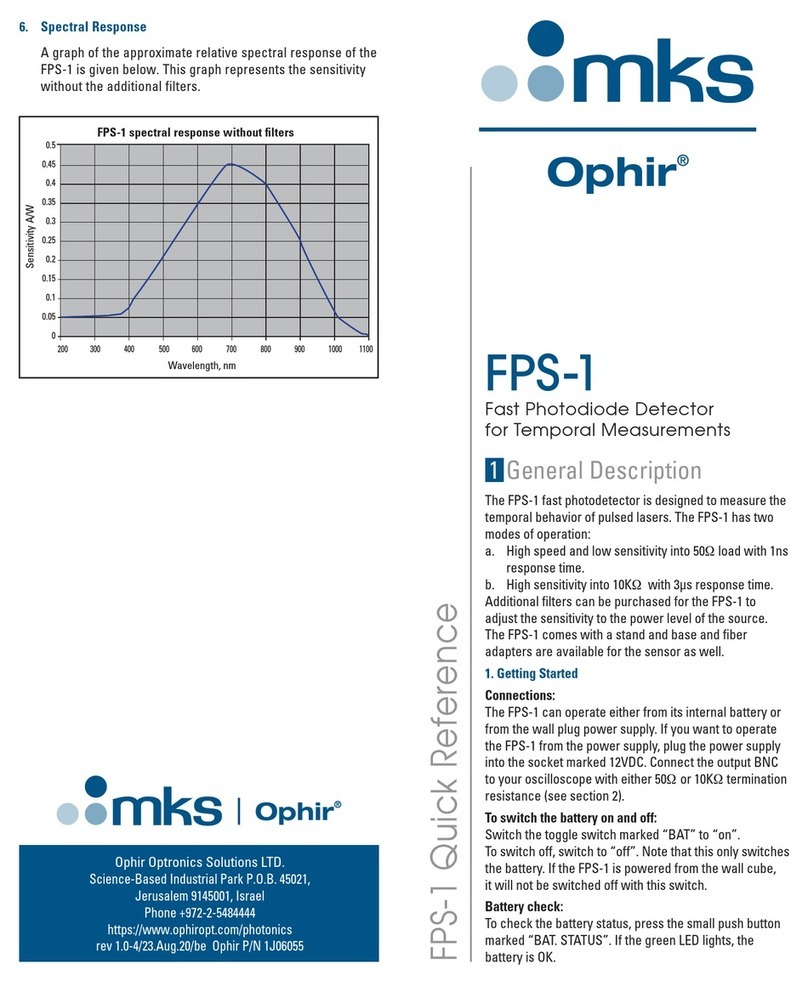
6. Spectral Response
A graph of the approximate relative spectral response of the
FPD-IG-25 is given below. This graph represents the sensitivity
without the additional filters.
1 General Description
The FPD-IG-25 is a very fast indium gallium arsenide
photodiode detector for the NIR spectrum designed to
work with oscilloscopes and spectrum analyzers for
measuring the temporal characteristics of pulsed lasers. Its
rise and fall times are <25 picoseconds.
Optional input accessories provide for connecting optical
fibers or IS6 integrating spheres to the device’s input.
Optional filter accessories enable attenuation of the optical
input signal.
All FPD detectors come with a stand and base. A nylon
standoff is included to allow for electrically insulating the
detector from the stand. This can be used in the event that
electrical noise is introduced through the base.
1. Getting Started
Connections:
The FPD-IG-25 operates from internal batteries. Connect
the output BNC to your oscilloscope or spectrum analyzer
via an input with 50Ωtermination resistance. The coax
cable used should have an impedance of 50Ωand its
length should preferably be 1 m or less. Note: In order to
avoid premature battery drainage, the power switch should
be turned to OFF whenever the detector is not in use.
Fast Photodiode Detector
for Temporal Measurements
FPD-IG-25
0.0
0.2
0.4
0.6
0.8
1.0
800 1000 1200 1400 1600
Responsivity [A/W]
Wavelength [nm]
Spectral Response: FPD-IG-25
175 X 210 mm
Ophir Optronics Solutions LTD.
Science-Based Industrial Park P.O.B. 45021,
Jerusalem 9145001, Israel
Phone +972-2-5484444
https://www.ophiropt.com/photonics
rev 1.0-2/18.Jun.20/se Ophir P/N 1J06075

Model FPD-IG-25
P/N 7Z02508
Detector InGaAs photodiode
Spectral range 900 nm – 1700 nm
Detector area 0.0008 mm²
Spectral response See graph in section 6
Performance Into 50
Ω
load
specifications
Risetime 0 – 90% <25 ps
Sensitivity at peak 0.19 mV for 1W/cm² input
wavelength
Maximum average 0.475 V
output voltage
Output connection SMA
Power 6V (CR2430 battery x2)
Input Direct or scattered laser light or from fiber
optics
Input thread M20 x 1 thread
Optional attenuators Description P/N
and fiber adapters IS6 adapter 7Z08350
(M20 thread) X10 nom. attenuator 7Z08200
X50 nom. attenuator 7Z08201
SMA fiber adapter 1G01236A
FC, FC/APC fiber adapter 7Z08229
ST fiber adapter 7Z08226
SC fiber adapter 7Z08227
5. Specifications
2. Power vs. Time Measurement
The peak power of nanosecond pulses is usually very high
and above the saturation level of the FPD-IG-25. However,
it is not necessary to have the laser beam incident directly
on the detector to measure properly. The beam can be
scattered from a diffusive white surface and the FPD-IG-25
can be placed facing the same surface at a distance from
it so that the detector receives only a small fraction of the
total power. The distance from the scattering surface to
the FPD-IG-25 can be varied to get a good, but not
saturated signal. If the intensity is still too high, or it is not
convenient to measure scattered light, attenuating filters
are available to reduce the laser intensity. See ordering
information in section 5.
Measuring pulsed lasers with the FPD-IG-25:
1. Verify that the batteries are in good condition.
2. Turn the power switch on.
3. Make sure the BNC cable is terminated with a
50Ωimpedance.
4. Start with diffusing the laser beam off of a diffusive
white surface and placing the FPD-IG-25 at a distance
of ~20cm from the surface. If the peak intensity is still
too high, move the FPD-IG-25 further away and/or
rotate it so that it faces the diffusing surface at an
angle. If the intensity is still too high, one or more filters
are recommended (see ordering information in
section 5). If the intensity is too low, move the sensor
closer to the laser spot.
5. If you are measuring a laser pulse through a fiber and
are using the optional fiber adapter, first try measuring
the beam with several filters in and remove them as
necessary.
6. If using the FPD-IG-25 with an IS6 integrating sphere,
attenuating filters can be used to lower the signal level.
3. Battery Replacement
In order to conserve battery charge, turn the power switch
to OFF whenever the FPD-IG-25 is not in use.
The batteries can be accessed for testing and replacement
by removing the 4 screws at the top of the units to open the
top plate. Batteries are to be inserted with the positive
terminal down.
4. Maintenance
The detector probe should be periodically cleaned with
tissue and alcohol. Otherwise no other care is needed for
the instrument.
175 X 210 mm
Other MKS Security Sensor manuals