7
TwistedPairCable(UTP/STP/ScTP/FTPetc.)
Must be 4pair wiring .Make sure you use cable that complies
with theTIA-568wiringspecification.
100BASE-TX: Cat.5eorbetter
1000BASE-T: Cat.5eorbetter
10GBASE-T:Cat.6orbetter
(Recommendation:Cat.6Aorbetter)
100m (max.)
When used for 10GBASE-T, Cat 6 cable's maximum length is 55
meters
If theadapter is unable to link or establishlink less than 10Gbps with
straight-through cable, please try to change the cable to cross-over
cable.
Hardware Installation / Uninstallation
Forhardwareinstallation/uninstallation,refertotheUser’sGuide oftheserver.
When the system is up, please turn the power off after
shutdown process on the OS. And then unplug the AC
powercord.
For rack-type server, before open the top cover, need to
disconnect thecablefrom thisproduct.
Bracket Replacement
Depending on the type of system, installation of this product requires
either a standard bracket or a low-profile bracket is attached. Please
replacethebracketaccording to thefollowingsteps asnecessary.
1. Removetwoscrews from theadapter.
2. Detachthebracketfrom theadapter.
3. Attachtheotherbracket totheadapterusingthescrews.
P0
P1
10G=GRN
1G=YLW
LINK/
ACT =GRN
P0
P1
10G=GRN
1G=YLW
LINK/
ACT =GRN
x2
Driver Installation / Uninstallation
The driver and software of this product is published on NEC web site. Also an
installationguide ofthisproductincludesin thefilesonNECwebsite.
Togetthedriverandtheinstallationguide, access to theNECwebsite.
URL:
http://www.58support.nec.co.jp/global/download/index.html
Unable to Start the System
Check the BIOS setting
Change the setting of the system BIOS of the server about Option
ROM expansion.
If network boot function is not required, disable the function to expand the
Option ROM of this adapter. Need to access system BIOS. See User’s
GuideoftheExpressServer.
If network boot function is required, but POST is stopped, disable the
functiontoexpandtheOptionROMofanotherPCI slot.
□Verifythat yourserver isusingtheLatestBIOS
ChecktheversionofthesystemBIOS.
Iftheversionisnotproper,Updatethesystem BIOStolatestversion.
Check theadapter
Make suretheadapterisnotbroken
Check thecomponentonthe adapter.
If it has broken, Please contact to reseller, sales agents or service
representative
Make suretheadapterhasnotenteredforeignsubstance
Check thecomponentonthe adapter.
If it has foreign substance, Please contact to reseller, sales agents or service
representative
Make sure a foreign substance has adhered to the connector of a
board.
Check thePCI-Express®connectoron theadapter.
If a foreign substance has adhered to thePCI-Express® connector, wipe off
withsoftclothetc.
Check theadapter installation
Make sure theadapterismountedproper slot
Check the slotis conformedtomount theadapter. Refer to the User’s Guide
oftheserver.
Iftheadapterinnotseatproperslot,Seattheadaptertoproperslot.
Make suretheadapterisconnectedto PCI-Expressslotfirmly
Check theadapter isconnected firmly. If it is notso, Re-installthe adapter
Checkthescrew(orclip)ontheserverforbracketfixingisnotloose
Make sureequipmentontheServerhasnofailures.
Make sure that the PCI-Express slot does not broke, or foreign substance
has notentered.
Ifit isso,Pleasecontacttoreseller,salesagentsorservicerepresentative
If the computer does not work correctly even when all the above
items are confirmed, shutdown the computer, disconnect the
product, reboot the computer, and perform the self-diagnostic
program POST. If POST ends normally, this product may be
defective. Please contact to reseller, sales agents or service
representative.
Unable to Connect the Network
Check thecable
Make surethecablelatchhaslocked
Check thelatchofthecable.If it isnot locked, Re-connect thecable.
Ifthelatchisbroken, replacethecable.
Make surethe cable hasnot too bent
Check thecablerouting.
Ifthecablehasbenttightlyorhasanydamage, replacethecable.
Make surethecablehascompliance withthestandards
Check whether it conforms to the cable specification which can connectthis
product.Ifitisnotso, Replace to a proper cable. See also “NetworkCables”
Check the link partner (switch, hub, etc.)
Check asettingorconfigurationonthelinkpartner.
Make surethelinkpartnersetting iscorrect.
Ifthesettingismis-configured, correct thesetting.
If the partner’s port is disabled, enable it.
If the adapter’s communication mode is set to full duplex mode, make sure
that the link partner’s communication mode is also set to full duplex mode.
If these are set differently, it may cause lower performance, loss of data, or
the connection. For example, while a switching hub’s LAN port is set to
Auto-Negotiation mode, if the adapter’s port is set to full duplex mode, the
switching hub’s port becomes half duplex mode. Here, the link is
establishedbetweenthem;however,thenetworkperformancewillextremely
below.
Check astatusofthelinkpartner.
Makesurelinkpartnerisaliveandinanormalstate.
Common problems and solutions
The Connection fails or an erroroccurs
Usea twisted paircabletoconnect this adapter. Especiallytousefor
10Gbps,usea twistedpaircableof CAT6aorbetter.
Also,makesurethatthecableis securelyattached.
Makesurethatthecommunicationmode (fullduplex/half duplex) onthe
adaptermatchesthatonlink partner.
Exchangethe networkcable.
Tryanotherportonthelinkpartner(suchashub/switch).
Makesurethatthereisnonoisesource(suchasafluorescentlightorpower
line)aroundthecable.
Remove ifthereisa factortobeapplied vibrationandshock to the
connectorsandcables.
LINK/SPEEDlampstayoff
MakesuretheOSbootnormally.
Check allconnectionsattheadapter andlink partner.
Exchangethe networkcable(xTP).
Ifconnectingtoagigabitswitch,Trytochangethecableto “Crossovertype”
Tryanotherport on thelink partner(suchashub/switch).
Makesurethecommunicationrateonthe adaptermatchesthatonthelink
partner.
Make sure that thecablebetweentheadapterandlink partneris theproper
type. Ifyouusethisadapterat 10Gbps,useaCAT6a cableorbetter.
Make surenoforeignobjectisinLANport.
Confirmthat yourtwistedpaircableis 4pairtype.
Failure on resolving IPAddress on DHCP
Trytochangethecableto“Crossovertype”
Trytoconnect anotherswitching hub
TrytosetalinkparameterontheOS.Ifthe10G-NICis operatingonalinux
OS,seta”LINK DELAY”parameter(seebelow)
[File]
/etc/sysconfig/network-scripts/ifcfg-ethXX
[Additional Parameter]
LINKDELAY=10
If the problem persists even after you checked the above items, something
may be wrong with this adapter. Please contact to reseller, sales agents or
servicerepresentative.
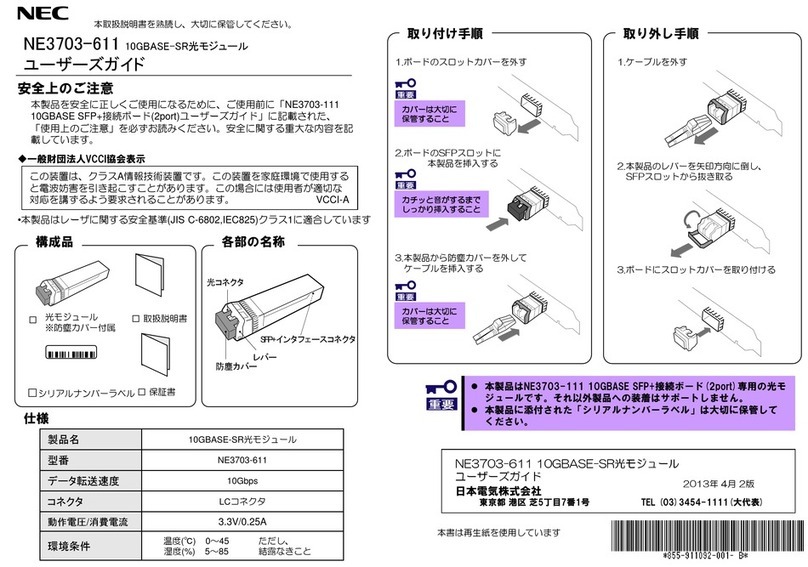
Dimensions
(cardw/o/ bracket)
PowerConsumption
(Maximum)
Temp.: 0 - 40C
Humid.:20 - 80%
Temp.:-40 - 70C
Humid.:5 - 95%
EUContact:
NECNederlandB.V.
Olympia4,1213 NTHilversum,TheNetherlands
Trademark,nameandaddressofthemanufacturer:
Silicom Ltd.
14AtirYeda St.
KfarSava4464323,Israel
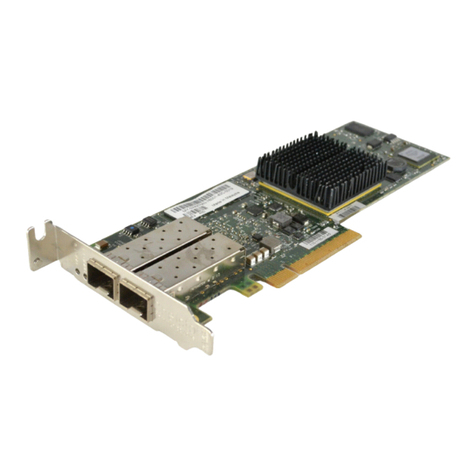
DualPort10GBASE-TAdapter
DualPort10GBASE-TAdapter
4th. Edition
December 2017
NEC Corporation
7-1 Shiba 5-Chome, Minato-Ku, Tokyo 108-8001, Japan