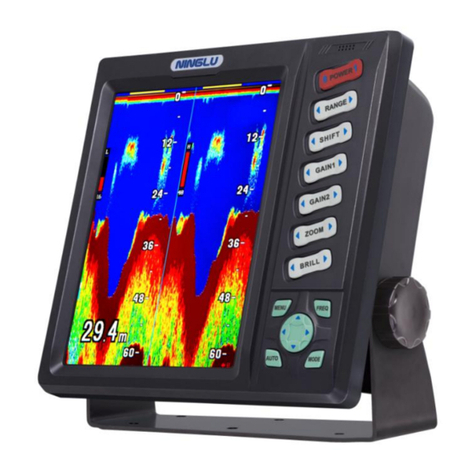
Ninglu DF612 User manual
Doc No::NLT-DFXXXX-SSEN
Version:V121112
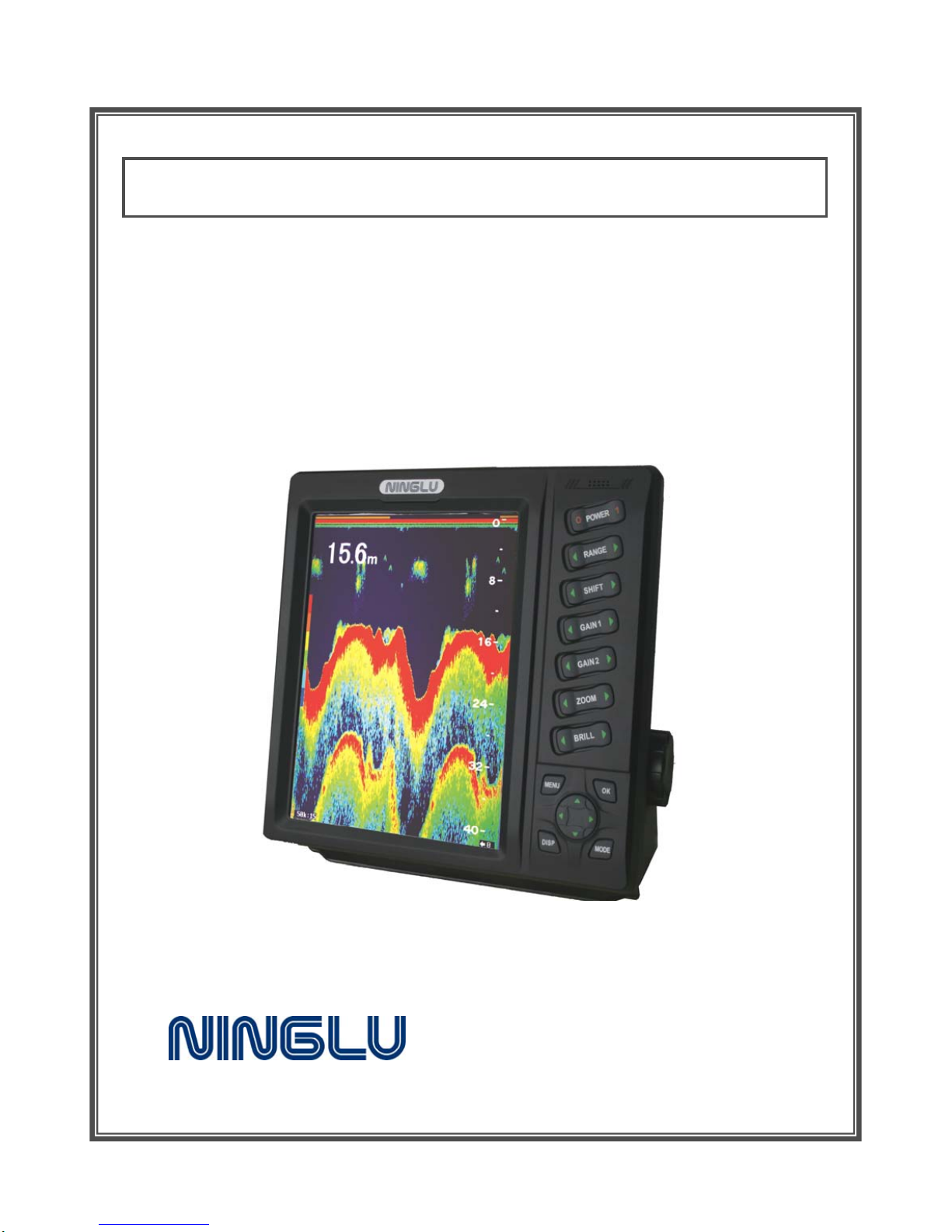
10 INCH LCD DIGITAL FISH FINDER
OPERATION MANUAL
Model:DF SERIES

CONTENTS
SYSTEM DESCRIPTION........................................................1
Specifications ....................................................................2
Performance .................................................................. 2
Environment .................................................................. 2
Operation..........................................................................3
Keyboard..................................................................... 3
Fixed key functions .......................................................... 4
POWER .................................................................. 4
RANGE................................................................... 4
SHIFT .................................................................... 4
GAIN & GAIN 1 & GAIN 2 ............................................. 4
Color (single-freq fish finder).......................................... 4
ZOOM .................................................................... 4
BRILL..................................................................... 5
MENU .................................................................... 5
OK ........................................................................ 5
DISP ...................................................................... 5
MODE .................................................................... 5
Arrows (UP▲/DOWN▼/LEFT / RIGHT )....................... 5
MENU contents and factory setting........................................ 6
MENU <1>............................................................... 6
MENU <2> (DF612 & DF1011 & DF1511 & DF2022) ............. 6
MENU <2> ( DF5088 & DF2099 ).................................... 7
Setting on MENU............................................................. 7
Pic Speed ................................................................ 7
Auto Range .............................................................. 7

Max A-Range............................................................ 8
Zoom ..................................................................... 8
Fish Alarm ............................................................... 8
Back Ground ............................................................ 8
Pulse Width.............................................................. 8
TVG....................................................................... 9
Noise Rej................................................................. 9
Color Del ................................................................. 9
Palette.................................................................... 9
Depth Alarm..........................................................10
Shallow Set ...........................................................10
Deep Set...............................................................10
WaterTemp Al ........................................................11
Low Set ................................................................11
High Set................................................................11
How to get the steady data..................................................12
Installation ......................................................................13
Operating unit installation ..................................................13
Installation ......................................................................14
Connection ...................................................................14
VGA ...........................................................................14
Transducer wiring ...........................................................15

1
SYSTEM DESCRIPTION
We thank you very much for your purchasing our fish finder.
Please be sure to read this operation manual carefully and understand
what it describes before operating this unit. Your fish finder will perform to
the utmost of its ability only if it is operated and maintained in accordance
with the correct procedures.
Summary:
Model Channel Frequency &
Output power Transducer cable(m) Transducer
maker
DF612 single 50/200 kHz - 600W BP60-200-15L 15 NINGLU
DF1011 single 50 kHz - 1000W 50B-9B-15L 15 JAPAN
DF1511 single 50 kHz - 1500W TGM60-50B-10L 10 NEC
DF2022 double 50 kHz - 600W TGM50/200B-12L 12 NEC
200 kHz - 600W
DF5088 double 50 kHz - 2000W CM199 15 AIRMAR
200 kHz -1000W
DF2099 single 100 kHz -1000W B258 15 AIRMAR
Features
zClear viewing applying high quality 10.4 inch color LCD.
zBottom zoom function as well as fixed-zoom function.
zBeginners can operate without worry using auto-range control.
zHigh sensitivity, digital signal technology.
System:
The whole fish finder system consists of operating unit and transducer.
Operating unit:
Display LCD: 10.4 inch color TFT LCD.
Back cabinet: ground stud and interface of power & transducer.

2
Specifications
Performance
Dimension: 264(H) x 270(W) x 93(D) mm
Power: DC24V (19~36V)
Fish finder will automatically shut down when voltage is too high
Consumption: <24W
Frequency & DF612 50/200kHz 600W
Output power DF1011 50kHz 1000W
DF1511 50kHz 1500W
DF2022 50 kHz 600W,200 kHz 600W
DF5088 50kHz 2000W,200kHz 1000W
DF2099 100kHz 1000W
LCD: 10.4 inch TFT color LCD, 640X480 pixels
Back colors:Grey Blue D-Blue Black
Echo colors:7 kinds of color configuration
Time scale: 30s
Range scope: 5 10 20 30 40 50 60 80 100 120 150 180 200 250 300
400 500 600 800 1000 1500 2000m
Shift range:5 ~500 m
Alarm: shallow alarm (prior), fish alarm
Alarm mode:buzzing, letters glittering on screen
Environment
Working temperature: -10 ~40℃,complying to IEC60945
Working humidity: 10 ~90% relative humidity
Operating unit waterproofing: IP23, complying to IEC60529
Transducer waterproofing: IP66
3
Operation
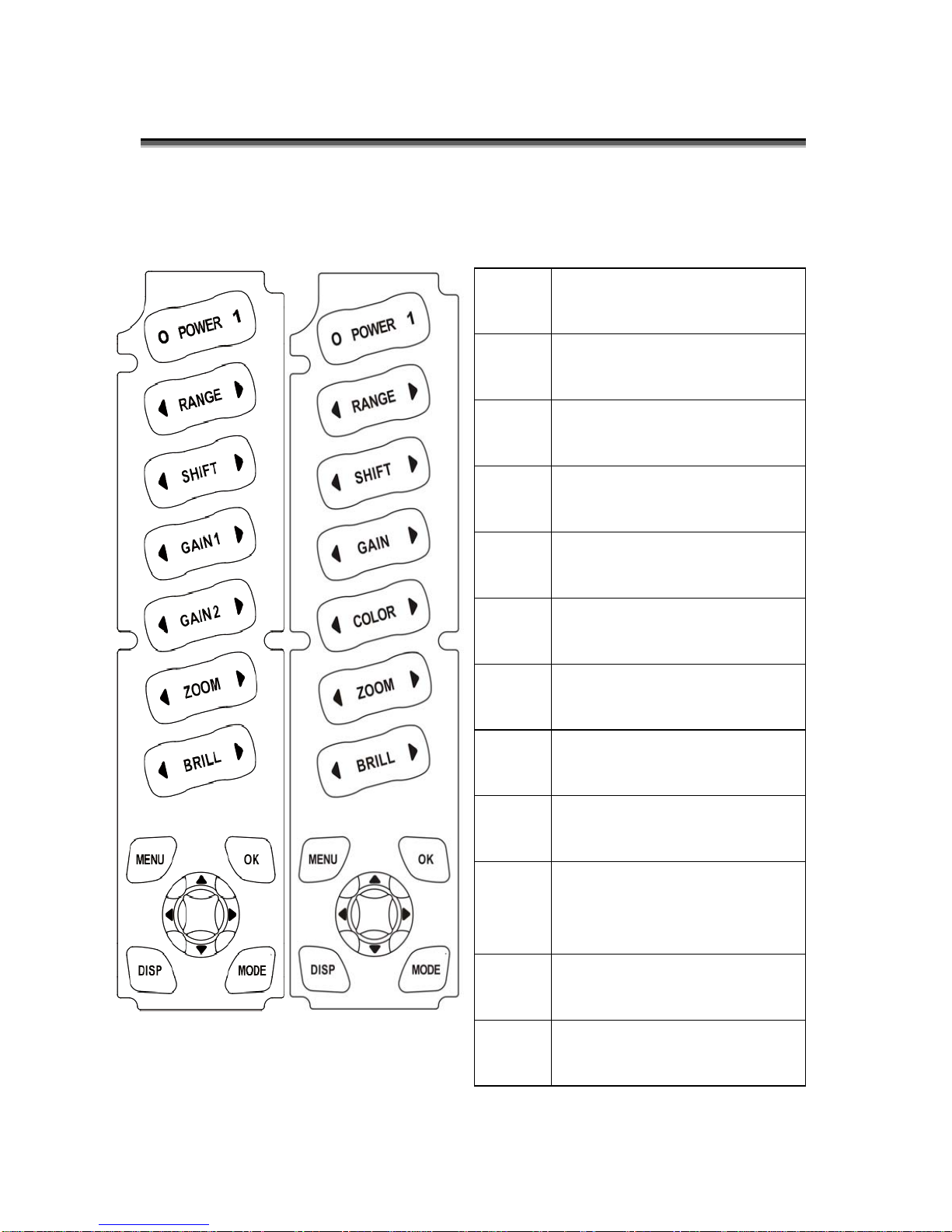
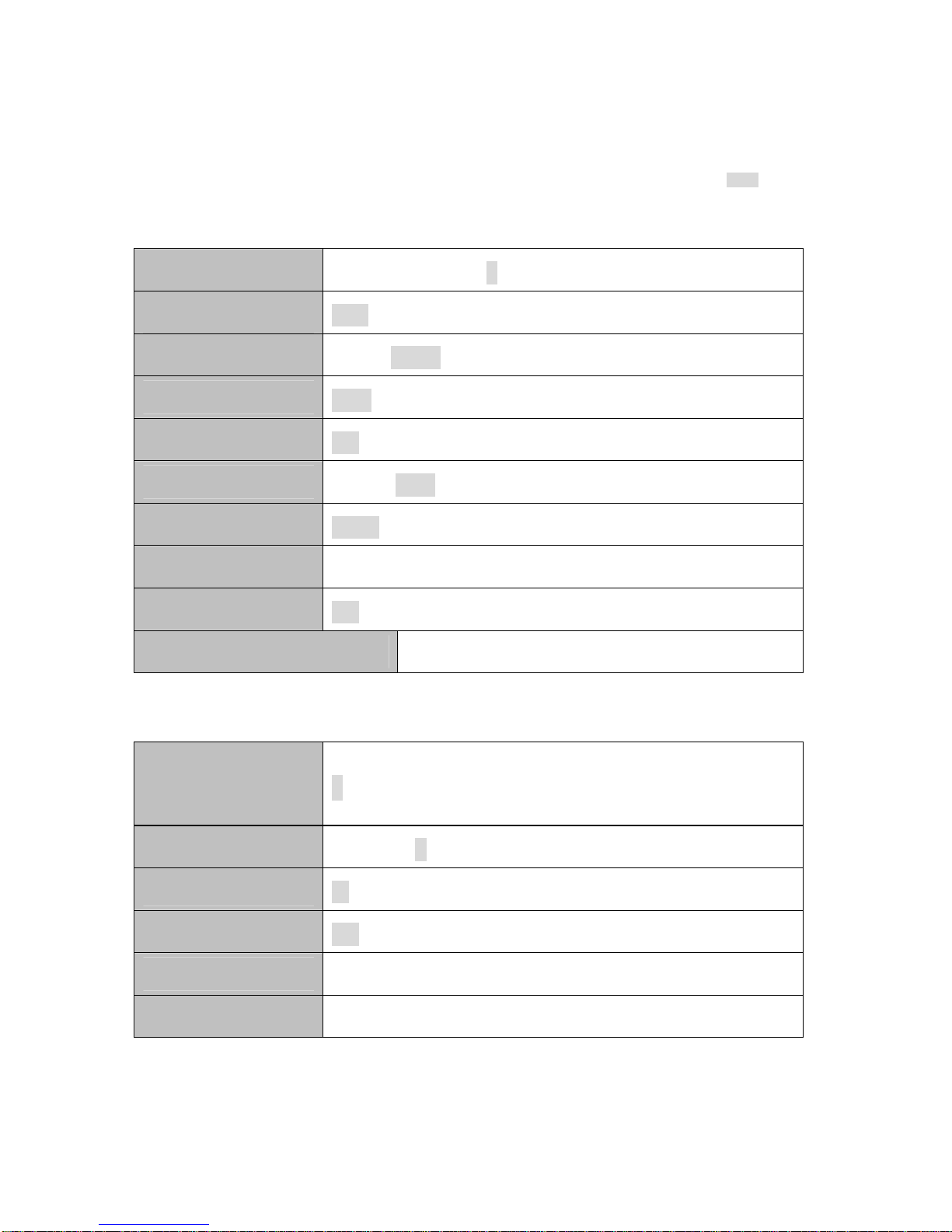
Keyboard
POWER Turn power off/on.
RANGE Set the displayed depth range.
SHIFT Shift displayed depth range.
GAIN 1 Adjust sensitivity of frequency 1.
GAIN 2 Adjust sensitivity of frequency 2.
ZOOM Move the expanded area toward
sea surface or sea bottom.
BRILL Adjust the brightness of display.
MENU Open MENU<1>, MENU<2>,
Quit.
OK Execute selected items.
Arrows Select items or change the
setting in MENU.
DISP
Select display mode:
High- freq / Low-freq / High-freq
& Low-freq.
MODE Switch Normal mode / Bottom-Z
/ Fixed-Z
Dual-freq
Fish finder
Single-freq
Fish finder

4
Fixed key functions
POWER
【POWER】button is used to turn on/off the system.
RANGE
【RANGE】button sets the depth range(how deep from the surface)
showed on the screen: 5 10 20 30 40 50 60 80 100 120 150 180 200 250
300 400 500 600 800 1000 1500 2000m (22 optional values).
SHIFT
You can shift the initial displaying depth downward. For example, when you
shift 5m downward at 0 ~5m depth range, initial display depth becomes
to 5m and display range becomes to 5 ~10m. Shift range: 5 ~500m.
GAIN & GAIN 1 & GAIN 2
This adjusts the sensitivity to distinguish the bottom or fish school easily.
Dual-freq fish finder:
【GAIN 1】: adjust the sensitivity of 50 kHz signal received.
【GAIN 2】: adjust the sensitivity of 200 kHz signal received.
Color (single-freq fish finder)
This facilitates clear observation by eliminate weak echo.
ZOOM
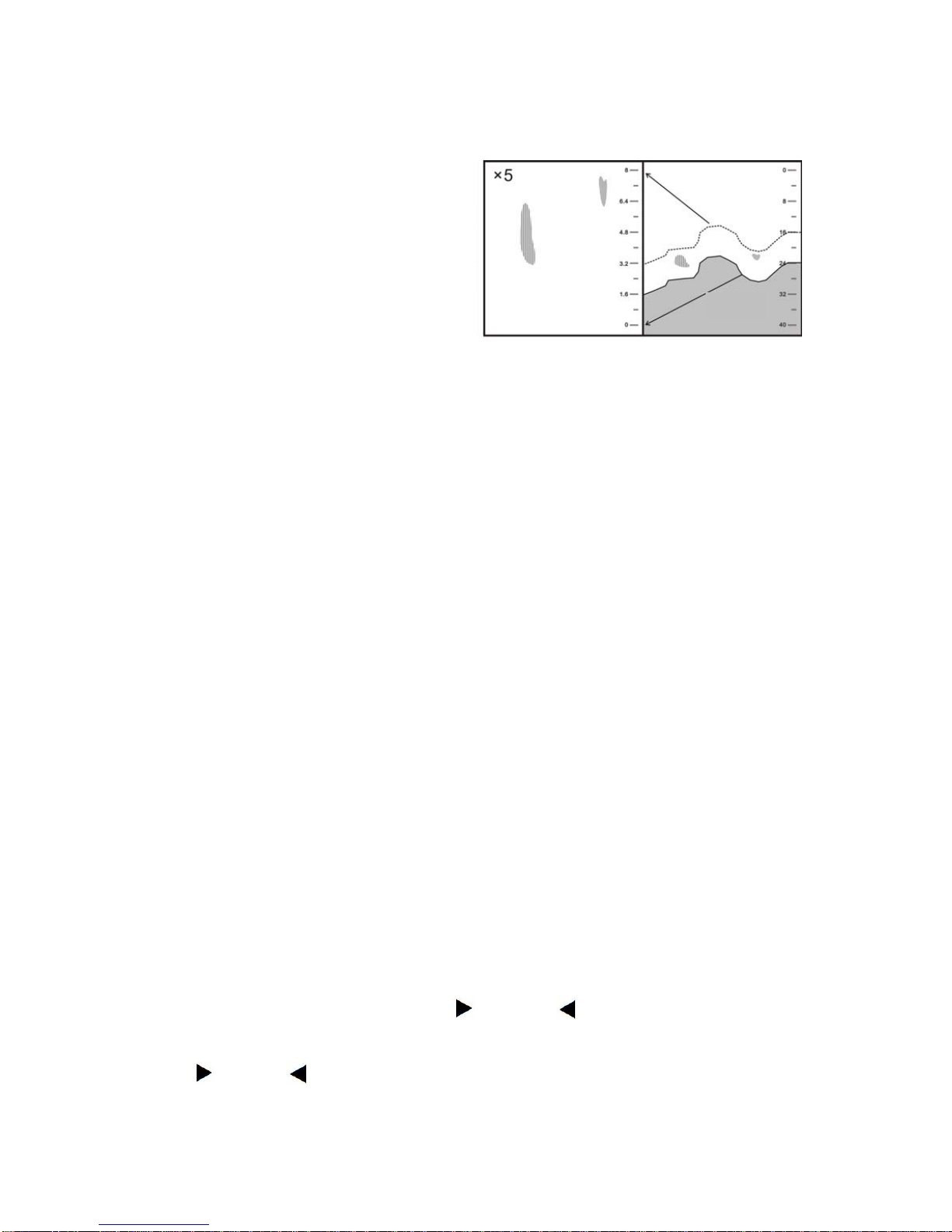
Expanded display is shown on the left half screen.
Zoom mode is set by【MODE】key, more details refer to page 5 MODE.
Fixed-Z
You can choose expansion area by【ZOOM】key as you wish.
Expansion rate is set in MENU 1 Zoom: ×2.5, ×5, ×10.
5
Seabed
Bottom-Z
Bottom contour is indicated as a
straight line and expansion view of
certain area from its contour is
shown. Zoom rate is set in MENU 1
Zoom: ×2.5, ×5, ×10.
BRILL
【BRILL】key is used to adjust the LCD brightness.
MENU
【MENU】button facilitates selection of MENU 1, MENU 2, quit MENU.
OK
【OK】button confirms the setting value and quits from MENU.
DISP
Frequency displayed toggles among 50 kHz, 200 kHz, 50 / 200 kHz.
MODE
Three modes are optional toggled by pressing【MODE】key:
Normal mode
Display normal echo graphic.
Bottom-Z
Bottom contour is indicated as a straight line and expansion view of certain
area from its contour is shown.
Fixed-Z
Expansion display a certain area.
Arrows (UP▲/DOWN▼/LEFT / RIGHT )
UP▲/DOWN▼: select the item of the MENU.
LEFT / RIGHT : set value of item selected.
6
MENU contents and factory setting
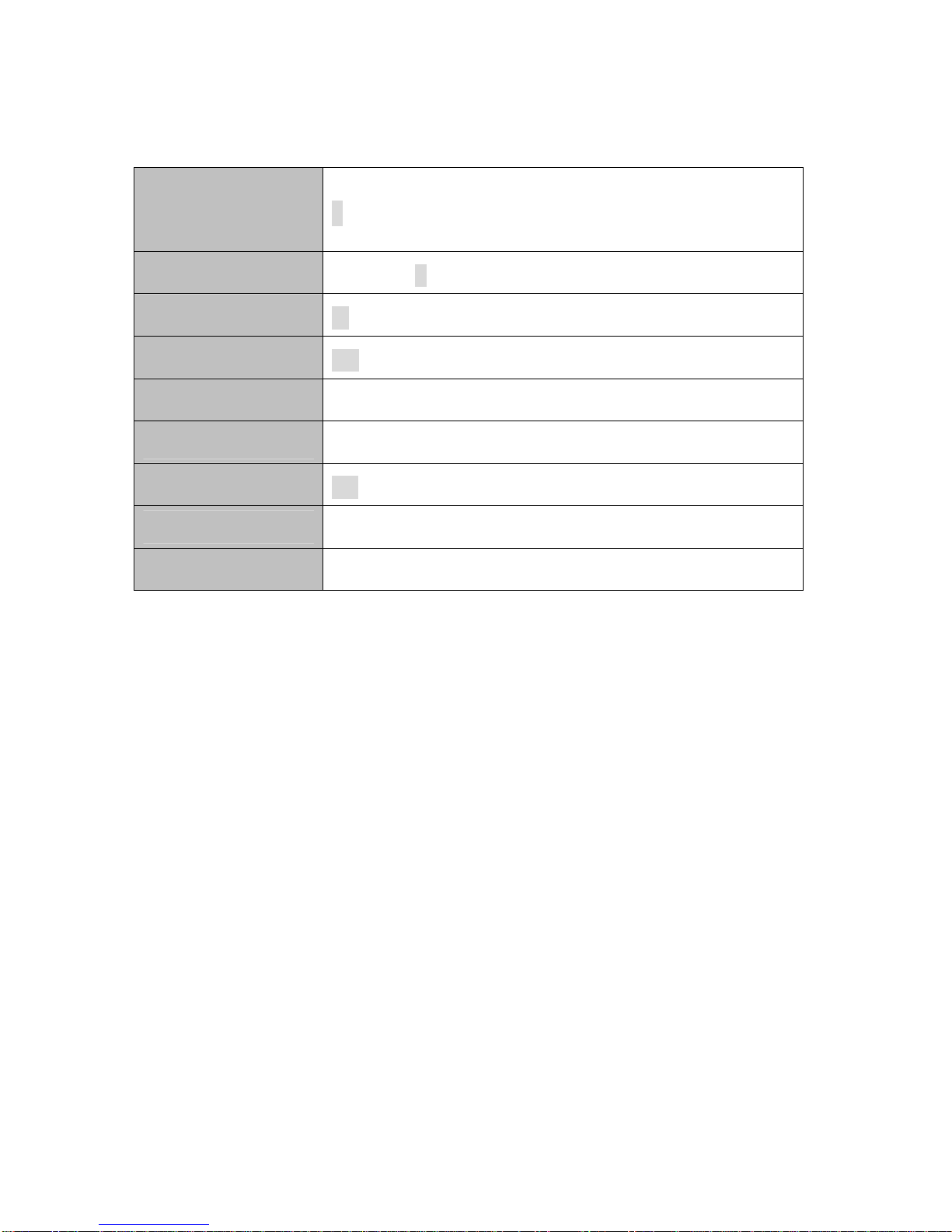
Note: In the following MENU list, the factory setting is marked with grey back color, such as 100m.
MENU <1>
MENU <2> (DF612 & DF1011 & DF1511 & DF2022)
Pic Speed Stop 1 2 3 4 ×2 ×4
Auto Range Off On
Max A-Range 30m 100m 200m 300m Max
Zoom ×2.5 ×5 ×10
Fish Alarm Off Small Big
Back Ground Grey Blue D-Blue Black
Pulse Width Short Long
TVG 0 ~40
Noise Rej. Off Low High
【MENU】ÆMENU <2> Press 【MENU】into MENU <2>
Color Del 0 ~-12
Palette 0 1 2 3 4 5 6
Unit m fm
Depth Alarm Off Shal Midd Deep
Shallow Set 1m ~50m
Deep Set 16m ~501m
7
MENU <2> ( DF5088 & DF2099 )
Setting on MENU
Pic Speed
On fish finder, the newest display (display just under the boat) is shown on
the right edge of screen. At the same time previous display moves leftward.
Display of fish finder is formed by repeating such movement. Pic speed is
speed that display forwards. Display expands or reduces horizontally by
changing the pic speed.
Set Pic speed on MENU 1: OFF, 1, 2, 3, 4, ×2, ×4.
Auto Range
Depth range is automatically changed so that sea bottom is always shown
on the optimum position of the screen (lower half area).
When auto range function is operating, 【DEPTH】key is non-functional.
Set Auto range on MENU 1: Off, On.
Color Del 0 ~-12
Palette 0 1 2 3 4 5 6
Unit m fm
Depth Alarm Off Shal Midd Deep
Shallow Set 1m ~50m
Deep Set 16m ~501m
WaterTemp AL Off Low Midd High
Low Set 0℃~High Set Value – 1 ℃
High Set 1℃~Low Set Value + 1 ℃
This manual suits for next models
5
Table of contents
Other Ninglu Fish Finder manuals