Reproduction of part or all of the contents of this document in any form is expressly prohibited other than for individual use only.
Subject to modifications and errors. All text, images and labels are property of nimax GmbH.
Congratulation on the purchase of a pair of binoculars
from the new Omegon Talron series. These are high-end,
high-resolution binoculars for the best performance at
the best price. Special glass and coatings are used to
provide you with the best vivid colors and sharpness. The
binoculars are air-purged and nitrogen-filled to avoid
undesired condensation. These binoculars are also water
resistant.
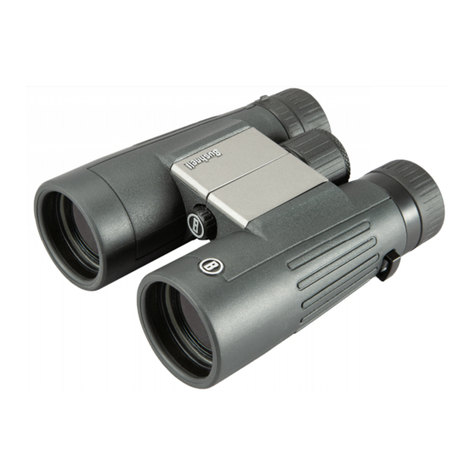
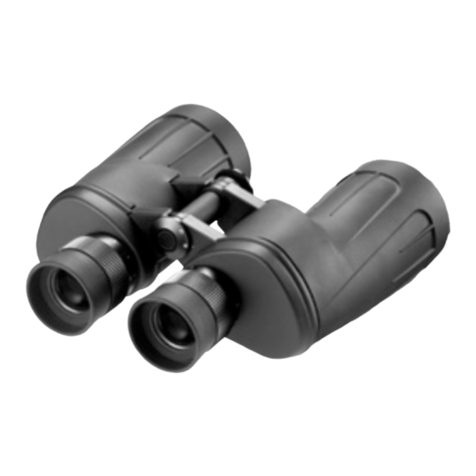
1. What’s included 2. Parts description
Binoculars; 1- Eyepieces;
Objective caps; 2- Extendable eyepiece cups;
Eyepiece caps; 3- Central focus knob;
Strap; 4- Left barrel;
Bag; 5- Aperture/objective;
Cleaning tissue; 6- Right barrel;
7- Diopter adjuster;
3. Getting started.
3.1. Understanding the binoculars. Remove the
binoculars from its original box. Each pair of binoculars
has a certain magnification (power) and light gathering
ability (aperture).
3.2 Power and aperture.
A pair of 8x42 binoculars provides 8x power
(magnification) having a 42mm diametre (aperture) for
each objective lense. Both power and aperture are
important when choosing a pair of binoculars. For hiking,
lightweight binoculars are preferable. For hunting, bigger
and more powerful binoculars are more useful. The
Omegon Talron series consists of a complete line of
different aperture and power binoculars for the most
demanding applications.
3.3. Check specifications. Starting at 8x26 up to 10x42.
Make sure you have the exact ordered model. Do this by
reading the engraved data on the centre focus wheel
top.
3.4. Field of view (FOV). There is, besides the power and
aperture, another very imporant feature, the FOV at
1,000m. This is the provided field of view in meters as
seen for an object 1,000m away. Usually lower
magnifications provide wider fields of view.
4. How to use your binoculars. Remove the end caps
from the binoculars. Aperture lens (#5 –figure 1) should
point to the object being observed.
4.1. Pointing. Try to keep pointing at the same object
without changing to objects at significantly different
distances.
4.2. Inter-pupillary distance. Adjust inter-pupillary
distance by moving the barrels closer or further away
from each other. This is important in oder to merge the
two barrel images into a single one (see figure 2).
4.3. Adjust eyecups. The eyecups can be rotated, thus
extending or retracting. Adjust to a comfortable position.
Users who wear glasses might find it more comfortable
to keep them retracted.
4.4 Obtaining a sharp image. Now that you have
proceeded with 4.2 and 4.3, you can go ahead and focus
the binoculars. First point to an object nearby, about 40
to 50 metres away. Now close your right eye. You will
only see light coming from the left barrel, but that is
okay. You want to adjust the sharpness of the image
coming through that particular barrel. Use the centre
focus knob (#3 –figure 1), rotate it to one side and the
other until you get a sharp image. Looking through the
binoculars (with the left eye open and with the right one
closed) you should be able to have a nice sharp image of
the object being observed just by adjusting the centre
focus knob.
4.5. Dioptre adjustment. Now it is time to open the right
eye and keep both eyes open. Do you see a single fused
image or do you see two different images? If you
adjusted 4.2 and 4.3 correctly, you should see only one
image but the image coming from the right barrel might
not be as sharp as expected. You need to adjust the
dioptre for that ocular. Do not use the centre focus knob
for this. Rotate the silver ring below the eyecup (#7 –
figure 1) so that you match the sharpness of the image
on the left eye. Now when you point to an object, you
should be able to quickly get a precisely-focused image
by just rotating the centre focus knob.
5. Care and maintenance. These binoculars should be
stored in a clean, dust free, dry place. We recommend
keeping them in the original supplied pouch when not in
use.
Solar warning: Do not point the binoculars at the sun.
Concentrated sunlight will permanently damage your
eyes.