How To Operate
1. Assure the correct cleaning solution is properly loaded into dispensing
bottle and that dispensing bottle is correctly loaded into the holster. NOTE:
Consult your MSDS Right to Know Center before using chemicals. Affix the
corresponding Chemical Identification Label to the dispensing bottle. (Be sure
to consult full label copy and MSDS prior to use.)
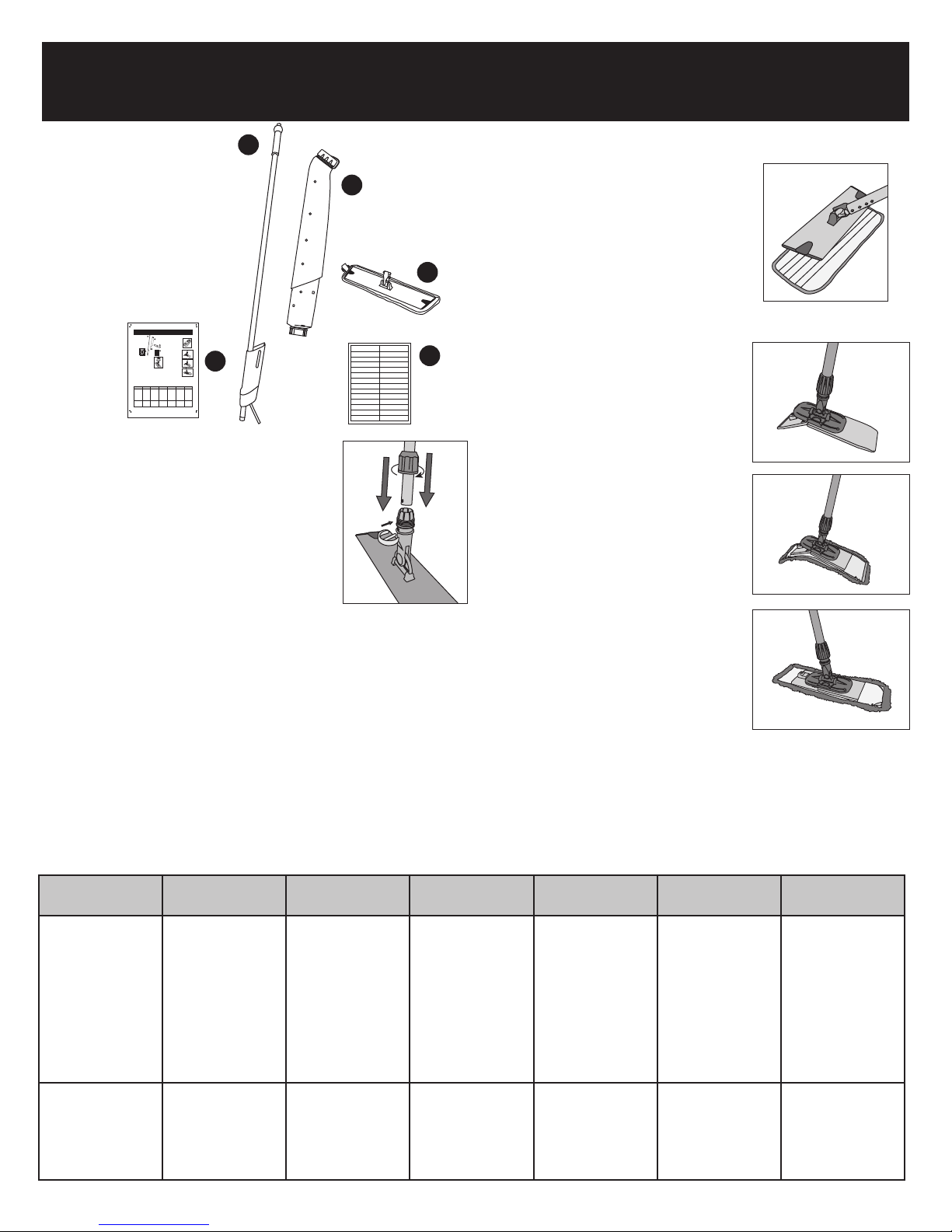
2. Assure proper mop head has been chosen and that it is correctly attached to
a properly installed frame. (see chart)
3. Be sure to have your room prepared by removing all furnishings, posting a
Wet Floor sign, and properly dust mopping the floor to be cleaned.
4. Use proper PPE’s (Personal Protective Equipment).
5. Choose a spot in the room that is furthest from the door you will be exiting.
With frame and mop head on the floor, depress the orange valve button once
to turn the solution flow valve on until enough fluid is discharged to provide an
initial “wetting” of your mop head. Push button again to turn the solution
flow valve off. Flow will stop when button is pressed a second time.
Operation is similar to a ball point pen.
NOTE: The click-on, click-off feature is designed to reduce user fatigue when
a constant flow of fluid is desired.
6. Frame the area you wish to clean, return to the starting point and work your
way toward the intended exit door working the frame in a figure 8 motion,
being certain to effectively overlap each pass to ensure an even clean.
7. Reapply fluid to the floor and subsequently to the mop head by depressing
the orange valve button as needed.
8. Return unit to storage area. See How To Clean, Maintain and Store After Use
instructions below.
How To Clean, Maintain and Store After Use
1. Remove mop head and place in laundry bag (if launderable) or in trash if
disposable.
2. Remove dispensing bottle from holster by pulling upward firmly, yet gently.
3. Dispensing bottle is sealed and may be stored in dedicated storage area.
NOTE: Always read and follow chemical label instructions.
4. If dispensing bottle is empty, rinse out dispensing bottle by removing both top
(orange) and bottom caps and allow clean water to flow. Most chemistries call
for a triple rinse.
5. Bring handle to water source and with orange valve button locked “on” rinse
water through the holster/valve assembly.
6. Using a clean, dry microfiber towel, wipe down the entire unit.
7. If dispensing bottle is clean and empty, replace to holster. NOTE: We
recommend purchasing extra dispensing bottles to allow for more efficient
cleaning programs and multiple cleaning chemical changes.
8. Store handle on wall via our GateMate Plus® Holder or the integrated
handle hook. NOTE: Do not hang unit by bottle tether. Bottle may become
disengaged and cause damage to unit.
9. Extra dispensing bottles may be stored by hanging them by their integrated
storage hook onto a properly anchored edge / shelf / lip.
Trouble Shooting Guide
Symptom Solution
Frame falls off handle Ensure swivel connector tabs on mop
frame have “clicked” into the receiving
holes on the handle.
Valve will not dispense Confirm that dispensing bottle is firmly
“clicked” into holster.
Is dispensing bottle filled with chemistry?
Is orange valve button fully depressed?
Is dispensing tube kinked or clogged?
Valve will not turn off Ensure that orange valve button is not in
locked-on position.
Dispensing bottle will not properly Is there any debris inside holster?
seat or “click” into place Is dispensing bottle button cap installed?
Is dispensing bottle button cap tight?
Is dispensing bottle in holster backward?
Frame does not swivel 360° Is swivel locked engaged?
Is frame properly mounted to handle?
Replacement Parts
LBH18VK Valve Kit
LBH18H Tether without Cap
LBH18HC Tether and Large Bottle cap
LBH18N Bottom Bottle Cap Valve
LBH18B Bottle with Tether and Caps