PG LIFELINK Mark IV Line Isolation Monitor Instruction Manual
Rev 1.3 Page 5 of 7
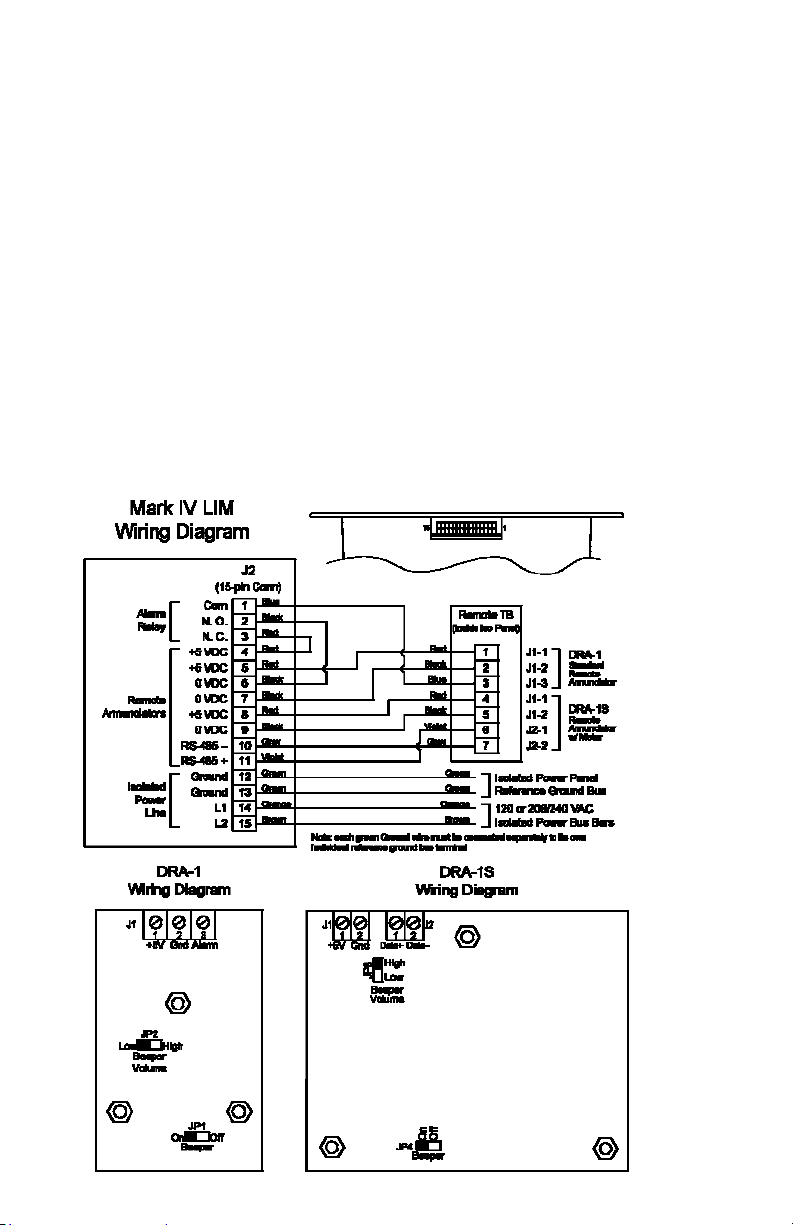
Up to 3 DRA-1S remotes are supported due to their higher power consumption. For
a single remote, this model should be connected with minimum 18 ga. wire for
wire lengths up to 50’, 16 ga. up to 75’, 14 ga. up to 100’ or 12 ga up to 125’. For
greater wiring distances, more than 3 simultaneously-operating remotes, or multiple
remotes sharing a single wire run, an auxiliary power supply is available. Consult the
factory for engineering assistance and pricing. With one or more of these supplies,
both the number of remotes and their distance from the LIM can be increased.
The LIM mounts using 4 holes in the corners of its front panel. In case of retrots
into existing panels, any additional brackets and harnesses needed are usually sup-
plied when a “retrot kit” is ordered from PG LifeLink for a specic application. Con-
sult the factory for assistance.
3.Operation
On initial power-up, the LIM goes through a self-test procedure. It rst displays its
rmware version as “P” followed by the version number, then performs a lamp test,
lighting all indicators and activating the audible alarm. Any remotes attached to the
LIM will perform the same self-test. It then enters automatic self-calibration.
Upon successful completion of this sequence (about 45 seconds), the LIM will begin
to indicate the THC of the isolated power system and attached equipment. Both the
digital and the analog bar-graph displays will show the predicted hazard current. If
the hazard current value is below the unit’s user-selectable alarm level setting of
2mA or 5mA, the green “Safe” indicator will be lit. If the hazard current goes above
the alarm set-point, the red “Hazard” light will light, and the audible alarm will
sound if enabled. To silence the alarm, press the “Silence” button on the front panel
of the LIM. The yellow “Silenced” indicator will light, and the red “Hazard” light will
remain lit. When the hazard current decreases below the alarm threshold, the Haz-
ard (and Silenced if active) lights will extinguish, and the green “Safe” light will come
back on, without any user action.
DRA-1 remotes silence only themselves and are not silenced if the LIM is silenced.
DRA-1S remotes and the LIM are all silenced together when any one is silenced.
The Mark IV performs automatic self-test and calibration every 24 hours. It also can
be manually tested at any time using the “Test” button on its front panel or on a
DRA-1S remote. Briey pressing and releasing the button will initiate self-calibration.
Press and hold the “Test” button to perform a functional test of alarm operation and
threshold such as the annual test required by NFPA 99. After holding for a few sec-
onds, the hazard current indication will begin to rise, and will reach the alarm trip
point within about 10 seconds. The LIM will simulate its operation during a hazard
condition by indicating a high hazard current value, lighting the “hazard” light, and
sounding the audible alarm, on the LIM displays and on any connected remotes.
4.User Settings
The Mark IV has a bank of DIP switches for user conguration, located at
the upper left of the Display board. Remove front cover to expose them.
S1 – Beeper volume: off = low, on = high (default is on, high vol)
S2 – Beeper Silence: off = active, on = silent (default is off, active)
S3 – THC range: off = 2 mA, on = 5 mA (default is on, 5 mA)
S4 – Factory use only: on = normal operate (default is on, operate)
S5, 6, 7, 8 – inactive: usually left in on position