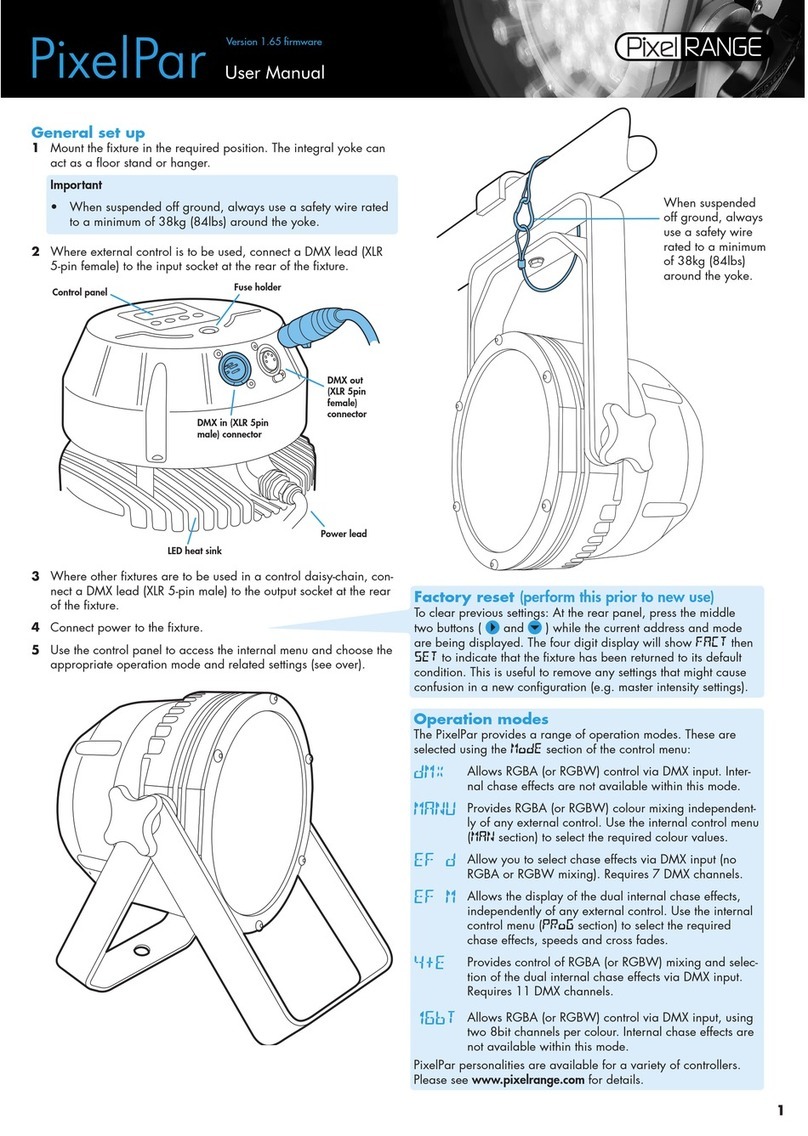
Using the control menu
• When not in the menu, the four digit display shows
the current DMX address e.g. A001
• Press to enter the menu. The four digit display will
show ADDR.
• Use and to move between menu options (or to
change a value within an option).
• Press to enter an option (or to fix a changed value
within an option and return to the previous option level).
Note: If you do not press to fix a value, operation will
revert to the previously set mode at the next power on.
• Press to exit from a menu option (and eventually
exit the menu completely).
General notes
• Ensure that only one DMX device
in the chain is set as master (e.g.
the lighting desk). The fixture is
usually set to slave mode
• If the fixture is used as a master,
DMX transmission will only occur
when the DMX address is dis-
played (e.g. A001, A002, etc).
• The four digit display can be set to
fade out after 60 seconds, press
to resume. To alter this mode:
PERS >DISP.
Chase effects
This section describes each of the 31 internal chase
effects that are selectable either via the control menu
(PROG > C1/C2 > EFEC) or using DMX values sent
from an external source. To use the internal effects, set
the MODE option either to EF M (to control effects via
the menu) or EF D, EX61, MAX1 or MAX2 (to control
effects externally via DMX).
DMX EFEC Chase effect description
value value
0-7 00 Off
8-15 01 Rainbow chase forward - 6 cell split
16-23 02 Rainbow chase reverse - 6 cell split
24-31 03 White single cell chase forward
32-39 04 White single cell chase reverse
40-47 05 Double bouncing cells - centre to edge
48-55 06 50/50 duty cycle strobe white
56-63 07 50/50 duty cycle strobe red
64-71 08 50/50 duty cycle strobe blue
72-79 09 50/50 duty cycle strobe yellow
80-87 10 50/50 duty cycle strobe green
88-95 11 Pulse strobe white
96-103 12 Pulse strobe blue
104-111 13 Pulse strobe rainbow
112-119 14 Pulse strobe red/green/blue
120-127 15 Primary/secondary chase
128-135 16 Rainbow chase
136-143 17 Yellow/blue chase
144-151 18 Rainbow chase - 2 cell split
152-159 19 Yellow/blue alternate cell chase
160-167 20 Red/blue alternate cell chase
168-175 21 Red/green chase
176-183 22 Rainbow chase - 6 cell split
184-191 23 Rainbow chase - 3 cell split
192-199 24 Red/green/blue chase - 3 cell split
200-207 25 Static orange
208-215 26 Static yellow
216-223 27 Static light blue
224-231 28 Static purple
232-239 29 Static red
240-247 30 Static green
248-255 31 Static blue
DMX channel and cell layouts
This section shows the different ways, when using DMX mode, that the 18 cells can
be mapped to varying numbers of DMX channels using the PERS >RES option.
The first channel of the fixture occurs at the DMX address selected using ADDR
and successive channels for the fixture follow from there.
Chase effects and master intensity channel layouts
The table below shows how the chase effects and master intensity controls are
mapped to DMX channels for each mode. Mode DMX does not use chase effects.
The first channel of the fixture occurs at the DMX address selected using ADDR
and successive channels for the fixture follow from there.
Control MAX1 MAX2 EF D EX61
C1 Effect Ch55 Ch4 Ch1 Ch56
C1 Speed Ch56 Ch5 Ch2 Ch57
C1 Xfade Ch57 Ch6 Ch3 Ch58
C2 Effect Ch58 Ch7 Ch4 Ch59
C2 Speed Ch59 Ch8 Ch5 Ch60
C2 Xfade Ch60 Ch9 Ch6 Ch61
RGB master intensity None None None Ch55
Effects master intensity None None None Ch62
Combined master intensity Ch61 Ch10 Ch7 None
* DMX mode only, when PERS >MINT is set to ON.
Modes EX61 and MAX1 use a 54 channel layout. Modes MAX2 and EF D use
a 3 channel layout (Mode EF D uses channels 8, 9 and 10 for RGB control).