UM1A
9
5. Press the swoop arrow soft button to return to the previous operation.
6. The following items can be adjusted:
xKey Beep (ON / OFF)
xLCD Backlight (1 –10)
xLCD Backlight Night Mode (1-10) (active only on DIM)
xLCD Contrast (1 –10)
xLCD Invert (ON / Night Mode / Off)
xButton Backlight (1 –10)
xButton Backlight Night Mode (1-10) (active only on DIM)
xPower Button Backlight (1 –10)
xTuning Region (USA / Europe)
xSXM Satellite Radio (Sub Menu, only accessible in SiriusXM mode)
- Set Lock Code
- Locked Channels
- SXi Software Version
xBluetooth Setup (Sub Menu, only accessible in Bluetooth mode)
- BT ON/OFF: Choose “BT ON” or “BT OFF”.
- BT PAIR (ON / OFF): Choose “YES” to pair a new device
- BT DEVICE (Lock / Unlock, Disconnect / Connect, Delete): View, lock and
delete from a list of previously paired mobile devices.
xSub Control
- Sub ON / OFF
- Sub Center (HIGH / MID / LOW)
xBalance Control (ON / OFF)
xFade Control (ON / OFF)
xAUX1 Level (HIGH / MID / LOW)
xAUX2 Level (HIGH / MID / LOW)
xBattery Alarm (ON / OFF)
xBattery Auto Off (ON / OFF)
xRestore Defaults: Press Encoder Knob to confirm. (Resets to factory default)
NOTE: BT Pair and BT Device menu options are only available while UM1A is in
Bluetooth mode.
Battery Alarm Operation
If Battery Alarm is set to “ON”, an alarm will sound (3 beeps every 30 sec) when the voltage
drops to 10.8V (+/- 0.3V). A visual warning (Battery Low) will appear flashing on the LCD
display.
NOTE: “OFF” is the default setting for Battery Alarm. If the audio is muted or the
volume is set to 0, the audible beep will not be heard.
Auxiliary Input
To access an auxiliary device:
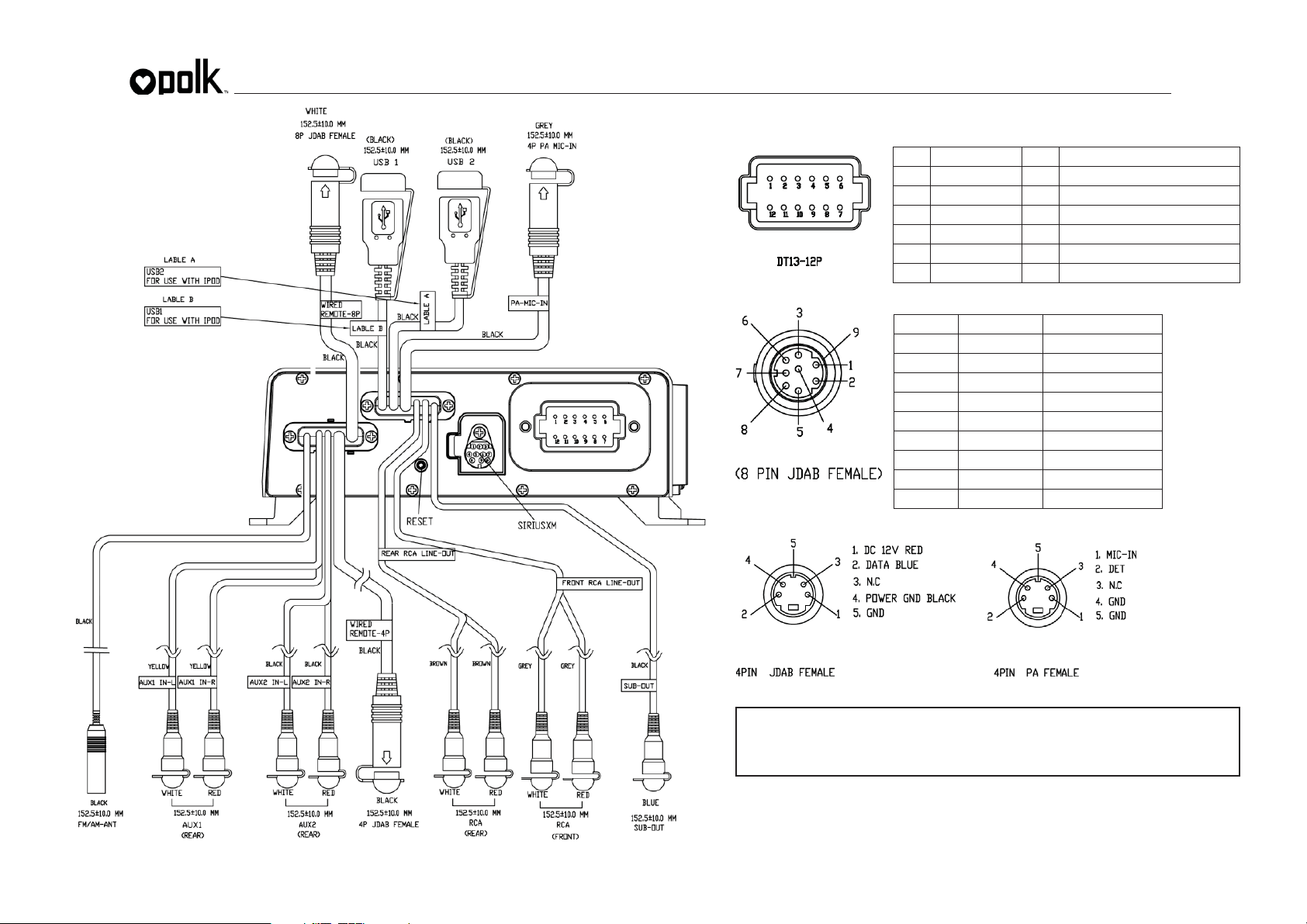
1. Connect the portable audio player to the AUX1 IN or AUX2 IN cables routed from the
rear of the radio.
2. Press the MODE button twice to view the AUX option.
3. Press the AUX1 or AUX2 soft button to select auxiliary audio input mode.
PA Operation (PA microphone sold separately)
xConnect the PA Microphone with 4-PIN connector to the PA-MIC-IN on rear.
xThe unit will automatically switch to PA mode when the mic switch is pushed “ON”.
xThe PA output level can be adjusted using the rotary volume encoder when “ON” (1).
xWith radio power off, the radio will wake up when PA mic is keyed to make an
announcement. Please note that it will take a few seconds before the radio “wakes up”
and PA is active. Radio will return to the off state when the PA mic is released.
LCD Invert
xInverts LCD colors to enable a high-contrast view for difficult lighting situations.
Night Mode
xConnect the ILL-DIM wire on the UM1A harness to your vessel’s running lights or
instrument panel lights.
xLCD Invert, LCD Backlight Night Mode, and Button Backlight Night Mode levels will be
automatically activated in Night Mode.
xBacklight levels and invert function can be adjusted through system menu.
xWhen running lights are activated, UM1A display will automatically switch to Night
Mode settings.
Liquid Crystal Display (LCD)
The current frequency and activated functions are shown on the LCD panel (10).
NOTE: LCD panels may take longer to respond when subjected to cold temperatures
for an extended period of time. In addition, the visibility of the numbers on the LCD
may decrease slightly. The LCD display will return to normal when the temperature
increases to a normal range.
Back Key (swoop arrow)
In various modes and conditions, the swoop arrow option will be available in the lower right
soft button. Press button to exit the current operation without waiting for the system default
time out and returning to the previous menu display.