3. INSTALLATION
Inspect the UPS upon receipt. The packaging is recyclable; keep it for reuse or disposed
of properly.
3.1 Recharge the battery
UPS may be used by anyone immediately upon receipt. The battery is fully charged
before shipped from the factory. However, user is recommended to recharge the battery
at least four hours before using UPS. Energy loss may occur during shipping or long
duration storage. To recharge the battery, simply let UPS be plugged into an AC outlet
and switch it on.
3.2 Connect the loads
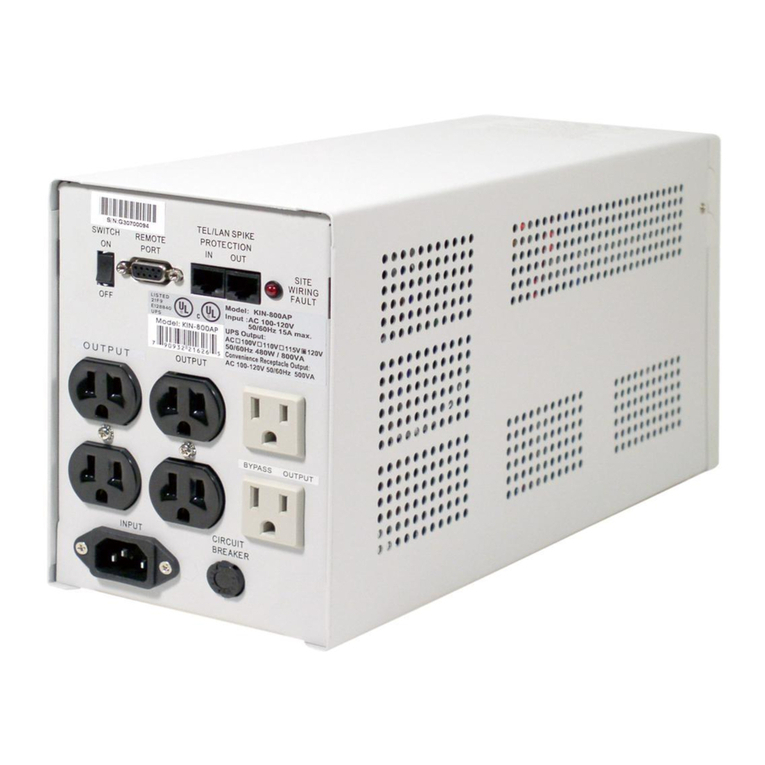
Plug your primary equipment (e.g. computer, monitor and critical data storage device,
etc.) to the Battery Power-Supplied outlets. Plug your peripheral equipment (e.g. printer,
scanner, fax, or audio device) to the Full-time Surge Protection outlets. Do not plug laser
printer to the UPS output outlets, as its power demand is much higher than typical
peripherals and may cause the circuit breaker to trip. It is suggested to connect the
similar heavy loads (like laser printer) to the bypass outlets.
3.3 Connect the telephone
If you wish to extend the length of wire of, connect the telephone cable from the wall
outlet to the “IN” jack. Connect the telephone cable (provided) from the “OUT” jack to the
fax or modem.
3.4 Connect to the utility power
Plug UPS to a 2-pole, 3-wire grounding receptacle. Make sure the branch is protected
and does not service equipment requiring heavy electricity (e.g. refrigerator, air
conditioner, copier, etc.).
3.5 UPS self-test
UPS will conduct a self-test once switched on it each time. Do not add or take off any
equipment while UPS conducts self-test; await it until the Power indicator lights up.
Besides this, switch on your equipment after switch on UPS.
3.6 Battery auto-charging
Once the power cord is connected, the battery of UPS will be automatically charged by
itself.
3.7 Auto restart feature
UPS is equipped with Auto Restart feature. It will activate when the battery level
becomes too low to sustain its operation and the utility is not present. UPS will switch
itself to waiting mode, waiting for utility switch itself on and recharge its battery. If the
user is away during a utility failure, UPS will manage to return to normal function and
recharge its battery when utility power returns.
5