DMX TERMINATOR
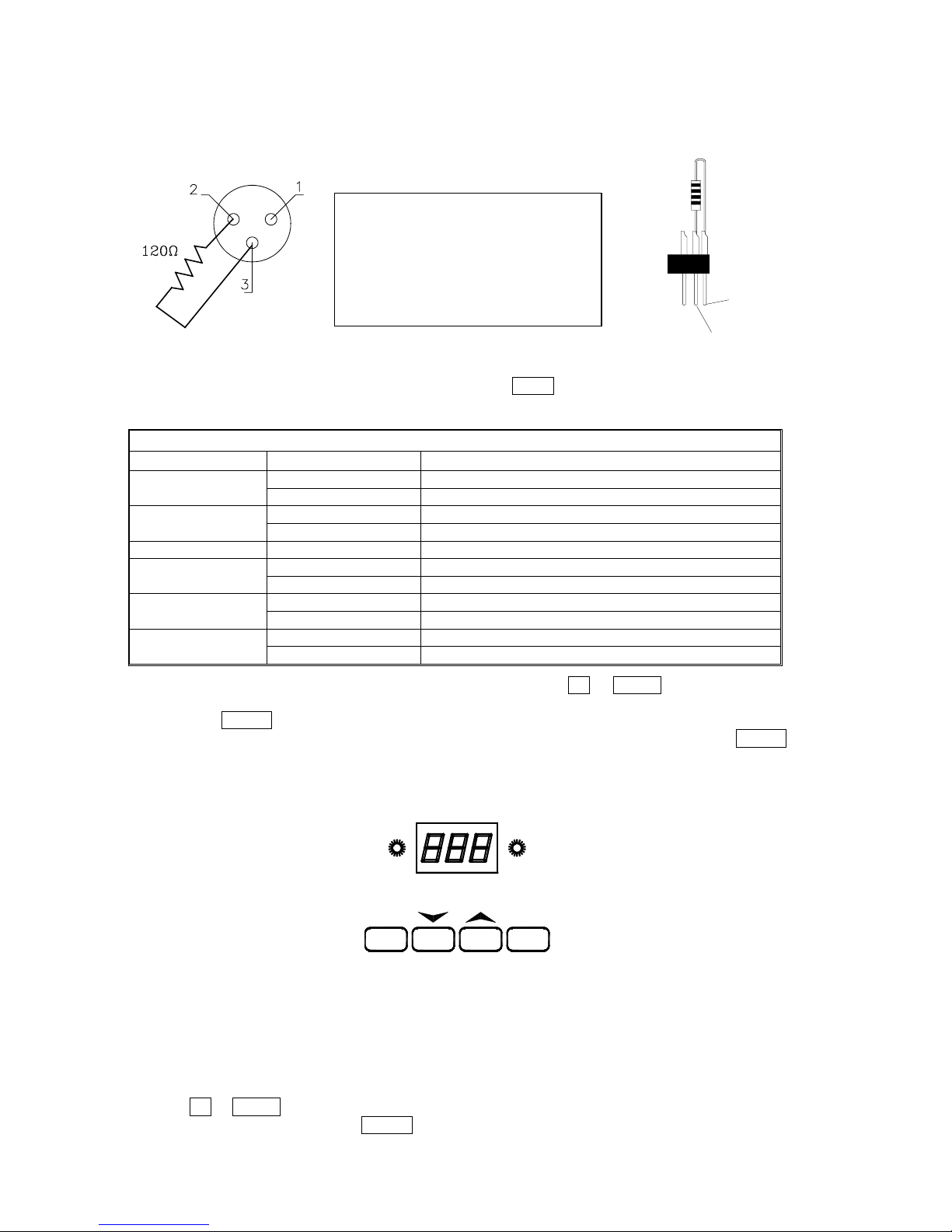
At the last fixture in the chain, the DMX output has to be connected with a DMX terminator. This
prevents electrical noise from disturbing and corrupting the DMX control signals.
The DMX terminator is simply an XLR connector with a 120Ω(ohm) resistor connected across pins 2
and 3, which is then plugged into the output socket on the last projector in the chain. The connections
are illustrated below.
PIN 3
PIN 2
DMX TERMINATOR
CONNECTION
Connect a 120Ω(OHM) resistor across
pins 2 and 3 in an XLR plug and insert
into the DMX OUT socket on the last
unit in the chain.
SETUP OPTIONS – PROJECTOR CONFIGURATION
To browse through the various Setup Options, press the FUNC button consecutively. There are 6
Option codes (1~6), and each code has a specific function. The functions provided are listed in the
following table.
SETUP OPTIONS
CODE CHOICE FUNCTION
Y Reverse Tilt enable - Tilt is reversed
1 N Reverse Tilt disable - Tilt is normal
Y Reverse Pan enable - Pan is reversed
2 N Reverse Pan disable - Pan is normal
3 Microphone activation of Auto Programmes 1 & 2
N Automatic programme 1 enable
4 Y Automatic programme 2 enable
N Automatic programmes 1 or 2
5 Y Master / Slave operation of programmes 1 or 2
Y 16bit Pan/Tilt movement resolution enable
6 N 16bit Pan/Tilt movement resolution disable
Once you have selected the desired operation code, press the key UP or DOWN to select either “n”
(means OFF) or “y “ (means ON). n = NO, y = YES.
Press the key ENTER to save the selected function and configuration. If the display is showing “y”,
then the setting has been enabled. In the same way, if it was showing “n” when you pressed ENTER
the option has been disabled.
The Red LED will flash during this operation.
PROJECTOR DMX START ADDRESS
GREEN LED RED LED
FUNC DOWN UP ENTER
Each PILOT 150 must be given a DMX start address so that the correct projector responds to the
correct control signals. This DMX start address is the channel number from which the projector starts
to “listen” to the digital control information being sent out from the controller. The PILOT 150 has 8
channels, so set the No. 1 projector’s address 001, No. 2 projector’s address 009, No. 3 projector’s
address 017, No. 4 projector’s address 025, and so on.
The display shows the DMX start address after the projector is switched on (if you have already set
the DMX start address and saved it, the screen will display the last setting).
TO SET THE DMX START ADDRESS
Press the UP or DOWN buttons and the display will show the DMX start address.
Confirm your choice by pressing the ENTER button, this will save and set the DMX start address.
The display will show the latest setting each time the projector is powered up.
PILOT150 manual en.doc
6/14