manuals.online logo
Brands
  1. Home
  2. •
  3. Brands
  4. •
  5. qtran
  6. •
  7. Industrial Equipment
  8. •
  9. qtran iQA-FMZ-NONL User manual

qtran iQA-FMZ-NONL User manual

This manual suits for next models

1

Popular Industrial Equipment manuals by other brands

ABB +Q957 user manual

ABB

ABB +Q957 user manual

G.B.C BASIC EDGE 50 instruction manual

G.B.C

G.B.C BASIC EDGE 50 instruction manual

Tronair Batpak 11-6602-1000 Operation & service manual

Tronair

Tronair Batpak 11-6602-1000 Operation & service manual

Pilz PNOZ mi2p Operation manual

Pilz

Pilz PNOZ mi2p Operation manual

Clemco Zero BNP 6012 manual

Clemco

Clemco Zero BNP 6012 manual

Erskine Attachments V-Plow Operator's manual

Erskine Attachments

Erskine Attachments V-Plow Operator's manual

ABB HT610965 Operation manual

ABB

ABB HT610965 Operation manual

Morra MH 540 user manual

Morra

Morra MH 540 user manual

Eaton S090ST manual

Eaton

Eaton S090ST manual

GRIGGIO G 240 P4 instructions

GRIGGIO

GRIGGIO G 240 P4 instructions

Nexen AIR CHAMP HT45 user manual

Nexen

Nexen AIR CHAMP HT45 user manual

WTE V5 installation manual

WTE

WTE V5 installation manual

ABB HT845232 Operation manual

ABB

ABB HT845232 Operation manual

SMC Networks CJP Series Operation manual

SMC Networks

SMC Networks CJP Series Operation manual

JohnDow Industries JDI-AFT58 Operator's manual

JohnDow Industries

JohnDow Industries JDI-AFT58 Operator's manual

IMB MB9016A instruction manual

IMB

IMB MB9016A instruction manual

Clarke CUMB1 Assembly & operating instructions

Clarke

Clarke CUMB1 Assembly & operating instructions

amiad Arkal Spin Klin 2 user guide

amiad

amiad Arkal Spin Klin 2 user guide

manuals.online logo
manuals.online logoBrands
  • About & Mission
  • Contact us
  • Privacy Policy
  • Terms and Conditions

Copyright 2025 Manuals.Online. All Rights Reserved.

ENLIGHTENEDTHINKING
®
© 2018, Q-Tran Inc. 155 Hill St. Milford, CT06460. All rights reserved - 203-367-8777 - [email protected] - www.q-tran.com 1
2018.V01
INSTALLATION INSTRUCTION
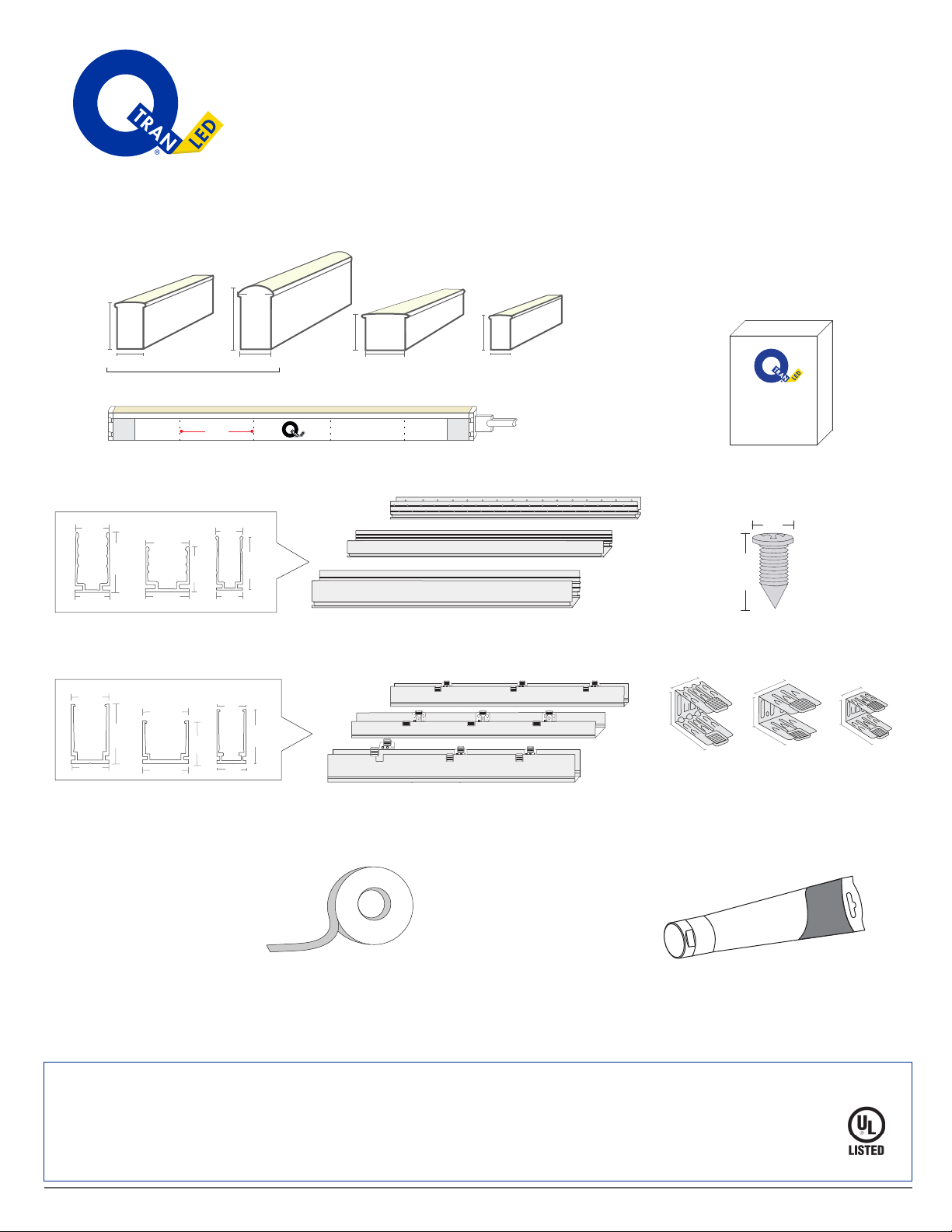
FLEX ALUMINUM EXTRUSION
MATERIALS
A B
CD
E
G H
F
S
T
R
O
N
G
S
T
i
K
Gl
ui
n
g
Mad
e
Powe
r
fu
l
TM
.72"
4”
01 02 01 02 01 02 0 1 02
Flex LEDs POWER SUPPLY
(1)
(3)
(2)
(1) (2) (3)
(1) (3)(2)
(1)
(2)
(3)
(1) (2) (3)
.86".81"
.54"
.52” .42"
.93"
.65" .81"
.67"
.72"
.75".45"
.74"
.79"
.79"
.71"
.35"
.85"
.45"
1.11"
.45"
.63"
.62"
.62"
.57"
.87"
.57"
.52"
(1) (2) (3)
.27"
.55"
.49"
.78"
.55"
.41"
.74"
.55"
.63"
.65"
B = Power Supply
D = Screw
F = Self-locking Clip1, Self-locking Clip2, Self-locking Clip3
H = Strong Stik
A = FLEX Meza1, FLEX Round1, FLEX Square2, FLEX Mini3
C = iQA-FMZ-NONL1, iQA-FLR-NONL1, iQA-FLS-NONL2, iQA-FLM-NONL3
E = iQA-FMZ-SELF1, iQA-FLR-SELF1, iQA-FLS-SELF2, iQA-FLM-SELF3
G = VHB Tape
© 2018, Q-Tran Inc. 155 Hill St. Milford, CT06460. All rights reserved - 203-367-8777 - [email protected] - www.q-tran.com
ENLIGHTENEDTHINKING
®
2
INSTALLATION INSTRUCTION
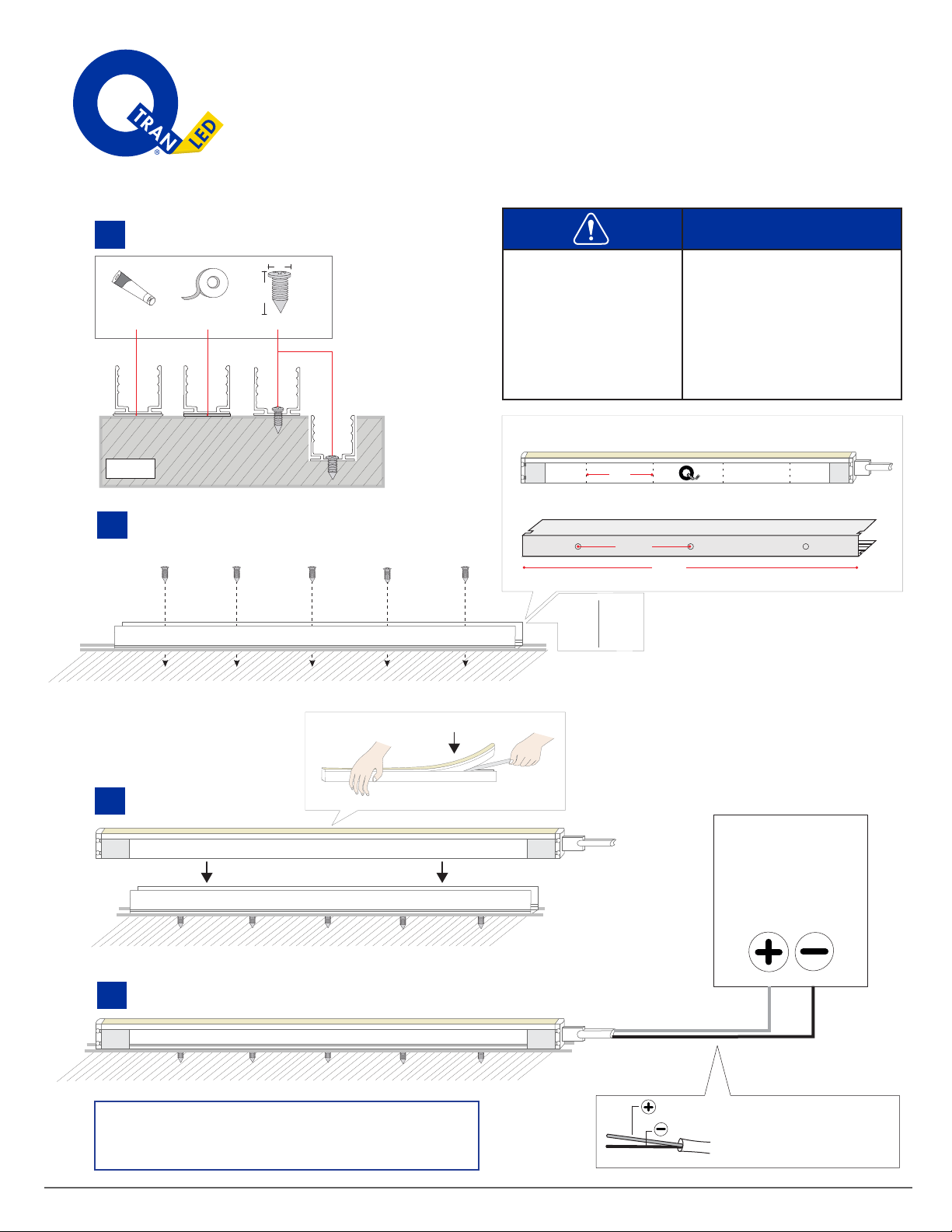
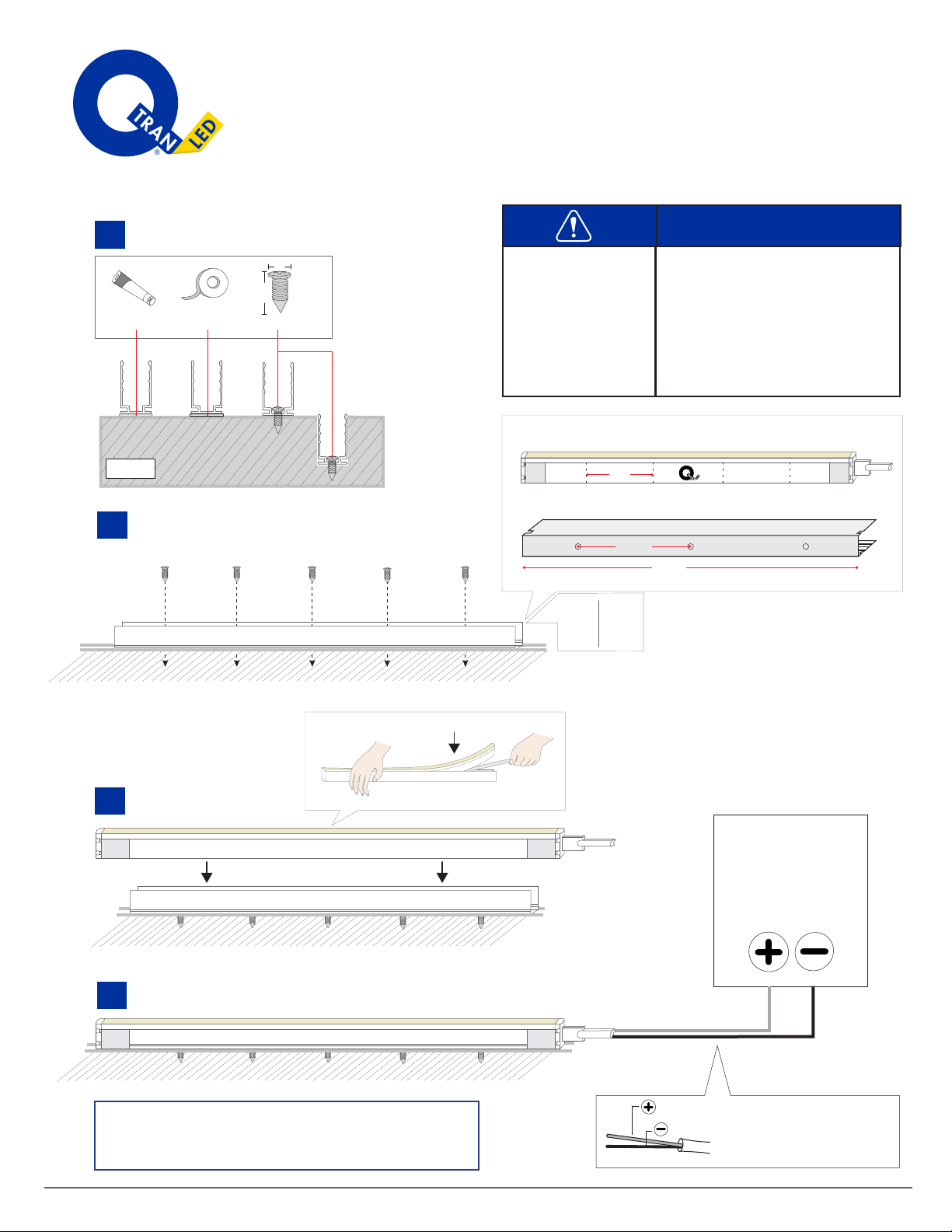
iQA-FMZ-NONL and iQA-FLR-NONL
Materials
Flex Meza, Flex Round
Power Supply
iQA-FMZ-NONL, iQA-FLR-NONL
Screws
Strong Stik
• Q-Tran tests all factory
Flex Series before
shippping to ensure
LED is working.
•
Throughly clean the
area where the Flex
light is to be installed.
A1:
B:
C1:
D:
H:
Floor
.27”
.72”
S
T
R
ONG
S
T
i
K
Gl
u
in
g
M
ade
P
o
w
erful
TM
BlackRed
POWER
SUPPLY
Black
Red
Screw
VHB
Foam Tape
Strong stik
1.
3.
4.
surface mounting.
2. Insert screws and tighten them evenly but not to overtight it.
Put LED into aluminum profile
Connect to Q-Tran power supply.
4”
01 02 01 02 01 02 01 0 2
iQ Flex
7.85”
19.75”
Bottom view
LED Tape Light : Wire lead can
be trimmed to length as needed
Always test LED operation before installing. Connect LED
to power supply to ensure it is working properly.
Note:
2"
19.75"
39.5"
79"
1
3
5
10
Extrusion Screw Hole
19.75”
© 2018, Q-Tran Inc. 155 Hill St. Milford, CT06460. All rights reserved - 203-367-8777 - [email protected] - www.q-tran.com
ENLIGHTENEDTHINKING
®
INSTALLATION INSTRUCTION
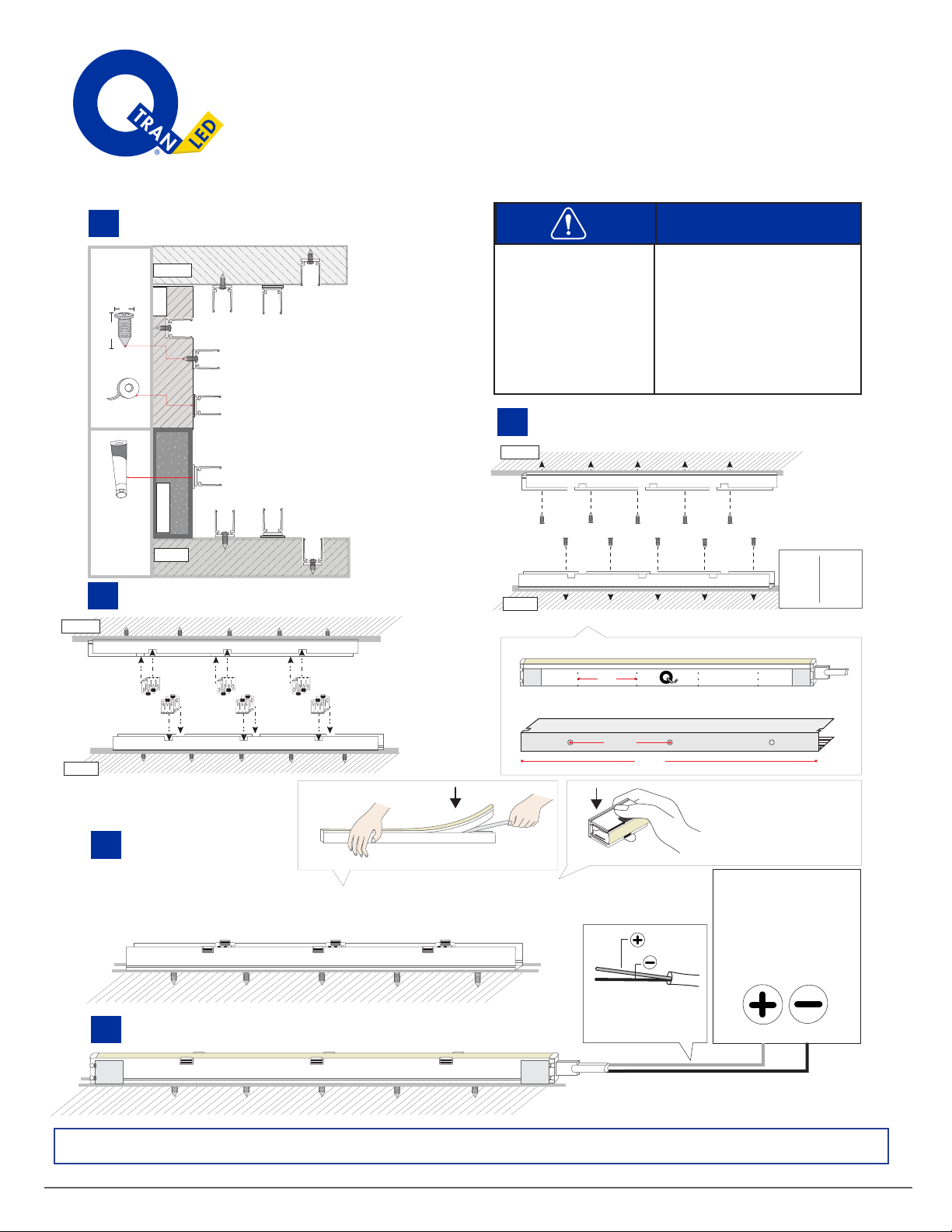
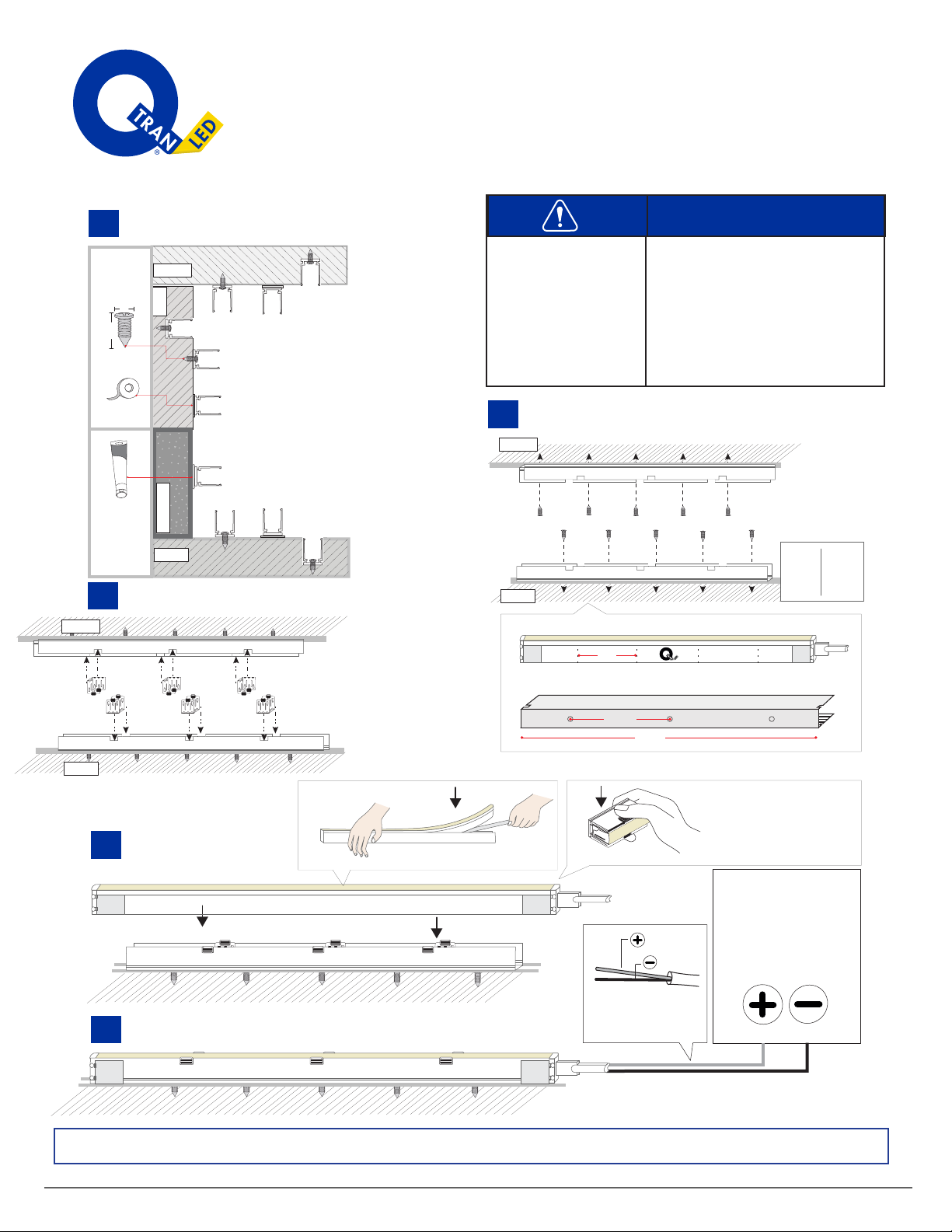
iQA-FMZ-SELF and iQA-FLR-SELF
Ceiling
Floor
Concrete Wall
S
T
R
O
NG
STi
K
G
l
u
ing
M
ade
P
owerful
TM
Screw
VHB
Foam Tape
Strong stik
1. Select surface mounting.
.27”
.72”
3
4.
2. Insert screws and tighten them evenly but not to overtight it.
Put LED into aluminum profile
BlackRed
POWER
SUPPLY
LED Tape Light : Wire lead
can be trimmed to length
as needed.
Black
Red
5.
Flex Meza, Flex Round
Power Supply
iQA-FMZ-SELF, iQA-FLR-SELF
Screws
Strong Stik
• Q-Tran tests all factory
Flex Series before
shippping to ensure
LED is working.
•Throughly clean the
area where the Flex
light is to be installed.
Note
:Always test LED operation before installing. Connect LED to power supply to ensure it is working properly.
3. Put Clips into aluminum profile.
Self-locking Clips
Connect to Q-Tran power supply.
4”
01 02 01 02 01 02 01 0 2
Flex LED
7.85”
Bottom view
Ceiling
Floor
Ceiling
Floor
If you should need to remove
Flex LED, press and hold the
two raised buttons while you
gently pull Flex LED out from
the mount channel.
A1:
B:
E1:
D:
F1:
H:
Materials
1.5"
19.75"
39.5"
79"
1
3
5
10
Extrusion Screw Hole

© 2018, Q-Tran Inc. 155 Hill St. Milford, CT06460. All rights reserved - 203-367-8777 - [email protected] - www.q-tran.com
ENLIGHTENEDTHINKING
®
INSTALLATION INSTRUCTION
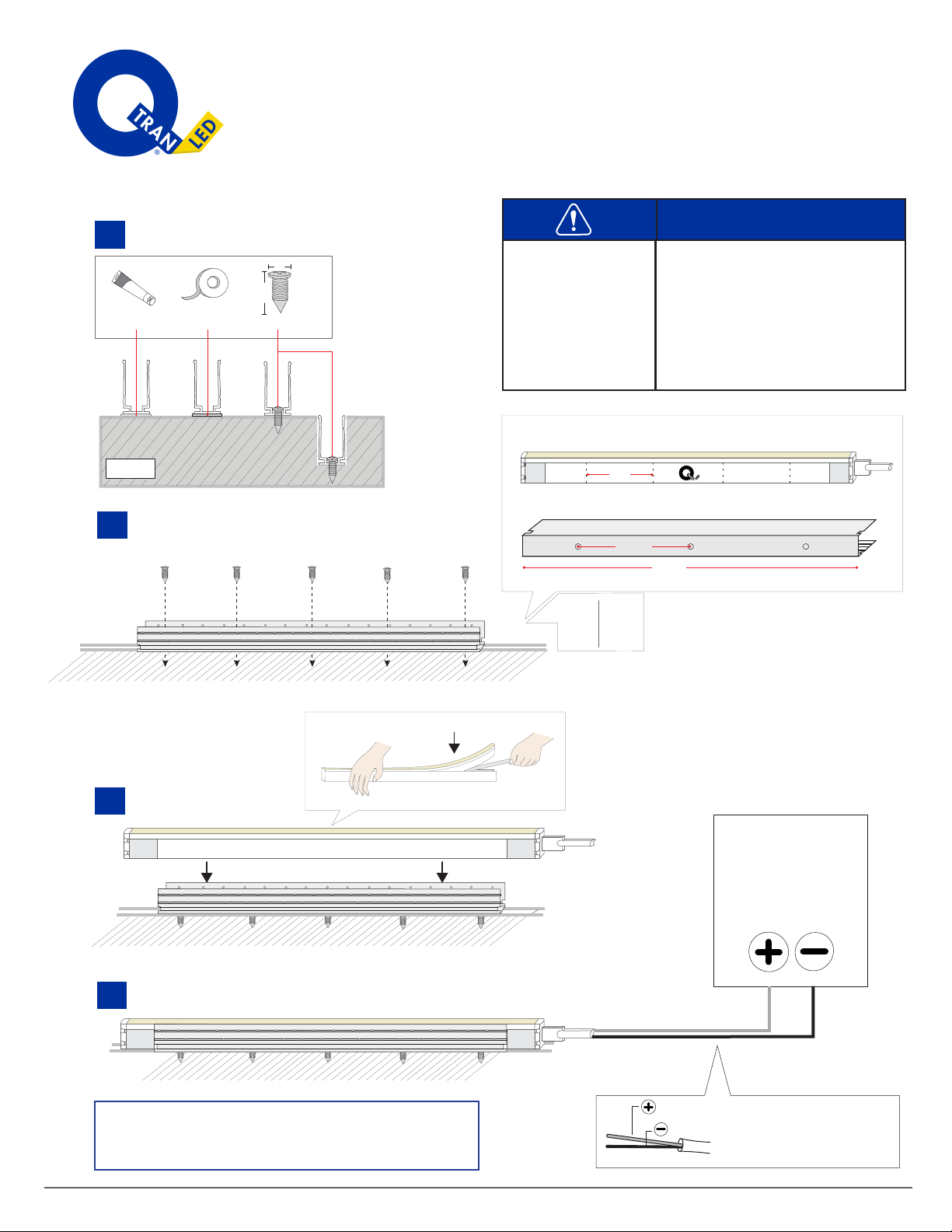
iQA-FLS-NONL
4
Materials
Floor
.27”
.72”
S
T
R
ONG
S
T
i
K
Gl
u
in
g
M
ade
P
o
w
erful
TM
BlackRed
POWER
SUPPLY
Black
Red
Screw
VHB
Foam Tape
Strong stik
1.
3.
4.
surface mounting.
2. Insert screws and tighten them evenly but not to overtight it.
Put LED into aluminum profile
Connect to Q-Tran power supply.
Flex Square
Power Supply
iQA-FLS-NONL
Screws
• Q-Tran tests all factory
Flex Series before
shippping to ensure
LED is working.
•Throughly clean the
area where the Flex
light is to be installed. Strong Stik
A2:
B:
C2:
D:
H:
4”
01 02 01 02 01 02 01 0 2
iQ Flex
7.85”
19.75”
Bottom view
LED Tape Light : Wire lead can
be trimmed to length as needed
Always test LED operation before installing. Connect LED
to power supply to ensure it is working properly.
Note:
2"
19.75"
39.5"
79"
1
3
5
10
Extrusion Screw Hole
Materials
19.75”
4”
01 02 01 02 01 02 01 0 2
Flex LED
7.85”
Bottom view
© 2018, Q-Tran Inc. 155 Hill St. Milford, CT06460. All rights reserved - 203-367-8777 - [email protected] - www.q-tran.com
ENLIGHTENEDTHINKING
®
INSTALLATION INSTRUCTION
iQA-FLS-SELF
5
Ceiling
Floor
Concrete Wall
.27”
.72”
S
T
R
O
NG
STi
K
G
l
u
ing
M
ade
P
owerful
TM
Screw
VHB
Foam Tape
Strong stik
1.
4.
Select surface mounting.
2. Insert screws and tighten them evenly but not to overtight it.
Put LED into aluminum profile
BlackRed
POWER
SUPPLY
LED Tape Light : Wire lead
can be trimmed to length
as needed.
Black
Red
5.
Flex Square
Power Supply
iQA-FLS-SELF
Screws
Strong Stik
• Q-Tran tests all factory
Flex Series before
shippping to ensure
LED is working.
•Throughly clean the
area where the Flex
light is to be installed. Self-locking Clips
A2:
B:
E2:
D:
F2:
H:
Note
:Always test LED operation before installing. Connect LED to power supply to ensure it is working properly.
3. Put Clips into aluminum profile.
Connect to Q-Tran power supply.
Ceiling
Floor
Ceiling
Floor
If you should need to remove
Flex LED, press and hold the
two raised buttons while you
gently pull Flex LED out from
the mount channel.
Materials
1.5"
19.75"
39.5"
79"
1
3
5
10
Extrusion Screw Hole
© 2018, Q-Tran Inc. 155 Hill St. Milford, CT06460. All rights reserved - 203-367-8777 - [email protected] - www.q-tran.com
ENLIGHTENEDTHINKING
®
•
Throughly clean the
area where the Flex
light is to be installed.
INSTALLATION INSTRUCTION
iQA-FLM-NONL
6
Materials
Flex Mini
Power Supply
iQA-FMZ-NONL
Screws
Strong Stik
• Q-Tran tests all factory
Flex Series before
shippping to ensure
LED is working.
A3:
B:
C3:
D:
H:
Floor
.27”
.72”
S
T
R
ONG
S
T
i
K
Gl
u
in
g
M
ade
P
o
w
erful
TM
BlackRed
POWER
SUPPLY
Black
Red
Screw
VHB
Foam Tape
Strong stik
1.
3.
4.
surface mounting.
2. Insert screws and tighten them evenly but not to overtight it.
Put LED into aluminum profile
Connect to Q-Tran power supply.
4”
01 02 01 02 01 02 01 0 2
iQ Flex
7.85”
19.75”
Bottom view
LED Tape Light : Wire lead can
be trimmed to length as needed
Always test LED operation before installing. Connect LED
to power supply to ensure it is working properly.
Note:
2"
19.75"
39.5"
79"
1
3
5
10
Extrusion Screw Hole
19.75”
4”
01 02 01 02 01 02 01 0 2
Flex LED
7.85”
Bottom view
© 2018, Q-Tran Inc. 155 Hill St. Milford, CT06460. All rights reserved - 203-367-8777 - [email protected] - www.q-tran.com
ENLIGHTENEDTHINKING
®
INSTALLATION INSTRUCTION
iQA-FLM-SELF
7
Ceiling
Floor
Concrete Wall
S
T
R
O
NG
STi
K
G
l
u
ing
M
ade
P
owerful
TM
Screw
VHB
Foam Tape
Strong stik
1.
4.
Select surface mounting.
2. Insert screws and tighten them evenly but not to overtight it.
Put LED into aluminum profile
BlackRed
POWER
SUPPLY
LED Tape Light : Wire lead
can be trimmed to length
as needed.
Black
Red
5.
Flex Mini
Power Supply
iQA-FLM-SELF
Screws
Strong Stik
• Q-Tran tests all factory
Flex Series before
shippping to ensure
LED is working.
•Throughly clean the
area where the Flex
light is to be installed.
Note
:Always test LED operation before installing. Connect LED to power supply to ensure it is working properly.
3. Put Clips into aluminum profile.
Self-locking Clips
Connect to Q-Tran power supply.
Ceiling
Floor
Ceiling
Floor
If you should need to remove
Flex LED, press and hold the
two raised buttons while you
gently pull Flex LED out from
the mount channel.
A3:
B:
E3:
D:
F3:
H:
Materials
.27”
.72”
1.5"
19.75"
39.5"
79"
1
3
5
10
Extrusion Screw Hole