manuals.online logo
Brands
  1. Home
  2. •
  3. Brands
  4. •
  5. Rane
  6. •
  7. Media Converter
  8. •
  9. Rane PAQRAT Instruction and safety manual

Rane PAQRAT Instruction and safety manual

This manual suits for next models

1

Other Rane Media Converter manuals

Rane SM 26B User manual

Rane

Rane SM 26B User manual

Rane BB 44X User manual

Rane

Rane BB 44X User manual

Rane BB 22 Instruction Manual

Rane

Rane BB 22 Instruction Manual

Rane BB 22 User manual

Rane

Rane BB 22 User manual

Rane BB 22 User manual

Rane

Rane BB 22 User manual

Rane BB 44X User manual

Rane

Rane BB 44X User manual

Popular Media Converter manuals by other brands

TR-Electronic CMS582M-4096/4096 IOL DMS 14H7 KRF Assembly instructions

TR-Electronic

TR-Electronic CMS582M-4096/4096 IOL DMS 14H7 KRF Assembly instructions

Korenix JetCon 2301S user manual

Korenix

Korenix JetCon 2301S user manual

StarTech.com ET91000LCOAM manual

StarTech.com

StarTech.com ET91000LCOAM manual

Alesis AI-3 Reference manual

Alesis

Alesis AI-3 Reference manual

Caton Vpro 5100 user guide

Caton

Caton Vpro 5100 user guide

Cypress CSC-5500 Operation manual

Cypress

Cypress CSC-5500 Operation manual

H&B TX-100 Installation and instruction manual

H&B

H&B TX-100 Installation and instruction manual

Bolin Technology D Series user manual

Bolin Technology

Bolin Technology D Series user manual

IFM Electronic Efector 400 RN30 Series Device manual

IFM Electronic

IFM Electronic Efector 400 RN30 Series Device manual

GRASS VALLEY KUDOSPRO ULC2000 user manual

GRASS VALLEY

GRASS VALLEY KUDOSPRO ULC2000 user manual

Linear Technology DC1523A Demo Manual

Linear Technology

Linear Technology DC1523A Demo Manual

Lika ROTAPULS I28 Series quick start guide

Lika

Lika ROTAPULS I28 Series quick start guide

Weidmuller IE-MC-VL Series Hardware installation guide

Weidmuller

Weidmuller IE-MC-VL Series Hardware installation guide

Optical Systems Design OSD2139 Series Operator's manual

Optical Systems Design

Optical Systems Design OSD2139 Series Operator's manual

Tema Telecomunicazioni AD615/S product manual

Tema Telecomunicazioni

Tema Telecomunicazioni AD615/S product manual

KTI Networks KGC-352 Series installation guide

KTI Networks

KTI Networks KGC-352 Series installation guide

Gira 0588 Series operating instructions

Gira

Gira 0588 Series operating instructions

Lika SFA-5000-FD user guide

Lika

Lika SFA-5000-FD user guide

manuals.online logo
manuals.online logoBrands
  • About & Mission
  • Contact us
  • Privacy Policy
  • Terms and Conditions

Copyright 2025 Manuals.Online. All Rights Reserved.

OPERATING/SERVICEMANUAL RC 24A
PAQRATRECORDINGCONVERTER
DESCRIPTION
TheRC24A(or“PAQRAT”)allowsyoutorecordandplaybackstereodigitalaudiosignalswithupto24bitsof
resolutionusingyourAlesisADATmodulardigitalmultitrack.
TheRC24AaccomplishesthistaskbyconvertingtheAES/EBU(orSPDIF)stereo24-bitdigitalaudiosourcesignalto
four16-bitchannelscompatiblewithAlesis’sproprietary“ADATOptical”interface.TheRC24Asimultaneouslywrites
thesesignalsontotheADATand reads them backoffagain.Controlsonthefront panel allow you toassignthesefour
channels to tracks 1-4, 5-8, or 1-8 (two identical groups of four tracks) on the ADAT. The odd tracks carry the upper 16
bitsoftheoriginaldigitalaudio signal, and the eventrackscarrythelowereightbits plus a -20dB reference tone.
Note:Althoughitisnearlyimpossibletoachievebetterthan20-bitperformancefromtoday’sA/Dconverters,werefer
tothehighresolutioninputsandoutputsto/fromthePAQRATas24-bitanyway,justtosimplifythings.Youcaninterface
anyAES/EBUorSPDIFsignaltotheinputandoutputofthePAQRATfrom16to24bits.
SETUP&OPERATION
1.Connectone ofthesuppliedfiber opticcablesbetweenthe digitaloutputconnectoron yourADATand theDIGITAL
INPUTconnectorontheRC-24A.
2.Connectone of thesuppliedfiberoptic cablesbetweenthedigital inputconnectoronyour ADATandtheDIGITAL
OUTPUTconnectorontheRC-24A.
3.Connectastereodigitalaudiosource signal (up to 24-bit) to the AES/EBU (or SPDIF) INPUT on the rear of the RC-24A.
SettheINPUT SELECTswitchtoAES/EBU orSPDIFforthe appropriate input.
4.ConnecttheAES/EBUOUTPUTon therearof theRC-24Ato whateverisreceiving the24-bitdigitalaudiosignalduring
playback(andmonitoring).
5.ConnectthesuppliedRane RS-1 remotepowersupplytothered POWER jack ontherearofRC-24A.
6. Make sure the ADAT is plugged in and turned on.
7.PresstheDIGITALINbuttonontheADATtoselecttheADATOPTICALinterfaceasthe audio signal source.
8.PresstheRECORDTRACKASSIGNandPLAYBACKTRACKASSSIGNbuttonsontheRC-24Atoselecttracks1-4,5-8,
or1-8(record only).Armthecorresponding tracksontheADAT for recording.
9.Recordandplaybacktracks on the ADAT as normal,usingtheAES/EBU(orSPDIF)Inputand Output on the RC-24Aas
thesourceanddestinationforthe24-bitdigitalaudiosignal.
www.audiovias.com
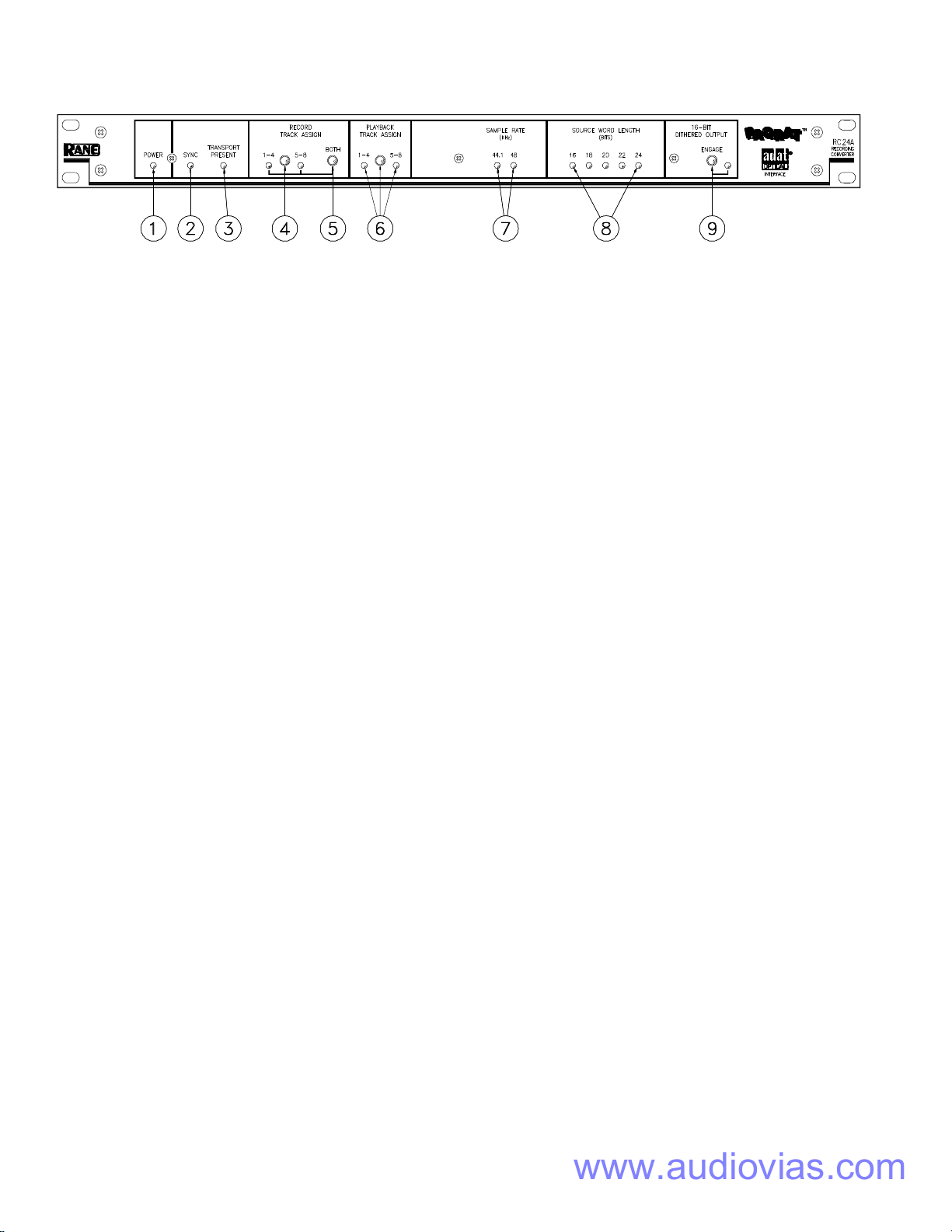
FRONTPANELDESCRIPTION
1.POWERLED. Whendim,thisLEDindicates that you forgottopluginthe RC-24A.
2.SYNC LED. Indicates that a suitable AES/EBU (or SPDIF) sync source is plugged in. If this LED is not lit, the RC-24A is
notreceivingsignalfrom a source. Check theINPUTSELECTswitchto make sure theproperinputisselected.
3.TRANSPORTPRESENTLED. When lit,thisLED indicatesthatanADATisconnectedtotheRC-24Aviathefiberoptic
interface.
4.RECORDTRACKASSIGNBUTTON.Thispushbutton switchletsyouselectwhichfourtracks oftheADATare
recordedwiththestereo 24-bitdigitalaudiosource signal. An LEDindicateswhetheryou are recordingontotracks1-4 or
5-8.
5.RECORDTRACKASSIGN“BOTH”BUTTON .Thispushbuttonselectsall8tracksforrecording,nomatterwhatthe
stateofthe RECORD TRACKASSIGNBUTTON(previous section)is. Tracks1-4are identicaltotracks5-8. Usethis
optionwhenyouarearchivingastereomaster,andwishtocreatearedundantcopyonthesametape.
6.PLAYBACKTRACKASSIGNBUTTON.Thispushbuttonswitchletsyouselectwhichfour tracksoftheADATare
convertedbackto24-bitdigitalaudio,andtransmittedouttheAES/EBUOUTPUT.AnLEDindicateswhetheryouare
playingtracks1-4or 5-8.
7.SAMPLERATELEDS. TheseLEDsindicatethe samplerateofthe AES/EBU(orSPDIF)source (sync)input(44.1kHzor
48kHz).
8.SOURCEWORDLENGTHLEDS.TheseLEDsindicatethewordlength(inbits)oftheAES/EBU(orSPDIF)source
(sync)input.
9.16-BITDITHEREDOUTPUTENGAGESWITCH. Thisswitchengages16-bitditheringandtruncationontheAES/
EBUOUTPUT. Dithershouldbe engaged whentheAES/EBUOUTPUT is feedingadevicethattruncates the signalto16
bits(e.g.DATrecorder,digitalsignalprocessors,andsoon).
www.audiovias.com
REARPANELDESCRIPTION
1.AES/EBUOUTPUT. TheAES/EBUOUTPUTtransmitsdigitalaudioconformingtotheAES/EBUstandard.Digitalaudio
exitingthisOutputisidenticalto the original digital audiofedtotheAES/EBU(orSPDIF) INPUT and recorded onto the
ADAT.ThisOutput istypicallyconnectedto aD/Aconverter,hard diskrecorderora CDmasteringsystem. TheAES/EBU
OUTPUTfollowsinternationalconventions,withpin2hot,pin3negative,andpin1tiedtochassisground.
2.AES/EBUINPUT. TheAES/EBUINPUTfollowstheAES/EBUstandard.LiketheAES/EBUOUTPUTconnector,pin2is
hot, and pin 3 is not. This Input is typically connected to a digital audio source, such as an A/D convertor or the output of a
digitalmixer.
3.SPDIFINPUT. TheSPDIFINPUT isjustliketheAES/EBUINPUT,except datareceivedherereceivesdigitalaudio
formattedwiththeconsumer“SonyPhilipsDigitalInterfaceFormat”.
4.INPUTSELECTSWITCH. ThisswitchallowsyoutoselectthedesiredInput(SPDIForAES/EBU).Anotherwayof
puttingitis:youmustselecttheproperInput(theoneyoupluggedacable into).
5.ADATOPTICALINTERFACE. ThisinterfaceconnectstheRC-24AtoadeviceequippedwiththeADATOPTICAL
INTERFACE(e.g.AlesisADATorFostexRD-8).UseonlyRanepart#280-101fiberopticcables.
6.POWERINPUT. Plugtheexternalpowersupplyintothisconnector.Caution:NeverconnectanythingexcepttheRane
RS1ACpowersupply(enclosedwiththeunit)tothethingthatlookslikearedtelephonejackontherearoftheRC-24A.
Thisisa low-voltageACpower input,andconnectingit totelephones,computer keyboards,orotherdevices willresultin
unpredictable,andpotentiallycatastrophic,results.IfyouwanttodestroyyourRC-24A,wesuggestwiringittotheoutput
of a power amplifier, or dropping it out of an airplane.
FCC&VDENOTICE
Thisequipmenthasbeentestedandfoundtocomply
withthelimitsfor a ClassAdigitaldevice, pursuant to
Part15oftheFCCRules,andsimilarrequirementsfound
inEuropeanspecificationsVDE0871/0875.Theselimits
aredesignedtoprovidereasonableprotectionagainst
harmfulinterferencewhentheequipment isoperatedin a
commercialenvironment.Thisequipmentgenerates,uses,
andcan radiate radio frequency energy and, if not
installedandusedinaccordancewiththeinstruction
manual,maycauseharmfulinterferencetoradiocommu-
nications.Operationofthisequipmentinresidentialarea
islikelytocauseharmfulinterferenceinwhichcasethe
user will be required to correct the interference at their
ownexpense.USEOFSHIELDEDDIGITALCABLES
ISREQUIREDFORFCCCOMPLIANCE.
IMPORTANTNOTE
www.audiovias.com
All features & specifications subject to change without notice. 520-388 MAY95Printed in the U.S.A. on Recycled Paper
©RaneCorporation1080247thAvenueWest,MukilteoWA98275-5098 TEL(206)355-6000 FAX(206)347-7757
OPERATINGNOTES
ByRogerNichols
MixingtoPAQRAT.ThefirsttimeI usedthePAQRAT
wastostore 20-bitmixesofWalterBecker’s soloalbum.In
mastering,morethanonce,adrop-outon theopticaldisk
madeusscrambleforthe PAQRAT encoded tapetosavethe
day.Ifyouareprinting your mixes toPAQRATandDAT,
connecttheDAT machineontheoutputof thePAQRATand
engageOUTPUTDITHERonthePAQRATfrontpanel.This
way you will get the benefit of 16-bit dithering for DAT
storage.IftheDATmachineisconnecteddirectly to the 20-
bit data, the 16 bits stored on the DAT will be truncated,
resultinginlowerfidelity.
HardDiskAudio. IfyouperformDSPoperationsonhard
disk(iftheharddiskcontainsdigital audio,shouldthe
spelling of disc end in a “C” instead of a “K”?) files, the
highestfidelitywouldberealizediftheresultantfilewas
storedas a 24-bit file. If multiple DSP operations are tobe
performed,suchasnoisereductionononepass,limitingon
anotherpass,EQonanotherpass,and thenfinallydigitally
mixedwithanother audio file,thenallof theprocessing
shouldbedone inthe24-bit mode.Theresultantaudio file
RC24AANDALESISADATSYSTEMCONNECTION
thenneedstobe convertedto16-bitonlyonce, and thenasty
artifactsarekepttoaminimum.The24-bitfilescanbe
backedupthroughaPAQRATtomaintainthehighestquality
intheaudiodata.
MasteringwithPAQRAT.Whenmasteringaprojectthat
was mixed 16-bit, use the PAQRAT to make an EQ safety.
Theoutputfromdigitalmasteringconsolesisusually24-bit
(the24-bitsis generatedbythemathused toperformdigital
EQ,limiting,compressionandlevelchanges).IftheEQtape
isonly16-bit,the noise floorincreasesbecauseofthe
roundedoffmath.
SelectingBoth.WhenusingthePAQRATtostoretwo
channelmixes,select“BOTH” fortheRECORDTRACK
ASSIGN.Thisprovides youwithan addedlevelofredun-
dancy.Theaudiodataisrecordedtwice.Ifforsomereason
youweretoencounteradropoutontheprimarytracks,then
it may be possible to retrieve the data from the other set of
tracksbyswitchingthePLAYBACKTRACKASSIGNtothe
othersetoftracks.Thismethodlets you think of the eight
trackasagiantDATmachinewithbuilt-inredundancy.

www.audiovias.com