
Roswell RMA 500.2 User manual

REV. 02-Feb-14 Pg. 1/19
Roswell Marine Audio
Amplier Owner’s Manual
RMA 600.1 C920-0029
RMA 500.2 C920-0030
RMA 600.4 C920-0031
RMA 800.5 C920-0032

Roswell Marine Audio Amplier Owner’s Manual
REV. 02-Feb-14
Thank you for purchasing a Roswell Marine Audio (RMA) Amplier. Since 1998 Roswell has
been the world leader in wakeboard towers and accessories in the marine industry and is quickly
becoming a leader in marine audio.
This RMA Marine Amplier uses a super-efcient Class D topology that signicantly improves
efciency while enhancing sound quality. The amplier has been designed using the latest
available electronic technology, allowing you to produce high quality stereo reproduction in mobile
applications. This system provides low harmonic distortion, a considerable amount of reserve
voltage, and high temperature stability.
Installation Instructions
RMA ampliers are designed for easy installation in your boat. To ensure proper operation of your
new investment, please follow the suggestions listed in this manual.
Warning
Please check the suitability of the installation location before you begin. Do not cut any of the
boat’s structure. Pay close attention to what is behind any bulkheads, panels and carpet. Often
the boat manufacturer will hide wires and cables in the exact location you may wish to install in.
The amplier is sensitive to electrical and motor noise and interference from the amplier may
affect your radio reception, try mounting the amp at least three feet away from the receiver.
If you do not have experience with automotive or marine electrical and mechanical systems please
contact a professional installer. Paying a qualied installer is almost always cheaper than paying a
dealership to repair your boat.
Location of the Amplier
The amplier must be securely mounted to a solid surface. Please select a dry location such as
in the storage compartment. Do not mount the amplier to any area that may have excessive
vibration (like the subwoofer box) or under any cup holder drain lines that may leak water. Position
the amplier in an area that receives sufcient airow and mount it vertically or completely at for
optimal heat dissipation.
Supplying Enough Power
Your amplier converts power, or current, from your boat’s electrical system and turns it into high
power audio energy. If the amp does not get all the power it needs, it will not produce its full
output. If the voltage or current drops too low, the amplier will drop below it’s rated output. Make
sure your boats charging system is in good working order. Any hi-performance audio amplier will
increase the demand on your alternator and battery. If you are unsure, have your charging system
tested by a professional technician.
Pg. 2/19
Vertical Mount Flat Mount

Roswell Marine Audio Amplier Owner’s Manual
REV. 02-Feb-14
Important: The performance of your amplier is reliant on using high quality marine grade wiring
components. There are inherent risks when using low-cost wiring materials with a high power
amplier, most critical of which is overheating. A full RMA Wiring Kit (C920-0003) can be purchased
separately through an RMA dealer, we highly recommend using our wiring kit as it ensures high
quality wiring and fusing.
The Ground
Warning: Read the following carefully
The ground wire should be connected directly to the battery of your boat. Remember, the ground
must carry the same high current as the positive wire.
To reduce the risk of noise, run all signal cables away from any power supplying wires.
Running the Cables
Carefully run your power and ground wires to the battery. 4 AWG is the minimum recommended
wire size for this amplier. If powering multiple ampliers from the same power wire, verify the wire
size is adequate for the total amp draw. Roswell recommends using full spec wiring adequate for
the total amp draw from the ampliers being powered. You must install a main fuse within 12” of
the battery rated for the total amount of ampliers used. You must also use an in-line fuse for each
amplier, installing it no further than 18” away from the amplier (check your particular amplier
model for fuse rating).
Level
Due to the wide range of head unit output congurations all RMA ampliers have an adjustable
input sensitivity or “LEVEL” or “GAIN”. The level is not a volume control. It properly matches the
input of the amplier to the output of the head unit and makes the amplier more sensitive to input
from the stereo. With the level up, the amplier will reach maximum output at a lower volume
setting on the deck. At higher level settings the amplier becomes more sensitive to noise from the
boats electrical system. Try to run the level at the lowest setting possible for your system for the
best sound quality while still achieving full power output.
There is no correct level setting suitable for all applications as head unit preamp outputs vary.
Since speakers have different power requirements to reach the same output, the level is most often
needed to compensate for these differences.
Protection Indicator
This amplier is equipped with an advanced protection system. If for any reason this unit goes into
protection mode it will ash a solid single red LED light found on the control end of the amplier.
Control Panel
The control panel can be found under the cover located on the face of the amplier. To access the
control panel remove the cover by unfastening the two screws using the included Allen key.
Crossover Controls
Note: All frequency markings are intended as guidelines only, the only way to set these dials
exactly is with an oscilloscope.
A crossover is a device that removes unwanted frequencies from a speaker or amplier and
enhances the desired ones. A tweeter can easily be blown by bass frequencies if they are not
Pg. 3/19
Roswell Marine Audio Amplier Owner’s Manual
REV. 02-Feb-14 Pg. 4/19
ltered out. A subwoofer will not sound natural if it is playing mid range frequencies. Careful
adjustment is needed to ensure that all speakers are playing the right frequencies and that they are
left with no gaps in the frequency response.
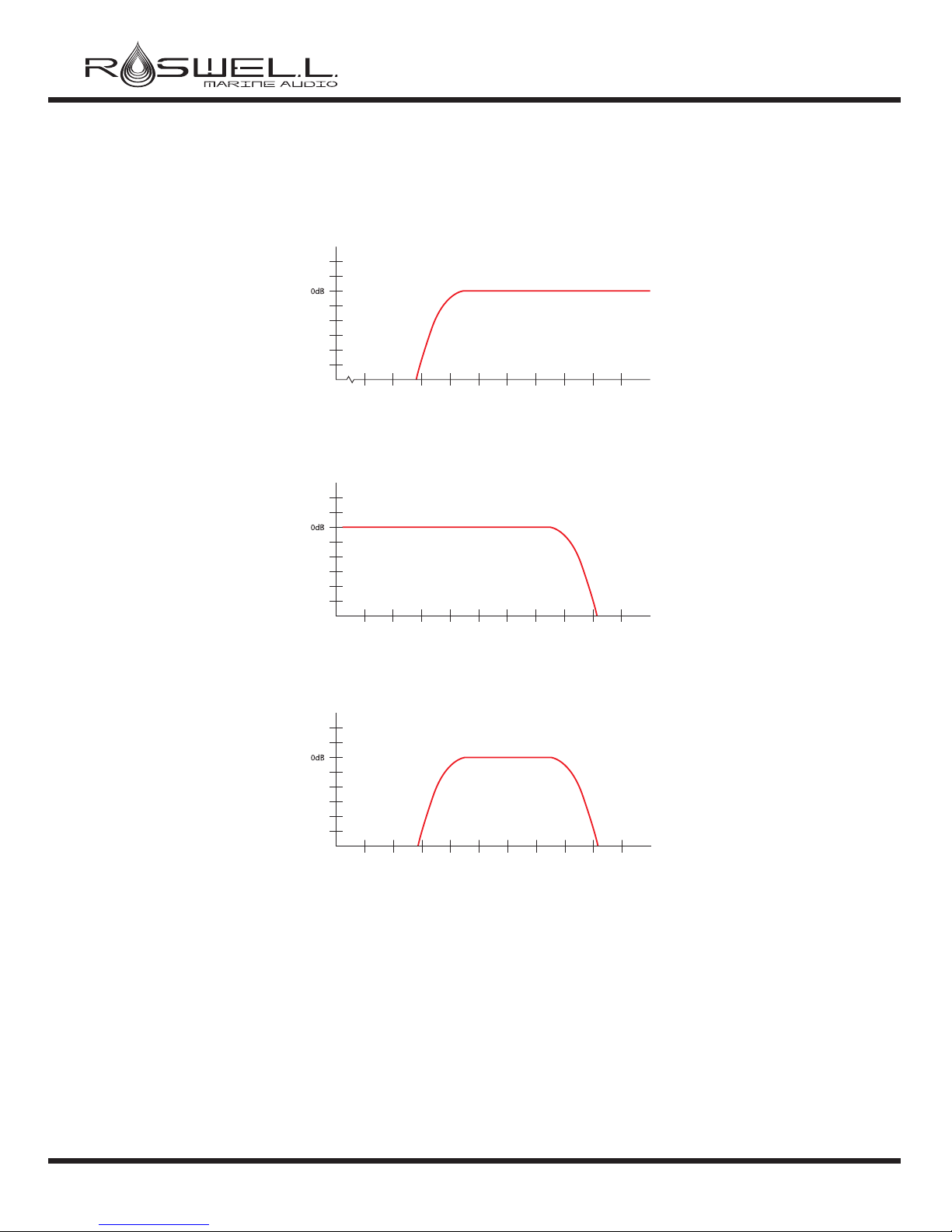
• HPF (High-Pass Filter) - A high-pass lter allows high frequency signals to pass through while
reducing all signals lower than the cutoff frequency setting on its dial.
• LPF (Low-Pass Filter) - A low-pass lter allows low frequency signals to pass through while
reducing all signals higher than the cutoff frequency setting on its dial.
• Bandpass Filter (BP) - Uses both the high-pass and low-pass lters in order to only play a
selected range of frequencies.
• Subsonic - A Subsonic lter allows higher frequency signals to pass through while reducing
all signals lower than the cutoff frequency set on its dial. This allows you to remove unwanted
frequencies in order to protect your equipment. Typically this should be set in the 30Hz range.
Note: As an added benet to you, all low-pass lters work in conjunction with the high-pass to
function as a bandpass. In low-pass mode your high-pass dial functions as a subsonic lter.
We recommend this be set around 30Hz as anything below this level is wasting battery power
and could cause potential damage to your speaker.
• Full - Allows the full range of frequencies to pass through.
• Double - This setting applies the crossover settings of channels 3 and 4 to all four channels.
This applies to the 600.4 amplier only. Typically this setting is used when powering two
identical speakers in bridged mode.
60 70 80 90 100 110 120 130 140 150
Frequency (Hz)
HPF Frequency Response Curve
(illustrates crossover set at 90Hz)
Amplitude (dB)
10 20 30 40 50 60 70 80 90 100
Frequency (Hz)
LPF Frequency Response Curve
(illustrates crossover set at 80Hz)
Amplitude (dB)
10 20 30 40 50 60 70 80 90 100
Frequency (Hz)
BPF Frequency Response Curve
(illustrates HPF set at 40Hz & LPF set at 80Hz)
Amplitude (dB)

Roswell Marine Audio Amplier Owner’s Manual
REV. 02-Feb-14 Pg. 5/19
Bass Boost
All of the RMA ampliers have an adjustable bass boost. Use Bass Boost carefully - the response
on the power output is tremendous!
• 600.1 - The RMA Mono Amplier includes a bass boost of 0-12dB at 45Hz. The 600.1 includes
a subsonic lter that sets the lower cutoff frequency, variable from 15Hz to 55Hz.
• 500.2 - The RMA 2-channel amplier includes a bass boost of 0-12dB at 45Hz.
• 600.4 - The RMA 4-channel amplier includes a bass boost of 0-12dB at 45Hz. The bass
boost only affects channels 3 & 4.
• 800.5 - The RMA 5-channel amplier includes a bass boost of 0-12dB at 45Hz. The 800.5
includes a subsonic lter that sets the lower cutoff frequency, variable from 15Hz to 55Hz.
Please note the bass boost and subsonic settings will only function on CH5.
Remote Gain Control
• The RMA 600.1, 500.2, and 800.5 Ampliers include a remote gain control module that can
be plugged into the amplier to allow easy reduction of the gain setting without accessing the
amplier.
Remote Gain Control Module
RCA Line Out - The RMA 600.1, 500.2, and 500.4 ampliers all have line out connections that
allow you to connect multiple ampliers together. The RCA pre-outs supply a full range mono signal
as they are designed to feed additional subwoofer ampliers.
RCA cable
Optional full range line out
connection to additional
amplifiers in the system
Speaker Outputs
All RMA ampliers are equipped with a block style terminal for speaker connection. Make these
connections carefully and neatly. Strip your wire back ⅝” and twist the exposed leads. Insert
them into the appropriate spot on the block terminal. Make sure that there are no loose or frayed
strands of wire sticking out. If a wire comes in contact with another wire, the amplier will go into
protection mode. Fasten the wire in place with the small Allen hex key (included). Verify your wires
are secured in place by gently pulling on them. Note: Know your impedance before you make any
connections.

Roswell Marine Audio Amplier Owner’s Manual
REV. 02-Feb-14 Pg. 6/19
Installation Instructions (Reference Diagrams on Page 7 to 11)
1. Disconnect the negative cable from the boat battery. Tape up the end so it is isolated from the
battery.
2. Run a red 4 AWG wire from the battery to the amplier. Plan this part of the installation carefully.
This cable will carry a very high current (or battery switch common post). If it should short to any
metal and is not properly fused it could catch re.
3. Connect an in-line fuse holder to the power cable no further than 12” away from the positive
battery terminal. If one amplier is being used, refer to the table below for recommended fuse
rating. If two or more ampliers are being used, verify the fuse and wire are capable of handling the
total current load of all ampliers connected. To protect each amplier, use an in-line fuse holder or
fused distribution block within 18” of the ampliers, again referring to the table below. Do not install
the fuse(s) until the end of the installation.
Please refer to the following recommended fuse ratings for your specic amplier:
• 600.1 Amplier - 50 Amp Fuse
• 500.2 Amplier - 40 Amp Fuse
• 600.4 Amplier - 50 Amp Fuse
• 800.5 Amplier - 80 Amp Fuse
4. Run the black 4 AWG ground wire directly to the negative (-12V) pole on the battery. This wire
should handle the load in the previous step and be as short as possible.
5. Wire your speakers and route wires to your amp mounting location.
6. Connect the power and the ground wires to the amplier.
7. Connect the blue remote wire from the head unit to the “REMOTE” connection of the amplier.
** Only after this step should you install the fuse at the battery**
8. Turn on the amplier to verify it is wired correctly and does not go into protection mode. The
power LED should turn solid green after a few seconds.
9. Once you verify you have a steady green light please turn the amplier off to complete the
remaining connections.
10. Connect the speaker wires to the amplier, making sure the polarity (+ and -) are correct.
11. Connect the RCAs to the appropriate inputs on the amplier.
You must now set the controls on the amplier.
This is the most important part of an ampliers installation and should be
completed by a trained audio professional.

Roswell Marine Audio Amplier Owner’s Manual
REV. 02-Feb-14 Pg. 7/19
Power Input Connections
Amplier Applications
+
-
12V Battery
50 amp fuse at battery
for wire short protection
(-) Ground to
amplifier
+12V wire (4 AWG)
Ground connection
directly to the battery
RCA cable
Supplied remote gain can
be connected to reduce
the gain setting remotely
RMA 600.1 Amplier
Subwoofer
2–8 ohms
Subwoofer
4–8 ohms
Subwoofer
4–8 ohms

Roswell Marine Audio Amplier Owner’s Manual
REV. 02-Feb-14 Pg. 8/19
Control Panel
Power Input Connections
RMA 500.2 Amplier
+
-
12V Battery
40 amp fuse at battery
for wire short protection
(-) Ground to
amplifier
+12V wire (4 AWG)
Ground connection
directly to the battery
RCA cable
Supplied remote gain can
be connected to reduce
the gain setting remotely
Please note: These controls are approximate guidelines
and have natural occurring variances, use as reference only.

Roswell Marine Audio Amplier Owner’s Manual
REV. 02-Feb-14 Pg. 9/19
Control Panel
Amplier Applications
2CH Outputs
Bridged Mono
Output
CH 1
2–8 ohms
CH 2
2–8 ohms
Subwoofer
4–8 ohms
Please note: These controls are approximate guidelines
and have natural occurring variances, use as reference only.

Roswell Marine Audio Amplier Owner’s Manual
REV. 02-Feb-14 Pg. 10/19
4CH Outputs
3CH Outputs
Subwoofer
4–8 ohms
CH 2
2–8 ohms
CH 1
2–8 ohms
CH 2
2–8 ohms
CH 3
2–8 ohms
CH 4
2–8 ohms
CH 1
2–8 ohms
Power Input Connections
RMA 600.4 Amplier
+
-
12V Battery
50 amp fuse at battery
for wire short protection
(-) Ground to
amplifier
+12V wire (4 AWG)
Ground connection
directly to the battery
RCA cables
Amplier Applications
Table of contents
Other Roswell Amplifier manuals


















