manuals.online logo
Brands
  1. Home
  2. •
  3. Brands
  4. •
  5. Sharp
  6. •
  7. Calculator
  8. •
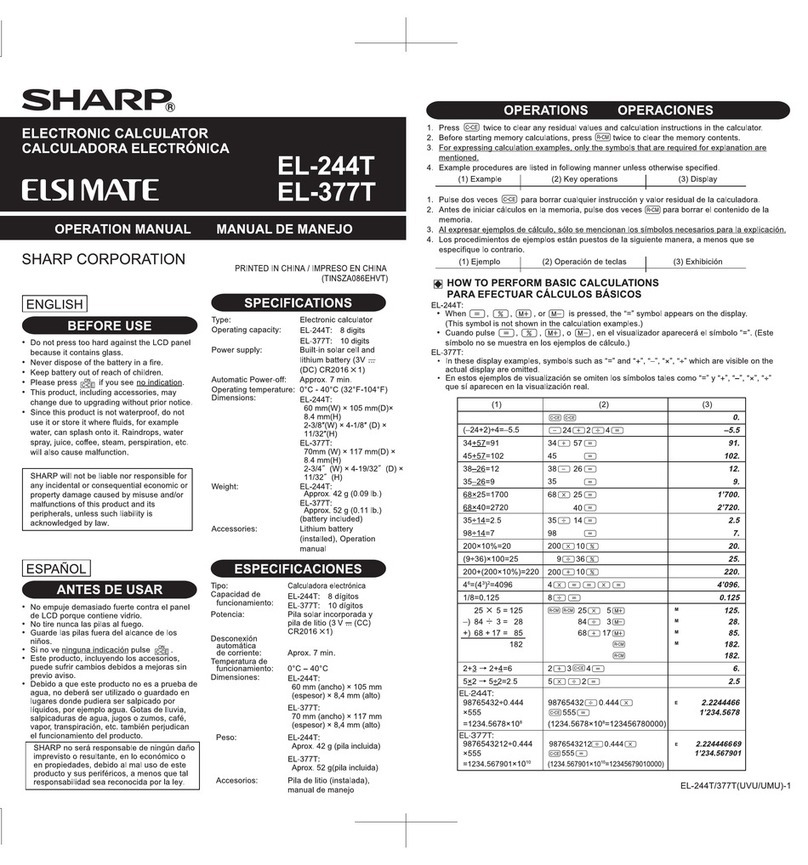
  9. Sharp ELSI MATE EL-244W User manual

Sharp ELSI MATE EL-244W User manual

This manual suits for next models

2

Other Sharp Calculator manuals

Sharp EL-1611E User manual

Sharp

Sharp EL-1611E User manual

Sharp CS-4194H User manual

Sharp

Sharp CS-4194H User manual

Sharp EL-W516XBSL Installation instructions

Sharp

Sharp EL-W516XBSL Installation instructions

Sharp Compet VX-792C User manual

Sharp

Sharp Compet VX-792C User manual

Sharp PC-1211 User manual

Sharp

Sharp PC-1211 User manual

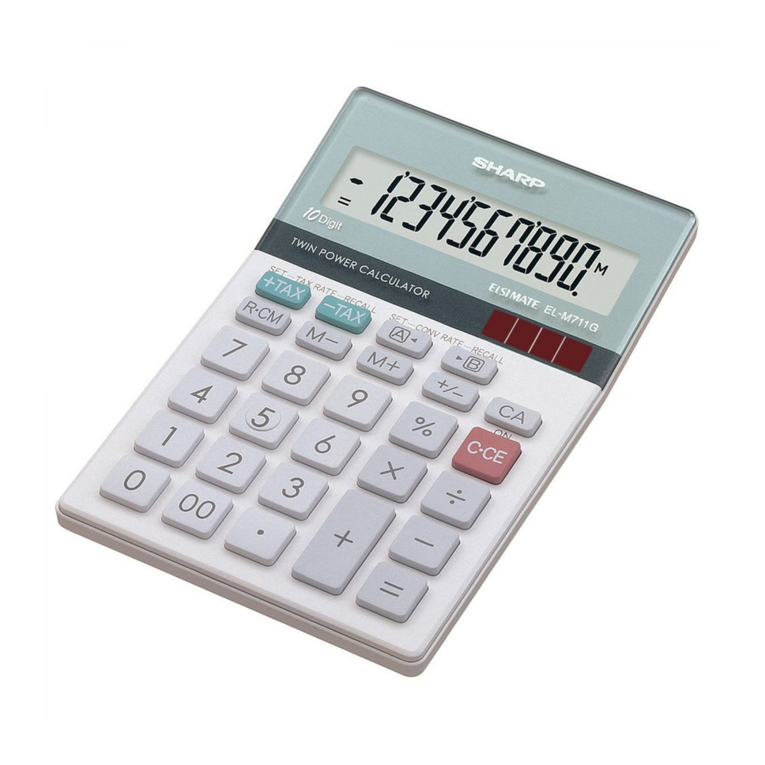
Sharp ELSI MATE EL-M711G User manual

Sharp

Sharp ELSI MATE EL-M711G User manual

Sharp EL-531XBGR User manual

Sharp

Sharp EL-531XBGR User manual

Sharp EL-5230 User manual

Sharp

Sharp EL-5230 User manual

Sharp EL-506V User manual

Sharp

Sharp EL-506V User manual

Sharp ELSI MATE EL-334W User manual

Sharp

Sharp ELSI MATE EL-334W User manual

Sharp EL-364BBK User manual

Sharp

Sharp EL-364BBK User manual

Sharp ELSIMATE EL-334M User manual

Sharp

Sharp ELSIMATE EL-334M User manual

Sharp EL-506H User manual

Sharp

Sharp EL-506H User manual

Sharp EL-531W User manual

Sharp

Sharp EL-531W User manual

Sharp EL-R277B-BK User manual

Sharp

Sharp EL-R277B-BK User manual

Sharp ELSIMATE EL-2139H User manual

Sharp

Sharp ELSIMATE EL-2139H User manual

Sharp EL-2901RC User manual

Sharp

Sharp EL-2901RC User manual

Sharp EL-T100WB User manual

Sharp

Sharp EL-T100WB User manual

Sharp EL-501V User manual

Sharp

Sharp EL-501V User manual

Sharp EL1197PIII - Printing Calculator, 12-Digit User manual

Sharp

Sharp EL1197PIII - Printing Calculator, 12-Digit User manual

Sharp CS-4194H User manual

Sharp

Sharp CS-4194H User manual

Sharp Esi Mate EL-240SA User manual

Sharp

Sharp Esi Mate EL-240SA User manual

Sharp EL-2901RH User manual

Sharp

Sharp EL-2901RH User manual

Sharp EL-738XT User manual

Sharp

Sharp EL-738XT User manual

Popular Calculator manuals by other brands

HP 35s Instruction guide

HP

HP 35s Instruction guide

Casio CFX-9970G user guide

Casio

Casio CFX-9970G user guide

LEXIBOOK EL350 instruction manual

LEXIBOOK

LEXIBOOK EL350 instruction manual

HP HP-97 Service manual

HP

HP HP-97 Service manual

Citizen SDC-414N instruction manual

Citizen

Citizen SDC-414N instruction manual

Casio fx-3800P Operation manual

Casio

Casio fx-3800P Operation manual

Canon P26-DHIII instructions

Canon

Canon P26-DHIII instructions

Citizen 520DPA instruction manual

Citizen

Citizen 520DPA instruction manual

Casio FX-9860GII - SOFTWARE VERSION 2-00 quick start guide

Casio

Casio FX-9860GII - SOFTWARE VERSION 2-00 quick start guide

Casio MS-7UC user guide

Casio

Casio MS-7UC user guide

Casio fx-CG50 instructions

Casio

Casio fx-CG50 instructions

HP HP-67 Owner's handbook

HP

HP HP-67 Owner's handbook

Royal CBC2000 instruction manual

Royal

Royal CBC2000 instruction manual

Heathkit IC-2009 Assembly manual

Heathkit

Heathkit IC-2009 Assembly manual

Universal UNV-15907 owner's manual

Universal

Universal UNV-15907 owner's manual

Casio ALGEBRA FX 2.0 user guide

Casio

Casio ALGEBRA FX 2.0 user guide

Casio CLASSPad300 - ClassPad 300 Touch-Screen Graphing Scientific... user guide

Casio

Casio CLASSPad300 - ClassPad 300 Touch-Screen Graphing Scientific... user guide

Casio HR-110S Operation manual

Casio

Casio HR-110S Operation manual

manuals.online logo
manuals.online logoBrands
  • About & Mission
  • Contact us
  • Privacy Policy
  • Terms and Conditions

Copyright 2025 Manuals.Online. All Rights Reserved.

ENGLISH
BEFORE USE
•Do not press too hard againstthe LCD panel
because it contains glass.
•Never dispose of the battery in a fire.
•Keep battery out of reach of children.
•Please press if you see no indication.
• This product, including accessories, may
change due to upgrading without prior notice.
•Sincethis product is not waterproof, do not
use it or store it where fluids, for example
water, cansplash onto it. Raindrops, water
spray, juice, coffee, steam, perspiration, etc.
will also cause malfunction.
SPECIFICATIONS
Type:Electronic calculator
Operating capacity:
[EL-244W/310W] 8 digits
[EL-377W] 10 digits
8 dígitos
10 dígitos
Power supply:
[EL-244W/377W]
[EL-310W]
manganese
(1.5V
...
(DC) LR1130×1)
Automatic Power-off: Approx. 7 min.
Operating temperature:0°C - 40°C (32°F-104°F)
Dimensions:
[EL-244W]
[EL-310W]
[EL-377W] 72 mm (W) × 120.5 mm(D) ×
8.4 mm(H)
2-27/32″(W) × 4-3/4″(D) ×
11/32″(H)
61 mm(W) × 104 mm(D)×
8.4 mm(H)
2-13/32″(W) × 4-3/32″ (D) ×
11/32″(H)
72 mm (ancho) × 120,5 mm
(espesor) × 8,4 mm (alto)
61 mm (ancho) × 104 mm
(espesor) × 8,4 mm (alto)
Weight
(battery included)
:
[EL-244W]
[EL-310W]
[EL-377W]
Approx. 46 g (0.11 lb)
Approx. 91 g (0.21 lb)
Approx. 62 g (0.14 lb)
Accessories:
Alkaline
manganese
battery
(installed), Operation manual
ESPECIFICACIONES
Tipo:
Calculadora electrónica
Capacidad de
funcionamiento:
[EL-244W/310W]
[EL-377W]
Pila solar incorporada y pila de
manganeso alcalino
(1,5
V ...(CC)
LR1130×
1)
Desconexión
automática
de corriente:Aprox. 7 min.
Temperatura de
funcionamiento:0°C – 40°C
Dimensiones:
[EL-244W]
[EL-310W]
[EL-377W]
PRINTED IN CHINA / IMPRESO EN CHINA
EL-377W
EL-244W
ELECTRONIC CALCULATOR
CALCULADORA ELECTRÓNICA
OPERATION MANUALMANUAL DE MANEJO
SHARP will not be liable nor responsible for
any incidental or consequential economic or
property damage caused by misuse and/or
malfunctions of this product and its
peripherals, unless such liability is
acknowledged by law.
OPERATIONS OPERACIONES
1. Press twice to clear any residual values and calculation instructions in the calculator.
2. Before starting memory calculations, press (EL-244W: twice) to clear the memory
contents.
3. For expressing calculation examples, only the symbols that are required forexplanation are
mentioned.
4. Example procedures are listed in following manner unless otherwise specified.
(1) Example (2) Key operations(3) Display
1. Pulse dos veces para borrar cualquier instrucción y valor residual de la calculadora.
2. Antes de iniciar cálculos en la memoria, pulse (EL-244W : dos veces ) para borrar el
contenido de la memoria.
3. Al expresarejemplos de cálculo, sólose mencionan lossímbolos necesarios para la explicación.
4. Los procedimientos de ejemplos están puestos de la siguiente manera, amenos que se
especifique locontrario.
(1) Ejemplo (2) Operación de teclas(3) Exhibición
ESPAÑOL
ANTES DE USAR
•No empuje demasiado fuerte contra el panel
de LCD porque contiene vidrio.
•No tirenunca las pilas al fuego.
•Guarde las pilas fuera del alcance de los
niños.
•Si no ve ninguna indicación pulse .
• Este producto, incluyendo los accesorios,
puede sufrir cambios debidos amejoras sin
previo aviso.
•Debidoaque este producto no es aprueba de
agua, no deberáserutilizado o guardado en
lugaresdonde pudiera ser salpicado por
líquidos,por ejemplo agua. Gotas de lluvia,
salpicaduras deagua, jugosozumos, café,
vapor, transpiración, etc.también perjudican
el funcionamiento del producto.
EL-244W/310W/377W(UVU)-1
Peso:
[EL-244W]
[EL-310W]
[EL-377W]
Accesorios:
Pila de manganeso alcalino (instalada),
manual de manejo
SHARP no será responsable de ningún daño
imprevisto o resultante, en lo económico o
en propiedades, debido al mal uso de este
producto y sus periféricos, a menos que tal
responsabilidad sea reconocida por la ley.
Aprox. 46 g (pila incluida)
Aprox. 91 g (pila incluida)
Aprox. 62 g (pila incluida)
)3()2()1(

0.
(–24+2)÷4=–5.5 24 2 4
–5.5
34+57=91 34 57
91.
45+57=102 45
102.
38–26=12 38 26
12.
35–26=9
9.
68×25=1700 25
40
68
98
200
200
35
35
1’700.
68×40=2720
2’720.
35÷14=2.5 14
2.5
98÷14=7
7.
200×10%=20 10
20.
(9÷36)×100=25 009 36
25.
200+(200×10%)=220 10
220.
46=(43)2=4096 4
4’096.
1/8=0.125 8
0.125
25 × 05 = 125
25 5
125.
–) 84 ÷ 03 = 028 84 3
28.
+) 68 + 17 = 085 68 17
85.
182
182.
182.
2+3 →2+4=6 2 3 4
6.
5×2 →5÷2=2.5 25
2.5
98765432÷0.444 98765432 0.444
2.2244466
×555
×555
555
1’234.5678
=1234.5678×10
8
(1234.5678×10
8
=123456780000)
M
M
M
M
E
HOW TO PERFORM BASIC CALCULATIONS
PARAEFECTUAR CÁLCULOS BÁSICOS
• In these display examples, symbols such as “=” and “+”, “–”, “×”, “÷” which are visible on the
actual display are omitted.
• En estos ejemplos de visualización se omiten los símbolos tales como “=” y “+”, “–”, “×”, “÷”
que sí aparecen en la visualización real.
EL-244W/310W:
EL-377W:
9876543212÷0.44498765432120.444
2.224446669
555
1’234.567901
=1234.567901
×10
10
(1234.567901×10
10
=12345679010000)
E
EL-310W
16GSC(TINSZA161EHVT)
87 mm(W) × 122 mm(D)×
26.5 mm(H)
3-7/16″(W) × 4-13/16″ (D) ×
1-1/32″(H)
Built-in solar cell and
alkaline
manganese (1.5V
...
(DC) LR44×1)
Built-in solar cell and
alkaline
Potencia:
[EL-244W/377W]
[EL-310W]
Pila solar incorporada y pila de
manganeso alcalino
(1,5
V ...(CC)
LR44×
1)
87 mm (ancho) × 122 mm
(espesor) × 26,5 mm (alto)
Operating time:
[EL-244W/377W]
[EL-310W]
(varies according to
use and other factors)
Approx. 18 months
Approx. 24 months
(with 1 hour of daily use, using
the alkaline battery only)
Tiempo de
funcionamiento:
[EL-244W/377W]
[EL-310W]
(varía de acuerdo al
uso y otros factores)
Aprox. 18 meses
Aprox. 24 meses
(con 1 hora de uso diario, utilizando la pila
alcalina solamente)
EL-244W:
EL-310W/EL-377W:
125.
28.
85.
182.
182.
M
M
M
M
25 5
3
17
84
68
(EL-310W/377W)
)3)2()1(
13×(–4)÷2=–26 13 2
4
–26.
4.
25 – 9 =4 25
9
123456 →123478 123456 78
123’478.
(
(1) • Set a 5% tax rate.
Calculate the tax on $800 and
calculate the total Including tax.
•Establezca un tipo de impuesto
del 5%.
Calcule et impuesto sobre $800
y calcule el total incluyendo el
impuesto.
(1) • Perform two calculations using
$84 and $52.5, both of which
already include tax. (tax rate:
5%)
Calculate the tax on the total and
the total without tax.
•Realice dos cálculos utilizando
$84 y $52,5, Ios cuales ya
incluyen impuesto. Calcule et
impuesto sobre el total y el total
sin impuesto. (tasa de
impuestos: 5%)
)3()2(
5
800
)3()2(
84 52.5
)3()2(
CALCULATING TAX / CÁLCULO DELIMPUESTO
• To perform a taxcalculation, first it is absolutely necessary to set and check the tax rate. (The
initial tax rate is 0.)
A tax rate can be set (or changed) with a number containing up to four digits. (Decimal point is not
regarded as a digit.)
The set tax rate is retained until it is changed. However, the set tax rate may be changed or lost if
the battery is consumed largely.
• Para hacer cálculos de impuestos, es esencial ajustar ycomprobar primero la tasa de impuestos
(La tasa de impuestos por defecto es 0).
La tasa de impuestos puede ser ajustada (ocambiada) con un número dehasta cuatro dígitos.
(EIpunto decimal no se considera como un dígito).
La tasa de impuestos se mantiene mientras no se la cambie. Sin embargo, Ia tasa de impuestos
puede variar o borrarse si la carga de la batería baja demasiado.
(1) • Confirming the tax rate. (0%)
•Para confirmar la tasa impositiva. (0%)
BATTERY REPLACEMENT
CAMBIO DE PILAS
EL-310W:
EL-244W/377W:
EL-244W/310W/377W(UVU)-2