Shure Incorporated
5/26
•
•
•
•
•
•
•
•
•
•
•
•
•
•
•
•
•
•
•
1.
2.
•
•
Flexible conduit clamp
Cover plate
Using Designer's Optimize Workflow
Designer's Optimize workflow speeds up the process of connecting systems with at least 1 microphone and 1 audio processor.
Optimize also creates mute control routes in rooms with MXA network mute buttons. When you select Optimizeinaroom,De-
signer does the following:
Creates audio routes and mute control routes
Adjusts audio settings
Turns on mute synchronization
Enables LED logic control for applicable devices
The settings are optimized for your particular combination of devices. You can customize settings further, but the Optimize
workflow gives you a good starting point.
After optimizing a room, you should check and adjust settings to fit your needs. These steps may include:
Deleting unnecessary routes.
Checking levels and adjusting gain.
Verifying that AEC reference signals are correctly routed.
Fine-tuning DSP blocks as needed.
Compatible devices:
MXA910
MXA920
MXA710
MXA310
P300
IntelliMix Room
®
ANIUSB-MATRIX
MXN5-C
MXA Network Mute Button
To use the Optimize workflow:
Place all relevant devices in a room.
Select Optimize. Designer optimizes microphone and DSP settings for your equipment combination.
If you remove or add devices, select Optimize again.
Installing the Ceiling Loudspeaker
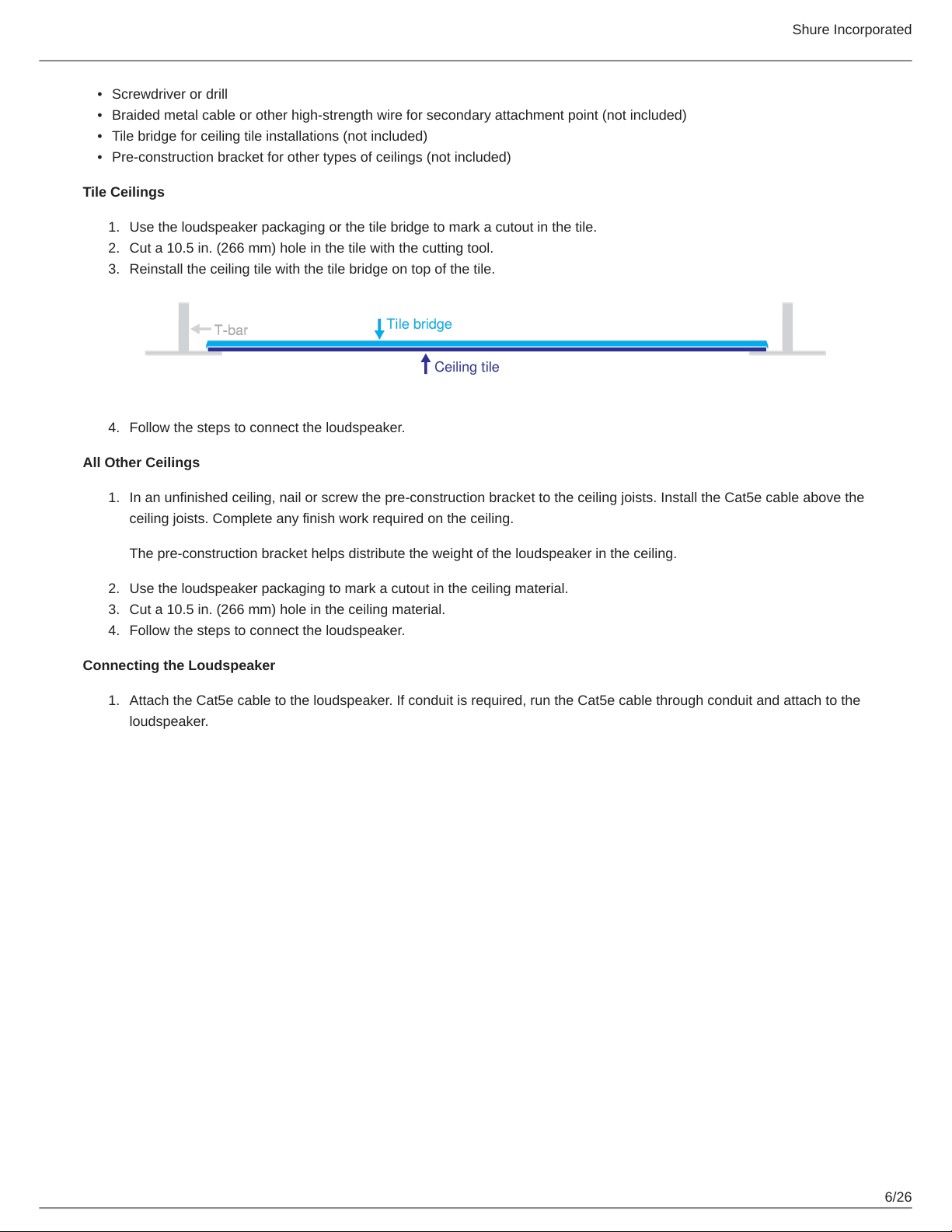
Forceilingtileinstallations,usethetilebridgeaccessorytosupporttheweightoftheloudspeaker.Youcaninstalltheloud-
speaker in other types of ceilings if the material safely supports the weight of the loudspeaker.
To install, you will need:
Utility knife or other tool to cut hole in ceiling
Shielded Cat5e (or better) Ethernet cable