manuals.online logo
Brands
  1. Home
  2. •
  3. Brands
  4. •
  5. Sony
  6. •
  7. Digital Camera
  8. •
  9. Sony Alpha 7 III User manual

Sony Alpha 7 III User manual

Other manuals for Alpha 7 III

1

This manual suits for next models

1

Other Sony Digital Camera manuals

Sony Cyber-shot DSC-HX30V User manual

Sony

Sony Cyber-shot DSC-HX30V User manual

Sony Cyber-shot DSC-T110D User manual

Sony

Sony Cyber-shot DSC-T110D User manual

Sony SLT-A65V &alpha User manual

Sony

Sony SLT-A65V &alpha User manual

Sony ILCE-5100 User manual

Sony

Sony ILCE-5100 User manual

Sony Cyber-Shot DSC-HX9 User manual

Sony

Sony Cyber-Shot DSC-HX9 User manual

Sony FCB-EV7100 User manual

Sony

Sony FCB-EV7100 User manual

Sony DSC-W230/R User manual

Sony

Sony DSC-W230/R User manual

Sony SNC-RZ25N - Network Camera Quick start guide

Sony

Sony SNC-RZ25N - Network Camera Quick start guide

Sony DSC-WX5/WX5C User manual

Sony

Sony DSC-WX5/WX5C User manual

Sony Cyber-shot DSC-U50 User manual

Sony

Sony Cyber-shot DSC-U50 User manual

Sony SLT-A58 User manual

Sony

Sony SLT-A58 User manual

Sony DSC-W310 User manual

Sony

Sony DSC-W310 User manual

Sony DSC-T2 User manual

Sony

Sony DSC-T2 User manual

Sony Cyber-shot DSC-T25 User manual

Sony

Sony Cyber-shot DSC-T25 User manual

Sony DSC-W350 Cyber-shot® User manual

Sony

Sony DSC-W350 Cyber-shot® User manual

Sony Alpha 7RV User manual

Sony

Sony Alpha 7RV User manual

Sony Alpha SLT-A77V User manual

Sony

Sony Alpha SLT-A77V User manual

Sony 350 User manual

Sony

Sony 350 User manual

Sony Cyber-shot DSC-HX1 User manual

Sony

Sony Cyber-shot DSC-HX1 User manual

Sony Cyber-shot DSC-S600 User manual

Sony

Sony Cyber-shot DSC-S600 User manual

Sony Cyber-shot DSC-TX20 User manual

Sony

Sony Cyber-shot DSC-TX20 User manual

Sony DSC-HX400 User manual

Sony

Sony DSC-HX400 User manual

Sony DSC-W35 Cyber-shot® User manual

Sony

Sony DSC-W35 Cyber-shot® User manual

Sony Cyber-shot DSC-F505 User manual

Sony

Sony Cyber-shot DSC-F505 User manual

Popular Digital Camera manuals by other brands

GE C1440W null

GE

GE C1440W null

GE E1680W null

GE

GE E1680W null

GE J1470S null

GE

GE J1470S null

Konica Minolta DIMAGE X1 9979-2801-80/12984 null

Konica Minolta

Konica Minolta DIMAGE X1 9979-2801-80/12984 null

Epson r-d1 - Rangefinder Digital Camera null

Epson

Epson r-d1 - Rangefinder Digital Camera null

GE E1680W null

GE

GE E1680W null

GE J1456W null

GE

GE J1456W null

Mercury 350K user manual

Mercury

Mercury 350K user manual

Pentax Optio LS 465 operating manual

Pentax

Pentax Optio LS 465 operating manual

Sanyo VPC-S1085 instruction manual

Sanyo

Sanyo VPC-S1085 instruction manual

GE SMART A1255 user manual

GE

GE SMART A1255 user manual

Point Grey Gazelle Getting started

Point Grey

Point Grey Gazelle Getting started

Nikon COOLPIX A Reference manual

Nikon

Nikon COOLPIX A Reference manual

Pentax P-5 manual

Pentax

Pentax P-5 manual

BlazeVideo A280 instruction manual

BlazeVideo

BlazeVideo A280 instruction manual

ATIK Cameras One user manual

ATIK Cameras

ATIK Cameras One user manual

CohuHD Costar 3930 Series Installation and operation manual

CohuHD Costar

CohuHD Costar 3930 Series Installation and operation manual

Leica M10-R quick start guide

Leica

Leica M10-R quick start guide

manuals.online logo
manuals.online logoBrands
  • About & Mission
  • Contact us
  • Privacy Policy
  • Terms and Conditions

Copyright 2025 Manuals.Online. All Rights Reserved.

©2018 Sony Corporation Printed in China
C:\4732950411ILCE7M3CEC\00COV-ILCE7M3CEC\000COV.indd
2017/11/06 10:48
C:\4732950411ILCE7M3CEC\00COV-ILCE7M3CEC\000COV.indd
2017/11/06 10:48
ILCE-7M3
4-732-950-41(1)
ILCE-7M3
4-732-950-41(1)
ILCE-7M3
4-732-950-41(1)
http://rd1.sony.net/help/ilc/1720/h_zz/
“Help Guide” (Web manual)
Refer to “Help Guide” for
in-depth instructions on the
many functions of the camera.
« Guide d’aide » (Manuel en ligne)
Consultez le « Guide d’aide » pour
obtenir des instructions détaillées
au sujet des nombreuses fonctions
de l’appareil.
E-mount
Interchangeable Lens Digital Camera/Instruction Manual GB
Fotocamera digitale con obiettivo intercambiabile/Istruzioni per l’uso
IT
Digitalkamera med utbytbart objektiv/Handledning SE
Digitalkamera mit Wechselobjektiv/Gebrauchsanleitung DE
Цифровой фотоаппарат со сменным объективом/Инструкция по эксплуатации
RU
Digitale camera met verwisselbare lens/Gebruiksaanwijzing NL
Digitalkamera med utskiftbart objektiv/Bruksanvisning NO
Appareil photo à objectif interchangeable/Mode d’emploi FR
Câmara Digital de Objetivas intercambiáveis/Manual de instruções
PT
Digitaalinen kamera vaihdettavalla objektiivilla/Käyttöopas FI
Cámara Digital de Lentes Intercambiables/Manual de instrucciones
ES
Цифровий фотоапарат зі змінним об’єктивом/Посібник з експлуатації
UA
Aparat cyfrowy z wymiennymi obiektywami/Instrukcja obsługi PL
Digitalkamera med udskifteligt objektiv/Betjeningsvejledning DK
Questo manuale d’istruzione è fornito da trovaprezzi.it. Scopri tutte le offerte per Sony Alpha 7 III +
24-240mm o cerca il tuo prodotto tra le migliori offerte di Fotocamere
ILCE-7M3
4-732-950-41(1)
GB
2
C:\1102\4732950411ILCE7M3CEC\01GB-ILCE7M3CEC\010BEF.indd
DTP data saved: 2017/11/01 16:10
PDF file created: 2017/11/02 15:24
English
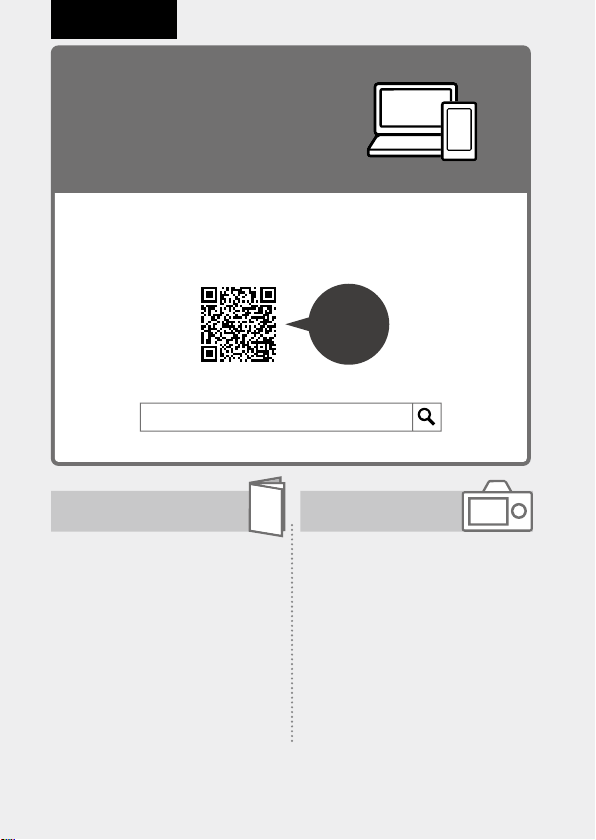
Check out the
Help Guide!
The “Help Guide” is an on-line manual that you can read on your
computer or smartphone. Refer to it for details on menu items,
advanced usage, and the latest information on the camera.
Scan
here
http://rd1.sony.net/help/ilc/1720/h_zz/
Instruction Manual
(this book) In-Camera Guide
This manual introduces some
basic functions.
For the quick start guide, see
“Startup guide” (page22). The
“Startup guide” introduces the
initial procedures from when you
open the package until you release
the shutter for the first shot.
The [In-Camera Guide] shows
explanations of the menu
items on the monitor of the
camera.
You can quickly pull up information
during shooting.
To use the [In-Camera Guide]
function, some settings must be
made beforehand. For details,
search “In-Camera Guide” in the
Help Guide.
ILCE-7M3 Help Guide
ILCE-7M3
4-732-950-41(1)
GB
3
C:\1102\4732950411ILCE7M3CEC\01GB-ILCE7M3CEC\010BEF.indd
DTP data saved: 2017/11/01 16:10
PDF file created: 2017/11/02 15:24
GB
Notes on using your camera
Along with this section, also see
“Precautions” in the Help Guide
(page2).
Screen language
You can select the language
displayed on the screen using the
menu (page 70).
Notes on handling the product
• This camera is designed to be dust-
and moisture-resistant, but is not
waterproof or dust-proof.
• When using the power zoom lens,
be careful not to get your fingers
or any other objects caught in the
lens.
• Always attach the lens front cap
or body cap when you are not
using the camera. To prevent dust
or debris from getting inside the
camera, remove dust from the
body cap before attaching it to the
camera.
• Do not leave the lens or the
viewfinder exposed to a strong light
source such as sunlight. Because
of the lens’s condensing function,
doing so may cause smoke, fire, or
a malfunction inside the camera
body or the lens. If you have to
leave the camera exposed to a light
source such as sunlight, attach the
lens cap to the lens.
• When you shoot with backlighting,
keep the sun sufficiently far away
from the angle of view. Otherwise,
the sunlight may enter the focus
inside the camera and cause smoke
or fire. Even if the sun is slightly
away from the angle of view, it may
still cause smoke or fire.
• Do not directly expose the lens to
beams such as laser beams. That
may damage the image sensor and
cause the camera to malfunction.
• Do not look at sunlight or a strong
light source through the lens when
it is detached. This may result in
unrecoverable damage to the eyes
or cause a malfunction.
• Do not leave the camera, the
supplied accessories, or memory
cards within the reach of infants.
They may be accidentally
swallowed. If this occurs, consult a
doctor immediately.
Notes on the monitor and
electronic viewfinder
• The monitor and electronic
viewfinder are manufactured
using extremely high-precision
technology, and over 99.99% of the
pixels are operational for effective
use. However, there may be some
small black dots and/or bright
dots (white, red, blue or green in
color) that constantly appear on the
monitor and electronic viewfinder.
These are imperfections due to
the manufacturing process and do
not affect the recorded images in
any way.
ILCE-7M3
4-732-950-41(1)
GB
4
C:\1102\4732950411ILCE7M3CEC\01GB-ILCE7M3CEC\010BEF.indd
DTP data saved: 2017/11/01 16:10
PDF file created: 2017/11/02 15:24
• The image may be slightly distorted
near the corners of the viewfinder.
This is not a malfunction. When you
want to see the full composition
with all its details, you can also use
the monitor.
• If you pan the camera while looking
into the viewfinder or move your
eyes around, the image in the
viewfinder may be distorted or the
color of the image may change.
This is a characteristic of the
lens or display device and is not
a malfunction. When you shoot
an image, we recommend that
you look at the center area of the
viewfinder.
• When shooting with the viewfinder,
you may experience symptoms
such as eyestrain, fatigue,
travel sickness, or nausea. We
recommend that you take a break
at regular intervals when you are
shooting with the viewfinder.
In case you may feel
uncomfortable, refrain from using
the viewfinder until your condition
recovers, and consult your doctor
as necessary.
• If the monitor or electronic
viewfinder is damaged, stop using
the camera immediately. The
damaged parts may harm your
hands, face, etc.
Notes on continuous shooting
During continuous shooting, the
monitor or viewfinder may flash
between the shooting screen and a
black screen. If you keep watching
the screen in this situation, you may
experience uncomfortable symptoms
such as feeling of unwellness. If you
experience uncomfortable symptoms,
stop using the camera, and consult
your doctor as necessary.
Notes on recording for long
periods of time or recording 4K
movies
• Depending on the camera and
battery temperature, you may be
unable to record movies or the
power may turn off automatically
to protect the camera. A message
will be displayed on the screen
before the power turns off or you
can no longer record movies. In
this case, leave the power off and
wait until the camera and battery
temperature goes down. If you turn
on the power without letting the
camera and battery cool enough,
the power may turn off again
or you may be unable to record
movies.
• When the temperature of the
camera rises, the image quality may
deteriorate. It is recommended that
you wait until the temperature of
the camera drops before continuing
to shoot.
• Under high ambient temperatures,
the temperature of the camera rises
quickly.
• Camera body and battery may get
warm with use – this is normal.

ILCE-7M3
4-732-950-41(1)
GB
5
C:\1102\4732950411ILCE7M3CEC\01GB-ILCE7M3CEC\010BEF.indd
DTP data saved: 2017/11/01 16:10
PDF file created: 2017/11/02 15:24
GB
• If the same part of your skin
touches the camera for a long
period of time while using the
camera, even if the camera does
not feel hot to you, it may cause
symptoms of a low-temperature
burn such as redness or blistering.
Pay special attention in the following
situations and use a tripod, etc.
–When using the camera in a high-
temperature environment
–When someone with poor
circulation or impaired skin
sensation uses the camera
–When using the camera with
the [Auto Pwr OFF Temp.] set to
[High].
• Especially during 4K movie
shooting, the recording time may
be shorter under low temperature
conditions. Warm up the battery
pack or replace it with a new
battery.
Notes on recording/playback
• Before you start recording, make a
trial recording to make sure that the
camera is working correctly.
• The recorded image may be
different from the image you
monitored before recording.
• Do not use the camera in areas
where strong radio waves or
radiation are being emitted.
Recording and playback may not
function correctly.
• Playback of images recorded with
your product on other equipment
and playback of images recorded
or edited with other equipment on
your product are not guaranteed.
• Sony can provide no guarantees
in the event of failure to record or
loss or damage of recorded images
or audio data due to a malfunction
of the camera or recording media,
etc. We recommend backing up
important data.
• Once you format the memory
card, all the data recorded on
the memory card will be deleted
and cannot be restored. Before
formatting, copy the data to a
computer or other device.
Notes on the Multi Interface Shoe
• When attaching or detaching
accessories such as an external
flash to the Multi Interface Shoe,
first turn the power to OFF. When
attaching the accessory, confirm
that it is firmly fastened to the
camera.
• Do not use the Multi Interface Shoe
with a commercially available flash
that applies voltages of 250 V or
more or has the opposite polarity
of the camera. It may cause a
malfunction.
Sony lenses/accessories
Using this unit with products from
other manufacturers may affect its
performance, leading to accidents or
malfunction.
ILCE-7M3
4-732-950-41(1)
GB
6
C:\1102\4732950411ILCE7M3CEC\01GB-ILCE7M3CEC\010BEF.indd
DTP data saved: 2017/11/01 16:10
PDF file created: 2017/11/02 15:24
On the data specifications
described in this manual
The data on performance and
specifications are defined under
the following conditions, except
as described in this manual: at an
ordinary ambient temperature of
25ºC (77°F), and using a battery pack
that has been fully charged until the
charge lamp has turned off.
Warning on copyright
Television programs, films,
videotapes, and other materials
may be copyrighted. Unauthorized
recording of such materials may
be contrary to the provisions of the
copyright laws.
Notes on location information
If you upload and share an image
tagged with a location, you may
accidentally reveal the information
to a third party. To prevent third
parties from obtaining your location
information, set [ Loc. Info. Link Set.]
to [Off] before shooting images.
Notes on discarding or transferring
this product to others
When discarding or transferring
this product to others, make sure to
perform the following operation to
protect private information.
• Select [Setting Reset] [Initialize].
Notes on discarding or transferring
a memory card to others
Executing [Format] or [Delete] on
the camera or a computer may not
completely delete the data on the
memory card. When transferring
a memory card to others, we
recommend that you delete the
data completely using data deletion
software. When discarding a memory
card, we recommend that you
physically destroy it.
Notes on wireless LAN
If your camera is lost or stolen, Sony
bears no responsibility for the loss or
damage caused by illegal access or
use of the registered access point on
the camera.
Notes on security when using
wireless LAN products
• Always make sure that you are
using a secure wireless LAN to avoid
hacking, access by malicious third
parties, or other vulnerabilities.
• It is important that you set the
security settings when using a
wireless LAN.
• If a security problem arises
because no security precautions
are in place or due to any
inevitable circumstances when
using a wireless LAN, Sony bears
no responsibility for the loss or
damage.
How to turn off wireless network
functions (Wi-Fi, etc.) temporarily
When you board an airplane,
etc., you can turn off all wireless
network functions temporarily using
[Airplane Mode].
ILCE-7M3
4-732-950-41(1)
GB
7
C:\1102\4732950411ILCE7M3CEC\01GB-ILCE7M3CEC\010BEF.indd
DTP data saved: 2017/11/01 16:10
PDF file created: 2017/11/02 15:24
GB
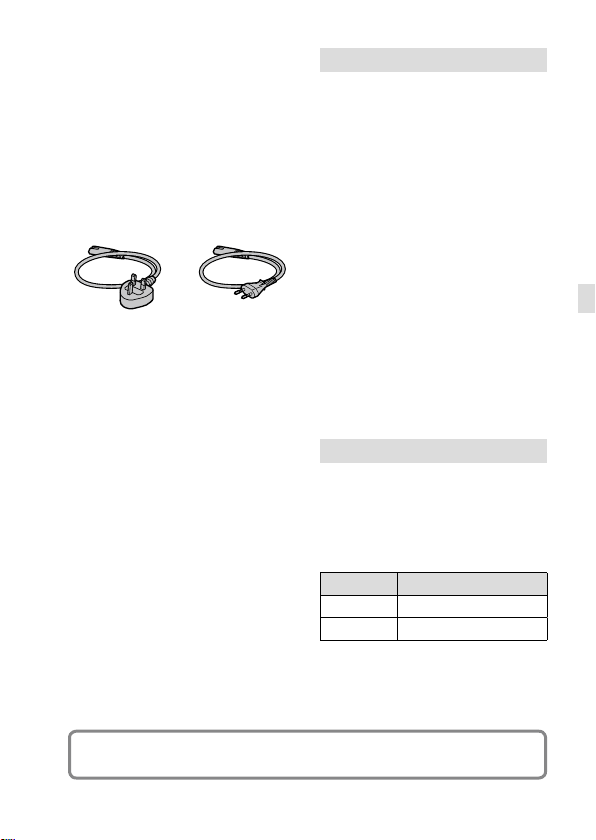
Power Cord
For the customers in the UK, Ireland,
Malta, Cyprus and Saudi Arabia
Use the power cord (A). For safety
reasons, the power cord (B) is not
intended for above countries/regions
and shall therefore not be used there.
For the customers in other EU
countries/regions
Use the power cord (B).
(A) (B)
For Customers in the U.S.A.
For question regarding your product
or for the Sony Service Center nearest
you, call 1-800-222-SONY (7669).
Declaration of Conformity
Trade Name: SONY
Model No.: WW541200
Responsible Party: Sony Electronics
Inc.
Address: 16535 Via Esprillo, San
Diego, CA 92127 U.S.A.
Telephone Number: 858-942-2230
This device complies with part 15 of
the FCC rules. Operation is subject
to the following two conditions:
(1)This device may not cause harmful
interference, and (2)this device must
accept any interference received,
including interference that may cause
undesired operation.
Notes on this manual
This manual covers several models
supplied with different lenses.
The model name varies depending
on the supplied lens. The available
model varies depending on the
countries/regions.
Model name Lens
ILCE-7M3 Not supplied
ILCE-7M3K FE28-70mmF3.5-5.6OSS
For details on the Wi-Fi functions and NFC One-touch functions, refer to the
“Help Guide” (page 2).
ILCE-7M3
4-732-950-41(1)
GB
8
C:\1102\4732950411ILCE7M3CEC\01GB-ILCE7M3CEC\020PRE.indd
DTP data saved: 2017/11/01 16:10
PDF file created: 2017/11/02 15:24
Preparations for shooting
Checking the camera and the supplied
items
First check the model name
of your camera (page7).
The accessories supplied differ
depending on the model.

The number in parentheses
indicates the number of pieces.

Supplied with all models
•Camera (1)
•AC Adaptor (1)
The shape of the AC Adaptor may
differ depending on the country/
region.
•Power cord (mains lead) (1)*
(supplied in some countries/
regions)
* Multiple power cords may be
supplied with your camera.
Use the appropriate one that
matches your country/region.
See page 7.
•Rechargeable battery pack
NP-FZ100 (1)
•Micro USB cable (1)
•Shoulder strap (1)
•Body cap (1) (Attached to the
camera)
•Shoe cap (1) (Attached to the
camera)
•Eyepiece cup (1) (Attached to
the camera)
•Instruction Manual (1) (this
manual)
•Reference Guide (1)
ILCE-7M3K
•Zoom lens FE 28-70 mm F3.5-
5.6 OSS (1) (including a front
lens cap and a rear lens cap)
•Lens hood (1)
ILCE-7M3
4-732-950-41(1)
GB
9
C:\1102\4732950411ILCE7M3CEC\01GB-ILCE7M3CEC\020PRE.indd
DTP data saved: 2017/11/01 16:10
PDF file created: 2017/11/02 15:24
GB
GB
9
Identifying parts
See the pages in parentheses for details.
Front side
ON/OFF (Power) switch
(28)/Shutter button (29)
Front dial
You can quickly adjust the
settings for each shooting
mode.
Remote sensor
Lens release button (27)
Wi-Fi/Bluetooth antenna
(built-in) (49)
Microphone
Do not cover this part during
movie recording. Doing so
may cause noise or lower the
volume.
AF illuminator (59)/Self-
timer lamp
When the lens is removed
Mounting index (26)
Image sensor*
Mount
Lens contacts*
* Do not directly touch these parts.
ILCE-7M3
4-732-950-41(1)
GB
10
C:\1102\4732950411ILCE7M3CEC\01GB-ILCE7M3CEC\020PRE.indd
DTP data saved: 2017/11/01 16:10
PDF file created: 2017/11/02 15:24
Rear side
Eyepiece cup
To remove the eyepiece cup
Push the grips at the bottom
of the eyepiece cup to the left
and right and lift up the cup.
Remove the eyepiece cup
when attaching an angle
finder (sold separately).
Also, select MENU 
(Camera Settings 2) 
[FINDER/MONITOR], and then
switch to [Viewfinder (Manual)]
or [Monitor (Manual)].
Viewfinder
C3 button (Custom button 3)
(65)/(Protect) button
MENU button (56)
Monitor
(For touch operation: Touch
panel/Touch pad) (40)
You can adjust the monitor to
an easily viewable angle and
shoot from any position.
Eye sensor