EnglishDeutsch
 logo
Brands
  1. Home
  2. •
  3. Brands
  4. •
  5. Sony
  6. •
  7. Home Theater System
  8. •
  9. Sony DAV-TZ230 User manual

Sony DAV-TZ230 User manual

Other manuals for DAV-TZ230

1

Other Sony Home Theater System manuals

Sony DAV IS50 - Bravia Theater Home System User manual

Sony

Sony DAV IS50 - Bravia Theater Home System User manual

Sony HT-6900DP User manual

Sony

Sony HT-6900DP User manual

Sony BDV-E770W / T77 User manual

Sony

Sony BDV-E770W / T77 User manual

Sony HT-DDWG700 User manual

Sony

Sony HT-DDWG700 User manual

Sony HT-DDW990 User manual

Sony

Sony HT-DDW990 User manual

Sony HT-DDW3500 User manual

Sony

Sony HT-DDW3500 User manual

Sony SA-VE312 User manual

Sony

Sony SA-VE312 User manual

Sony BDV-IT1000 User manual

Sony

Sony BDV-IT1000 User manual

Sony HT-DDW830 User manual

Sony

Sony HT-DDW830 User manual

Sony HT-SS370 - 10htib User manual

Sony

Sony HT-SS370 - 10htib User manual

Sony DAV-SB100 - 5 Dvd Changer System User manual

Sony

Sony DAV-SB100 - 5 Dvd Changer System User manual

Sony DAV-HDX274 - Bravia Theater System User manual

Sony

Sony DAV-HDX274 - Bravia Theater System User manual

Sony HT-CT350 User manual

Sony

Sony HT-CT350 User manual

Sony HT-DDW870 User manual

Sony

Sony HT-DDW870 User manual

Sony HT-DDW660 - Receiver Speaker System Home... User manual

Sony

Sony HT-DDW660 - Receiver Speaker System Home... User manual

Sony BDV-F500 User manual

Sony

Sony BDV-F500 User manual

Sony BDV-E370 - Blu-ray Disc™ Player Home Theater... User manual

Sony

Sony BDV-E370 - Blu-ray Disc™ Player Home Theater... User manual

Sony BDV-IZ1000W User manual

Sony

Sony BDV-IZ1000W User manual

Sony SA-VE522 User manual

Sony

Sony SA-VE522 User manual

Sony DAV X1 - Platinum DVD Dream Home Theater... User manual

Sony

Sony DAV X1 - Platinum DVD Dream Home Theater... User manual

Sony HT-DDWG700 User manual

Sony

Sony HT-DDWG700 User manual

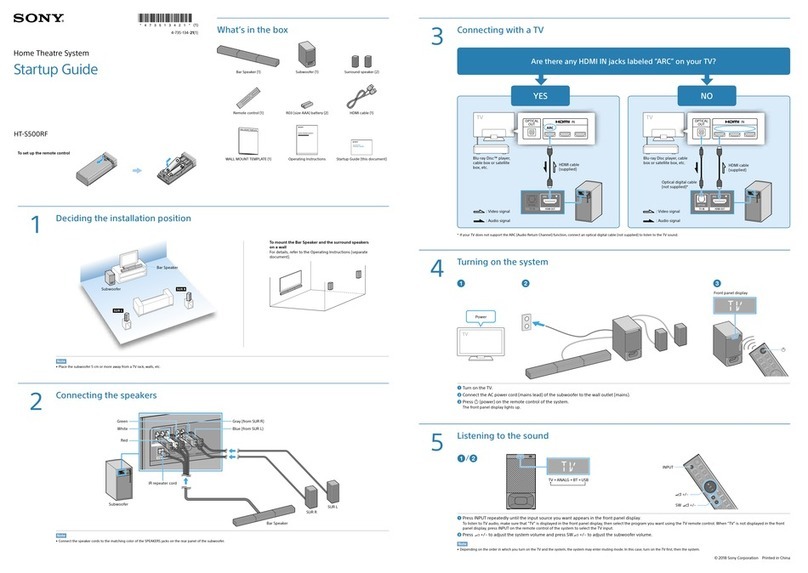
Sony HT-S700RF User guide

Sony

Sony HT-S700RF User guide

Sony DAV-HDX285 - Bravia Theater Home System User manual

Sony

Sony DAV-HDX285 - Bravia Theater Home System User manual

Sony DAV-DZ350 User manual

Sony

Sony DAV-DZ350 User manual

Popular Home Theater System manuals by other brands

Samsung HT-ES4200K user manual

Samsung

Samsung HT-ES4200K user manual

Harman Kardon HS 100 owner's manual

Harman Kardon

Harman Kardon HS 100 owner's manual

Samsung HT-P10 instruction manual

Samsung

Samsung HT-P10 instruction manual

Philips HTS5131 User manaul

Philips

Philips HTS5131 User manaul

Goodmans GDVD19SWS user manual

Goodmans

Goodmans GDVD19SWS user manual

Moxi media center user guide

Moxi

Moxi media center user guide

Samsung HT-EM35 user manual

Samsung

Samsung HT-EM35 user manual

LG HE903PAW manual

LG

LG HE903PAW manual

Bose SoundTouch 520 owner's guide

Bose

Bose SoundTouch 520 owner's guide

Manta GK-500 user manual

Manta

Manta GK-500 user manual

Sharp SBW800 user manual

Sharp

Sharp SBW800 user manual

Philips HTS3541 user manual

Philips

Philips HTS3541 user manual

LG LHT799 specification

LG

LG LHT799 specification

Samsung HT-TWZ415 user manual

Samsung

Samsung HT-TWZ415 user manual

Loewe REFERENCE 52 SL FHD+ 200 NMP Service manual

Loewe

Loewe REFERENCE 52 SL FHD+ 200 NMP Service manual

Samsung AH68-02166R user manual

Samsung

Samsung AH68-02166R user manual

RCA 600-Watt owner's manual

RCA

RCA 600-Watt owner's manual

Samsung HT-DS630T instruction manual

Samsung

Samsung HT-DS630T instruction manual

https://manuals.online logo
https://manuals.online logoBrands
  • About & Mission
  • Contact us
  • Privacy Policy
  • Terms and Conditions

Copyright 2026 Manuals.Online. All Rights Reserved.

SUBWOOFER
SUR L
SUR R
FRONT R
CENTER
FRONT L
Main unit/
Unidad principal
4-175-722-11(1)
©2010 Sony Corporation Printed in China
(1)
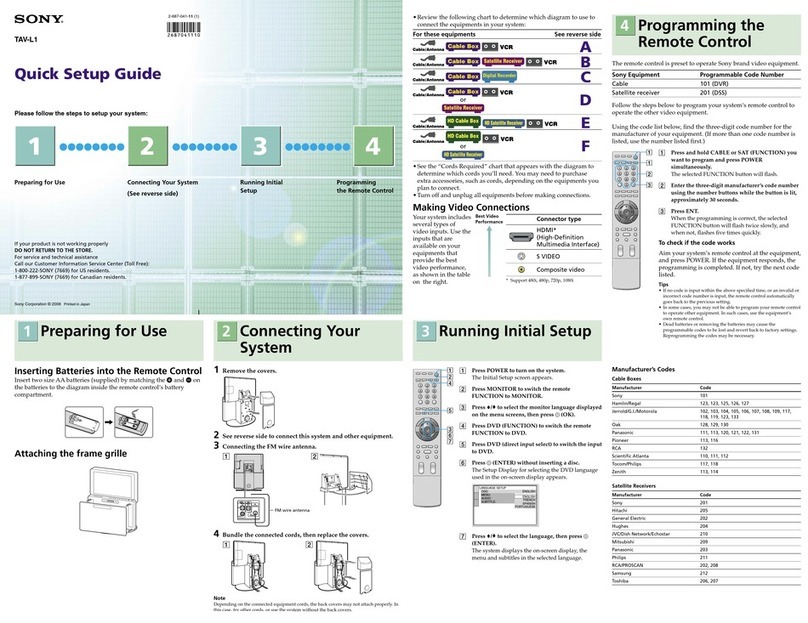
Quick Setup Guide/Guía de ajuste rápido
1Connecting the speakers/Conexión de los altavoces
Rear panel of the main unit/Panel posterior de la unidad principal
HDMI OUT
SPEAKERS
FRONT R FRONT L
SUR R SUR L CENTER
SUBWOOFER
ONLY FOR SS-TS
ONLY FOR
SS-CT ONLY FOR
SS-WS
Green
Verde
Purple
Púrpura
Red
Rojo
White
Blanco
Blue
Azul
Gray
Gris
2Connecting your TV/Conexión del televisor
To connect speaker cords to the speaker/
Para conectar los cables de altavoz al
altavoz
Rear of the speaker/Parte posterior del altavoz
DAV-TZ230
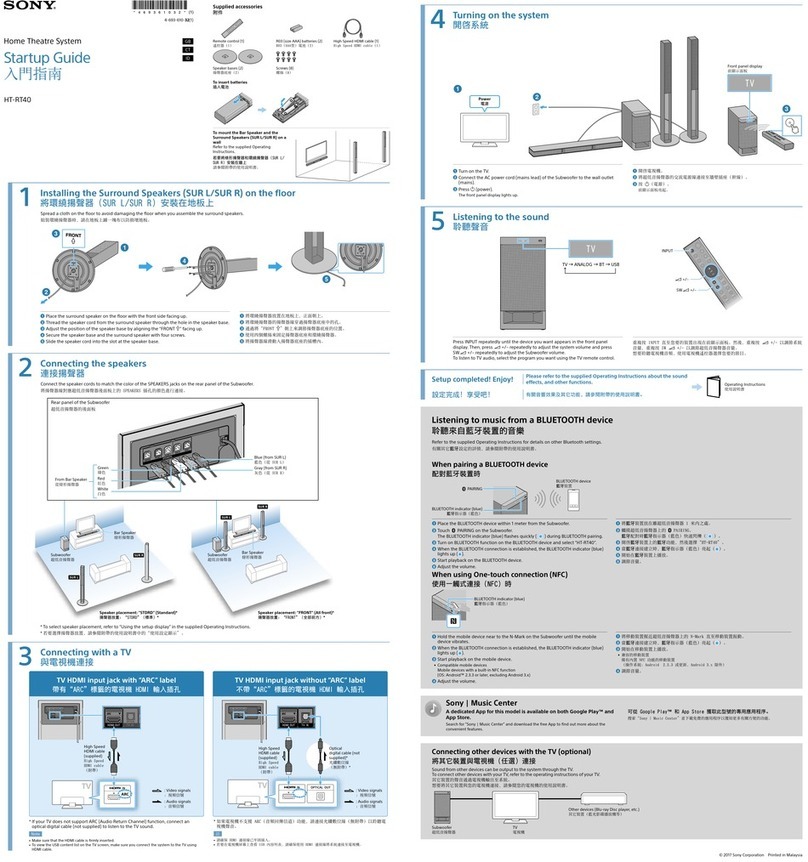
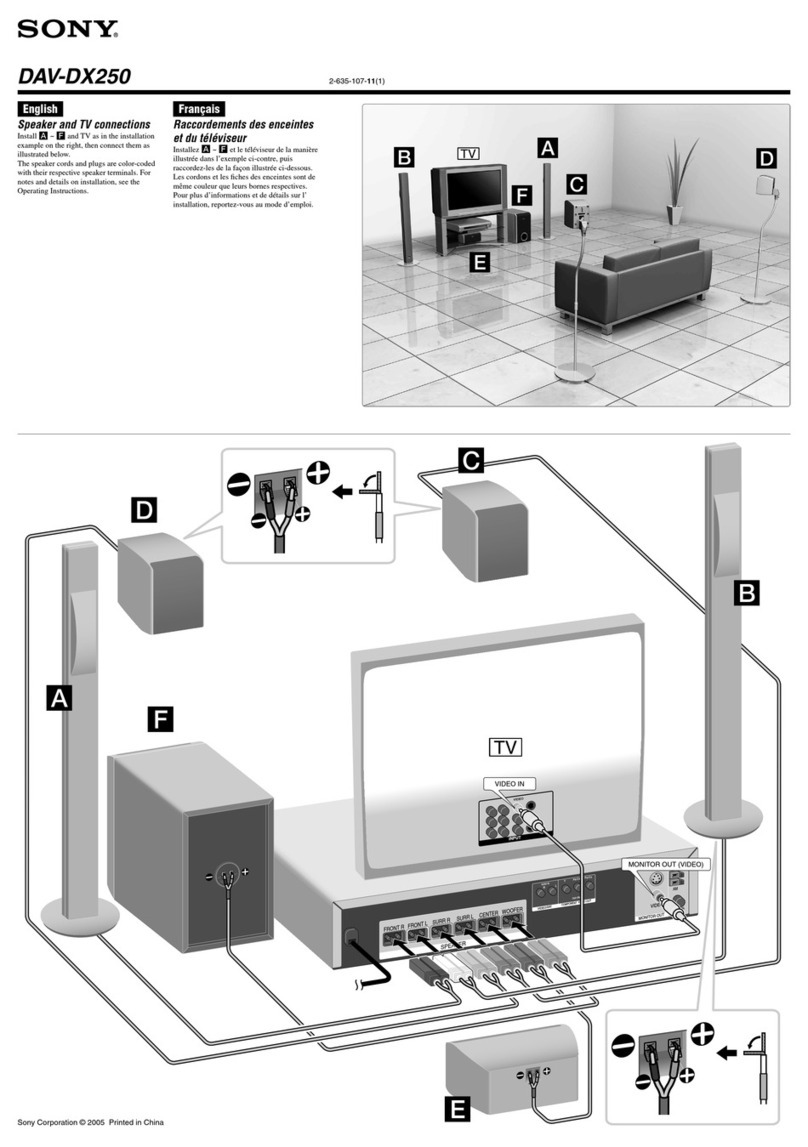
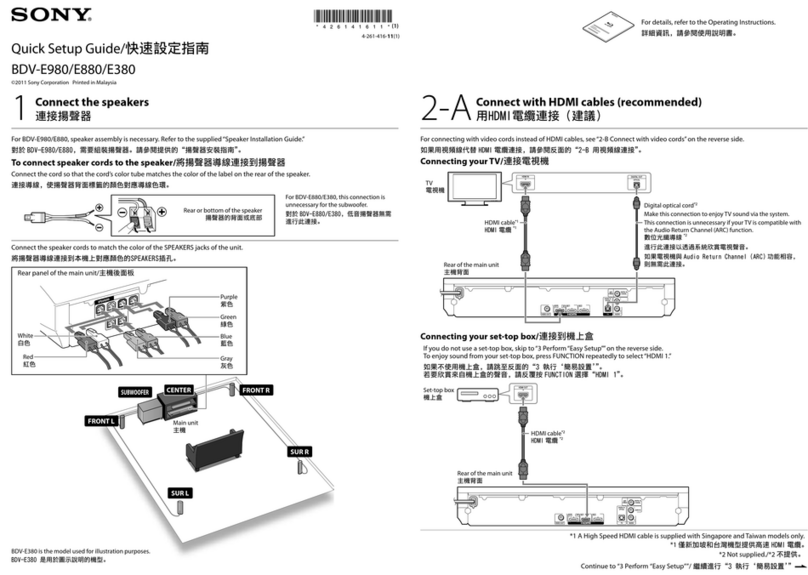
Connect the speaker cords to match the color of the SPEAKERS jacks of the unit.
Conecte los cables de altavoz para hacerlos coincidir con las tomas SPEAKERS de la unidad.
For details, refer to the Operating Instructions.
Para obtener más información, consulte el Manual de instrucciones.
Depending on the jacks on your TV, select one of the connection methods.
En función de las tomas del televisor, seleccione uno de los métodos de conexión.
Method 1: SCART (EURO AV) cable* connection
Método 1: Conexión del cable SCART (EURO AV)*
This is the basic connection and sends both video and audio signals.
Esta es la conexión básica, que permite enviar señales de vídeo y audio.
OUT
EURO AV
OUTPUT(TO TV)
HDMI IN
P
B
/C
B
P
R
/C
R
Y
COMPONENT VIDEO IN VIDEO IN
DIGITAL OUT
COAXIAL
OPTICAL
TV
AUDIO OUT L
R
TV/VIDEO
EURO AV
SCART (EURO AV) cable/
Cable SCART (EURO AV)*
*Not supplied/No suministrado
Method 2: HDMI cable* and SCART (EURO AV) cable* connection
Método 2: Conexión del cable SCART (EURO AV)* y el cable HDMI*
Picture quality will be improved compared to Method 1. To listen to TV stereo sound via the system, also connect the SCART (EURO
AV) cable*.
La calidad de imagen mejorará en comparación con la que se obtiene mediante el Método 1. Para escuchar el sonido estéreo del
televisor a través del sistema, también debe conectar un cable SCART (EURO AV)*.
P
B
/C
B
P
R
/C
R
Y
COMPONENT VIDEO IN VIDEO IN
DIGITAL OUT
COAXIAL
OPTICAL
TV
AUDIO OUT L
R
TV/VIDEO
HDMI IN
EURO AV
OUT
EURO AV
OUTPUT(TO TV)
SCART (EURO AV) cable/
Cable SCART (EURO AV)*
HDMI cable/
Cable HDMI*
*Not supplied/No suministrado

4 Press /to display “PRO LOGIC,”then press
.
Pulse /hasta que aparezca “PRO LOGIC” y, a
continuación, pulse .
5 Press SYSTEM MENU to exit the menu.
Pulse SYSTEM MENU para salir del menú.
Select an on-screen
language.
Seleccione un idioma
para las indicaciones
en pantalla.
LANGUAGE SETUP
MENU:
OSD:
AUDIO:
SUBTITLE:
ENGLISH
ENGLISH
FRANÇAIS
DEUTSCH
ITALIANO
ESPAÑOL
NEDERLANDS
DANSK
/,
Select the aspect ratio
of the connected TV.
Seleccione el formato
del televisor
conectado.
VIDEO SETUP
COLOR SYSTEM
(VIDEO CD)
:
TV TYPE:
PAUSE MODE:
16:9
16:9
4:3 LETTER BOX
4:3 PAN SCAN
/,
Select the output
method for video
signals.
Seleccione el método
de salida de las señales
de vídeo.
VIDEO SETUP
LINE:
TV TYPE:
PAUSE MODE:
16:9
VIDEO
VIDEO
VIDEO
VIDEO
RGB
/,
Select [ON] when you
connect the main unit
and the TV with an
HDMI cable.
Seleccione [SI] si
conecta la unidad
principal y el televisor
con un cable HDMI.
HDMI SETUP
HDMI RESOLUTION:
VOLUME LIMIT:
AUTO
(1920x1080p)
OFF
SD
YCBCR/RGB(HDMI):
JPEG RESOLUTION:
AUDIO(HDMI):
CONTROL FOR HDMI: OFF
OFF
ON
/,
Select the speaker
formation.
Seleccione la
disposición de los
altavoces.
SPEAKER FORMATION
STANDARD
/,
QUICK SETUP is complete.
Home Theatre System
Note
Do not insert a disc before performing the Quick Setup.
Nota
No inserte ningún disco antes de realizar el ajuste rápido.
1 Connect the AC power cord.
The shape of the wall outlet differs depending on the area.
Conecte el cable de alimentación de ca.
La forma de la toma de pared varía en función de la zona.
CENTER
SPEAKERS
SUBWOOFER
FRONT R FRONT L
2 Turn on the power of the main unit and TV.
Encienda la unidad principal y el televisor.
/
/
(power/encendido)
3 Switch the input selector on your TV to display
“SONY Home Theatre System.”
Cambie el ajuste del selector de entrada del
televisor para visualizar“SONY Home Theatre
System”.
4 Set each following item, using ///and
.
Displayed items vary depending on the area.
Ajuste cada uno de los elementos siguientes
mediante ///y .
Los elementos que aparecen varían en función de la zona.
///,
(ENTER)
Home Theatre System
1 Press TV.
Pulse TV.
2 Press SYSTEM MENU.
Pulse SYSTEM MENU.
3 Press /to display “SUR.SETTING,” then press
.
Pulse /hasta que aparezca “SUR.SETTING”
y, a continuación, pulse .
3Performing the Quick Setup/Realización del ajuste rápido
Listening to TV sound from all speakers/Audición del sonido del televisor a través de todos los altavoces