KLV-60EX640(PA)/KDL-60EX640(AUS) 9
SELF DIAGNOSIS FUNCTION
DIAGNOSTIC TEST INDICATORS
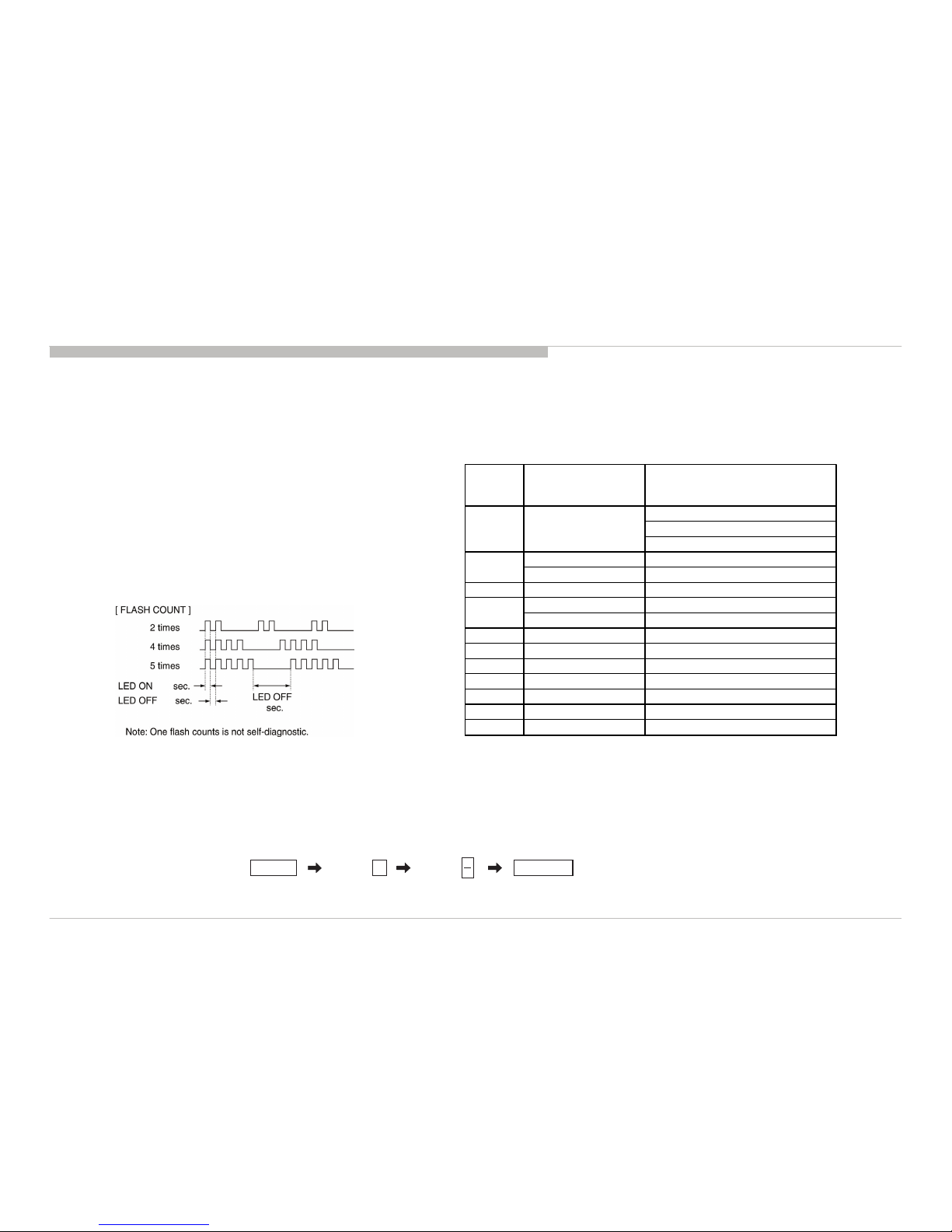
When an error occurs, the STANDBY LED will flash a set number of times to
indicate the possible cause of the problem.
If there is more than one error, the LED will identify the first of the problem areas.
Result for all of the following diagnostic items are displayed on screen.
If the screen displays a “0”, no error has occurred .
The units in this manual contain a self-diagnostic function. If an error occurs, the STANDBY LED will automatically begin to flash.
The number of times the LED flashes translates to a probable source of the problem.
A definition of the STANDBY LED flash indicators is listed in the instruction manual for the user’s knowledge and reference.
If an error symptom cannot be reproduced, the remote commander can be used to review the failure occurrence data stored in memory to reveal past problems and how often these
problems occur.
STBY LED
Fla s h tim e
Service menu Item
name
(Screen Display)
Diagnostic Item Description
12V_AMP Error
12V_SW Error
24V_Error
DC_ALERT1 3V3/5V Error
AUDIO_PROT Audio Error
4 BALANCER_ERR Not used
TCON_ERR T-con Error
PANEL_ID_NVM_ERR Panel ID Error
6 BACKLIGHT_ERR Back Light Error
7TEMP_ERR Not used
8-Notused
9-Notused
10 - Not used
11 - Not used
12 - Not used
3
2MAIN_POWER
5
0.5
0.5 3
DISPLAY OF STANDBY LED FLASH COUNT
SELF-DIAGNOSTIC SCREEN DISPLAY
For errors with symptoms such as “power sometimes shuts off” or “screen sometimes goes out” that cannot be confirmed, it is possible to bring up past occurrences of failure for
confirmation on the screen:
[To Bring Up Screen Test]
In standby mode, press buttons on the remote commander sequentially in rapid succession as shown below:
5
*: Note that this differs from entering the service mode (volume +)
*
Info TV POWERChannel Volume