SUPERMICR R
ContaCt InformatIon
• Manuals: http://www.supermicro.com/support/manuals
• Drivers & Utilities: ftp://ftp.supermicro.com/CDR_Images/CDR-X10-UP/
• Safety: http://www.supermicro.com/about/policies/safety_information.cfm
© 2016 Supermicro Computer Inc. All rights reserved. Reproduction of this document whether in part or in whole is strictly prohibited without Supermicro's written
consent. All Trademarks are property of their respective entities. All information provided is deemed accurate at the time of printing; however, it is not guaranteed.
PaCkage Contents
X10sDV-tLn4f/f serIes
QuICk referenCe guIDe reV. 1.0a
• One (1) Supermicro Motherboard
• Six (6) SATA Cables
• One (1) I/O Shield
• One (1) Quick Reference Guide
• Website: www.supermicro.com
• Phone: +1 (408) 503-8000, Fax: +1 (408) 503-8008
for your system to work ProPerLy, PLease DownLoaD aPProPrIate
DrIVers/Images/user'smanuaL from the LInks beLow:
MNL-1726-QRG 1.0a
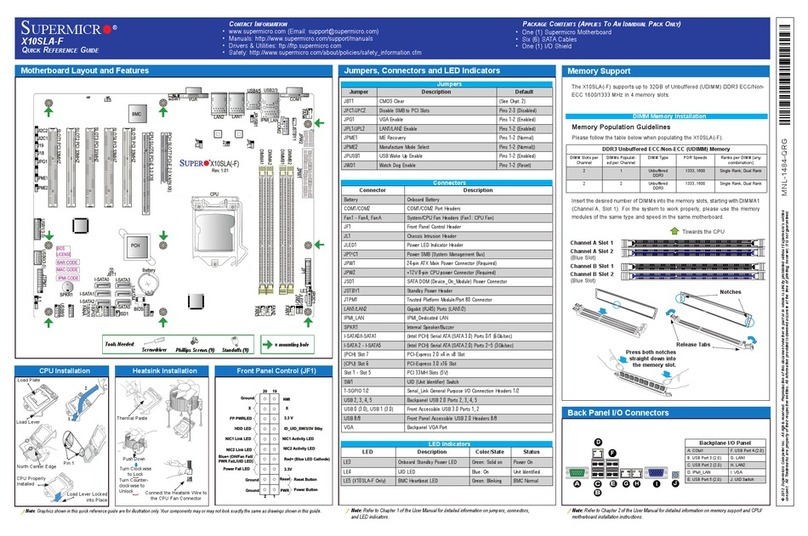
Item # Jumper Description Default
16 JBR1 BIOS Recovery Pins 1-2 (Normal)
40 JBT1 CMOS Clear Open: Normal, Short: Clear CMOS
13, 14 JI2C1/JI2C2 SMB to PCI-E Slots Pins 2-3 (Disabled)
11 JPG1 VGA Enable Pins 1-2 (Enabled)
3JPL1 LAN1/LAN2 Enable Pins 1-2 (Enabled) (Not available on TLN2F)
37 JPME1 ME Recovery Pins 1-2 (Normal)
17 JPME2 Manufacturing Mode Pins 1-2 (Normal)
19 JPTG1 10Gb Ethernet Enable Pins 1-2 (Enabled)
21 JPUSB1 USB Wakeup Pins 1-2 (Enabled) (For USB0/1 Only)
18 JWD1 Watch Dog Enable Pins 1-2 (Reset)
JF1
JPI2C1
COM1
I-SATA0
JGPIO1
JSMB1 JPTG1
JBR1
JI2C1 JI2C2
JPG1
JPL1
JPME1
JPME2 JPUSB1
JWD1
DESIGNED IN USA
SRW2
SRW1
JUIDB1
J21
I-SGPIO2 I-SGPIO1
JL1
JOH1 JD1
PJ1
JSTBY1
JPW1
LED8
C
LED7
A
C
LED3
AC
LEDM1
A
C
BT1
FAN4 FAN3
FAN2 FAN1
VGA
JTPM1
JSD1
I-SATA1
I-SATA4
I-SATA2
I-SATA3 I-SATA5
DIMMB2
DIMMA2
DIMMB1
DIMMA1
JIPMB1
JNVI2C1
X10SDV-F
REV: 2.00
LAN3/4
LAN1/2
PCI-E 3.0 X16
PWR
ON RST NIC2
OH
FF
XNIC1 PWR
LED
HDD
LED
JF1:
USB 2/3
USB 0/1(3.0)
USB 4/5
SLOT7
JBT1
IPMI_LAN
J6
Intel CPU
BMC
AST2400
i350
Connectors
DIMM Memory Installation
Jumpers and Connectors
Memory Support
Motherboard Layout and Features
Jumpers
Note: Graphics shown in this quick reference guide are for illustration only. Your components may or may not look exactly the same as drawings shown in this
guide.
Note: Refer to Chapter 1 of the User Manual for detailed information on jumpers, connectors,
and LED indicators.
Note: Refer to Chapter 2 of the User Manual for detailed information on memory support and CPU/
motherboard installation instructions.
= mounting hole
Front Panel Control (JF1)
1
5
1
9
1
14
1
10
1
15
1
4
1
8
1
13
1
3
1
7
1
12
1
17
1
18
1
19
1
20
1
2
1
6
1
11
1
16
1
21 1
26
1
31
1
36
1
41
1
37 1
42 1
43 1
44 1
45
1
46
1
47
1
48
1
49
1
50
1
55
1
54
1
53
1
52
1
51
1
56
1
38 1
39
1
40
1
32
1
33
1
34
1
35
1
27
1
28
1
29
1
30
1
22
1
23
1
24
1
25
1
1
Note: Item numbers are shown in counterclockwise order
LED Indicators
Item # LED Description Color/State Status
55 LEDM1 BMC Heartbeat LED Green: Blinking BMC: Normal
33 LED3 Power LED Green: On System Power On
8LED7 UID Switch LED Blue: On Unit Identied
51 LED8 Overheat/PWR Fail/Fan
Fail LED
Red: Solid on/
Blinking
Solid On: Overheat,
Blinking: PWR Fail or
Fan Fail
LED Indicators
Back Panel I/O
A. IPMI LAN E. LAN Port 1 (Not available on TLN2F)
B. USB Port 1 F. LAN Port 4 (TLN4F/TLN2F Only)
C. USB Port 0 G. LAN Port 3 (TLN4F/TLN2F Only)
D. LAN Port 2 (Not available on TLN2F) H. VGA Port
B
A
C
D
E
X
NIC2 Activity LED3.3V Stby
3.3V Stby
UID LED
3.3V
Item # Connector Description
41 BT1 Onboard Battery
50 COM1 COM1 Header
45,43,24,23 FAN1 ~ FAN4 CPU/System Cooling Fans (FAN4 is on PCBA 2.0 Only)
1IPMI LAN Dedicated IPMI LAN Port
26 ~ 31 I-SATA0 ~ I-SATA5 Intel®Serial ATA Ports (I-SATA0 supports SuperDOM)
39,38 I-SGPIO1, I-SGPIO2 Serial Link General Purpose I/O Headers
36 JGPIO1 General Purpose I/O Expander Header
42 J6 4-pin Power Connector for HDD use (To provide power from the
motherboard to onboard HDD devices.)
56 J21 M.2 Socket
22 JD1 Speaker/Buzzer (Pins 1-3: Power LED, Pins 4-7: Speaker)
34 JF1 Front Panel Control Header
10 JIPMB1 4-pin External SMbus I2C Header (for an IPMI Card)
20 JL1 Chassis Intrusion Header
9JNVI2C1 NVMe I2C Header
12 JOH1 Overheat LED Header
48 JPI2C1 Power Supply SMBus I2C Header (On PCBA 2.0 Only)
46 JPW1 24-pin ATX Main Power connector
25 JSD1 SATA DOM (Device_On_Module) Power Connector
15 JSMB1 SMBus Header
44 JSTBY1 Standby Power Header
32 JTPM1 Trusted Platform Module (TPM)/Port 80 Connector
7JUIDB1 Unit Identier (UID) Button
4
5
LAN1, LAN2
LAN3, LAN4
Gigabit Ethernet (RJ45) Ports (Not available on TLN2F)
10G Ethernet (RJ45) Ports (TLN4F/TLN2F Only)
47 PJ1 4-pin 12V DC Power Connector (To provide alternative power for
special enclosure when the 24-pin ATX power is not in use.)
54 SLOT7 PCI-E 3.0 X16 Slot
53,52 SRW1, SRW2 M.2 Holding Screws
2USB0/1 Back panel USB 3.0 Ports
49, 35 USB2/3, USB4/5 Front Access USB 2.0 Ports
6VGA Back panel VGA Port
The X10SDV-TLN4F/F motherboard supports up to 128GB of DDR4 ECC
RDIMM or 64GB of DDR4 ECC/Non-ECC UDIMM of speeds up to 2133MHz
in four memory slots.
Note: Check the Supermicro website for recommended memory modules.
Module Notch
2. Install the DIMM module straight down into the socket until it is securely
seated in the socket. The side clips will automatically lock the module into
place.
When installing memory modules, the DIMM slots should be populated in the
following order: DIMMA1, DIMMB1, then DIMMA2, DIMMB2.
• Always use DDR4 DIMM modules of the same size, type and speed. Mixing
memory modules of different types and speeds is not allowed.
• The motherboard will support one DIMM module installed. However, for
best memory performance, install DIMM modules in pairs.
Installing DIMM Memory Modules
1. Align the key on the bottom of the DIMM module against the key on the
memory slot. Take note of the notches on the side of the DIMM module,
and of the locking clips on the socket to avoid causing damage.
Module Key
Socket Key Locking Clip
DIMMB2
DIMMB1
DIMMA2
DIMMA1
Back Panel I/O Connectors