manuals.online logo
Brands
  1. Home
  2. •
  3. Brands
  4. •
  5. Supersonic
  6. •
  7. Watch
  8. •
  9. Supersonic SC-65SW User manual

Supersonic SC-65SW User manual

Other Supersonic Watch manuals
Supersonic SC-64SW User manual

Supersonic

Supersonic SC-64SW User manual

Supersonic BT329 User manual

Supersonic

Supersonic BT329 User manual

Supersonic SC-175SWT User manual

Supersonic

Supersonic SC-175SWT User manual

Supersonic SC-64SW User manual

Supersonic

Supersonic SC-64SW User manual

Popular Watch manuals by other brands

Casio QW 5513 Operation guide

Casio

Casio QW 5513 Operation guide

Piaget 560P Instructions for use

Piaget

Piaget 560P Instructions for use

Armitron pro sport MD0346 instruction manual

Armitron

Armitron pro sport MD0346 instruction manual

West Marine BlackTip 13411293 Instruction Booklet and Care Guide

West Marine

West Marine BlackTip 13411293 Instruction Booklet and Care Guide

Jaeger-leCoultre HYBRIS MECHANICA CALIBRE 184 manual

Jaeger-leCoultre

Jaeger-leCoultre HYBRIS MECHANICA CALIBRE 184 manual

FOREVER iGO PRO JW-200 user manual

FOREVER

FOREVER iGO PRO JW-200 user manual

Relic OS10 quick start guide

Relic

Relic OS10 quick start guide

MyKronoz ZeClock manual

MyKronoz

MyKronoz ZeClock manual

Casio QW-782 General guide

Casio

Casio QW-782 General guide

Strikes and Spares SASM80 E-manual

Strikes and Spares

Strikes and Spares SASM80 E-manual

Christopher Ward C1000 Owner's handbook

Christopher Ward

Christopher Ward C1000 Owner's handbook

Lotus ILMFS01 instruction manual

Lotus

Lotus ILMFS01 instruction manual

Chronos Manufactures Chrono Diamond Thyrso 10400 instruction manual

Chronos Manufactures

Chronos Manufactures Chrono Diamond Thyrso 10400 instruction manual

Pandora WATCH2 quick guide

Pandora

Pandora WATCH2 quick guide

Suunto X6 user guide

Suunto

Suunto X6 user guide

Seiko N830 instruction manual

Seiko

Seiko N830 instruction manual

MotionX 365 user guide

MotionX

MotionX 365 user guide

Aplus GV18 user guide

Aplus

Aplus GV18 user guide

manuals.online logo
manuals.online logoBrands
  • About & Mission
  • Contact us
  • Privacy Policy
  • Terms and Conditions

Copyright 2025 Manuals.Online. All Rights Reserved.

SC-65SW
76914
Smart Watch Phone
User Guide
Please read the manual before use.
The information in this document won't be modified or
extended in accordance with any notice.
The watch should be charging 2 hours at least before use.
1. Product specification
Model:SC-65SW
CPU MTK2502 ARM7 260MHz
Memory:RAM 4MB+ ROM 4MB,
Capacitive touch screen 1.54” 240*240 pixel
Bluetooth version 4.0
Function: BT Call , BT SMS, Anti-lost,Alarm,Pedometer,Sleep
monitor,Sedentary reminder,Information notification (G-mail,Facebook, and
so on)
Battery Lithium-ion 3.7V 230mAh
2.Product details:
2.1 Product details
POWER
Power Key: Power On/Off;Awaken/turn off screen;Back to main menu
Touch screen: Each function (main menu) will be shown and displayed on
capacitive touch screen.
Charging procedure:
2.2 Products quick into
You can enter into next page by sliding screen left, and return to last page by
sliding screen right;enter into the sub-menu after clicking selected menu, and
return to upper menu after sliding from left to right.It is will be in mistake for a click
if the drag distance too short.
2.3 Clock Display
Setting method:
Method 1: Power on,when the phone in clock mode,please long press
middle screen and set different clock interfaces if you like.
Method 2:Power on,Main menu: settings--clock—clock type,choose the
clock mode if you like.
3.Product quick use
3.1 Download and install
You have to download and install the "Fundo Wear" App fromAPP Store or
Google Play Store;
Open the App and add your email account then it will recognize your smart
watch.
3.2 Connection and Synchronize data
3.2.1 Bluetooth connection
Connect your phone and watch via Bluetooth,Select the green “+”icon
from the Fundo APP home screen,select the “Bluetooth connection” icon to
connect your watch to the Fundo APP . When you check the watch Bluetooth
icon if it not show the blue green double color .Than connected the
watch with phone setting Bluetooth again.
After you have connected your watch to the Fundo APP, you can edit the
watch name, and search the position of your watch.
Notice:
The Sync software can open in sync APP already installed and Accessibility,
the mobile will show Bluetooth connected done after 2-5min;the watch will inform
you the time of Sync with phone, than the Sync switched on. The message will
sync to you watch when it incoming to mobile .
3.2.2 Synchronizing data
When you stop walking then go to your Smart phone and open the "Fundo
wear" App. and Press "Sync Data" and your steps will show exactly how it shows
in your smart watch.
3.3 Enable Notifications
This will allow your smart watch to send you notifications from apps you have
installed on your iPhone or Android device.
For example: if you want your email notifications send to your smart watch,
enable the app on the Fundo Wear App. When an email is received it will notify
you on your smart watch.
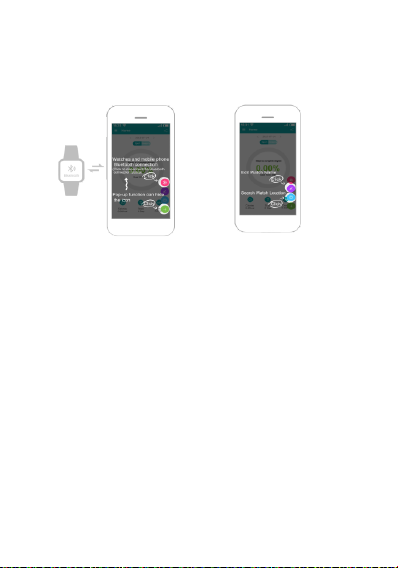
(See illustration images below)
Notice:
Please don’t shut the Bluetooth notify service when you are clearing software
by background or close background application software.It will affect the sync
function between watch and phone if shut it.
3.4 Base function
3.4.1 Phone book
3.4.2 Dial
3.4.3 Call logs
You can check your phone call records after you connect with the Bluetooth.
Shown all records including miss call,dialed calls and receive call;
You can check the date,time and phone number of the miss call after you choose
it,but only can call this number.
3.4.4.Messaging
Sync phone message.
3.4.5 Notifier
When there is SMS, incoming messages from Skype and other applications on
the connected phone, the watch phone will alert you to read them.