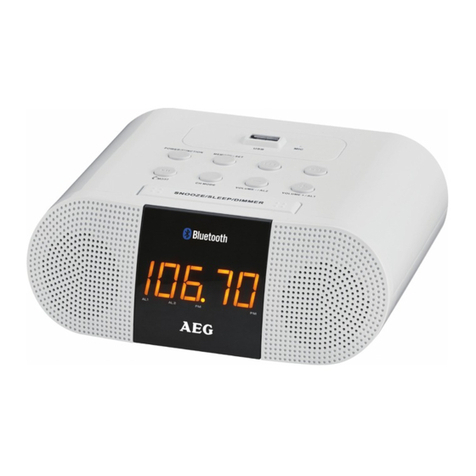
1. Press the button to turn on the radio and press the MODE button and select FM mode.
2. Press and hold one of the <TUNING> buttons to start automatic tuning up/down. Release the button when the unit is
receiving a station you would like to listen to. For manual fine-tuning, you can press it briefly to adjust the frequency
step by step.
3. Press and hold the button to turn off the radio.
For optimum reception
Extend and position the FM antenna to achieve optimum reception.
Preset radio stations
You can store up to 10 stations.
Use the <TUNING> buttons to search for a station. Press and hold the MEMORY button to store the station and a
number to be assigned for the preset will be displayed.
Listening to a preset station
While listening to the radio, press the MEMORY button to select a preset station. The current time is always displayed.
When you change to Radio mode, the frequency will be displayed for 5 seconds and then the unit will go back to
displaying the time.
1. Press the button to turn on the radio and press the MODE button and select Bluetooth mode. The Bluetooth indicator
will start flashing.
When pairing, remain within 3 feet of the unit.
After initial pairing, the unit will stay paired unless unpaired manually by the user or erased due to a reset of the device.
Use the <TUNING> buttons t
USB CHARGING FUNCTION
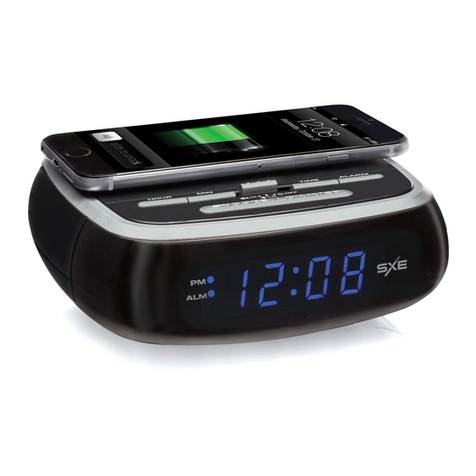
To charge, connect your USB device like smartphone to the USB port of this clock. Use only with devices that require
5V USB power. USB port provides 1000mA recharging current. Devices requiring more than 1000mA should not be
used. Charging time may vary for difference devices.
Note: Charging function may not be supported for all phones or electronic devices.
Charging output would be around 80% in radio mode.
FCC Warnings
Warning: Changes or modifications to this unit not expressly approved by the party responsible for compliance could
void the user's authority to operate the equipment.
NOTE: This equipment has been tested and found to comply with the limits for a Class B digital device, pursuant to
Part 15 of the FCC Rules. These limits are designed to provide reasonable protection against harmful interference in
a residential installation. This equipment generates, uses, and can radiate radio frequency energy and, if not installed
and used in accordance with the instructions, may cause harmful interference to radio communications. However,
there is no guarantee that interference will not occur in a particular installation. If this equipment does cause harmful
interference to radio or television reception, which can be determined by turning the equipment off and on, the user is
encouraged to try to correct the interference by one or more of the following measures:
- Reorient or relocate the receiving antenna.
- Increase the separation between the equipment and receiver.
- Connect the equipment into an outlet on a circuit different from that to which the receiver is connected.
- Consult the dealer or an experienced radio/TV technician for help.
Additional Warnings
- The apparatus shall not be exposed to dripping or splashing and that no objects filled with liquids, such as vases,
shall be placed on apparatus.
- Do not place the unit on top of any soft, porous, or sensitive surfaces to avoid damaging the surface. Use a protective
barrier between the unit and surface to protect the surface.
- Do not mix old and new batteries.
- Do not mix alkaline, standard (carbon-zinc), or rechargeable (ni-cad, ni-mh, etc) batteries.
- Batteries should be recycled or disposed of as per state and local guidelines.
USING THE RADIO
USING BLUETOOTH FUNCTION
2. Using the native controls on your Bluetooth device, select the “SXE86002” in your Bluetooth settings to pair.
3. When successfully paired and connected, the Bluetooth indicator will display a solid red light from the unit.
4. Use the native controls on the connected Bluetooth device to select a track.
5. o play or skip the selected track.
6. Use the button to pause the track.
7. Use the VOL+/- buttons to adjust the volume.
This device complies with Industry Canada license-exempt RSS standard(s). Operation is subject to the following
two conditions: (1) this device may not cause interference, and (2) this device must accept any interference, including
interference that may cause undesired operation of the device.
Le présent appareil est conforme aux CNR d'Industrie Canada applicables aux appareils radio exempts de licence.
L'exploitation est autorisée aux deux conditions suivantes : (1) l'appareil ne doit pas produire de brouillage, et
(2) l'utilisateur de l'appareil doit accepter tout brouillage radioélectrique subi, même si le brouillage est susceptible
d'en compromettre le fonctionnement.