7
CLOCK/TIMER
Clocksetting
1. In standbymode, pressandhold MEM/
CLK SET, “12HOUR” or “24HOUR” is
displayed and flashing. Press or
to change the hour mode.
2. Press MEM/CLK SET,the clock digits
for the hours flash. Press or
to set the hours.
3. Press MEM/CLK SET,the clock digits
for the minutes flash. Press
to set the minutes.
4. PressMEM/CLK SET to confirm the
time.
Timer setting
Thetimer enables the system to switch on
and off in CD or Tuner modeatthespecified
time as an alarm clock. The clocktime
needs to be set firstbefore thetimer can
beused.
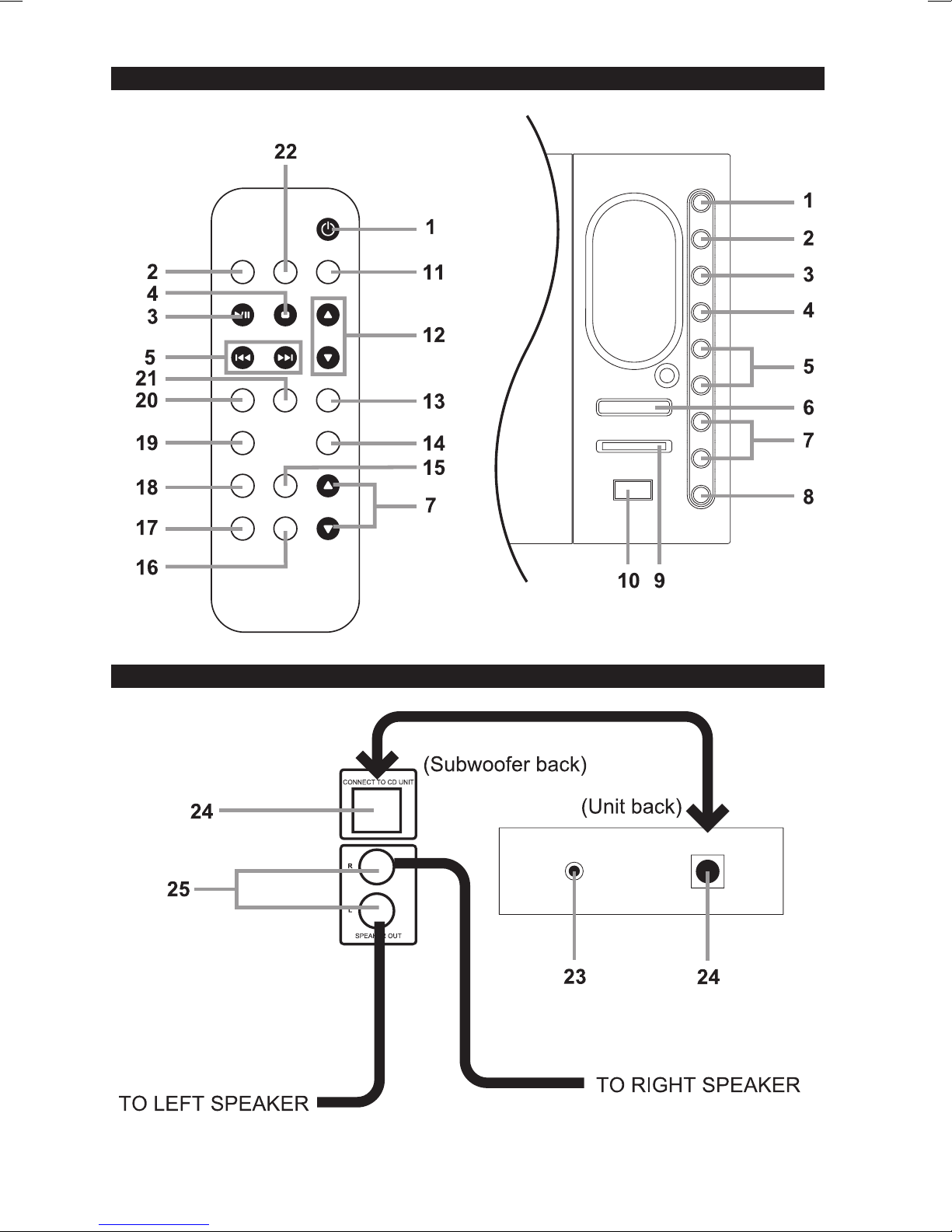
1. Pressand holdTIMER on remote
control until “TIMER”and“ON” are
displayed. Theclock digitsforthehours
flash. Press or to set the
hours of ON time
2. Press TIMER on remotecontrol. The
clockdigits for the minutes flash. Press
or to set the minutes of ON
time.
3. PressTIMER on remote control.
“TIMER” and “OFF” are displayed and
the clock digits for the hours flash. Press
or to set the hours of OFF
time.
4. Press TIMER on remote control. The
clockdigits for the minutes flash. Press
or to set the minutes of OFF
time.
5. PressTIMER on remote control.
“TUNER”or“CD”isdisplayed. Press
or to selectyourdesired
source which will be started at the set
time.
6. Press TIMER on remote control, “VOL
XX” is displayed. Press or to
adjust the volume level.
7. PressTIMER on remotecontrol to
confirm the timer.
Press TIMER once on remotecontrol.
Displayshows “TIMER” if activated and
disappearsifdeactivated.
Note:
•When the OFF time is same as the ON
time, display shows “ERROR”and then
returns to timer setting for revising the OFF
time. In this case do not press the timer
button for several seconds to let the timer
setting mode return to normal. Then, you
can re-enter new timer start from step 1.
•If you selected CD modeforthesource
of timer ON, a CD/MP3-CD disc must be
loaded into the system. In case you forget
Sleep timer setting
The sleep timer enables the system to
switch off by itself after a set period of time.
1. Press SLEEP on remot e c ontrol
repeatedly to select a preset time. The
selections from 90 to 10 minutes,
decreasing in 10 minute increments.
2. Oncethesleeptimeisselected,
“SLEEP” and the selected time appear
constant on the display.
3. To deactivate the sleep timer, press
SLEEP repeatedly on remotecontrol
until“SLEEP” and timer goes off.
to load a CD/MP3-CD disc into the CD
compartment. The system will also turn
on at the specified time but will change
to Tuner mode automatically.