
Trophy TA-1001HD User manual

User Manual
Trophy TA-1001HD
DVB-S/S2 HDTV digital receiver
Trophy-Access decoder
Personal Video Recorder

2www.trophy.com.ua
Trophy TA-1001HD User Manual
Contents
Device Operation 3
Specication 4
Front panel 5
Back panel 5
Remote control 6
Connection of Device to TV Set with RCA input 7
Connection of Device to TV Set with SCART input 7
Data Panel 8
Reading Address Messages 9
Main menu 9
File viewer 9
Recording 10
Timer Programming 11
Timer Programming using EPG information 12
Quick recording 12
Timeshift 13
Mosaic Preview 13
Stream selection 13
System setup 14
Program setup 14
Tuner conguration 14
Transponder List editor 15
Satellite scan 15
Service list editor 16
Audio/video setup 16
OSD Setup 17
Password and parental settings 17
Restore factory setting 18
Power up state 18
Trophy-Access Decoder Number 18

3
www.trophy.com.ua
Trophy TA-1001HD User Manual
Device Operation
Safety Requirements
DVB-S/S2 HDTV Set Top Box design complies with international safety standards. However,
operation with any electric appliances requires caution. We recommend you to ask a qualied
master to install the device. If you choose to install it yourself, please read this Operation
Manual carefully. Pay special attention to safety requirements below.
Supply Voltage
Power supply must be AC 180 V…250 V, 50/60 Hz. Make sure your power supply complies with
these requirements.
Overload
Avoid overloading the supply network by extension cords or adapters. It may cause re or give
you an electric shock.
Liquid Substances
Store liquid substances away from the device and make sure no such substances get inside
the Set Top Box.
Foreign Objects
Please keep coins and other small objects away from the device to prevent their getting
through the vent slots, which may cause serious damage to your Set Top Box. Getting of
insects into the device may also damage the device and, consequently, cause re.
Cleaning
Disconnect the device from power supply before cleaning. Use soft, slightly damp cloth to
clean the surface of the casing. Never use any solvents!
Ventilation
Make sure the vent slots are open and the location where the device is installed allows free air
circulation. Never put the device on a soft surface or cloth. Do not operate and never store the
device on the heat or under direct sunlight. Never put any other appliances on top of the device.
Connected Devices
Do not connect any unauthorized appliances to the device as it is dangerous and may damage
the appliance and this device.
Location
Install the device indoors on hard surface. Make sure the device is well protected from direct
sunlight or moisture.
WARNING: Never remove the top or back panel of the device. The device contains no parts and units which can be
handled by the user. If necessary, call service center for qualied personnel.
Do not leave the operating device unattended. Make sure it is out of reach of children.

4www.trophy.com.ua
Trophy TA-1001HD User Manual
In the event of a long pause between the watching, disconnect the device from the power supply by pulling the
plug out of the socket.
In the event of any malfunction (lost image, cracking sound or odor), disconnect the device from the socket
immediately and call the service center.
Subject to compliance with the instructions, the device life is 5 (Five) years following the manufacture date. Terms
and conditions of further operation must be agreed upon by the owner of device and the service company.
Specications
Demodulation
Input level
Input resistance
Symbol rate
FEC
Input frequency range
Tuning step
Picture ratio
Output connectors Picture ratio
Video output
Output resolution
Color system
Sound
Trophy-Access2 Decoder
Chipset
EPG
Target message to customers
Current balance details
Interface language
Supply voltage
Wattage
Dimensions
Weight
QPSK, 8PSK
-65…-25 dBm
75 Ohm
1...45 Мsymb/s (QPSK)
1… 37 Msymb/s (8PSK)
1/2_2/3_3/4_5/6_6/7_7/8 (QPSK)
1/2_3/5_2/3_3/4_4/5_5/6_8/9_9/10 (8PSK)
950...2150 MHz
1 MHz
4:3; 16:9
6хRCA, HDMI, USB, S/PDIF, LOOP
CVBS, RGB, Component, HDMI
480i,576&576i, 720p x 1080i
PAL, SECAM, NTSC
MPEG-1 Layer2, DD, DD+, MP3
onboard
Fujitsu H60
yes
up to 80 symbols on the screen
on the screen
English, French, German, Indonesian,
Russian, Ukrainian
External Adapter input 180...250VAC
External Adapter output +12V
up to 14W
220х120х45
1,6 kg

TA-1001HD
TROPHY
STANDBY TROPHY-ACCESS
DC 12VUSBHDMISPDIFPbYPr
LOOPRF IN
AUDIO-R AUDIO-L CVB-S
5
www.trophy.com.ua
Trophy TA-1001HD User Manual
Front Panel
Back Panel
1- LED indicator of power / standby
2- Infrared port to receive signal from the remote control.
1 – LNB input
2 – LOOP output
3 , 5 – Left/Right audio channel output
4 , 6 , 8 – In Cb/Y/Cr mode – component signal outputs.
In RGB – Blue/Green/Red signal outputs
7 – Composite“Video” output. In RGB mode – synchronization signal
9 – Optical digital audio output
10 – HDMI output
11 – USB connector
12 – DC +12V connector
1 2
2 4 6 81
3 5 7
910 11 12

6www.trophy.com.ua
Trophy TA-1001HD User Manual
Remote Control
MUTE button
STANDBY mode button
DIGITS – 0 to 9
TV/RA SELECT button
EPG button
INFO button
MENU button
UP – switching channels,
Cursor control in MENU
LEFT/RIGHT volume control
OK button
DOWN – switching channels,
Cursor control in MENU
AUDIO track select button
EXIT button
REWIND button
FAST FORWARD button
PLAY button
STOP button
RED / RECORD button
BLUE / PAUSE button
GREEN button
YELLOW button
1
2
3
4
5
6
7
8
9
10
11
12
13
14
15
16
17
18
19
20
21
Note: MENU appears as text messages on the screen. The lines you select are highlighted.
ОК button always conrms your choice in current MENU. Push MENU button to return to
the previous menu. Push EXIT button to exit the menu mode. Push MENU button to save
automatically any changes you have made.
4
3
21
6
5
7
10
21
13
15
17
19
9
8
11
20
12
16
18
14

DC 12VUSBHDMISPDIFPbYPr
LOOPRF IN
AUDIO-R AUDIO-L CVB-S
DC 12VUSBHDMISPDIFPbYPr
LOOPRF IN
AUDIO-R AUDIO-L CVB-S
7
www.trophy.com.ua
Trophy TA-1001HD User Manual
Connection of Device to TV Set
with RCA Input
Connection of Device to TV Set
with SCART Input
RCA
CVBS
General
Cb
General
Y
General
Cr
General
SCART
(20) VIDEO
(17) General
(7) BLUE
(5) General
(11) GREEN
(9) General
(15) RED
(13) General
Sat LNB output
Sat LNB output

8www.trophy.com.ua
Trophy TA-1001HD User Manual
Data Panel
While switching channels or pushing INFO button,
the screen will ash Data Panel.
You can set the data panel lifetime on the screen. Go to “Main menu” - “System setup” -“OSD
setup”. Use
buttons to set“OSD display time” from 1 sec to 30 sec.
Upper right corner of the data panel shows current time as broadcast by the central station of
the satellite or UMWS operator.
EPG (Electronic Program Guide) information is displayed in the center of the panel. Line 1
shows the name of the current program and time of its beginning. Line 2 shows the name of
the next program and time of its beginning. The scale in the upper part of data panel shows
how much of the programs you have missed.
Current balance on your subscriber account is shown in the bottom left corner of the panel.
When your balance reaches “0”, your device will automatically block your access to paid
programs.
Attention! If your device was disconnected from the socket, allow up to 30 seconds after
switching on to receive details on the balance and current time from the digital transponder.

9
www.trophy.com.ua
Trophy TA-1001HD User Manual
Reading Address Messages
Main menu
File viewer menu
Broadcasters may send address messages to your
device. To read the message, press YELLOW button.
Press MENU to enter the MAIN MENU.
Set Top Box provides the following additional features:
- record TV programs and radio programs on an external USB device (FAT, FAT32).
- playback of TS video,
- display JPEG, BMP, PNG, JPG images on TV,
- play mp3 music les.
To use these features, you need to connect your own USB storage device (e.g. USB ash) to the
USB connector on the rear panel of the Set Top Box.
Happy birthday, Vladimir Georgievich
10 www.trophy.com.ua
Trophy TA-1001HD User Manual
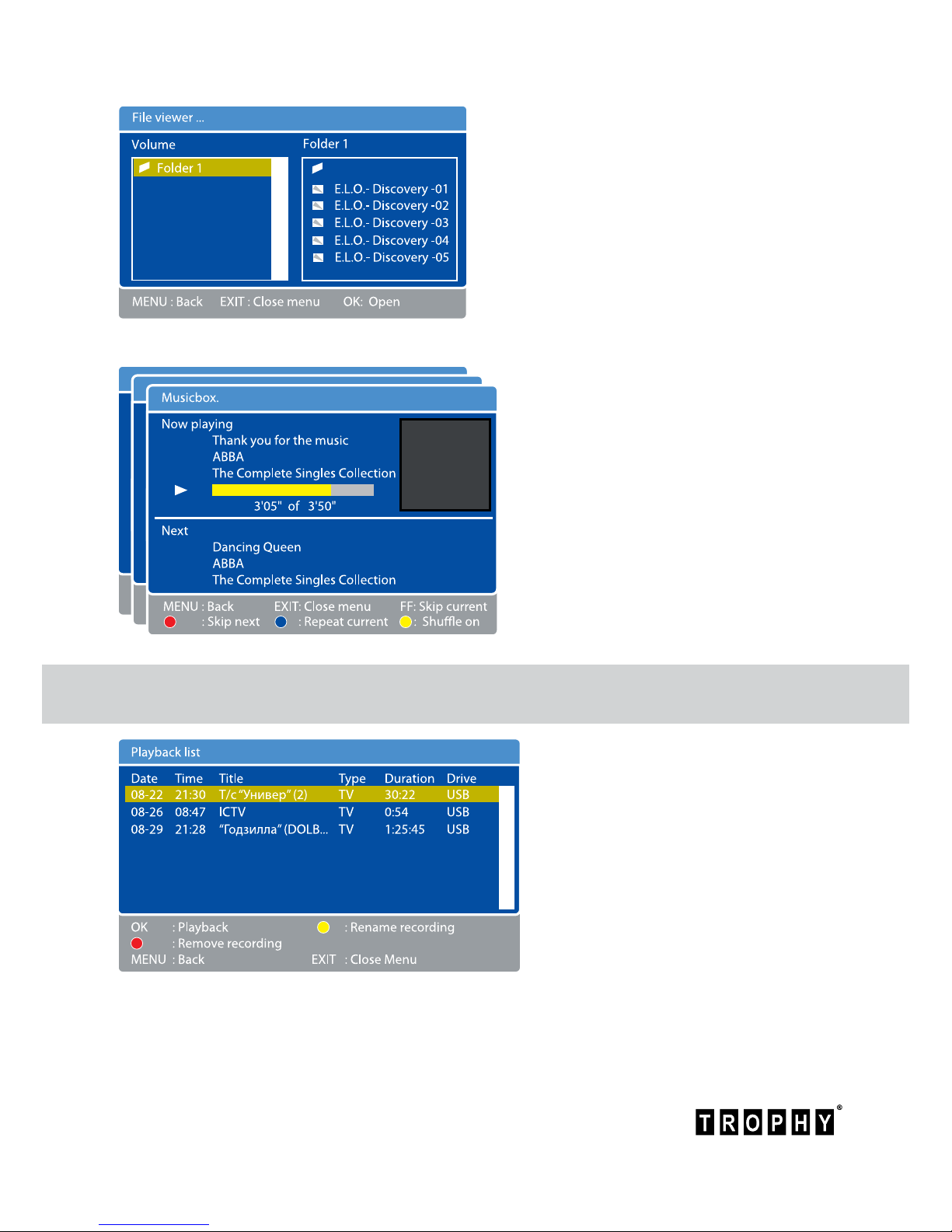
Recordings menu
Press MENU to enter the MAIN MENU.
Select “Recordings” row and click OK
button.
The screen will display the “Playback
list” menu.
This menu has complete information
about the date, title and duration of
video-clip.
You can select desired videole on your ash device.
Click OK button to view the videole. If you want to stop viewing of the le, click STOP button.
To open the FILE VIEWER menu, click OK
Use OK button and up/down/left/right
buttons to select the folder and le for
viewing. JPEG les are displayed on the
screen immediately after the cursor select.
To view videos, you must move the cursor
to the desired le and click OK. To nish
viewing the video, press STOP button.
If you want to listen to an MP3 album,
you can select desired folder and
click OK. On the screen you will see a
Musicbox menu. At the bottom of the
menu are buttons you need to select
tracks in a music album.
Table of contents

















