manuals.online logo
Brands
  1. Home
  2. •
  3. Brands
  4. •
  5. Velleman-Kit
  6. •
  7. Control Unit
  8. •
  9. Velleman-Kit K2636 User manual

Velleman-Kit K2636 User manual

This manual suits for next models

1

Other Velleman-Kit Control Unit manuals

Velleman-Kit K8030 User manual

Velleman-Kit

Velleman-Kit K8030 User manual

Velleman-Kit K2634 User manual

Velleman-Kit

Velleman-Kit K2634 User manual

Popular Control Unit manuals by other brands

Seitz 14A80 user manual

Seitz

Seitz 14A80 user manual

Wilo RS485 Installation and operating instructions

Wilo

Wilo RS485 Installation and operating instructions

Becker CentralControl CC41 Commissioning Instruction

Becker

Becker CentralControl CC41 Commissioning Instruction

SICK CDB650 operating instructions

SICK

SICK CDB650 operating instructions

Panduit NetKey NKP5E88M Series installation instructions

Panduit

Panduit NetKey NKP5E88M Series installation instructions

MX Options Concentric Petite Fitting instructions

MX

MX Options Concentric Petite Fitting instructions

Clean Water Systems Fleck 2510 Installation & start?up guide

Clean Water Systems

Clean Water Systems Fleck 2510 Installation & start?up guide

Fairchild FSB44104A user guide

Fairchild

Fairchild FSB44104A user guide

LEGRAND Wattstopper LMIN-104 installation instructions

LEGRAND

LEGRAND Wattstopper LMIN-104 installation instructions

PMK ATT10BNCS instruction manual

PMK

PMK ATT10BNCS instruction manual

Tektronix TDS3FFT user manual

Tektronix

Tektronix TDS3FFT user manual

Woodward easYgen Technical manual

Woodward

Woodward easYgen Technical manual

Balluff BNI EIP-502-105-R015 user guide

Balluff

Balluff BNI EIP-502-105-R015 user guide

NXP Semiconductors TWR-LS1021A Getting started

NXP Semiconductors

NXP Semiconductors TWR-LS1021A Getting started

Advantech PCM-3117 Startup manual

Advantech

Advantech PCM-3117 Startup manual

Danfoss MCO 101 manual

Danfoss

Danfoss MCO 101 manual

Moons' Lin Engineering R701P user manual

Moons'

Moons' Lin Engineering R701P user manual

Aventics RV1 operating instructions

Aventics

Aventics RV1 operating instructions

manuals.online logo
manuals.online logoBrands
  • About & Mission
  • Contact us
  • Privacy Policy
  • Terms and Conditions

Copyright 2025 Manuals.Online. All Rights Reserved.

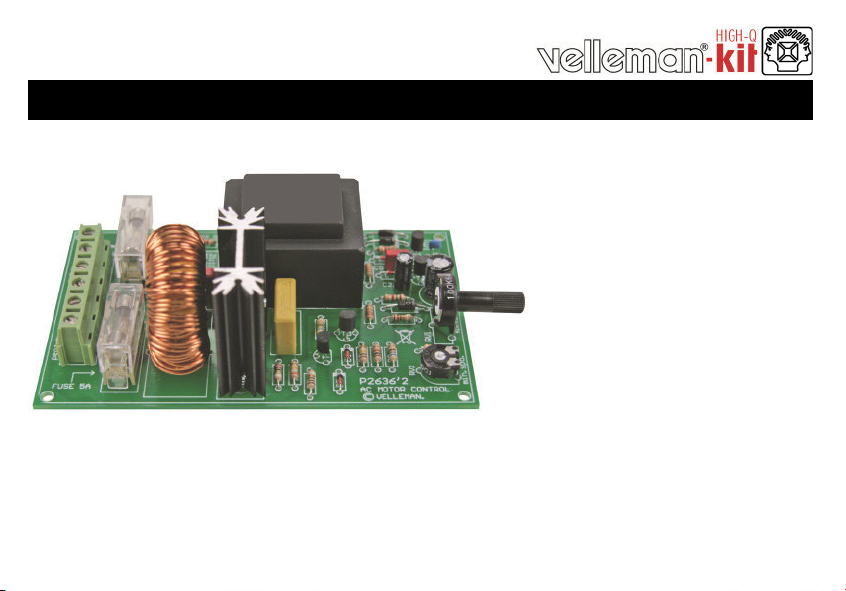
UNIVERSAL AC MOTOR CONTROL
K2636
ILLUSTRATED ASSEMBLY MANUAL H2636IP-1
Easyspeedcontrolof ACcollectormotors.
2
Features & Specifications
This kit is especially designed to control the speed of drills or any other AC-motors with carbon brushes. Contrary to the usual
dimmers, there isn't a phase cut every 1/2 period but only once per period. The moment of cutting determines the speed which can
be adjusted from 5 to about 95 %. Owing to this kind of controling, we keep a higher torque at low speed.This does not mean on
the other hand, that this circuit cannot be used for a resistive load (e.g. lamps, heating devices.).
A few advantages are :
The control range is from 5 to 95%.
There is an anti-RF interference circuit included.
The triac is protected against inductive voltage peaks from the motor.
The control circuit is powered by the mains, but the load supply may be derived from a different AC source.
Both voltages should have the same frequence though, and they should have completely the same phase or the
opposite phase (derived from one and the same phase out of the 3-Phase power source).
By keeping the MAINS- and LOAD SUPPLY separated this circuit is extremely appropriate for the use in low voltage
applications: e.g. in swimming pools, outdoors ...
Specifications
Power voltage :
MAINS 220-240 VAC or 115 VAC
LOAD SUPPLY 24VAC to 240VAC
MAINS AND LOAD SUPPLY are galvanically separated
Max. power to be regulated : 1200W at 240V (max. 5A).
Separate adjustment for the lowest speed.
Anti-RF interference circuit included.
Dimensions : 120x75x41mm / 4,72x2,95x1,6"
3
Assembly hints
1. Assembly (Skipping this can lead to troubles ! )
Ok, so we have your attention. These hints will help you to make this project successful. Read them carefully.
1.1 Make sure you have the right tools:
 A good quality soldering iron (25-40W) with a small tip.
 Wipe it often on a wet sponge or cloth, to keep it clean; then apply solder to the tip, to give it a wet look. This is called ‘thinning’ and will protect the tip,
and enables you to make good connections. When solder rolls off the tip, it needs cleaning.
 Thin raisin-core solder. Do not use any flux or grease.
 A diagonal cutter to trim excess wires. To avoid injury when cutting excess leads, hold the lead so they cannot fly towards the eyes.
 Needle nose pliers, for bending leads, or to hold components in place.
 Small blade and Phillips screwdrivers. A basic range is fine.
For some projects, a basic multi-meter is required, or might be handy
1.2 Assembly Hints :
Make sure the skill level matches your experience, to avoid disappointments.
Follow the instructions carefully. Read and understand the entire step before you perform each operation.
Perform the assembly in the correct order as stated in this manual
Position all parts on the PCB (Printed Circuit Board) as shown on the drawings.
Values on the circuit diagram are subject to changes, the values in this assembly guide are correct*
Use the check-boxes to mark your progress.
Please read the included information on safety and customer service
* Typographical inaccuracies excluded. Always look for possible last minute manual updates, indicated as ‘NOTE’ on a separate leaflet.

0.000
1.3 Soldering Hints :
1- Mount the component against the PCB surface and carefully solder the leads
2- Make sure the solder joints are cone-shaped and shiny
3- Trim excess leads as close as possible to the solder joint
DO NOT BLINDLY FOLLOW THE ORDER OF THE COMPONENTS ONTO THE TAPE.
ALWAYS CHECK THEIR VALUE ON THE PARTS LIST!
REMOVE THEM FROM THE TAPE ONE AT A TIME !
5
Choose operating frequency :
Europe (50Hz)
R7 : 47K (4 - 7 - 3 - B)
US (60Hz)
R7 : 10K (1 - 0 - 3 - B)
Construction
C3 : 100nF (104)
5. Capacitor
D1 : 1N4007
D2 : 1N4007
D3 : 1N4148
D4 : 1N4148
D5 : 1N4148
D6 : 1N4148
D7 : 1N4007
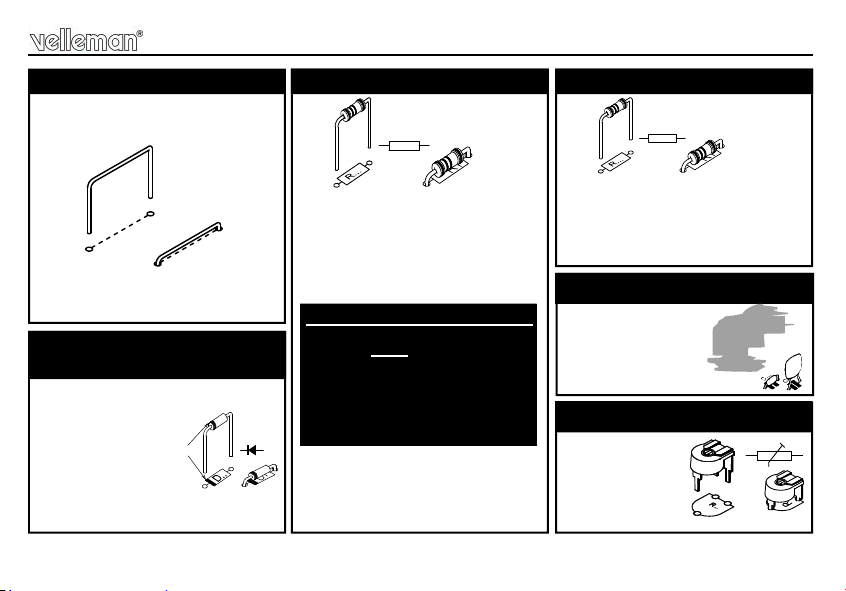
2. Diodes. Watch the
polarity !
D.. .
CATHODE
R1 : 4K7 (4 - 7 - 2 - B)
R2 : 3K3 (3 - 3 - 2 - B)
R3 : 680 (6 - 8 - 1 - B)
R4 : 22K (2 - 2 - 3 - B)
R5 : 22K (2 - 2 - 3 - B)
R6 : 1K5 (1 - 5 - 2 - B)
R8 : 100K (1 - 0 - 4 - B)
R12 : 1K (1 - 0 - 2 - B)
R15 : 2K2 (2 - 2 - 2 - B)
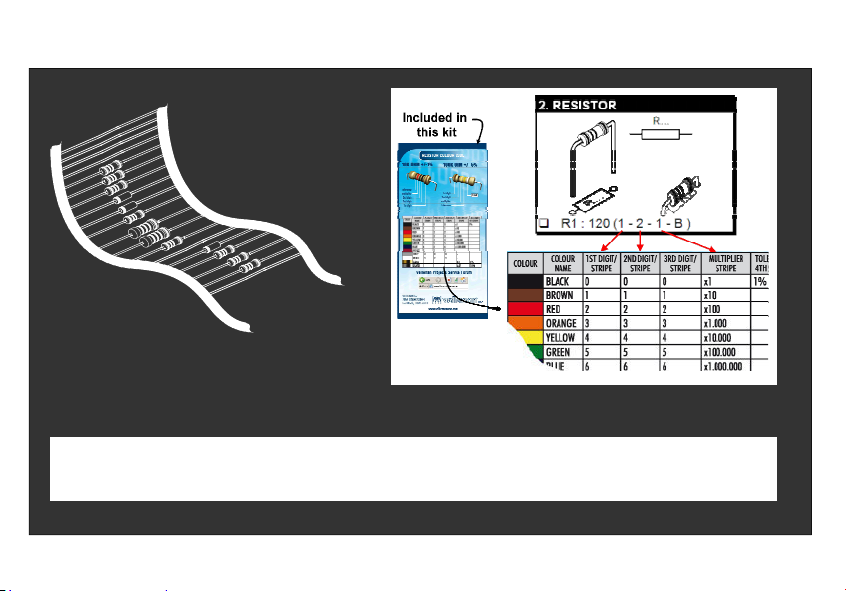
3. Resistors
R...
Mount jumper according to the
main voltage :
J1: 115V OR J2: 230V
1. Jumper SK4
R9 : 100 (1 - 0 - 1 - B - 9)
R10 : 120 (1 - 2 - 1 - B - 9)
R11 : 68 (6 - 8 - 0 - B - 9)
R13 : 27 (2 - 7 - 0 - B - 9)
R14 : 390K (3 - 9 - 4 - B - 9)
4. Metal film resistors
R...
RV2 : 100K
6. Trim potentiometer
R...
6
Construction
T1 : BC547B
T2 : BC547B
T3 : BC547B
T4 : BC517
7. Transistors.
C1 : 470µF
C2 : 1µF
9. Electrolytic Capacitors.
Watch the polarity !
C...
C5 : 47nF
C6 : 100nF/275VAC X2
C7 : 47nF/400V
8. Capacitors
F1 : 250mA (slow)
F2 : 5A (slow)
11. Fuse holders + fuses
F...
RV1 : 100K
12. Trim potentiometer
RV...
L1 : 1mH/5A/1Khz.
14. Coil.
TRAFO1 : 2 x 6V / 2 x 0,3A
Mount the 6V connections to
the OUTSIDE of the print !
15. Transformer
TRAFO...
LD1 : 3mm RED
LD...
CATHODE
VAC : 2p
LOAD : 2p
MAINS : 2p
10. Terminal blocks. 13. LED
7
Construction
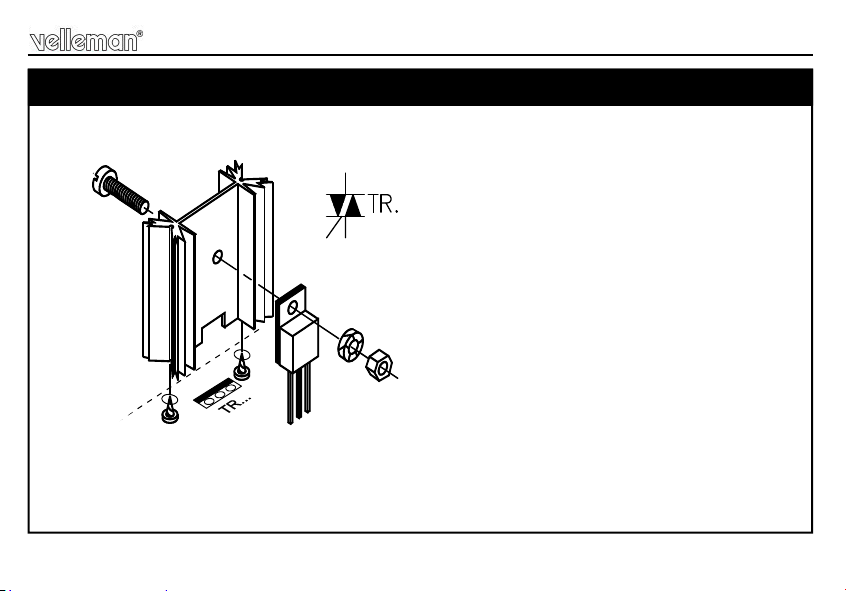
TR1 : BT137F-600
Place the heatsink and the triac on the PCB.
Fix the two components with a M3 bolt and nut.
Now, the triac may be soldered.
16. Triac.
mm
3 BOLT
M3
NUT
LOCK
WASHER
10mm
M3 BOLT
8
Test & connection
ATTENTION:
A PART OF THE CIRCUIT IS ALWAYS UNDER MAIN
VOLTAGE. TAKE ALL POSSIBLE PRECAUTIONS, SO
THAT
NO-ONE CAN TOUCH ANY PART. FOR YOUR OWN
SECURITY AS FOR THE USERS' SECURITY. MOUNT
THIS KIT PREFERABLY IN AN ISOLATING HOUSING.
THE FUSE WILL MELT IN CASE OF AN OVERLOAD, RE-
PLACE IT BY EXACTLY THE SAME TYPE.
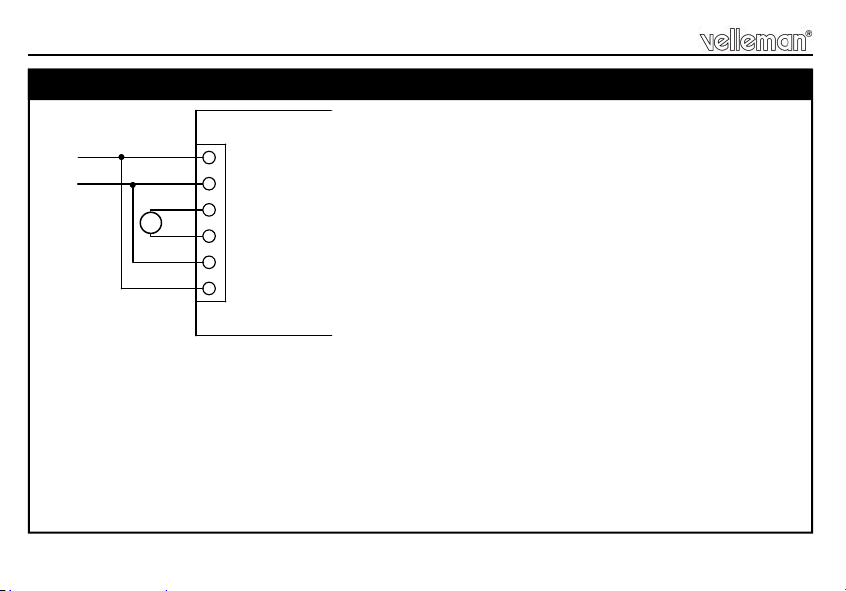
Connect the load to the screw connector marked by "LOAD" see fig. 1. Consider the max. load (5,5A)
Connect the mains voltage on the screw connector "MAINS".
See whether you have mounted the right jumper (J1 or J2).
The power voltage for the load is put on the connector. "VAC" (24 … 240VAC).
See that this voltage and the "MAINS" voltage have the same frequency and that they are either in phase
or in the opposite phase. Owing to the fact that the supply voltages of the load and the control circuit are
completely separated, one can also connect low voltage loads. This makes this circuits fits for regulations
M
110 - 240VAC
MAINSLOADVAC
L
N
L
N
Fig 1.0
N
L
N
LL
N
M
17. Test & connection
9
Test & connection
Turn RV1 completely to the left (minimal position) and RV2 completely to the right.
Switch the power on.
BE CAREFUL: a large part of the circuit is under mains power, do not touch it!
Adjust RV2 so that the motor will have the lowest speed. It is important for the motor to start at any time,
even where RV1 is put in its minimal position, otherwise there might be large currents causing sparks
that burn the carbon brushes.
NOTE: If the torque is poor, swap the two wires, connected to "VAC", mutually. The connections to
"MAINS" must remain un-changed!
10
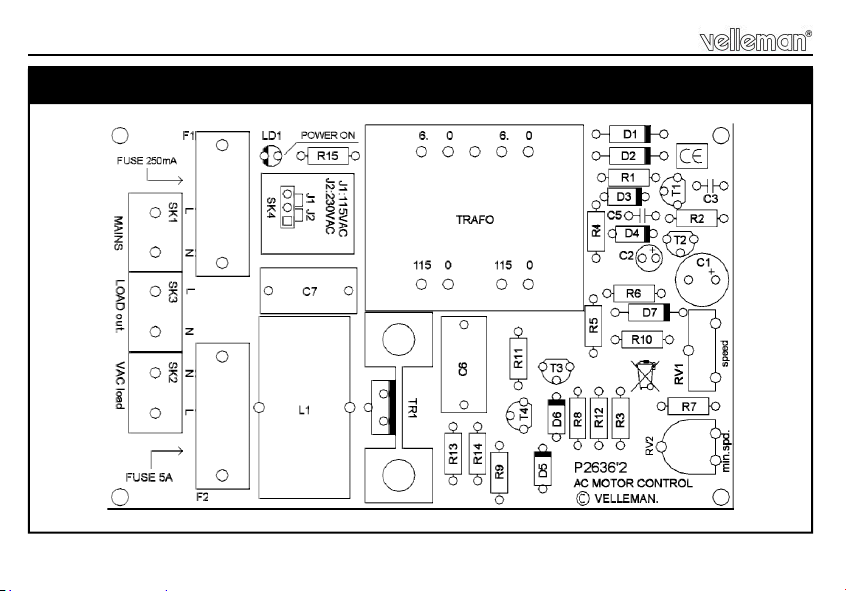
PCB
PCB