Vidicode Fax Server PRI User manual

Fax Server PRI Manual
Version 2.022 ©Vidicode 2005
International
Headquarters
VIDICODE Datacommunicatie BV
Blauwroodlaan 140, 2718 SK Zoetermeer
The Netherlands
Tel. +31 79-3617181 Fax +31 79-3618092
vidicode@vidicode.nl www.vidicode.nl

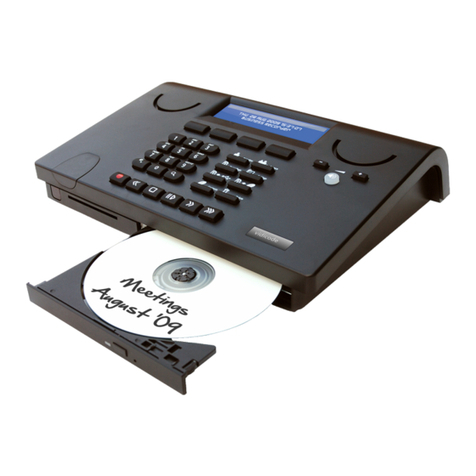
The Fax Server PRI
1. Menu keys
2. Backlight Display
3. Function keys
4. Speaker
5. Alfa-Numerical keys
6. CryptoCard reader
7. CD Recorder
8. Recorder keys
9. Speakerphone key
10. Volume adjustment
Fax Server PRI manual ©Vidicode 2005
2

Connections Fax Server PRI
1. Power
2. Loudspeaker 3.5 mm mini jack
3. Microphone 3.5 mm mini jack
4. Ethernet/LAN RJ45
5. RS 232 9 pin female serial connector
6. ISDN/PRI Out RJ45
7. ISDN/PRI In RJ45
Fax Server PRI manual ©Vidicode 2005 3

Function-keys
Fax Server PRI manual ©Vidicode 2005
4

Alfa-numerical functions
Fax Server PRI manual ©Vidicode 2005 5

Care and Maintenance
Keep the Fax Server PRI dry. If it gets wet, wipe it dry
immediately Liquids might contain minerals that can
corrode the electronic circuits.
Use and store the Fax Server PRI only in normal
temperature environments. Temperature extremes
can shorten the life of electronic devices and distort
or melt plastic parts.
Keep the Fax Server PRI away from excessive dust
and dirt that can cause premature wear of parts.
Do not use harsh chemicals, cleaning solvents or
strong detergents to clean the Fax Server PRI.
Fax Server PRI manual ©Vidicode 2005
6

Contents
1Operating the Fax Server PRI................................. 11
1.1 Frequently used key indicators................................ 11
1.2 Save Changes......................................................... 12
1.3 Initializing CD .......................................................... 12
2The Fax Server PRI ................................................ 13
2.1 What's in the box..................................................... 13
2.2 Connecting the Power supply.................................. 14
2.3 Connecting the E1 Primary Rate ISDN ................... 15
3Introduction ............................................................. 17
3.1 Fax Server Setup .................................................... 17
3.1.1 Fax recording ................................................................18
3.1.2 Automatic network printing............................................18
4System settings....................................................... 19
4.1 Fax ID...................................................................... 19
4.2 Top text ................................................................... 19
4.3 Stand Alone Mode................................................... 20
4.4 Max. Fax Lines ........................................................ 21
4.5 Max. Rx Fax Lines................................................... 21
4.6 Max. Tx Fax Lines................................................... 21
4.7 Tx Retries................................................................ 22
4.8 Tx Retry Time.......................................................... 22
4.9 Tx Answer Timeout ................................................. 22
4.10 Tx Start Time........................................................... 23
4.11 Tx Stop Time........................................................... 23
4.12 Fax to printer ........................................................... 23
4.13 Copy Fax to CD....................................................... 24
4.14 CD Copy Time......................................................... 24
4.15 Protect the Fax Server PRI with a Password .......... 24
4.16 Remove Password protection ................................. 25
4.17 Set the Clock........................................................... 25
4.18 Set the Language.................................................... 26
5LAN settings ........................................................... 27
Fax Server PRI manual ©Vidicode 2005 7

5.1 FTP user ................................................................. 27
5.2 FTP password ......................................................... 28
5.3 FTP server port ....................................................... 28
5.4 DHCP server ........................................................... 29
5.5 IP address ............................................................... 29
5.6 IP subnet mask........................................................ 30
5.7 Gateway .................................................................. 31
5.8 IP name................................................................... 31
5.9 E-mail address ........................................................ 32
5.10 Reply address ......................................................... 33
5.11 SMTP server IP address ......................................... 33
5.12 SMTP server port .................................................... 34
5.13 SMTP Login ............................................................ 34
5.14 Domain name .......................................................... 35
5.15 DNS server.............................................................. 36
5.16 Printer address........................................................ 36
5.17 Printer port .............................................................. 37
5.18 Printer queue........................................................... 37
5.19 NTP Server ............................................................. 38
5.20 NTP Server Port ...................................................... 38
5.21 GMT correction........................................................ 39
5.22 TelNet...................................................................... 39
5.23 Service timer ........................................................... 40
6Fax Server PRI function keys ................................. 41
6.1 Fax Number List......................................................41
6.1.1 Add a new number to the list ........................................42
6.1.2 Delete a number from the fax number list.....................43
6.2 Fax Archive ............................................................. 43
6.2.1 Received faxes..............................................................44
6.2.2 Sent faxes .....................................................................45
6.3 Email queue ............................................................ 46
6.3.1 Send an E-mail again....................................................46
6.4 Fax Queue .............................................................. 47
6.4.1 Send a fax again ...........................................................47
6.5 The CD menu .......................................................... 48
6.5.1 Free on CD....................................................................48
6.5.2 Create CD directory ......................................................48
Fax Server PRI manual ©Vidicode 2005
8

6.5.3 Erase CD Re-writable ...................................................49
6.5.4 Software update ............................................................50
6.6 Lan menu ................................................................ 51
6.7 Disk info .................................................................. 51
6.8 System menu .......................................................... 52
7Fax Server Setup .................................................... 53
7.1 Fax Server Setup Introduction................................. 53
7.2 Software updates .................................................... 53
7.3 Installation ............................................................... 54
7.4 Setting up a Fax Server PRI.................................... 55
7.5 The user list............................................................. 56
7.6 Create a new user................................................... 57
7.7 Edit a user profile .................................................... 57
8Acknowledgements................................................. 59
8.1 Guarantee ............................................................... 59
8.2 Liability .................................................................... 59
9Technical specifications .......................................... 61
10 INDEX ................................................................ 63
Fax Server PRI manual ©Vidicode 2005 9

Fax Server PRI manual ©Vidicode 2005
10
Table of contents
Other Vidicode Server manuals