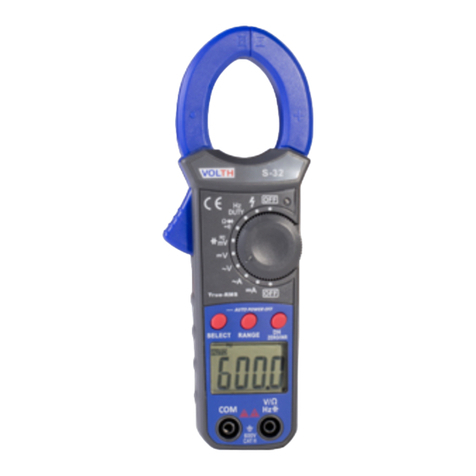
Operation
NOTICES : Read and understand all warning and precaution statements listed
in the safety section of this operation manual prior to using this
meter. Set the function select switch to the OFF position when the
meter is not in use.
AC/DC Current Measurements
WARNING : Ensure that the test leads are
disconnected from the meter before making
current clamp measurements.
1. Set the Function switch to the 1000ADC,
600ADC, 1000AAC or 600AAC range.
2. If the range of the measured is not known,
select the higher range first then move to
the lower range if necessary.
3. Press the trigger to open jaw. Fully enclose
one conductor to be measured.
The clamp meter LCD will display the reading.
DC/AC Voltage Measurements
1. Insert the black test lead into the negative COM terminal and the red test lead into
the positive V terminal.
2. Set the function switch to the V position.
3. Select AC or DC with the MODE button.
4. Connect the test leads in parallel to the circuit under test.
5. Read the voltage measurement on the LCD display.
Resistance Measurements
1. Insert the black test lead into the negative COM terminal and the red test lead into
the positive terminal.
2. Set the function switch to the Ω •))) CAP position.
3. Touch the test probe tips across the circuit or component under test. It is best to
disconnect one side of the device under test so the rest of the circuit will not
interfere with the resistance reading.
4. For Resistance tests, read the resistance on the LCD display.
Diode and Continuity Measurements
1. Insert the black test lead banana plug into the negativeCOM jack and the red
test lead banana plug into the positive diode jack.
2. Turn the rotary switch to the Ω •))) CAP position.
3. Press the MODE button until " " appears in the display.
4. ouch the test probes to the diode under test. Forward voltage will indicate 0.4V
to 0.7V. Reverse voltage will indicate “OL”. Shorted devices will indicate near 0mV
and an open device will indicate “OL” in both polarities.
For Continuity tests, if the resistance is < 40Ω, a tone will sound.Operation
Capacitance Measurements
WARNING : To avoid electric shock, disconnect power to the unit under test and
discharge all capacitors before taking any capacitance measurements.
Remove the batteries and unplug the line cords.
1. Set the rotary function switch to the Ω •))) CAP position.
2. Insert the black test lead banana plug into the negative (COM) jack. Insert the red
test lead banana plug into the positive (V) jack.
3. Touch the test leads to the capacitor to be tested.
4. Read the capacitance value in the display
Frequency/duty cycle Measurements (electronic)
1. Set the rotary function switch to “V” position.
2. Select ACV with the MODE button
3. Press the Hz/% button to indicate “Hz” in the display.
4. Insert the black lead banana plug into the negative COM jack and the red test
lead banana plug into the positive Hz jack.
5. Touch the test probe tips to the circuit under test.
6. Read the frequency on the display.
7. Press the Hz/% button again to indicate “%” on the display.
Read the % of duty cycle on the display.
Temperature Measurements
WARNING : To avoid electric shock, disconnect both test probes from any source
of voltage before making a temperature measurement.
1. Set the function switch to TEMP.
2. Insert the Temperature Probe into the negative (COM) and the V jacks, making
sure to observe the correct polarity.
3. Select °C or °F with the MODE button.
4. Touch the Temperature Probe head to the part whose temperature you wish to
measure. Keep the probe touching the part under test until the reading stabilizes
(about 30 seconds).
5. Read the temperature in the display. The digital reading will indicate the proper
decimal point and value.
WARNING : To avoid electric shock, be sure the thermocouple has been removed
before changing to another measurement function
Red Black Black Red
Probe Probe Probe Probe
Forward test Reverse test