`çãéäÉíÉ=háí=mÉíÉêÄáäí=
`çãéäÉíáçå=çÑ=~ëëÉãÄäó=Öêç éë
25
73
25
1
2
709
709
710
655
655
723
57
57
1
21
72
71
341
341
342
342
47
46
44 74
1160
1160
717
15
6
717
6
15
13
13
13 26
3 1326 33
32
33
32 13
26
13
13
3
13
26
68
70
70
70
70
17
20
17
20
52
52
3
13
26
3
13
26
33
32
13
1
13
66
12
12
32
13
13
26
13
3
1
26
13
3
715
716
33
109
109
4
114
714
34
34 34
34
64
114
4
B-41-5
B-41-4
Note!
Sometimes it happens that the
chromed rims sit too tightly on
the axle (work tolerance);
in this case remove a bit the
chrome inside the rims, and light-
ly grease the running
surface (e.g. using Vaseline).
NN `çãéçåÉåíë=~íí~ÅÜÉÇ=íç=íÜÉ==
êÉ~ê=Ñê~ãÉ=ëÉÅíáçå=
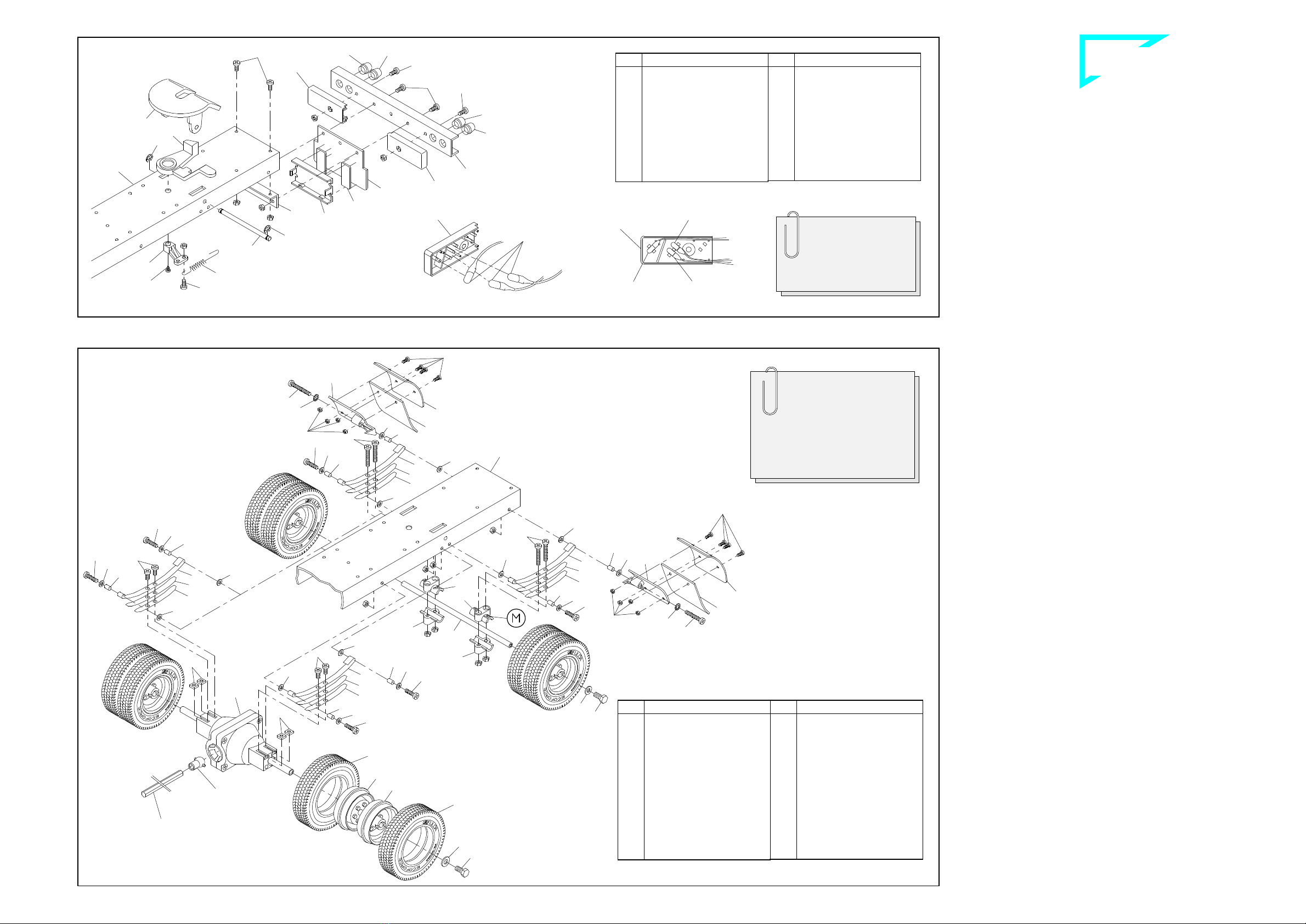
11.1 Mounting the fifth-wheel components
Attach the spring 74 to the link lever 44 with a screw 1and M3 nut. Insert the
bar 72 into the opening from above, securing it from below with the link lever
and a tapping screw 21. Mount the fifth-wheel 71 from above, inserting the
feet into the slots in the frame. Slide the shaft 73 through the holes at the si-
de of the frame and the feet of the fifth-wheel, catching the free end of the
spring 74 between the feet when doing so. The shaft is secured with two re-
taining washers 25.
Please ensure when attaching the fifth-wheel that the ribbon cable with the
two circuit boards is located between the frame and the shaft (ill. 9).
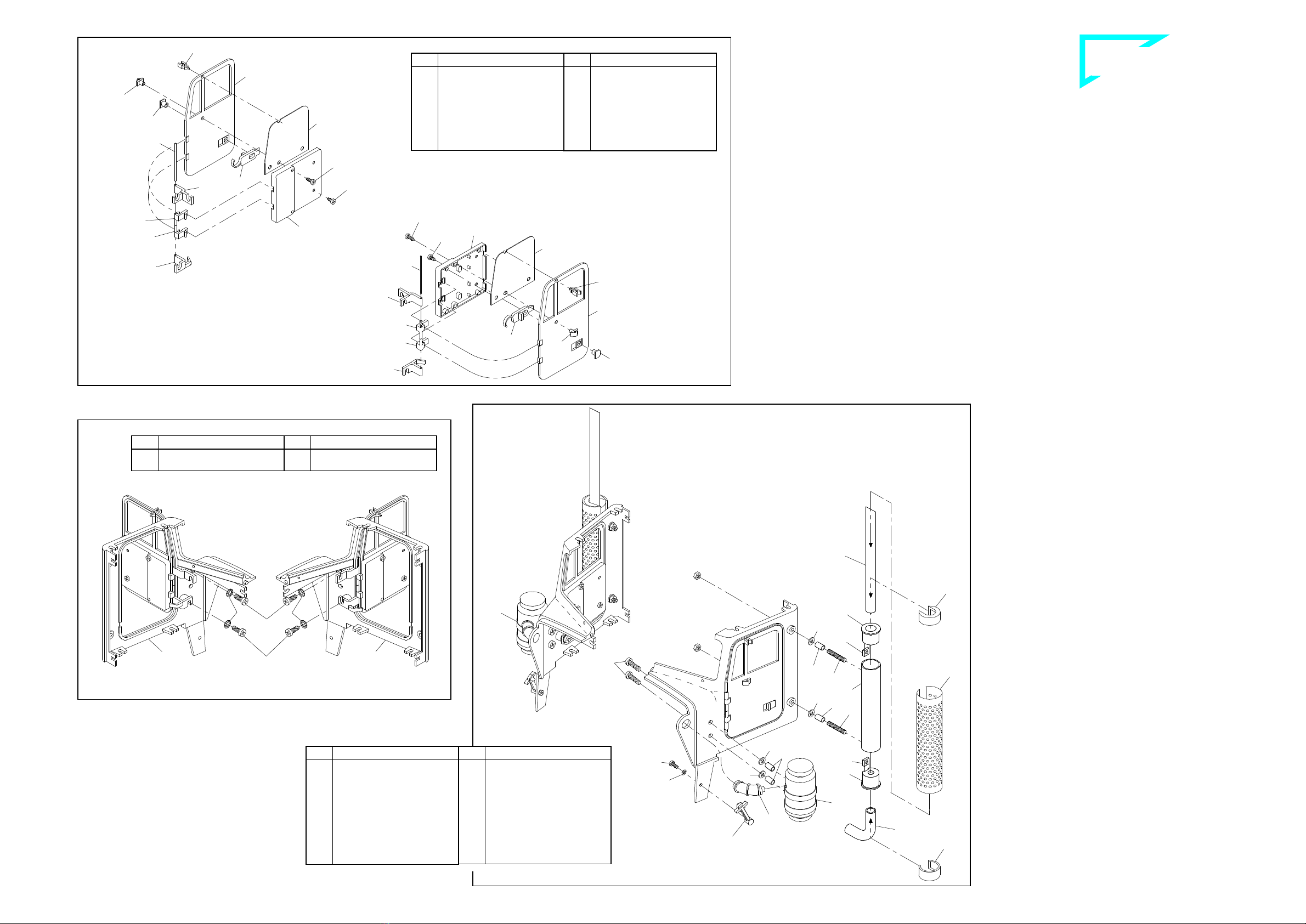
11.2 Mounting the rear bumper assembly
First insert the bulbs 713 in the lamp caps 709 as shown in the figure. Now af-
fix the assembled caps to the rear bumper 47 using one each screw 57 and
M3 nut. From the rear insert the lenses into the bumper: outwards the blinker
lenses 341, inwards the rear light lenses 342. Attach the frame tail piece 46
underneath the frame using screws 1and M3 nuts. Then the bumper and
carrier plate 710 are set in front of the frame tail piece and attached with
screws 2and M3 nuts.
Take particular care that the bulb cables are not clamped between the
bumper and the frame tail piece; this could cause a short circuit!
Using two adhesive pads 655, affix the PCB support 723 on the front surface
of the carrier plate, centred and flush with the bottom edge.
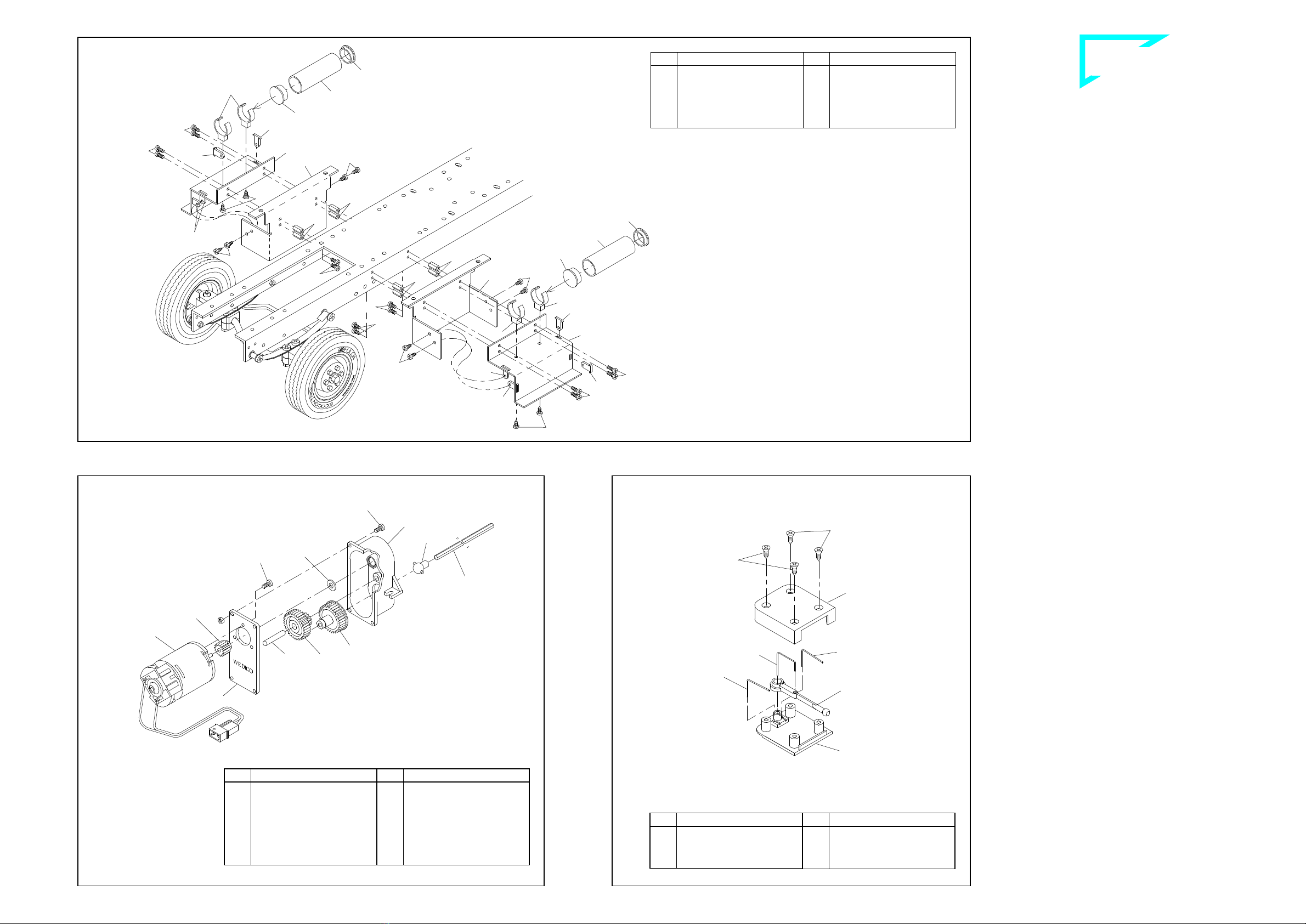
NO oÉ~ê=~ñäÉ=ëÉÅíáçå=
12.1 Mounting the mud guards
The mud guard support 715 is marked with an "X" and will later be mounted
on the passenger’s side, the mud guard support 716 marked "O" on the
driver's side. First attach to these supports the mud flaps 717 and the mud
guards 714 with four screws 114 and nuts 109 each. Then use screws 6, ser-
rated washers 15, bushings 26, two washers 13 and M3 nuts to attach the
supports to the holes at the rear of the frame.
12.2 Mounting the spring set and axle
Attach the open ends of the two long spring leaves 32 to the bushing and use
a screw 3, bushing 26, washer 13 and M3 nut to screw the closed end to the
frame. Press one each M3 nut into the hexagonal recess at the lower spring
carrier 70. The axle 68 can now be mounted together with the spring carriers,
one medium spring leaf 33 each, a short spring leaf 34 and screws 4.
Ensure that the end of the spring carrier 70 identified with an "M" is to-
ward the wheel.
The ribbon cable with the two lamp PCBs should be mounted when atta-
ching the rear axle and the differential!
12.3 Mounting the spring set and differential
First attach the long spring leaves 32 to the frame. Once you have inserted
one square nut 12 each into the grooves at the side of the differential the
springs can be attached with screws 1. The differential has two cams on the
wheel mounts; the grooves in the hubs are aligned exactly with these cams.
The wheels are affixed using screws 17 (which will cut their own threads) and
washers 20. Press the joint ball 64 into the joint socket at the mounted diffe-
rential.
In no case should you use an M3 screw more than 6 mm long to affix the
spring set as this would cause binding and damage the shafts on the dif-
ferential!
12.4 Mounting the wheels
Once you have mounted the drive axle tyres 1160 on the rims 52 the wheels
are mounted on the shaft, with the wheel nuts facing one another and the
chromed rims toward the outside; secure with a washer 20 and a screw 17.
The wheels should turn easily but there should not be too much play.
41-e.DOC / K-Peter Page 6
Rear axle section ill. 12
Components attached to the rear frame section ill. 11
Drive shaft
(grey)
(chromed)
Inserting the bulbs
Frame
Bulb for blinker
Bulb for
brake light
Bulb for rear light
Qty.
No. Assembly part
1 73
Shaft for fifthwheel
1 74
Draw spring
2 341
Blinker lens high, orange
4 342
Lens/rear light high, red
2 655
Adhesive pad,
double-sided
2 709
Lamp cap
1 710
Carrier plate for
support PCB
6 713
Bulb 3V
1 723
PCB support, small
Qty.
No. Assembly part
7 ---
Nut M3
3 1
Screw M3 x 6
2 2
Screw M3 x 8
1 21
Tapping screw 2.2 x 4.5
2 25
Retaining washer 3.2
1 44
Link lever
1 46
Frame tail piece
1 47
Bumper, rear
2 57
Screw M3 x 10
1 71
Standard fifthwheel
1 72
Bar for kingpin
Note!
The kit contains two
additional red lenses 342
for the US chassis version
equipped with red blinkers.
Qty.
No. Assembly part
4 52
Rim, grey
4 52
Rim, chromed
1 64
Ball joint
1 66
Standard differential,
mounted
1 68
Rear axle 144mm
4 70
Spring carrier, plastic
8 109
Nut M2
8 114
Screw M2 x 6
2 714
Mud guard
1 715
Mudguard support “X“
1 716
Mudguard support “O“
2 717
Mud flap
8 1160
Drive axle tyre “Ecoforce“
Qty.
No. Assembly part
12 ---
Nut M3
4 1
Screw M3 x 6
6 3
Screw M3 x 12
4 4
Screw M3 x 16
2 6
Screw M3 x 25
4 12
Square nut M3
16 13
Washer 3.2
2 15
Serrated washer 3.2
4 17
Hex head screw M4 x 8
4 20
Washer 4.3
8 26
Bushing 4 x 0.5 x 7
4 32
Spring long, “AF“
4 33
Spring medium, “AF“
4 34
Spring short, “AF“
For a better overview the il-
lustration is showing
an assembly without rear
bumper and fifth-wheel
Frame