manuals.online logo
Brands
  1. Home
  2. •
  3. Brands
  4. •
  5. yourDroid
  6. •
  7. Toy
  8. •
  9. yourDroid D2-6 User manual

yourDroid D2-6 User manual

Popular Toy manuals by other brands

FUTABA GY470 instruction manual

FUTABA

FUTABA GY470 instruction manual

LEGO 41116 manual

LEGO

LEGO 41116 manual

Fisher-Price ColorMe Flowerz Bouquet Maker P9692 instruction sheet

Fisher-Price

Fisher-Price ColorMe Flowerz Bouquet Maker P9692 instruction sheet

Little Tikes LITTLE HANDIWORKER 0920 Assembly instructions

Little Tikes

Little Tikes LITTLE HANDIWORKER 0920 Assembly instructions

Eduard EF-2000 Two-seater exterior Assembly instructions

Eduard

Eduard EF-2000 Two-seater exterior Assembly instructions

USA Trains EXTENDED VISION CABOOSE instructions

USA Trains

USA Trains EXTENDED VISION CABOOSE instructions

Modellbau Laffont Z1601 Assembly instructions

Modellbau Laffont

Modellbau Laffont Z1601 Assembly instructions

NOCH 12905 instruction manual

NOCH

NOCH 12905 instruction manual

Eduard Ki-61-Id quick start guide

Eduard

Eduard Ki-61-Id quick start guide

Viessmann Vollmer 45616 Mounting instruction

Viessmann

Viessmann Vollmer 45616 Mounting instruction

Vollmer 42004 Mounting instruction

Vollmer

Vollmer 42004 Mounting instruction

Phoenix Model CLASSIC-EP instruction manual

Phoenix Model

Phoenix Model CLASSIC-EP instruction manual

H-KING Sopwith Camel British WW1 Fighter instruction manual

H-KING

H-KING Sopwith Camel British WW1 Fighter instruction manual

MODSTER Predator 4x4 Crawler user manual

MODSTER

MODSTER Predator 4x4 Crawler user manual

DHK Hobby 8136 User instruction manual

DHK Hobby

DHK Hobby 8136 User instruction manual

THUNDER TIGER Raptor 50 V2 kit manual

THUNDER TIGER

THUNDER TIGER Raptor 50 V2 kit manual

Timberkits Skateboarder instructions

Timberkits

Timberkits Skateboarder instructions

Hangar 9 Funtana 125 Assembly manual

Hangar 9

Hangar 9 Funtana 125 Assembly manual

manuals.online logo
manuals.online logoBrands
  • About & Mission
  • Contact us
  • Privacy Policy
  • Terms and Conditions

Copyright 2025 Manuals.Online. All Rights Reserved.

D2-6 kit instructions
Introduce:
D2-6 type bluetooth car kit is the latest version of D2 series kit, single-chip microcomputer
as the core, through program control achieves tracking, obstacle avoidance, Bluetooth mobile
phone control, gravity induction control functions.
The car with the serial interface, through the connecting the Bluetooth module to achieve
wireless remote control function.
Compared to the previous D2 series car can only control forward, D2-6 added more features,
not only can achieve forward, but also can be achieve fall back.
Lithium batteries, rechargeable, reduce the cost of use. (You need to prepare your own
battery, this kit has no battery)
Feature:
Operating voltage: DC 3.7V (one lithium battery)
Circuit board size: 105mm * 72mm
Various light-emitting diodes
3MM infrared emitting diodes. Part of the lamp beads transparent, long legs positive, short
legs negative
3MM infrared receiver diode, lamp beads part is black, long legs positive, short legs
negative.
3MM green light-emitting diodes, lamp beads part is green, green light. Long legs positive,
short legs negative.
5MM red light-emitting diodes, light beads part is red, red light. Long legs positive, short
legs negative.

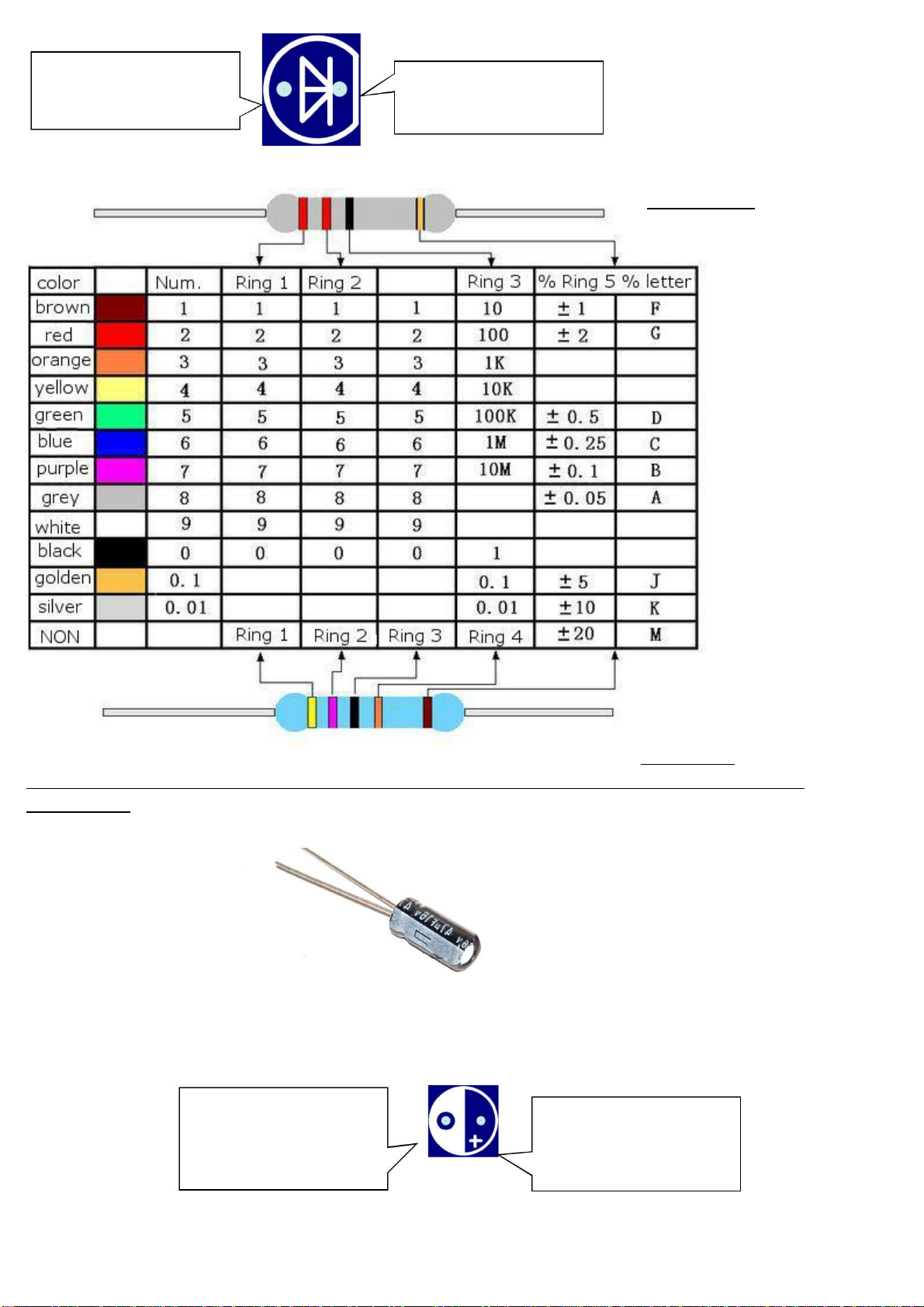
The above diodes in the car PCB installation location has the following symbols.
Here is the cathode,
connect the long leg
of the diode
Here is the negative,
connect the short leg
diode
Color ring resistance
22 ohms 5%
470KΩ1%
If you are not sure the resistance, you can use a multimeter to measure before the
installation.
Electrolytic capacitor
Electrolytic capacitor, long legs for the cathode, short leg for the negative
Electrolytic capacitors in the car mounted on the PCB location of the following symbols
Here is the cathode,
connect the
electrolytic capacitor
long legs
Here is the negative,
then the electrolytic
capacitor short legs
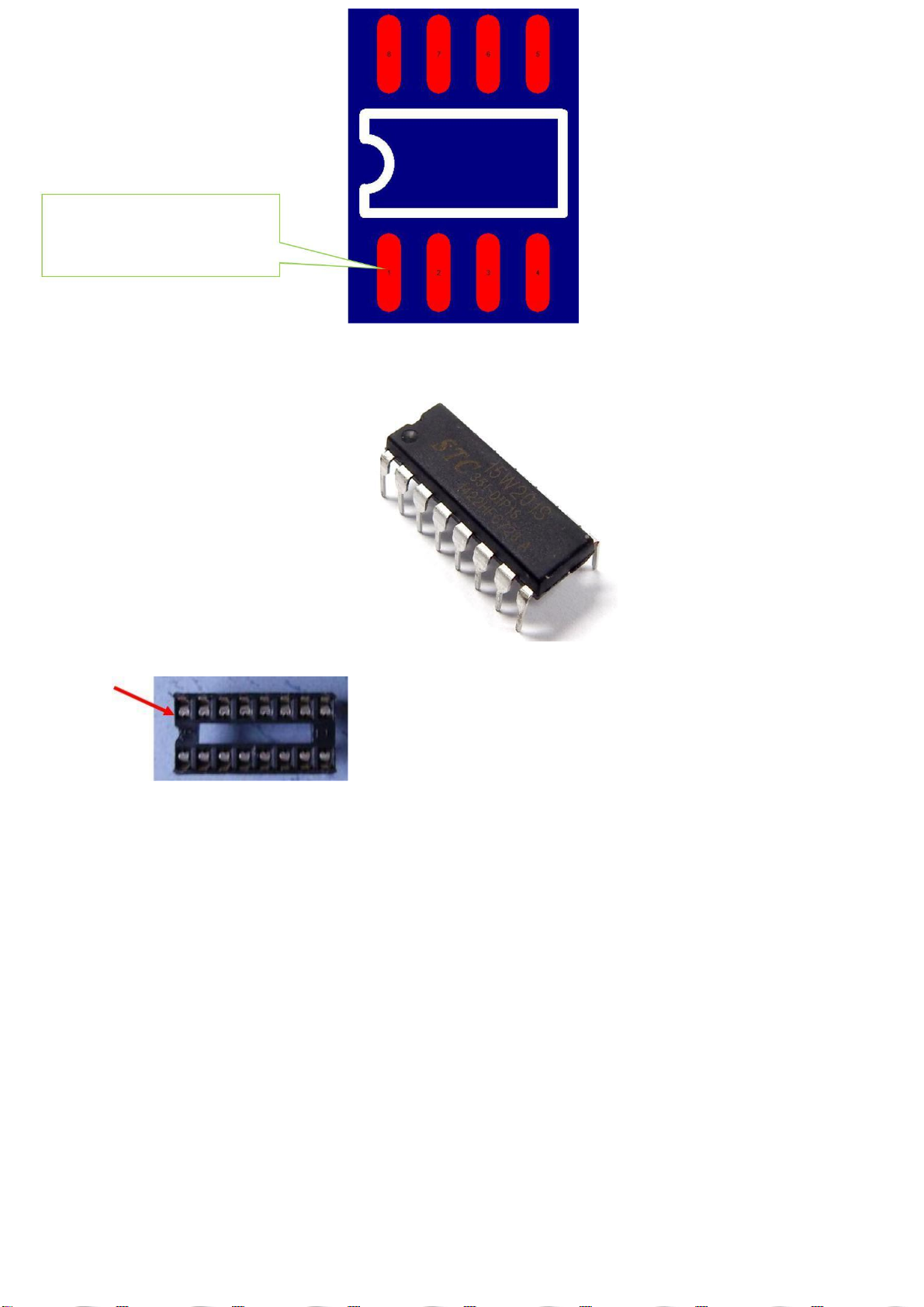
SMD Integrated Circuit
Learn to identify the first foot patch of IC
Note that there
is a small
concave point
The bottom of the
small point is
the first foot
On the PCB, this pad
connects to the first pin
of the LM339
SMD integrated circuit L9110S
Note that there
is a small
concave point
The bottom of the
small point is
the first foot
On the PCB, this pad
connects to the first
pin of the L9110S
Single - chip microcomputer STC15W201S
Single-chip is inserted on the IC Block, the assembly IC base, we should pay attention to the IC Block has
a semi-circular small gap
This mounting gap should be aligned with the semicircular notch on the top of the PCB. Single-chip IC
insert into the seat, we must pay attention to the semi-circular chip on the gap should also be semi-
circular gap with the IC on the same direction.
After the completion of the installation of all the pictures for reference only
Note that there is a
root fly wire connected
with the resistance of
the shear pin
Backside of the picture
www.banggood.com
Two pairs of infrared diodes for tracking, the top and the caster vertex distance is about 5MM
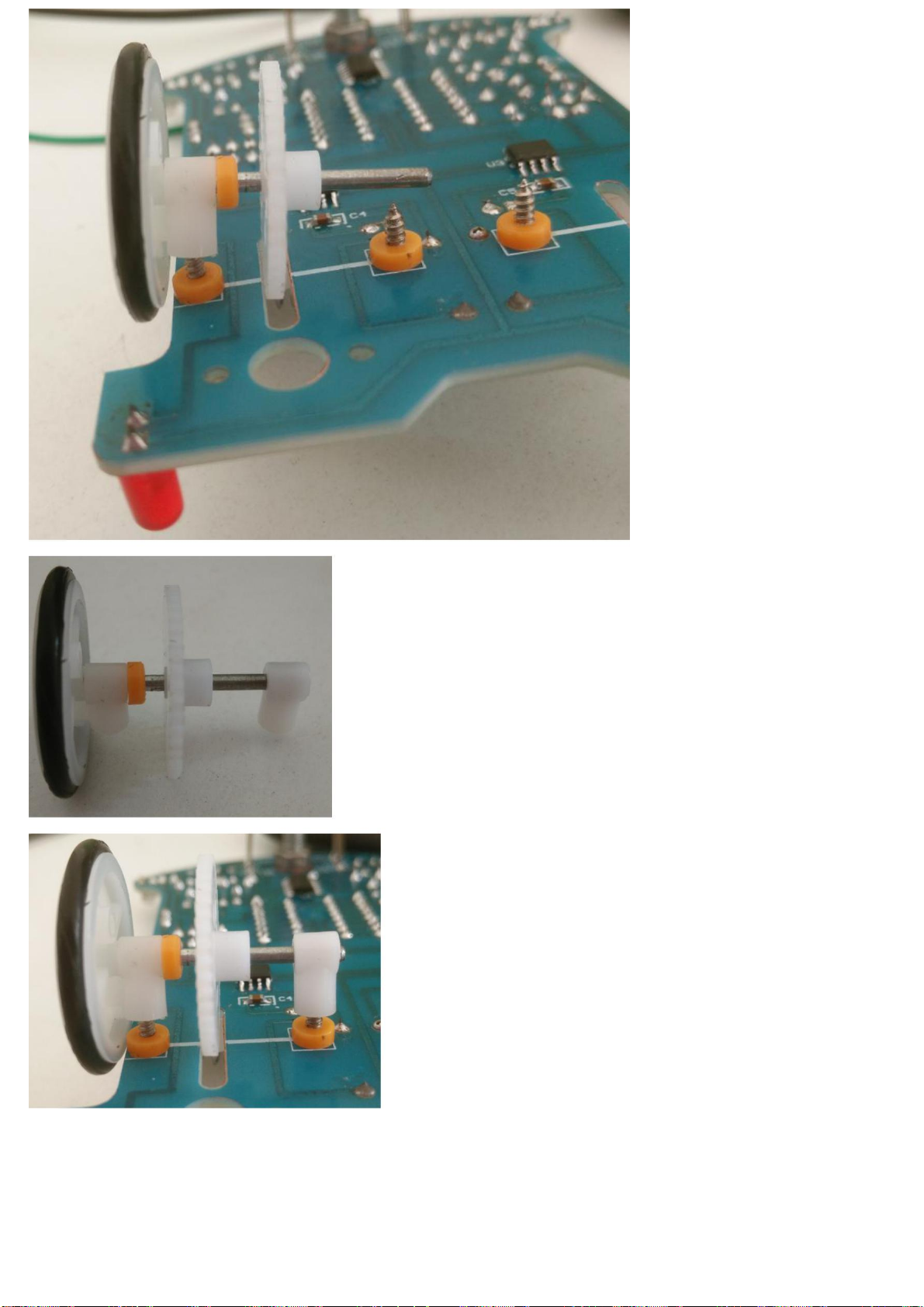
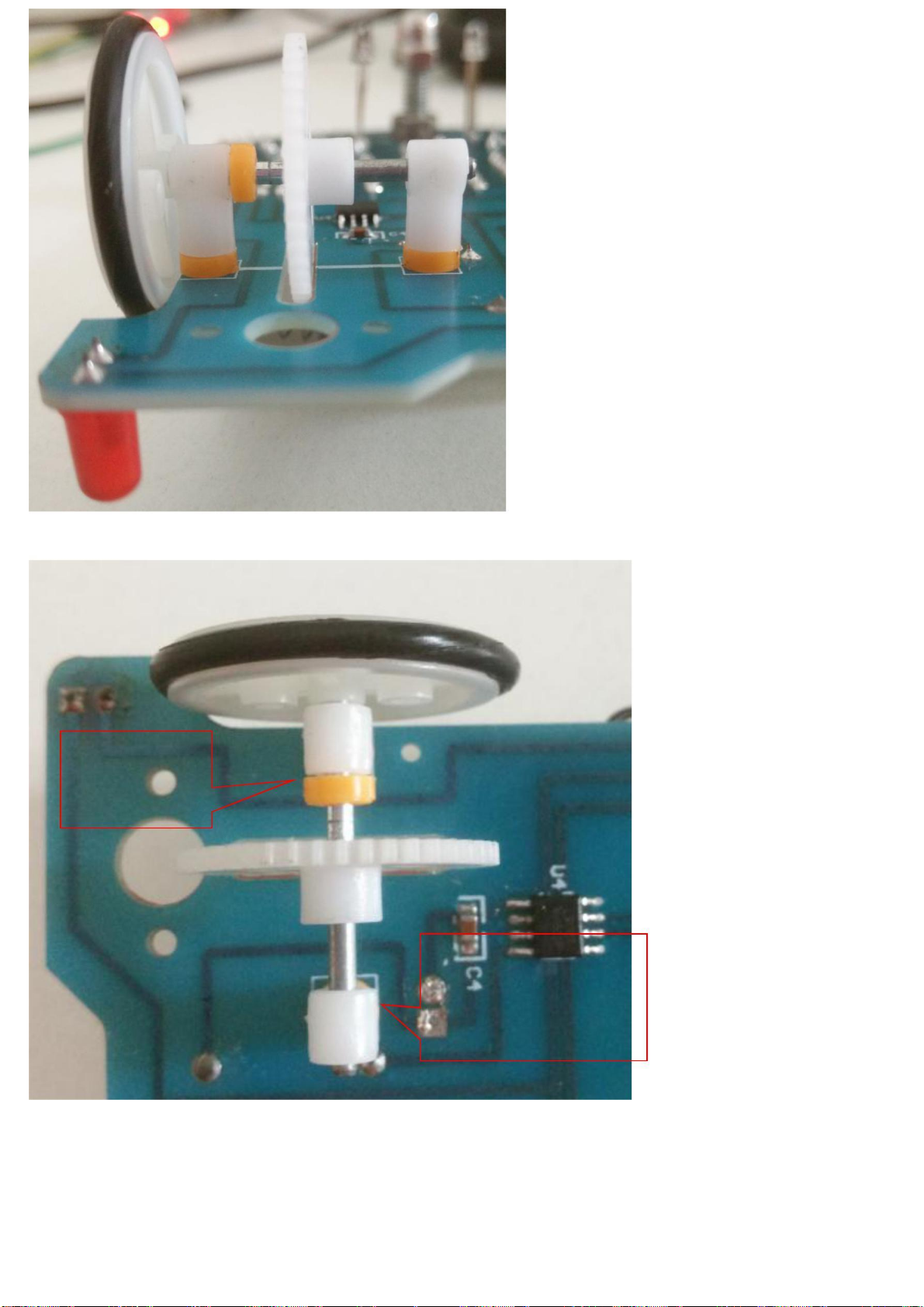
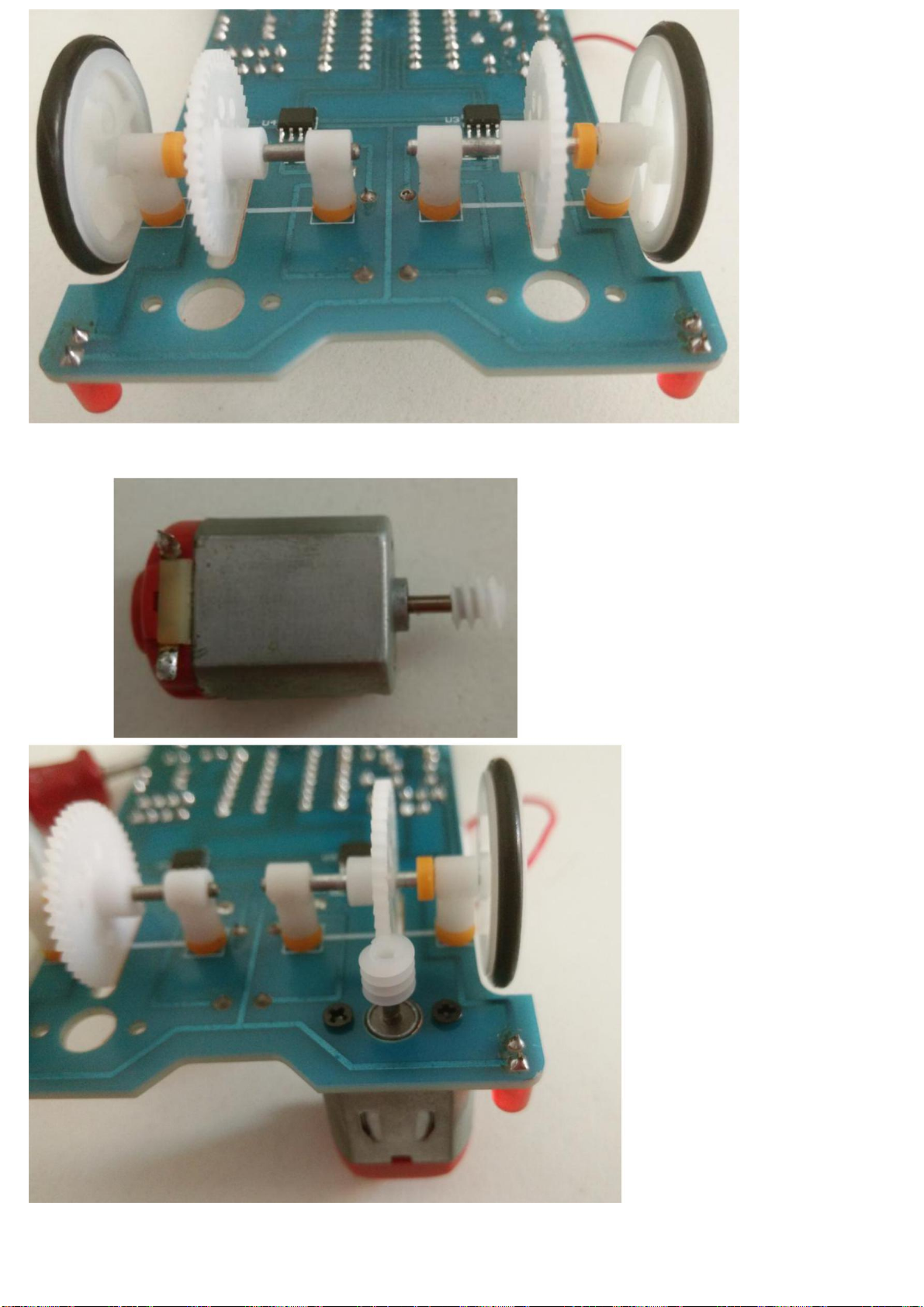
2B: put a three-way sleeve into the axle
www.banggood.com
2C: Insert a washer into the steel shaft next to the 3-way sleeve
if the gap is
too small will
cause the
wheel is not
The center hole and the
axle of the three-way
sleeve should be
parallel to each other,
otherwise the wheel