IN DETAIL | DELTA KNOB & ARROW TOGGLE:
The delta and arrow toggle allow users to change the speed and
duty parameters on the fly in 3 “modes”: tempo, duty cycle, or both
simultaneously. The delta knob only does stuff if the arrow toggle
is in the right or left position. Any time you change the arrow toggle
to the right or left position, one or both of the yellow LEDs next to
the speed and duty knobs will light up. Whenever a yellow LED is
lit next to these knobs, it means that the delta knob has control over
the changing of that parameter (turning a knob with a solid yellow
LED next to it won’t do anything). For example, let’s say you have
the delta knob parked fully counterclockwise (slowest acceleration).
Flip the arrow toggle to the right. The yellow LED next to the speed
knob lights up. The tempo is now accelerating at a slow rate from
whatever you had it set at. If you flip the arrow toggle the opposite
direction in one motion, the tempo will decrease at that same slow
rate. Moving the delta knob clockwise increases this rate. If you’d
rather change the duty cycle (instead of the tempo), flip the arrow
toggle back to the middle, then flip it to one of the sides within a
second. Now the yellow LED next to the duty knob will be lit up. The
delta knob is now controlling how fast the silence in a trem cycle is
shrinking or growing. In the right arrow position, the silence grows,
and in the left arrow position it shrinks. You can also change BOTH
duty cycle and tempo in this fashion by changing to the third “mode”
where both yellow LEDs are lit up. This probably sounds confusing,
but it’s pretty intuitive once you learn it and can produce some very
interesting effects. Please watch the Sonar™demonstration video at
zvex.com to get a better understanding as to how this all works.
HIDDEN FEATURES:
The hidden features described here give you the ability to shape the
tremolo with lots of variations outside of a square wave. These con-
trols include attack, release, and depth. The duty parameter is also
intimately linked to this wave shaping. In short, the attack parameter
controls how quickly the wave reaches its peak, and the release
parameter controls how quickly the wave reaches its low point. The
depth parameter allows you to increase the “bottom” of the wave
from levels higher than silence.
To access these parameters, you need to hold down the tap
button for one second. Keep holding the tap button. The yellow
LEDs should start slowly flashing. The speed knob is now attack, the
duty knob is release, and the delta knob is now depth. The original
parameters will not change unless you move the knobs. For example,
grab the attack knob (which, of course, actually says “speed” next
to it… but you are still holding the tap button that magically makes
it the “attack” parameter) and move it clockwise. The yellow LED
will blink more often the farther you rotate the knob clockwise. Do
the same with the release knob (which says “duty” next to it). See
the wave change? Releasing the tap button will save these settings,
even on power down. After you release the tap button, you are back
to your normal controls. Again, a normal setting (such as duty) will
change when you move the knobs now that you are back to the
standard controls.
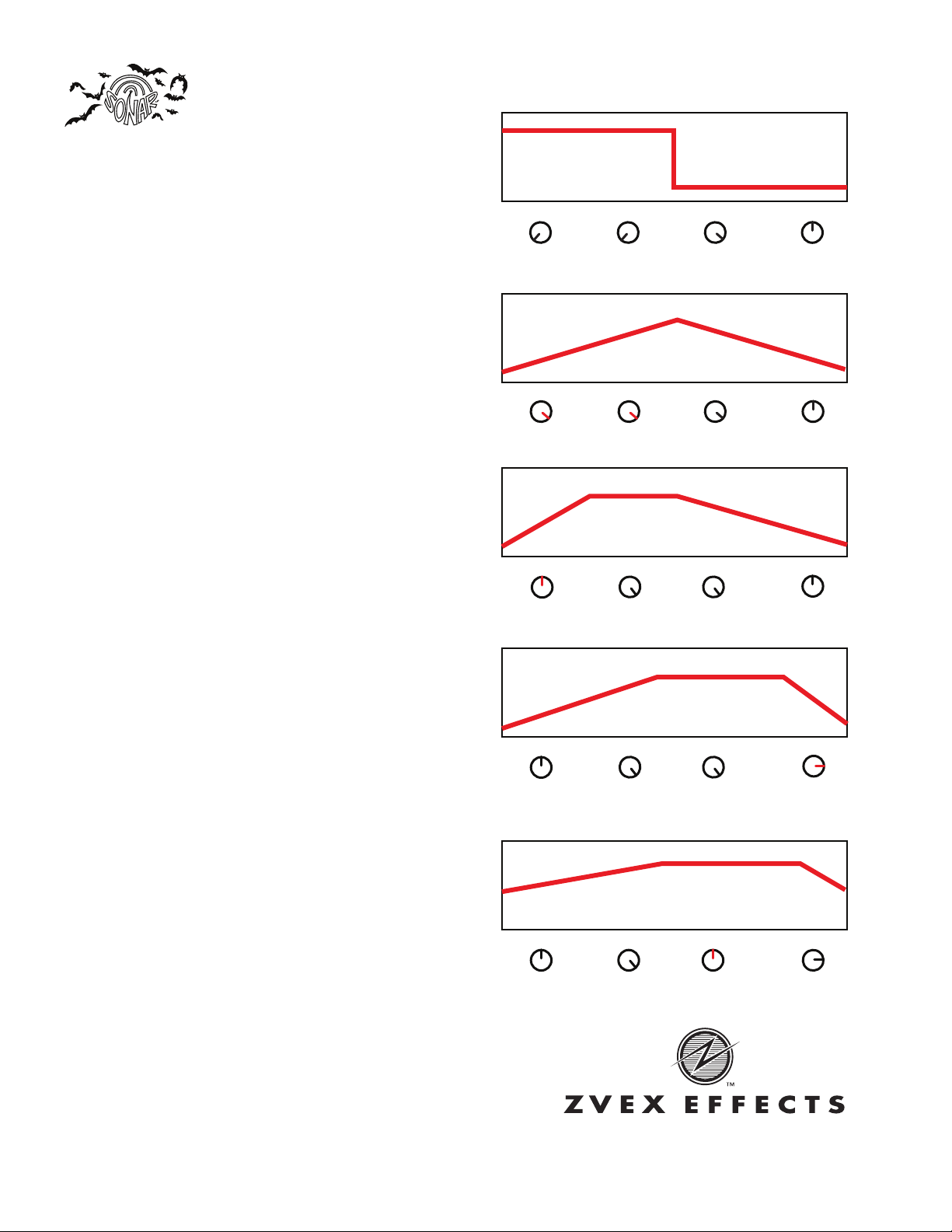
The pictures to the right showcase how each knob interacts with
each other to make a wave shape. As you can see, each can be
highly interactive with each other. The duty knob, in particular, can
drastically change the shape of the wave, as it controls at what point
the attack and release knob’s settings begin and end. Each window
to the right represents an individual “cycle” in the tremolo.
Sonar™Instruction Sheet | Page 2 of 2
AT TA C K
AT TA C K
AT TA C K
AT TA C K
AT TA C K
12:00 (half)
12:00 (half)
12:00 (half)
5:00 (max)
7:00 (min)
12:00 (half)
5:00 (max)
5:00 (max)
5:00 (max)
5:00 (max)
9:00
9:00
12:00 (max)
12:00 (half)
12:00 (half)
5:00 (half)
5:00 (max)
5:00 (max)
5:00 (max)
7:00 (min)
RELEASE
RELEASE
RELEASE
RELEASE
RELEASE
DEPTH
DEPTH
DEPTH
DEPTH
DEPTH
DUTY
DUTY
DUTY
DUTY
DUTY
MAX VOLUME
MAX VOLUME
MAX VOLUME
MAX VOLUME
MAX VOLUME
SILENCE
SILENCE
SILENCE
SILENCE
SILENCE
P.O. Box 16078 | Minneapolis, MN 55416
Last Updated: July 2012