ACTi B4 Series User manual

2014/05/06
Bullet with Integrated
Bracket (B4x)
Mounting on a Hard Ceiling
using the Ceiling Bracket
Installation Guide
For Models:
B41, B44, B45, B47

www.acti.com
Installation Guide
2
Table of Contents
Installation Procedures .....................................................3
Step 1: Disconnect the Ethernet Cable.................................................... 3
Step 2: Remove the Integrated Bracket................................................... 4
Step 3: Insert the Cable Through the Ceiling Bracket............................ 6
Step 4: Connect the Cable to the Camera ............................................... 8
Step 5: Attach the Ceiling Bracket to the Camera................................... 9
Step 6: Install the Camera to the Ceiling ............................................... 10
Step 7: Waterproof and Connect the Network Cable.............................11
Step 8: Connect to Network.....................................................................11
Step 9: Access the Camera Live View ....................................................11
Step 10: Adjust the Viewing Angle and Focus ...................................... 12
Waterproof Solution Using the “Pigtail” ........................13
How to Use the Female Cable Gland...................................................... 14
How to Use the Female Conduit Gland.................................................. 17
Appendices.......................................................................21
How to Access the Camera Live View.................................................... 21
Safety Information............................................................28

www.acti.com
Installation Guide
3
Installation Procedures
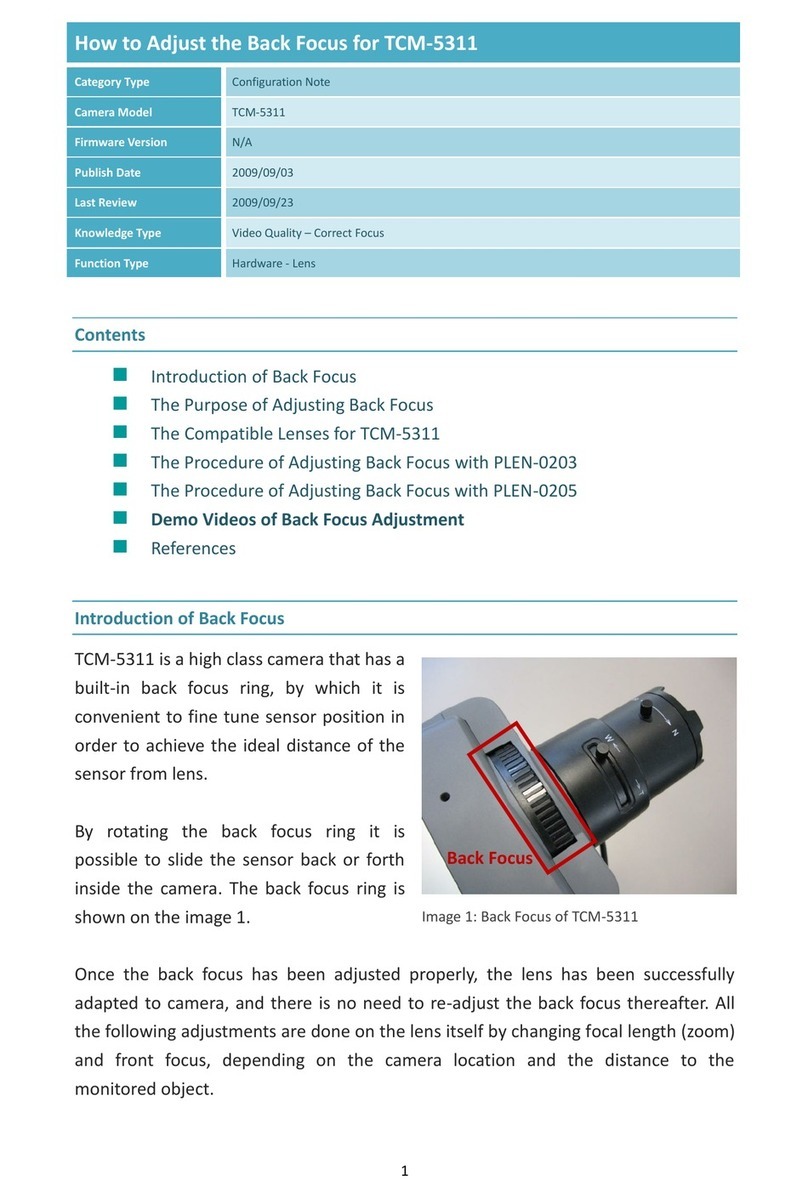
The camera comes with an integrated bracket used for wall installations. To mount the camera on
the ceiling, replace the integrated bracket with the Ceiling Bracket (PMAX-1300).
NOTE: Screws for ceiling installation are not supplied with the camera or the ceiling bracket
package. Purchase applicable screws separately according to the material of the ceiling where
the camera will be installed.
IMPORTANT! Before installation, make sure the ceiling can bear more than the weight of the
camera and its bracket.
Step 1: Disconnect the Ethernet Cable
Before replacing the integrated bracket, the network cable or “pigtail” must be disconnected and
removed from the camera first.
1. Loosen the four (4) screws to remove the back cover of the camera.
2. Disconnect the network cable from the Ethernet port and let it loose.
NOTE: This network cable is the other end of the “pigtail”.


www.acti.com
Installation Guide
6
Step 3: Insert the Cable Through the Ceiling Bracket
1. Determine how the cable will be routed: pass through the ceiling or along the ceiling.
If the cable will pass through the ceiling, insert the “pigtail” through the top hole of
the ceiling bracket.
If the cable will be routed along the ceiling, insert the “pigtail” through the side
hole of the ceiling bracket.
2. Insert the “pigtail” through the main bracket.


www.acti.com
Installation Guide
8
Step 4: Connect the Cable to the Camera
1. Insert the Ethernet cable through the bottom hole of the camera.
2. Pull the cable towards the back of the camera, and then connect the cable to the Ethernet
port.
3. Tighten the four (4) screws to attach the back cover to the camera.

www.acti.com
Installation Guide
9
Step 5: Attach the Ceiling Bracket to the Camera
1. Insert the sealing insert through the gland body and attach the clamping nut.
NOTE: Make sure the clamping nut is tightly attached to the gland body and the sealing
insert is squeezed tightly.
2. Secure the two (2) screws using the bundled bracket wrench to attach the main bracket to the
camera.
3. Push the excess length of cable through the ceiling bracket and align the ceiling bracket to
the main bracket.

www.acti.com
Installation Guide
10
4. Tighten the two (2) screws to secure the ceiling bracket to the main bracket.
Step 6: Install the Camera to the Ceiling
If necessary, drill the screw holes using the supplied drill template. If the cable will pass through
the ceiling, drill the cable hole and route the network end of the camera through that cable hole.
Otherwise, simply attach the camera to the ceiling using four (4) screws.
NOTE: Screws for ceiling installation are not supplied with the camera nor the ceiling bracket
package. Purchase applicable screws separately according to the material of the ceiling where
the camera will be installed.
This manual suits for next models
4
Table of contents
Other ACTi Security Camera manuals