manuals.online logo
Brands
  1. Home
  2. •
  3. Brands
  4. •
  5. BABI
  6. •
  7. Measuring Instrument
  8. •
  9. BABI ANGEL MONITOR User manual

BABI ANGEL MONITOR User manual

Other manuals for ANGEL MONITOR

1

Popular Measuring Instrument manuals by other brands

Powerfix Profi 278296 Operation and safety notes

Powerfix Profi

Powerfix Profi 278296 Operation and safety notes

Test Equipment Depot GVT-427B user manual

Test Equipment Depot

Test Equipment Depot GVT-427B user manual

Fieldpiece ACH Operator's manual

Fieldpiece

Fieldpiece ACH Operator's manual

FLYSURFER VIRON3 user manual

FLYSURFER

FLYSURFER VIRON3 user manual

GMW TG uni 1 operating manual

GMW

GMW TG uni 1 operating manual

Downeaster Wind & Weather Medallion Series instruction manual

Downeaster

Downeaster Wind & Weather Medallion Series instruction manual

Hanna Instruments HI96725C instruction manual

Hanna Instruments

Hanna Instruments HI96725C instruction manual

Nokeval KMR260 quick guide

Nokeval

Nokeval KMR260 quick guide

HOKUYO AUTOMATIC UBG-05LN instruction manual

HOKUYO AUTOMATIC

HOKUYO AUTOMATIC UBG-05LN instruction manual

Fluke 96000 Series Operator's manual

Fluke

Fluke 96000 Series Operator's manual

Test Products International SP565 user manual

Test Products International

Test Products International SP565 user manual

General Sleep Zmachine Insight+ DT-200 Service manual

General Sleep

General Sleep Zmachine Insight+ DT-200 Service manual

Sensa Core Lacto Spark user manual

Sensa Core

Sensa Core Lacto Spark user manual

VOLTCRAFT UTS-1980 operating instructions

VOLTCRAFT

VOLTCRAFT UTS-1980 operating instructions

EBCHQ 94915 Operation manual

EBCHQ

EBCHQ 94915 Operation manual

Balluff BIP LD2-T017-01-EP-S4 Series user guide

Balluff

Balluff BIP LD2-T017-01-EP-S4 Series user guide

Pulsar IMP Lite Series instruction manual

Pulsar

Pulsar IMP Lite Series instruction manual

ETCR 6800 user manual

ETCR

ETCR 6800 user manual

manuals.online logo
manuals.online logoBrands
  • About & Mission
  • Contact us
  • Privacy Policy
  • Terms and Conditions

Copyright 2025 Manuals.Online. All Rights Reserved.

BABI ANGEL MONITOR
USER MANUAL
FCC Statement
This device complies with part 15 of the FCC rules. Operation is subject to the following two conditions: (1) this device may
not cause harmful interference, and (2) this device must accept any interference received, including interference that may
cause undesired operation.
Changes or modifications not expressly approved by the party responsible for compliance could void the user's authority to
operate the equipment.
NOTE: This equipment has been tested and found to comply with the limits for a Class B digital device, pursuant to part 15
of the FCC Rules. These limits are designed to provide reasonable protection against harmful interference in a residential
installation. This equipment generates uses and can radiate radio frequency energy and, if not installed and used in
accordance with the instructions, may cause harmful interference to radio communications. However, there is no guarantee
that interference will not occur in a particular installation. If this equipment does cause harmful interference to radio or
television reception, which can be determined by turning the equipment off and on, the user is encouraged to try to correct
the interference by one or more of the following measures:
·Reorient or relocate the receiving antenna.
·Increase the separation between the equipment and receiver.
·Connect the equipment into an outlet on a circuit different from that to which the receiver is connected.
·Consult the dealer or an experienced radio/TV technician for help.
The device has been evaluated to meet general RF exposure requirement. The device can be used in portable exposure
condition without restriction.
ISED Statement
‐ English: This device complies with Industry Canada license‐exempt RSS standard(s). Operation is subject to the
following two conditions: (1) This device may not cause interference, and (2) This device must accept any interference,
including interference that may cause undesired operation of the device. The digital apparatus complies with Canadian
CAN ICES‐3 (B)/NMB‐3(B).
‐ French: Le présentappareilestconforme aux CNR d'Industrie Canada applicables aux appareils radio exempts de
licence. L'exploitationestautorisée aux deux conditions suivantes: (1) l'appareil ne doit pas produire de brouillage, et (2)
l'utilisateur de l'appareildoit accepter tout brouillageradioélec triquesubi, mêmesi le brouillageest susceptible
d'encompromettre le fonctionnement. Cet appareil numérique de la classe B est conforme à la norme NMB-003 du
Canada.
This radio transmitter (ISED certification number: 22014-AIR1) has been approved by Industry Canada to operate with the
antenna types listed with the maximum permissible gain indicated. Antenna types not included in this list, having a gain
greater than the maximum gain indicated for that type, are strictly prohibited for use with this device.
Le présent émetteur radio (ISED certification number: 22014-AIR1) a été approuvé par Industrie Canada pour
fonctionner avec les types d'antenne énumérés ci-dessous et ayant un gain admissible maximal. Les types d'antenne
non inclus dans cette liste, et dont le gain est supérieur au gain maximal indiqué, sont strictement interdits pour
l'exploitation de l'émetteur.

What is in the Box:
1 x BABI Angel Monitor Bracelet
1 x USB to Micro USB Cable
1 x BABI bracelet charging holder unit
1 x Power Adapter USB Charger
1 x User Manual Booklet
Product Description:
BABI Angel Monitor is a bracelet alert device designed to
continously monitor health parameters of any infants from
age of 0to 3 years. Giving Parents and Guardians peace
of mind predominatly at bed time.
Product Features:
Body Temperature monitoring
Heart Rate monitoring
Blood Oxygen Level monitoring
Movement Sensing
Audio Monitoring
How Product Works:
Using the BABI Angel monitor bracelet with the BabiCare
Mobile phone Application. The BABI Angel Monitor bracelet
will monitor the infant and send the relative data and alerts
to the Parents’or Guardians’mobile phone.If the infants
Body Temperature, Heart Rate or Blood Oxygen levels
change outside of the presets then an audio and visual
alarm will be sent to the parent or Guardians’mobile
phone to take the relative action. If this alert is not
acknowledged then a warning message with the relative
details and GPS co ordinates can be sent to other preset
registered users.
If the parent or guardian does not want to use a smartphone
App an accessory device BABI Angel Alarm, is available to
use as a primary alert device to recieve audio and visual
alerts. Note this device can also be used together with a
smart phone App as a secondary user eg Grandmother or
Au Pair etc.
`
Product Setup:
1. Before use, it is recommended to charge the BABI
bracelet for a minimum of two hours.
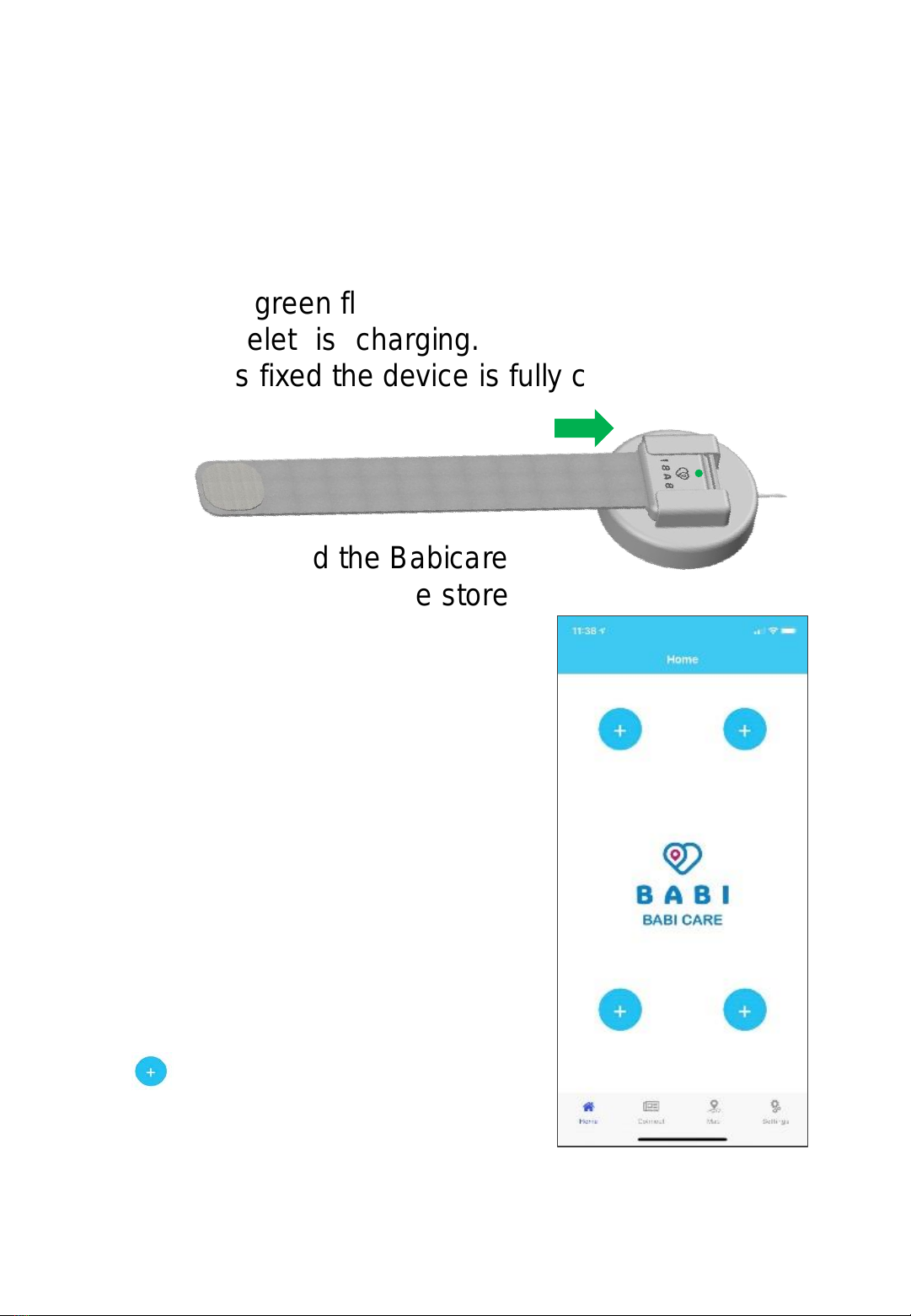
2. Slide the bracelet completely into the charging
holder. A green flashing light will appear to indicate
the bracelet is charging. When the green light
becomes fixed the device is fully charged.
3. First download the Babicare
Application from Apple store
or Google store. Note 2 user
Apps can be connected to one
Bracelet simultaneously.
(Note: Audio function will only
work on one App at a time.)
4. Once downloaded the home
page will display as shown
here on the right:
5. To register the baby / infant
press the top left + plus icon
. Note up to 4babi angel
monitor bracelets can be
registered and managed on
a Babicare phone App.
2
6. Once the plus icon has been pressed the App
will switch to the following page below:- Where you
can a) Insert the baby’s /infant’s name b) date of
birth and c) insert the infant’s photo by pressing on
the baby icon and either insert or take a photo,
which will then be displayed.
7. To connect, press the connect bar. For an Android
phone a request message will ask you to chose the
device, chose the device listed as Angel followed by
a unique code of 12 characters. For iphones the
product will automatically make the connection to
the device.
6a
6b
6c
7
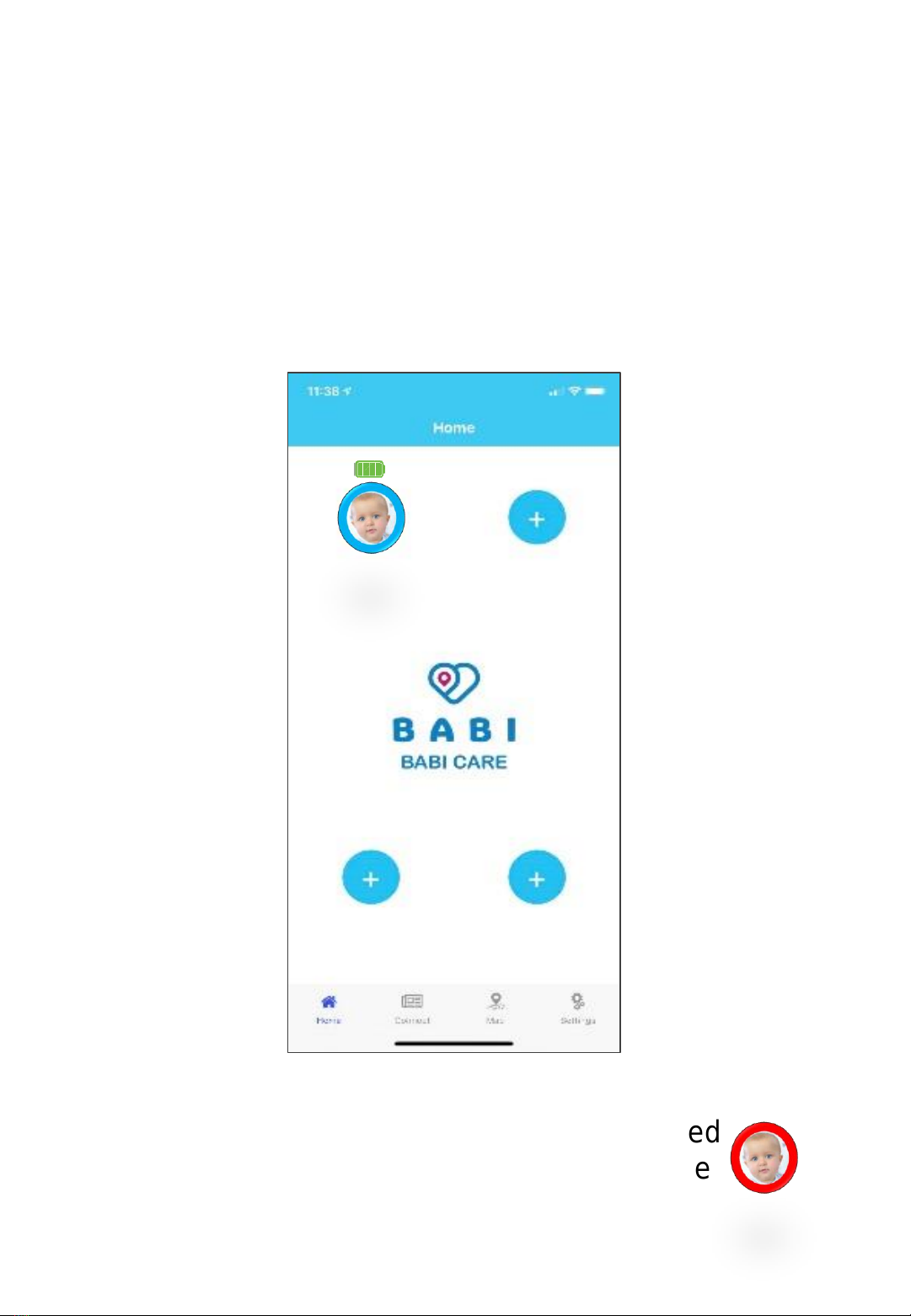
8. Once connected the home page will display the
infants photo with name and a battery charge icon
will appear, that informs the user of the status of
battery charge level, fully green bars indicates the
bracelet battery is fully charged when the bars are
red the bracelet has a low battery and will need to
be charged.
Note: When an audio or visual alarm is raised
a red ring will appear around the image of the
infant that has needs attention.
Kathy
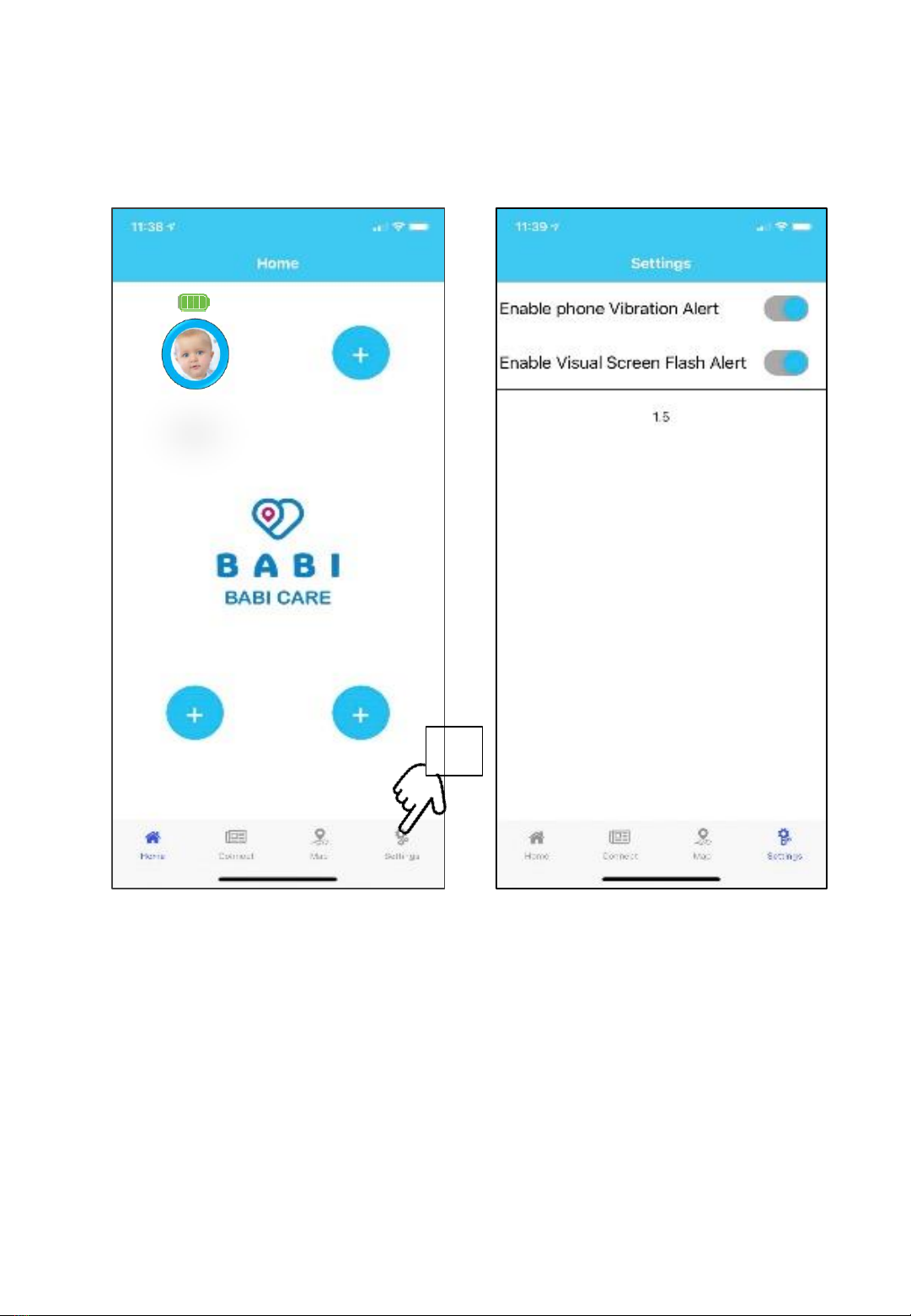
9. To complete the setup of the BABI angel monitor
bracelet device, press on the SETTINGS icon.
In the settings, the phone vibration alert or visual
screen flash alert can be enabled or disabled.
The babi angel monitor is now connected and the
device is setup and ready to use.
9
Kathy
9. There is an additional optional setting to cover an
extreme emergency scenario. When an Alarm raised
is not responded to by the user for whatever reason,
within a few minutes an alarm message can be sent
to an associated user (grandparent, nanny or
neighbour). Follow the instructions below if required.
a) Press CONNECT then b) Press ”SHOW MY QR
CODE” This will display the device’s unique QR
Code. Then on the associated users phone press
The “SCAN USER QR
CODE” bar and scan the
QR Code on the Main
user’s phone. This also
needs to be done by the
associated user :
c) Press CONNECT to
d) Press “SHOW MY
QR CODE” the QR code
displayed should be
scanned by the Main User.
Now both the main user
and associated users
are synchronized together which will ensure that
when one of the monitored parameters go out of
range, and a raised alarm to the user has not been
responded to, the associated users will receive an
alarm alert notification message with informing
them that the infant needs attention and the GPS
coordinates of where the infant is.
How to use Product :
1. Once the product is setup, it will begin to monitor
automatically and the data recorded. To use the
device on an infant, fit the bracelet making skin
contact to either the inside of the infants wrist or
on the leg just above the ankle.
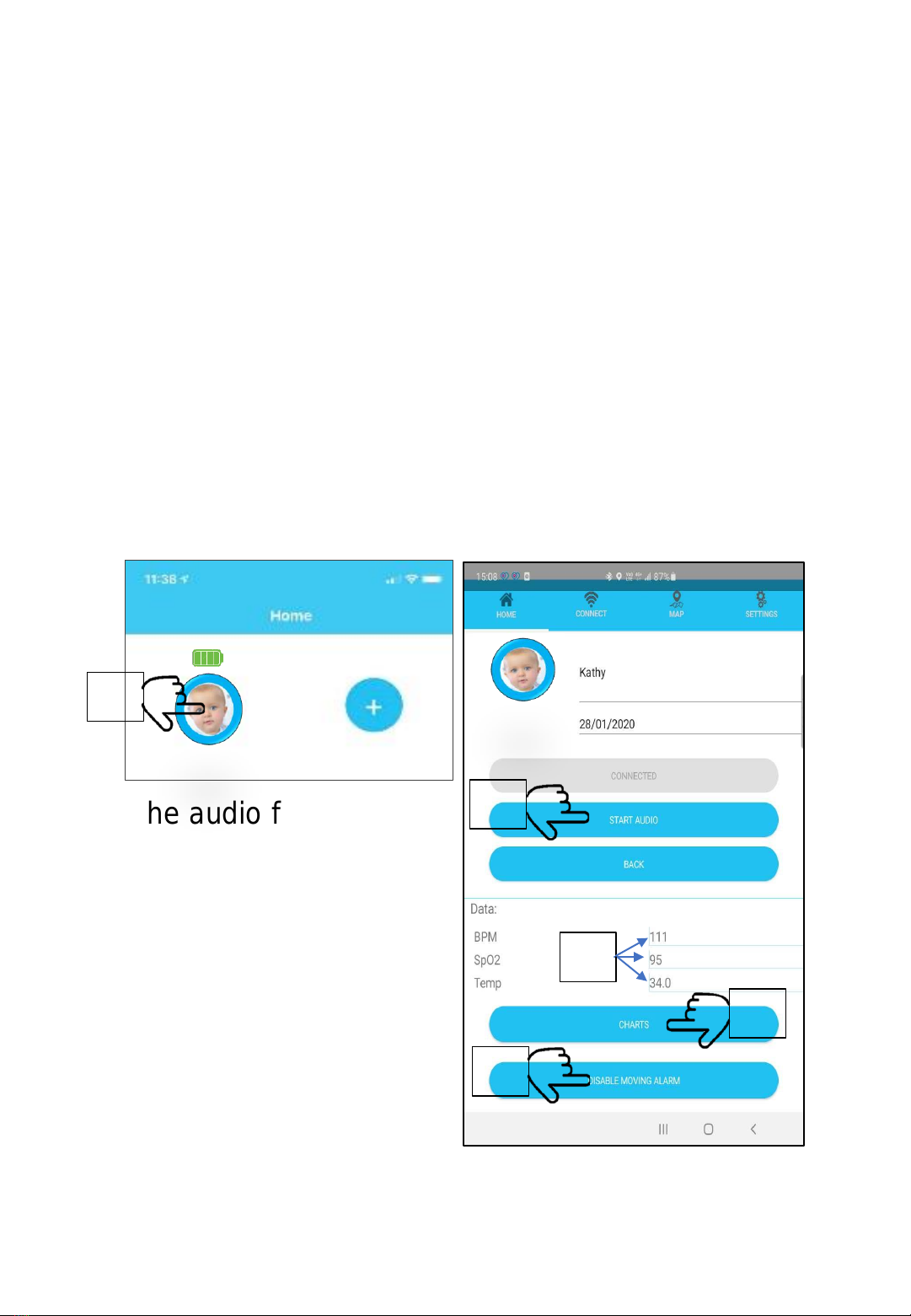
2. To access the infants latest measurements and
view the hourly, daily or weekly data or change
the status of the Audio and Movement sensor
functions. Press on the infant image and the page
will display the image below on the right.
3. The audio function to
listen in on the infant
can be enabled or
disabled.
4. The movement sensor
which alerts when the
infant can be enabled
or disabled.
5. The infant latest data
results are displayed.
6. Graphical displays by the hour, day or week data
can be viewed by pressing on the CHARTS tab.
Kathy
2
3
4
6
5