Switching SIMs
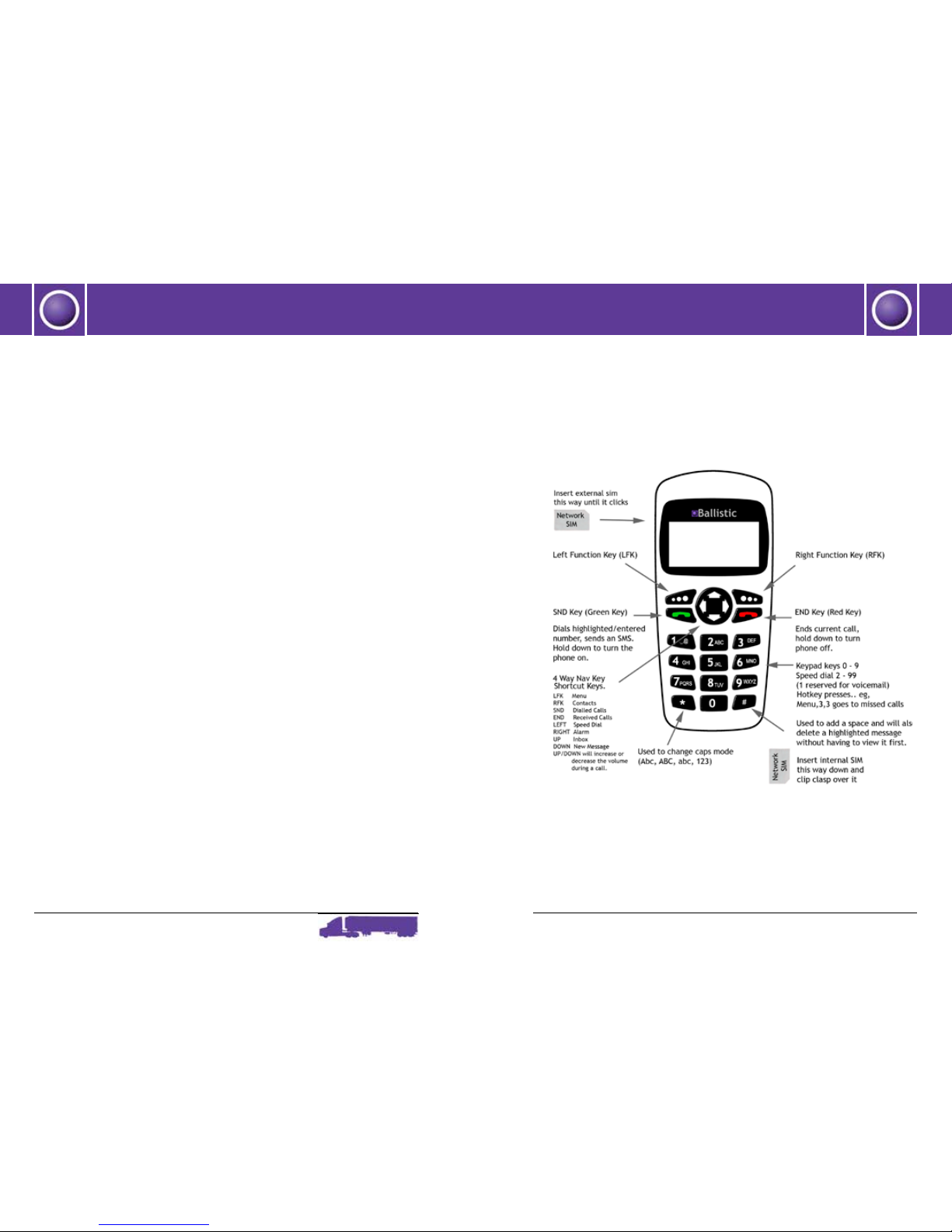
From the Ready Menu, LFK to Menu and scroll to Swap SIM.
Privacy Warning: Any time SIMs are switched or removed, the Messages
and Call Register Folders will remain as is. To ensure private messages
are not read, delete prior to removing or swapping SIMs.
Making calls
To make a call from the Ready screen, just enter the numbers using
the keypad and use the SND key to dial or refer to the Contacts List for
dialling a number from Contacts.
Receiving calls
To receive/answer a call, use either the LFK or SND key to answer.
To set any key to answer (other than the green SND key), go to
Settings/Calls/ In Call Setup/ Answer Key.
The optional privacy handset cannot be used to answer a call.Switch
to it once the call has been answered.
Call Options
During any call, the following options are available:
Hold/Resume, Mute/Unmute, New Call, End Call, Menu
Hold/Resume call
Using this will mean the other party cannot hear anything from the
microphone on your phone.
Usethistohaveanin-personconversationwithsomeonewhichthe
phone caller cannot hear or in order to dial a new number. Resume
will continue the call as normal.
Mute/Unmute call
Use this to mute a call (ie the other party cannot hear anything from
your microphone). This option will then become Unmute in the Options
list to enable the call to continue as normal.
New Call
Usingthiswhenonacallwillputtherstcallonholdandallowyouto
dial a 2nd number.
Volume Adjustment
The Up and Down keys can be used whilst the phone is ringing or
dialling to adjust the ring volume temporarily. To permanently alter
the volume, go to Settings.
The audio volume can only be set by using the Up and Down keys
whilst on a call. The value is retained (ie not changeable in Settings).
Call Waiting
If Call Waiting is active, an alert will sound if there is another
incoming call whilst you are already on a call. You will then be able to
holdtherstcallinordertoanswerthe2ndcall.SeeSettings/Calls/In
CallSet-up/CallWaiting(Menu5,3,2,4)toseewhetherthecallwaiting
option is set to active or not.
If Call Waiting is not set, the 2nd call will go to another number as per
the number set in the Settings /Call Diversion menu.
The RFK will enable switching between the 2 calls.
Note:Only1callcanbeactiveatatime-itisnotpossibletojointhe
calls (ie Conference Calls).
GETTING STARTED GETTING STARTED