Berg GmbH
Frauenhoferstraße 22
82152 Martinsried, Germany
Phone +49 379 160 - 0
Fax +49 379 160 - 199
www.berg-energie.de
Operating Instructions
3-349-868-74
3/8.18
Edited in Germany • Subject to change without notice • PDF version available on the Internet
Electronic
Energy Meters
Efficio Certified
Direct Meter BME
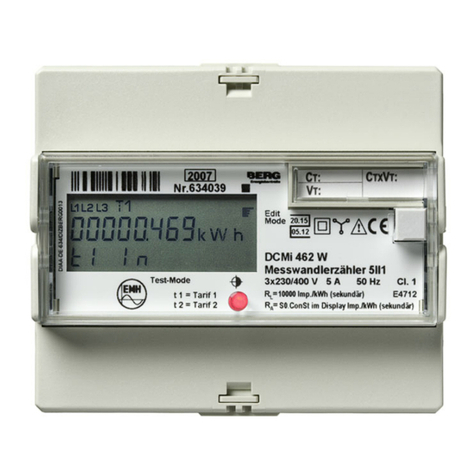
Transformer Meter BME
1ScopeofDelivery
1Energymeter
2 Operating instructions (German and English)
Operating instructions can be found at www.berg-energie.de
2 Safety Precautions – Symbols
– Check the specified nominal voltage on the serial
plate before placing the instrument into service.
– Observe maximum pulse output voltage.
– When wiring the instrument, make sure the connec-
tor cables are not damaged, and that they are volt-
age-free.
– If it can be assumed that safe operation is no longer
possible, the instrument must be immediately
removed from service (disconnect input voltage!).
Safe operation can no longer be relied upon if the
instrument demonstrates visible damage.
The device may not be placed back into operation
until troubleshooting and repair have been per-
formed, and calibration and dielectric strength have
been tested and approved at our factory or an autho-
rized service center.
– Voltage conducting parts may be exposed if the
cover is opened.
If balancing, maintenance or repair of a live open
instrument is required, this may only be carried out by
trained personnel who are familiar with the dangers
involved.
– When connecting measuring current, it is important
to provide for low-ohmic contact and to select an
appropriate conductor diameter.
Meanings of Symbols on the Instrument
DE MTP 18 B 004 MI-003 (Direct Meter)
DE MTP 18 B 005 MI-003 (Transformer Meter)
Prototype test certificate
Total insulation,
protection class II device
Warning concerning a point of danger
(attention, observe documentation!)
This device may not be disposed of with the
trash. Further information can be accessed on
the Internet at www.berg-energie.de.
Metrology mark
with indication of year (M18) and register
no. of the notified body for module D,
country-specific calibration validity period
Marking with stamp of the federally approved
test laboratory
(for recalibration only)
Tamper-Proof Sealing – Opening the Meter / Repairs
Tamper-Proof Calibration Sealing
with Manufacturer’s Seal
(at the side)
If the manufacturer’s seal is damaged or removed, all
guarantee claims are rendered null and void.
The meter may only be opened by authorized, trained per-
sonnel in order to ensure flawless operation and to assure
that the guarantee is not rendered null and void.
If it can be ascertained that the
meter
has been opened
by unauthorized personnel, no guarantee claims can be
honored by the manufacturer with regard to personal
safety, measuring accuracy, compliance with applicable
safety measures or any consequential damages.
Tamper-proof sealing for the terminal cover may be
attached either to the left or the right of the terminal
cover.
3 Rating Plate Entries
4 Connector Pin Assignments and Wire Gauge
Note: Observe the wiring diagrams in the top and bot-
tom terminal covers.
Meas. Inputs, Direct Meter (top & bottom terminals)
Meas. Inputs, Transformer Meter (bottom terminals)
Connections (top terminals)
5 Pulse Output
Default setting: active energy
Terminal 23 (S01) import, terminal 25 (S02) export
* Type of energy can also be selected with feature Impuls.
Underlined values are default values.
* Pulse rates are based on secondary side
6 Display and Control Panel
6.1 Test LEDs
The
test LEDs
are located above the control keys. The left-
hand LED indicates energy export, and the right-hand LED
energy import. LED blinking frequency increases along
with measured power. If all currents are smaller than start-
ing current, both LEDs light up continuously.
LED Constant
Direct Meter: 10,000 pls/kWh
Transformer Meter: 100,000 pls/kWh
6.2 Resolution, Main Display (large characters) Energy Import
Intern wird mit erhöhter Auflösung gezählt. Hierdurch kann bei
Mehrtarifnutzung das Gesamtregister in der letzten Stelle
einige Digit über der Summe der Einzelregister liegen.
* An additional place to the right of the decimal point is included
for the calibration display in the case of a main display which
can be calibrated. And thus the leading digit is eliminated in
the case of an 8-place display.
** Due to programmable CT, VT only the secondary display can be
calibrated. Therefore, display overflow is based on the secondary
display. The normal display is shifted one place to the left if neces-
sary.
6.3 Meanings of Symbols at the LCD
uMain display
, not calibrated
(programmable CT/VT, see section 6.2).
T1 ... T8: active tariff
Display of instantaneous power in 4 quad-
rants: positive or negative active power P,
positive or negative reactive power Q.
Correct connection:
Continuous illumination of the phase symbols
where P
≥
0
Phase failure:
Symbol for affected phase is cleared from the display.
Incorrect phase sequence:
Phase symbols blink in following order: 3 - 2 - 1.
Negative power:
Respective phase symbol blinks.
For bus connection: appears when
the meter transmits a data packet.
Key symbols for parameters configuration
(see next column)
Key Symbols for Parameters Configuration
for Feature Q1 and V2:
Key and 2nd key bit blanked:
Parameter CT, VT and SØ configurable according
to features, disabling with enable key.
Key displayed with one bit:
Parameter CT, VT and SØ disabled,
change after activating the enable key.
6.4 LCD Background Illumination
Background illumination is activated each time a key is
activated. Background illumination goes off after about
2 minutes.
Background illumination colors indicate various display
menus:
– White: query menus
– Red: display of firmware version
– Pink: parameters display and setting menu
– Blinking red: in case of error
6.5 Key Operation
Querying Parameter Values
In addition to the LCD test, the UP and ENTER keys also
make it possible to query currently set parameter val-
ues, as well as to change parameters for certain fea-
tures after first pressing the enable key (located behind
the top cover).
If no keys are pressed for a period of 1 minute, the
meter is returned automatically to its standard display.
Parameters can be changed for the following meters:
Parameters CT and VT for Transformer Meter,
Parameter SØ for Pulse Meter.
Further parameters in accordance with interface descri-
tion.
a) Enabling Parameter Changes
The enable key makes it possible to enable or disable
parameter changes. It’s located underneath the top ter-
minal cover between terminals 21 and 22 and is acti-
vated with a pointed object (e.g. a ballpoint pen).
Pressing the enable key activates the “change parame-
ters” operating mode (key off):
Pressing the enable key again disables the “change
parameters” operating mode (key on):
If no keys are pressed for a period of about 2 minutes,
the “change parameters” operating mode is exited auto-
matically and disabled (key on).
b) Changing Parameter Values
➭Briefly press the enabling key as described in point
a) above (this activates the “change parameters”
operating mode).
➭See the operating overview on the back with regard
to changing the parameters.
➭Press and hold the ENTER key until the firmware ver-
sion appears (red background).
➭Press the UP key. The display test appears.
Briefly press and hold the ENTER key in order to dis-
play two further test patterns.
➭Then repeatedly press the UP key until the parame-
ter to be changed appears at the display.
➭Briefly press the ENTER key in order to access the
setting menu.
➭The input cursor blinks at the leftmost entry posi-
tion. Each tine the ENTER key is pressed the cursor
is advanced to the next position to the right. The
value of the blinking digit can be increased by
pressing the UP key. When the rightmost digit is ac-
knowledged by pressing the ENTER key, the se-
lected value is accepted and SAVinG appears
briefly at auxiliary display 2. If no keys are pressed
for a period of about one minute, the setting menu
is exited.
➭Press and hold the ENTER key or wait for one minute
in order to change to the normal display.
➭Press the enable key once again. This disables the
“change parameters” operating mode.
Disabling takes place automatically after 2 minutes.
Meter CTxVT
min.
CTxVT
max.
Normal dis-
play
Calibration
display *
Unit
Direct
Meter — — 123456,78 23456,789 kWh
Tra ns
for-
mer
meter
Q1
**
1 4 u12345,67 ** kWh
5 40 u123456,7 ** kWh
41 400 u1234567 ** kWh
401 4000 u12345,67 ** MWh
4001 40000 u123456,7 ** MWh
40001 100000 u1234567 ** MWh