- 5 -
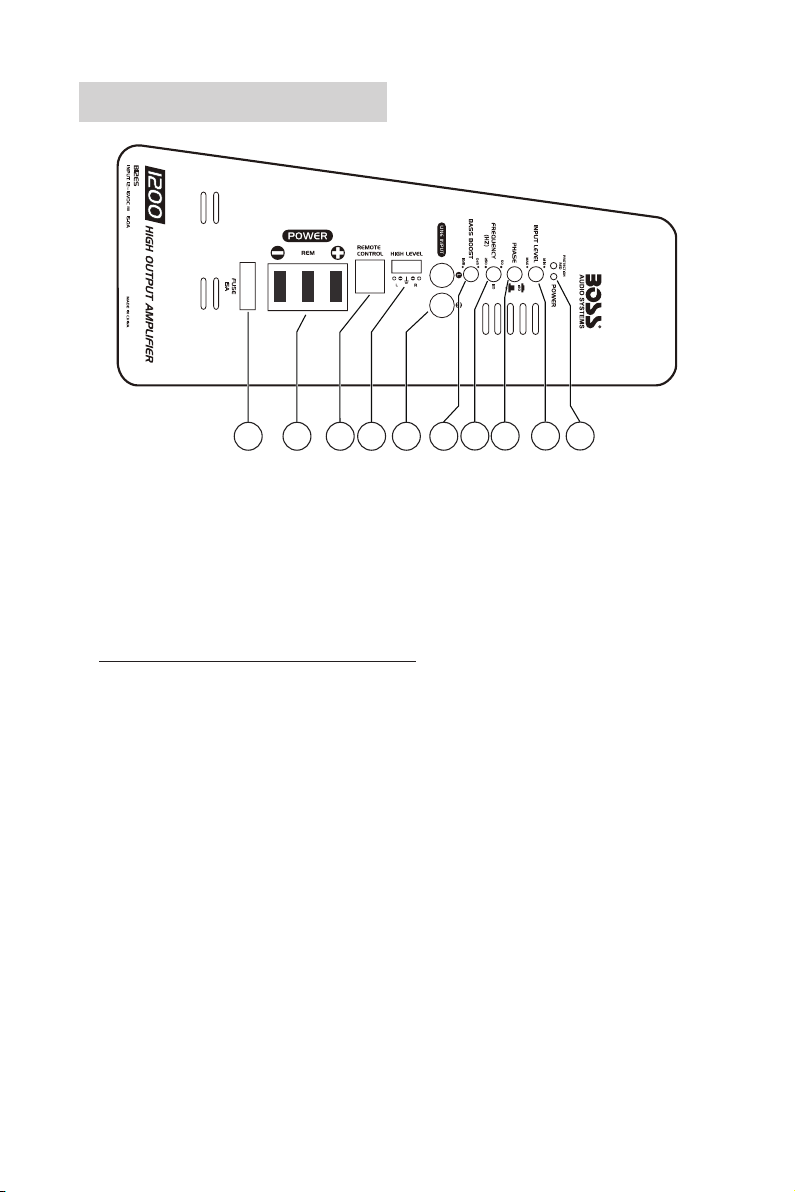
6. Low-Level Input (RCA Input)
Connect to the RCA outputs on your head unit. For best audio performance, low-level input is recommended
to input audio signal to this subwoofer if RCA outputs are present on your head unit or signal processor.
7. High-Level Input (Speaker Level Input)
Connect to the speaker wires on your head unit. If your head unit does not have RCA outputs, use the
speaker wires on the head unit for audio signal input from your head unit.
8. Remote Subwoofer Control Port
Connect to the supplied remote subwoofer level control. Use the remote control to independently adjust the
volume level of the subwoofer.
9. Power Terminals
: Connect to the closest point on the chassis of your vehicle.
REM: Connect to the remote output wire of your head unit for power on/off control on this subwoofer. No
need to make the remote connection if you use high-level input connection. High-level input connection auto
detects DC voltage to activate on/off control.
:Connect to the positive terminal of the 12V vehicle battery.
10. Fuse Holder
Insert a 15A blade type fuse (ATO) to provide protection of the circuitry. Do not use a fuse with a different
rating. Never replace the fuse with a wire or coin.
Subwoofer Setup Procedure
1. Secure this subwoofer in your vehicle. See the section “Placement” on page 6.
2. Disconnect the negative terminal of the vehicle battery to prevent a short circuit.
3. Establish audio signal input (low-level or high-level inputs). See the section “Low Level Input Wiring” or
“High Level Input Wiring” on page 7.
4. Make power connection on this subwoofer. See the section “ Power Connection” on page 8.
5. Recheck all connections to ensure correct and secure power/signal inputs.
6. Set the input gain control (INPUT LEVEL) to the minimum position.
7. Reconnect the negative battery terminal.
8. Turn on your source unit, then this subwoofer automatically turns on.
9. Set the source unit volume to about 3/4 full level, then adjust this subwoofer’s input gain control (INPUT
LEVEL) to just below the level of distortion.
10. Fine tune the various controls on this subwoofer to obtain best results.
Important notes on input level control
• The input gain control (INPUT LEVEL) is designed only to adjust the input level of the subwoofer in order to
match the output level of your source unit. It is not a volume control!
• Never adjust the input level to maximum unless your input level requires it.
• Failure to notice these instructions will result in an input overload to the subwoofer and excessive audio
distortion. It can also trigger protection mode, or may cause damage to the subwoofer or your speakers.